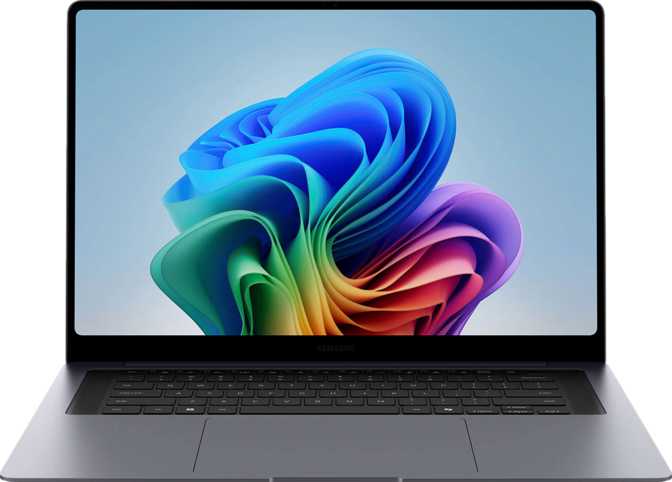
Samsung Galaxy Book6 Pro 16 Review: Premium OLED, Real-World Tested
LaptopsAt a Glance
Key specifications and editorial score
Editorial Score
Design and Build Quality
Physical experience, materials, and portability
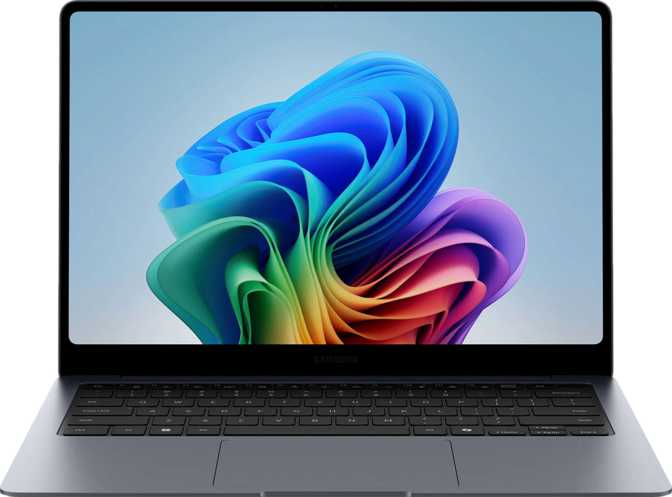
Pick up the Galaxy Book6 Pro 16 and the first thing you notice is that it should not feel this light. At just under 1.6 kilograms, it sits comfortably below what most people expect from a 16-inch laptop — a category where machines routinely push past 2 kilograms. Carrying it in a bag for a full day of commuting or travel is genuinely undemanding.
The physical footprint measures 356 mm wide and 248 mm deep — roughly the size of a large hardback book — and at 11 mm thick it slides into sleeves and satchels without drama. That thinness is not achieved through compromise in keyboard depth or port placement. Samsung has maintained a usable physical form while hitting dimensions that feel ambitious for a 16-inch machine.
The build is not rugged or weather-sealed, and that is worth stating plainly. This is not a machine for construction sites, outdoor fieldwork, or environments where spills are a regular risk. It is designed for offices, cafes, and libraries — polished professional environments that match its aesthetic. Within that context, it feels solidly constructed rather than fragile.
The backlit keyboard is a genuine asset for anyone who works in dim environments or after dark, and it does not feel like an afterthought. The overall design communicates seriousness without being visually cold — a laptop that fits as naturally in a boardroom as in a coffee shop.
- Backlit keyboard for low-light work
- 356 x 248 mm compact footprint
- Fingerprint scanner on power button
- No rugged or weatherproof build
The Display
Where the Galaxy Book6 Pro 16 makes its strongest case
OLED Contrast
Each pixel generates its own light and can turn off completely when displaying black. The result is true black — not dark grey — and striking contrast that makes photos, videos, and dark-mode interfaces look dramatically better than on a standard LCD backlit panel.
120 Hz Smoothness
The screen refreshes 120 times per second. Scrolling through documents, moving windows, and general interface interaction feels noticeably more fluid than on a standard 60 Hz laptop. Once you have used it, 60 Hz feels like stepping through frames rather than flowing motion.
Touch and Anti-Glare
Full touch input is supported across the display. The anti-reflection coating manages overhead lighting and window glare well enough for normal office use. It does not eliminate glare entirely, but it handles it without making the screen unusable in standard lit environments.
Performance
A processor built for all-day efficiency
Hybrid Architecture
Built on a 3-nanometre manufacturing process — the same cutting-edge fabrication used in high-end smartphone chips — this processor clusters cores into three groups: high-performance cores for demanding tasks, efficiency cores for lighter workloads, and low-power cores to manage background activity without draining the battery.
This architecture means day-to-day tasks like email, browsing, and documents draw minimal power, reserving capacity for when a heavier workload demands it. The result is responsive performance without constant fan activity under typical use.
- 16 threads for genuine multitasking
- Boost up to 4.7 GHz for burst workloads
- 18 MB L3 cache for fast data access
- 25 W TDP suits a slim, quiet chassis
Integrated Graphics
The GPU shares the same chip package as the processor. It reaches clock speeds above 2.4 GHz and supports DirectX 12 Ultimate and OpenCL 3, handling hardware-accelerated video playback, light creative work, and casual gaming at moderate settings capably.
What it cannot do is deliver the frame rates of a dedicated GPU. Ray tracing and DLSS are not supported. For productivity, content consumption, light photo editing, and video conferencing, the integrated graphics are entirely adequate.
Memory and Storage
Configured for professional workloads
32 GB DDR5 RAM
DDR5 is the current standard for high-performance systems, operating at significantly higher speeds and improved bandwidth compared to DDR4. The 32 GB configuration eliminates the friction of running multiple browser tabs, a communication app, a document editor, and a video call simultaneously — a combination that regularly throttles machines with half the memory.
- Dual-channel for doubled throughput
- Boosts integrated GPU bandwidth
- Handles developer environments comfortably
- Platform supports up to 128 GB
1 TB NVMe PCIe 5
The internal drive uses PCIe 5 — the newest and fastest available bus standard for laptop storage. Application load times, operating system boot speed, and large file transfers all benefit from the speed this interface provides compared to older PCIe 3 or 4 drives that ship with many competitors at similar price points.
- NVMe SSD for maximum responsiveness
- PCIe 5 — fastest current standard
- 1 TB suitable for large project libraries
- No memory card slot for camera files
Connectivity
Modern and mostly excellent, with one notable gap
| Port / Connection | Count | Speed / Notes |
|---|---|---|
| Thunderbolt 4 (USB-C) | x2 | 40 Gbps — display, charging, docking |
| USB4 (USB-C) | x2 | 40 Gbps — fast drives and displays |
| USB-A 3.2 Gen 1 | x1 | Legacy peripherals, standard speed |
| HDMI 2.1 | x1 | 4K+ external displays native |
| Wi-Fi 7 | Built-in | 802.11be — fastest current standard |
| Bluetooth 5.4 | Built-in | All current wireless accessories |
| Ethernet (RJ45) | None | Adapter required for wired networks |
| SD Card Slot | None | USB adapter needed for camera files |
Why Wi-Fi 7 Matters
Wi-Fi 7 delivers meaningfully higher throughput, lower latency, and better performance in congested environments — apartment buildings, conference centres, and open-plan offices — compared to Wi-Fi 6 and 6E. The laptop is backward compatible with all older Wi-Fi standards, ensuring it works with any existing router hardware.
Multi-Monitor Setup
The combination of Thunderbolt 4 and HDMI 2.1 supports up to four simultaneous displays including the built-in screen. A single Thunderbolt dock can drive multiple monitors, peripherals, and the laptop's power all from one cable — a clean, minimal desk setup for a permanent workspace.
Battery Life
Real-world expectations from a 78 Wh cell
The 78 Wh battery is a competitive capacity for a laptop of this size and weight. How long it lasts depends heavily on usage: screen brightness, whether the 120 Hz refresh rate is active continuously, and the intensity of the workload all affect draw considerably.
OLED displays are more efficient than LCD when displaying dark content. Using dark mode in applications and darker interface themes extends runtime meaningfully. Under moderate workloads — document editing, web browsing, video calls — with brightness at a comfortable indoor level, full-day use without a charger is realistic for most users.
The processor's 25 W thermal design is a meaningful asset. Lower sustained power draw compared to higher-TDP alternatives means the battery supports longer active sessions, and the efficiency architecture directs minimal power to background tasks — which matters significantly during meetings or light administrative work.
Estimated Usage Scenarios
Audio, Webcam and Security
Above average where it counts, plain where it does not
Dolby Atmos Audio
The stereo speaker system applies spatial audio processing that produces noticeably wider, more open-sounding output compared to a standard flat stereo pair. For video calls, streaming, and casual music listening, the result is above average for a laptop this thin. The dual microphone arrangement picks up voice clearly for calls in quiet to moderately busy environments.
2 MP Webcam
Sufficient for video calls on Teams, Zoom, or Meet under good lighting. Not impressive. Users who conduct regular video calls in variable lighting, or who care about recorded content quality, will find this underwhelming compared to external camera options at this price tier.
Fingerprint Security
The fingerprint scanner is integrated into the power button — one of the most practical implementations available. It enables biometric login the moment you power on the device, with no separate step required. There is no 3D facial recognition, but the fingerprint scanner is reliable across varied lighting conditions and faster in practice than face unlock on many competing devices.
Who Should Buy This Laptop
Matching the right buyer to the right machine
Strong Fit For
- Business professionals and executivesA presentable, lightweight machine for travel, presentations, and all-day productivity
- Content consumers and hybrid creativesThe OLED display makes video streaming, photo reviewing, and light editing genuinely pleasurable
- Students in design, media, or professional programsReal performance in a package light enough to carry without fatigue between locations
- Developers and data analysts32 GB DDR5 and fast storage handle virtual environments and data workloads comfortably
- Samsung ecosystem usersIntegration with Galaxy phones and tablets is more fluid here than with competing platforms
Not the Right Choice For
- 3D artists, professional video editors, animatorsNo discrete GPU means rendering workflows will hit a hard ceiling quickly
- GamersNo DLSS, no ray tracing, no dedicated GPU — modern titles will hit frame rate limits fast
- Users requiring wired EthernetNo RJ45 port means always carrying an adapter in enterprise or fixed network environments
- Camera and audio professionalsNo SD card slot requires a USB adapter workaround for every file transfer session
- Budget-focused buyers seeking raw CPU powerThe premium is paid for thinness, weight, and screen quality — not raw processing muscle
How It Compares
Galaxy Book6 Pro 16 against logical 16-inch alternatives
| Feature | Samsung Galaxy Book6 Pro 16 | 16" Thin-and-Light (Intel / LCD) | 16" Thin-and-Light (Apple M-series) |
|---|---|---|---|
| Display | OLED, 120 Hz, touch | IPS/LCD, 60–120 Hz, no touch | Liquid Retina, 120 Hz, no touch |
| Weight | ~1.6 kg | ~1.7–1.9 kg | ~2.1 kg |
| Thickness | 11 mm | 14–18 mm | ~18 mm |
| Port Selection | TB4 + USB4 + HDMI 2.1 | Varies widely | TB4 only, no native HDMI |
| GPU | Integrated (Intel Arc) | Integrated or discrete option | Integrated (Apple GPU) |
| RAM | 32 GB DDR5 | 16–32 GB DDR4/DDR5 | 16–24 GB unified |
| SD Card Slot | Often yes | ||
| Ethernet | Sometimes | ||
| AirPlay |
Strengths and Weaknesses
An honest assessment of what this laptop gets right and where it falls short
The Galaxy Book6 Pro 16 gets several things right that matter deeply in daily use. The OLED display is not a marketing differentiator — it is a genuine quality-of-life improvement for anyone who spends long hours looking at a screen. Reduced eye strain from OLED's contrast characteristics, combined with 120 Hz smoothness and anti-reflection coating, makes this one of the more comfortable large-screen laptops to use over extended sessions.
The weight-to-size ratio is a genuine achievement. Competing 16-inch machines routinely weigh 400–600 grams more — that gap is the difference between a bag that feels light and one that starts to ache on a long commute. For frequent travelers, this number matters considerably more than a spec sheet implies.
Genuine Strengths
- Best-in-class OLED display with 120 Hz refresh and anti-glare coating
- Outstanding weight for a 16-inch laptop — 400–600 g lighter than many rivals
- Future-ready port selection: two Thunderbolt 4 and two USB4 at 40 Gbps each
- 32 GB DDR5 in dual-channel removes memory bottlenecks for professional workloads
- Wi-Fi 7 for reliable, fast connectivity in dense network environments
- Dolby Atmos stereo audio well above average for a laptop this thin
Real Weaknesses
- Integrated GPU only — no discrete graphics option; a hard ceiling for demanding creative work
- No SD card slot — an extra adapter purchase for photographers and audio professionals
- No Ethernet port — wired network users must carry a dongle
- 2 MP webcam is adequate for calls but unimpressive for a premium-tier device
- OLED burn-in risk for users displaying static high-brightness content for extended periods
Common Buyer Questions
Answers to what real buyers search for before purchasing
Final Verdict
A display-first laptop that earns its premium
The Samsung Galaxy Book6 Pro 16 is a purpose-built productivity machine with a clear point of view: it exists for people who want a large, exceptional screen in the thinnest, lightest package currently feasible at this size class, with professional-grade processing power and future-ready connectivity underneath.
It delivers on those priorities without apology. The OLED display is among the best available on any laptop. The weight is genuinely competitive. The memory and storage configuration are appropriate for professional workloads. The wireless and wired connectivity reflect where professional hardware is heading rather than where it has been.
The trade-offs are real but bounded. The integrated GPU is the hard limit — creative professionals with GPU-intensive workflows will outgrow this machine. The missing SD card slot and Ethernet port will require adapter purchases for certain users. The webcam is adequate rather than impressive.
For the professional who travels regularly, works long hours in front of a screen, and handles demanding productivity and development workflows, the Galaxy Book6 Pro 16 is one of the most compelling options in its category. Buy it for the screen and the form factor. Accept the GPU limitation with clear eyes. Everything else holds up.
Editorial Score
Best For
Professionals, frequent travelers, and content-focused users who prioritize display quality and portability above discrete graphics capability.