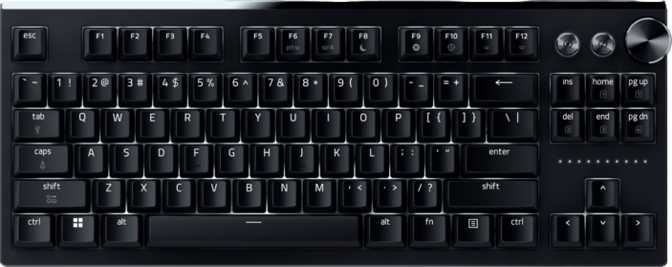
Razer Huntsman Signature Edition: Full Review and Performance Analysis
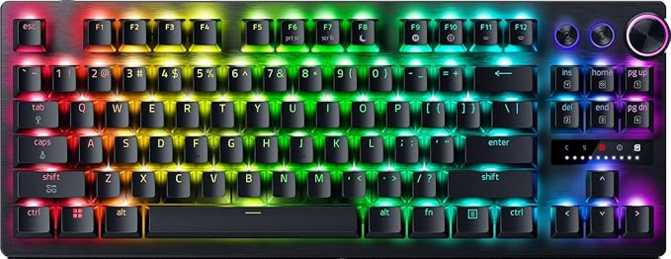
KeyboardsThe Huntsman Signature Edition is Razer's most technically capable tenkeyless keyboard. It combines analog optical switches with a gasket-mounted chassis, 8000 Hz polling, and a competitive feature set that few production boards offer at any price. This review covers what those features mean in real use, who genuinely benefits from them, and where the board makes meaningful trade-offs.
Design and Build Quality
Physical Presence and Materials
The Huntsman Signature Edition does not feel like a budget product the moment you pick it up. The chassis combines a plastic outer shell with an aluminum top plate and aluminum structural elements — a balance that delivers a solid, premium feel without making the board brittle, while keeping manufacturing tolerances manageable.
At three kilograms, this is exceptionally heavy for an 80% keyboard. That mass is a deliberate trade-off: it comes from the gasket mount system and aluminum internals, and translates directly into a board that stays exactly where you place it. For anyone who has dealt with lighter boards shifting during rapid keystroke sequences, the planted feel is immediately noticeable.
What Is a Gasket Mount?
In a standard gaming keyboard, the switch plate connects rigidly to the case. In a gasket-mounted keyboard, the plate is cushioned on soft gasket material at its contact points. This absorbs vibration with each keystroke — producing a lower-pitched, less clicky sound and a slightly cushioned typing feel. The difference becomes obvious the first time you use one side-by-side with a traditional rigid-mount board.
Size, Cable, and Wrist Rest
The tenkeyless form factor — 363mm wide, 139mm deep — removes the numpad and frees significant desk space to the right of the board. At lower mouse sensitivities this difference in available movement range is immediately practical. The 39mm thickness and standard OEM profile mean hand placement feels familiar if you are arriving from any mainstream gaming keyboard.
The cable detaches from the keyboard — a practical detail that protects the port during transport and makes cable replacement easy if ever needed. Razer includes a wrist rest in the box, which is an unusual inclusion at this tier and saves the need to source one separately for long typing sessions.
Physical Specifications
- Width
- 363 mm
- Depth
- 139 mm
- Thickness
- 39 mm
- Weight
- 3,000 g
- Case Material
- Plastic + Aluminum
- Plate Material
- Aluminum
- Mount Type
- Gasket
- Color
- Black
- Warranty
- 1 Year
Included in the Box
- Wrist rest
- Detachable USB cable
- Adjustable rear feet
- Per-key north-facing RGB backlighting
The Razer Analog Optical Switch Gen-2
How Optical Switches Work
A traditional mechanical switch registers a keypress when two metal contacts physically touch inside the housing. An optical switch replaces that contact with a light beam: when you press the key far enough, the stem interrupts or passes the beam, and the keyboard registers the input electronically — no metal-to-metal contact required.
The outcomes are practical: no contact debounce delay from metal bounce, better inherent longevity since there is no metal to corrode, and — critically — the ability to read where the key is in its travel at any moment rather than just whether it has crossed a single fixed threshold.
Actuation: An Adjustable Range from 0.1mm to 4mm
The Gen-2 switch offers an actuation range spanning from a near-imperceptible 0.1mm all the way to the full 4mm total travel distance. This is not a fixed actuation point — you choose where along that range the keyboard registers your press, and you can change it any time through software.
Setting it near 0.1mm means the key fires almost the instant you touch it. A 4mm setting requires a full deliberate stroke before registration — useful for reducing accidental inputs during intense play. Most users settle somewhere in the 1.5–2.5mm range as a balance between speed and accuracy.
Linear Feel
The switch has a linear feel — smooth travel from top to bottom with no tactile bump and no audible click at the actuation point. The 40-gram actuation force is light enough to type quickly without fatigue but firm enough that resting fingers on keys does not trigger accidental inputs. This makes the switch well-suited for gaming where consistent, rapid actuation matters more than tactile confirmation, and perfectly usable for typing if you prefer a quiet, smooth stroke.
Hot-Swappable Switches
Every switch on this board can be pulled and replaced without soldering. For most owners this feature stays dormant permanently — but it serves two real purposes: a failed switch can be replaced in minutes without sending the board in for service, and it leaves the door open for future switch upgrades if a compatible alternative becomes available. It is long-term investment protection, even if you never exercise it.
Performance Features Explained
The Huntsman Signature Edition's competitive value comes from four features that work together as a system. Each one solves a specific problem at the input layer. Understanding what they actually do separates meaningful performance from marketing language.
8000 Hz Polling Rate
A standard gaming keyboard reports its state to your computer 1,000 times per second. This board does it 8,000 times — once every 0.125 milliseconds. In daily use the difference is imperceptible. For competitive players where input consistency across thousands of actions per session matters, it removes the keyboard entirely as a latency variable in your input chain.
Rapid Trigger
On a standard keyboard, a key stays "held" until you lift it past a fixed reset threshold. Rapid trigger removes those fixed points entirely. Any downward movement registers as a press; any upward movement registers as a release — regardless of where in the travel range the key currently sits. In competitive FPS titles requiring fast directional resets, the timing advantage is real and measurable.
Dual Actuation
A single key can trigger two distinct actions — one at a halfway point in travel, a different one at full press depth. This opens up control configurations simply not possible with conventional switches. In games with analog support or for players who deeply optimize bindings, a single physical key can perform the work of two logical inputs depending on press depth.
Analog Input & NKRO
Because the optical switch reads key position continuously, supported applications can treat keys like joystick axes — a partial press yielding a slow walk in-game, a full press a sprint. Full N-Key Rollover ensures every key registers simultaneously with no conflicts under any combination, making the input system complete from both a latency and accuracy standpoint.
Keycaps, Layout, and Daily Typing Feel
PBT Double-Shot Keycaps
The keycaps use PBT plastic — denser, harder, and far more resistant to surface wear than the ABS plastic on most gaming keyboards. ABS keycaps develop a greasy, shiny surface in high-contact areas after months of use. PBT retains its texture for significantly longer under identical conditions.
Double-shot construction means each keycap is molded in two separate plastic layers: one for the key body, one for the legend. The legend is a structural part of the keycap — not ink applied to its surface. Legends cannot fade, wear off, or become illegible no matter how long or hard the board is used. Combined with PBT material, these keycaps will outlast the board itself under normal use.
OEM Profile and Standard ANSI Layout
The keycaps sit in OEM profile — a curved top surface with sculpted height rows that step slightly from back to front. OEM is the most common profile on gaming keyboards, meaning anyone arriving from a standard gaming board will feel immediately at home. The ANSI United States layout uses standard key sizing throughout, so any off-the-shelf ANSI keycap set will physically fit if you ever want to change colorways or try a different profile.
Rotary Dial and Media Controls
A rotary dial handles volume adjustment — a more natural control than key combinations, and once you have used one it is difficult to go back. Additional media controls are accessible through Fn key combinations rather than dedicated keys, which is the expected trade-off for the tenkeyless form factor. The north-facing LEDs produce clean, direct backlight illumination through the legend area rather than a diffused glow from below the keycap.
Keycap and Layout Details
- Keycap Material
- PBT Double-Shot
- Keycap Profile
- OEM
- Layout Standard
- ANSI (US)
- LED Direction
- North-Facing
- Standard Key Sizing
- Yes
- Rotary Dial
- Yes (volume)
Notable Absences
- No QMK / ZMK firmware support
- No VIA compatibility
- No USB passthrough port
- Not designed for Mac
- All advanced features require Razer Synapse
Who Should Buy This?
This Board Is Built For
-
Competitive FPS and action game playersThe combination of 8000 Hz polling, rapid trigger, adjustable actuation, and analog optical switches is among the strongest input feature sets available on a production keyboard. For players who train their inputs and optimize for consistency, this board delivers at every layer.
-
Heavy typists who also game seriouslyThe gasket mount, PBT keycaps, and included wrist rest reflect real investments in sustained comfort — not just performance specs. This board functions as a capable daily driver, not only a gaming peripheral.
-
Players who want to tune their setup over timeAdjustable actuation lets you change the feel without buying new switches. Hot-swap makes future modifications possible without soldering. For players who refine their gear incrementally, both features have real long-term value.
-
Desk-space-conscious Windows gamersTenkeyless frees meaningful real estate for mouse movement. The clean black aluminum chassis integrates well with standard desk setups, and the detachable cable keeps cable management tidy.
This Board Is Not Ideal For
-
Enthusiasts who want open firmwareNo QMK, ZMK, or VIA support means every advanced feature lives in Razer Synapse. For users who want firmware-level programmability independent of manufacturer software, this is a real limitation with no workaround.
-
Numpad-dependent usersThe tenkeyless form factor is a firm commitment. If you regularly use the numpad for data entry, financial work, or specific software shortcuts, this is the wrong keyboard regardless of its other strengths.
-
Portability-focused usersThree kilograms is substantial. This is a permanent desk board. Carrying it to events or between locations is possible but genuinely inconvenient compared to lighter alternatives in the same size class.
-
Mac usersThe board has no Mac key labeling or default macOS-optimized function behavior. It can operate on macOS in basic terms, but Razer Synapse's macOS support is limited and the advanced features are effectively Windows-only in practice.
How It Compares to the Alternatives
The Signature Edition's strongest differentiators are the 8000 Hz polling, analog optical switch technology, and gasket mount — all three together in a single production keyboard. The trade-off is software dependency and no open firmware path. Here is how it stacks up against logical alternatives:
| Feature | Razer Huntsman Signature Edition | Typical Optical Gaming TKL | Enthusiast Custom TKL |
|---|---|---|---|
| Switch Type | Optical (analog-capable) | Optical or mechanical | Usually mechanical |
| Polling Rate | 8000 Hz | 1000 Hz | 1000 Hz |
| Rapid Trigger | |||
| Analog Actuation | |||
| Mount Type | Gasket | Tray or top-mount | Gasket or top-mount |
| Hot-Swap Switches | Varies | ||
| QMK / VIA Support | |||
| Keycap Material | PBT Double-Shot | Usually ABS | Varies |
| Wrist Rest Included |
The core competitive advantage is the combination of all three differentiators in one production board. Rival optical keyboards typically lack 8000 Hz polling and rapid trigger. Enthusiast custom builds can match the firmware flexibility but require significant assembly effort and additional expense to reach this level of input performance.
Honest Assessment
What It Does Well
The Huntsman Signature Edition earns its premium positioning through genuine technical substance. The analog optical switch technology is not a marketing phrase — adjustable actuation, rapid trigger, and dual actuation each require underlying hardware capability to exist, and they are implemented here in a way that competitive players can configure and feel during real play sessions.
The gasket mount is a legitimate build quality decision, not a checkbox. The cushioned typing feel it produces is noticeably different from standard gaming keyboards, and the comfort improvement over long sessions is real and immediate. The PBT keycaps and bundled wrist rest extend this further — ergonomic investments that show up in daily use rather than a spec sheet.
Hot-swap provides future-proofing without requiring action today. The aluminum plate delivers premium rigidity, and north-facing LEDs produce clean, direct illumination through the legends. These are details that reflect considered design choices at every level.
Where It Falls Short
The software dependency is the most significant limitation. Every advanced feature — actuation adjustment, rapid trigger configuration, dual actuation mapping, RGB customization — lives in Razer Synapse. On a Windows gaming desktop this is typically a non-issue. But it ties the keyboard firmly to one software ecosystem and prevents it from functioning as a standalone programmable device independent of manufacturer software.
The three-kilogram weight is simultaneously an asset and a constraint. It will not shift on your desk under any circumstances, but it also will not travel conveniently. Anyone who moves between locations or attends LAN events should factor this honestly into their decision before purchasing.
The one-year warranty is on the shorter end for a keyboard at this price point. Given the optical switch's theoretical longevity advantage, the switches are unlikely to be the failure point — but a longer warranty period would signal greater confidence from Razer in the overall build. It is a minor but honest data point worth noting.
Frequently Asked Questions
Final Verdict
The Razer Huntsman Signature Edition is a technically accomplished keyboard for a specific kind of buyer: someone who wants a premium, competition-ready tenkeyless board and is fully committed to the Windows and Razer ecosystem. The analog optical switch technology, adjustable actuation, rapid trigger, and 8000 Hz polling are not features every buyer needs — but for competitive players who do, finding all of them together in a single board with this build quality is genuinely uncommon on the production keyboard market.
The gasket mount, PBT double-shot keycaps, hot-swap support, and included wrist rest demonstrate that Razer thought about how this board feels and holds up over time — not just how fast it responds. These are real investments in the ownership experience, not checkbox additions to justify a higher price.
The software lock-in and missing open firmware support are genuine limitations that should factor into your decision. If you want full firmware control or cross-platform flexibility without manufacturer software, a different keyboard serves you better. But if you are a Windows gamer who wants the most capable input technology available in a polished tenkeyless form factor, the Huntsman Signature Edition makes a compelling and well-rounded case.