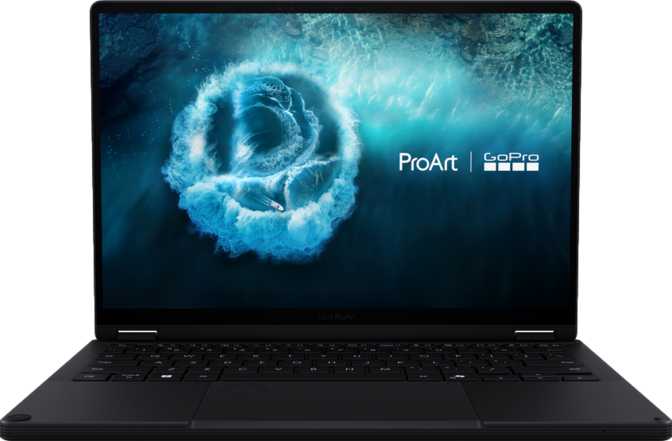
Asus ProArt GoPro Edition PX13 Review: Built for Serious Creators
LaptopsThere is a very specific type of creator this laptop was built for — someone who shoots with a GoPro, spends hours editing footage on the go, and refuses to accept the performance trade-offs that "ultraportable" usually implies. The Asus ProArt GoPro Edition PX13 (HN7306) is the product of a direct collaboration between Asus's professional creative line and GoPro, resulting in a machine that bridges rugged field recording with serious post-production capability. That is not a combination you see often in a 13.3-inch form factor.
The question is whether this machine lives up to its creative-professional billing or whether the "edition" branding is more marketing than engineering. After thoroughly examining every specification and what each means in real-world use, the answer is more interesting — and more nuanced — than the price tag alone might suggest.
Build, Dimensions, and First Impressions
Physical design, chassis quality, and what the specs feel like in your hands
A Compact Frame That Carries Real Weight (In the Best Way)
At 1,390 grams — just over three pounds — the PX13 sits in that sweet spot where you genuinely forget it's in your backpack, yet it doesn't feel fragile when you pull it out. For reference, most 13-inch productivity laptops hover between 1.2 and 1.6 kilograms, so this machine is mid-range by weight, not the absolute lightest, but far from burdensome.
The dimensions tell a similar story: 298mm wide, 209mm deep, and just 15mm thick. To put that concretely, it's narrower than an A4 sheet of paper and thinner than a standard spiral notebook. That 15mm profile is genuinely impressive given the hardware packed inside, and it speaks to real engineering discipline rather than spec-sheet bravado.
The total chassis volume is under one liter — 934 cubic centimeters — which means every millimeter of internal space is working hard.
What the Build Is and What It Isn't
The Display: Where This Laptop Earns Its Creative Credentials
13.3-inch OLED, 2880×1800, touch-enabled with stylus support
A Screen That Shows You What Your Footage Actually Looks Like
The 13.3-inch OLED panel running at 2880×1800 pixels is arguably the strongest single component on this machine, and that is saying something given the processor underneath.
The pixel density at that resolution across a 13.3-inch screen is exceptional — fine detail in 5.3K GoPro footage is rendered with precision, and color grading work benefits directly from what OLED technology delivers at a fundamental level: every dark pixel turns fully off. The result is a contrast ratio of one million to one, which is not a number you can achieve with traditional LCD backlighting regardless of price. True blacks mean that shadow detail in action footage — night skiing, cave diving, low-light city shots — is visible in a way it simply isn't on conventional screens.
Color accuracy is critical for ProArt-branded products, and the OLED technology here is well-suited to the task. If you've ever exported a video that looked great on your editing screen and washed out on every other screen your client viewed it on, that's a color space calibration problem. ProArt displays are built to avoid exactly that.
Brightness, Refresh Rate, and the Trade-offs to Know
The 60Hz refresh rate is standard for a productivity-class display. For content creation — color grading, photo editing, video review — 60Hz is completely sufficient. If you also play fast-paced games between editing sessions, the screen won't feel as fluid as a 120Hz panel. For pure creative work, it's a non-issue.
The touch screen functionality pairs well with the included stylus. The GPU supports up to four simultaneous external displays alongside the built-in screen — a capability that matters if this laptop doubles as a desktop editing station. Four monitors connected through the Thunderbolt and HDMI ports means a full multi-screen color grading setup is possible without a separate desktop machine.
Performance: The Processor and Memory Configuration That Changes the Equation
16-core CPU, 5.1GHz turbo, 128GB DDR5-8000, 2TB NVMe PCIe Gen 4
16 Cores, 128GB of RAM, and Why That Matters for Video Editing
The CPU at the heart of the PX13 runs 16 cores across 32 processing threads, manufactured on a 4-nanometer process — the current state-of-the-art node size that delivers the best performance-per-watt ratio available. The processor reaches a peak turbo frequency of 5.1GHz while maintaining a base speed of 3GHz across all cores.
For video editing context: most professional editing workflows — especially at 4K and above — are heavily multi-threaded. More cores mean faster timeline playback, shorter render queues, and snappier application response when multiple creative tools are open simultaneously. A 16-core laptop processor at this speed tier is not a concession compared to a desktop; it's genuinely desktop-competitive for the tasks a traveling creator performs.
The 128 gigabytes of DDR5 RAM running at up to 8,000MHz is the specification that separates this machine from nearly everything else at its physical size. Most high-end laptops ship with 16 to 32GB. Even enthusiast-tier machines commonly top out at 64GB. At 128GB in a 13.3-inch chassis, that memory ceiling simply does not exist for any realistic creative workflow — large video projects, complex After Effects compositions, and simultaneous heavy applications all run without the system resorting to storage-based memory overflow, which dramatically slows everything down.
Benchmark Reality Check
The benchmark scores align directly with what the raw specifications would lead you to expect. This processor sits firmly in the upper tier of current laptop CPUs. In practical terms: timelines that would stutter on a mainstream laptop play smoothly here. Exports that take 30 minutes on a mid-range machine happen faster here.
Storage: 2TB That Actually Keeps Up with the Processor
The 2TB NVMe SSD operating on the PCIe Gen 4 interface means storage speeds don't bottleneck the processor. Scrubbing through high-resolution video files — a task that constantly reads large amounts of data from disk — feels responsive rather than laggy. Two terabytes is generous enough to keep multiple active projects on the drive without constant file management, though prolific shooters will still want external drives for archiving completed work.
The Radeon 8060S: Integrated Graphics That Punch Above Their Class
AMD Radeon 8060S — 2,560 shaders, 2,900MHz boost, DirectX 12, OpenCL 3.0
Understanding What This GPU Actually Does
The AMD Radeon 8060S is an integrated graphics solution, meaning it shares system resources rather than having its own dedicated memory pool. However, this is where the 128GB of ultra-fast DDR5 RAM becomes critically important — the GPU can access a very large, very fast pool of system memory, which fundamentally changes its capability compared to conventional integrated graphics that are starved of bandwidth.
The GPU operates at a base clock of 1,295MHz, boosting to 2,900MHz when workloads demand it. It supports DirectX 12 and OpenGL 4.6 — the GPU acceleration paths used by major creative applications including video editors, compositing tools, and 3D software. OpenCL 3.0 support is also present, which matters for GPU-accelerated rendering in tools that use that compute path.
What It Won't Do
Connectivity: A Port Selection That Reflects Professional Priorities
2× Thunderbolt 4, HDMI 2.1, USB-A, card slot, Wi-Fi 7, Bluetooth 5.4
What You Get
-
Two Thunderbolt 4 PortsEach delivers up to 40Gbps of data throughput, supports video output, and enables power delivery. Having two means connecting a hub or external SSD doesn't consume your only high-speed option.
-
USB-A 3.2 Gen 2For direct connection to cameras, card readers, or accessories that still use the traditional rectangular connector. Gen 2 speeds mean offloading a full GoPro memory card happens quickly.
-
HDMI 2.1Supports 4K at high refresh rates and even 8K output, making this port genuinely useful for connecting to a high-resolution external monitor or presentation display.
-
External Memory Card SlotDirectly relevant for the GoPro use case: insert the SD or microSD card from your camera and transfer footage without a separate adapter.
-
Wi-Fi 7 (802.11be)The latest Wi-Fi generation, delivering the fastest available wireless speeds for offloading footage to a NAS, downloading large assets, or uploading finished content. Wi-Fi 7 delivers meaningfully lower latency and higher throughput than Wi-Fi 6E.
-
Bluetooth 5.4Current-generation Bluetooth for keyboards, mice, audio devices, and GoPro camera control. Stable, low-latency pairing across all modern accessories.
What's Missing
-
No Wired EthernetFor a professional machine used in studios or on sets with reliable network infrastructure, a Thunderbolt or USB-C to Ethernet adapter will be required. A common omission at this chassis size, but worth planning for before purchase.
-
All USB-C Is Thunderbolt 4There are no USB-C ports below Thunderbolt 4 standard — every USB-C connection is fully capable. This is actually a generous design choice that avoids the "which port is fast?" guessing game.
Features That Make the GoPro Edition Distinct
Stylus included, 3D facial recognition, dual microphones, and AirPlay support
Stylus Included
The included stylus works directly with the touch screen for annotation, color correction adjustments, timeline scrubbing, or freehand note-taking during client reviews. Stylus input provides more precision than a finger for tasks like masking, rotoscoping, or making fine adjustments in a color grading panel. That it's included in the box rather than sold separately is a meaningful detail.
3D Facial Recognition
The PX13 uses 3D facial recognition rather than a fingerprint scanner. This means unlocking the laptop with a glance — no pressing a button with a specific finger, no removing gloves in the cold. The 3D depth-sensing approach is significantly more secure than 2D camera-based face unlock, which can be defeated by a photograph of the user.
Dual Mics & AirPlay
The two built-in microphones are positioned for voice capture during video calls and on-device recordings. The AirPlay support — notable for a Windows laptop — allows direct wireless streaming to Apple TV and compatible displays, which is useful when presenting work to clients who use Apple devices in their offices or home setups.
Battery: The Endurance Story
73Wh cell, USB-C charging on both Thunderbolt 4 ports, no proprietary connector
What 73Wh Delivers in Practice
The 73 watt-hour battery is a substantial cell for a 13.3-inch machine — above average for the category. The processor has a thermal design power rating of 55 watts, which tells you what to expect: under sustained full-load creative work like active rendering or export, battery consumption will be significant. This is not a machine for eight hours of heavy video exporting on battery power.
For lighter workloads — reviewing footage, writing, browsing, light timeline work — the battery extends considerably further. The honest expectation is robust all-day use for mixed productivity tasks, with the understanding that the heaviest rendering is better done while plugged in.
Both Thunderbolt 4 ports support power delivery, so any USB-C charger capable of delivering sufficient wattage will keep the machine charged — you are not locked to a proprietary connector. That flexibility matters when traveling internationally or sharing a charger with other devices.
Who the PX13 Is For — and Who It Isn't
Matching this machine to the right buyer is as important as understanding its specs
This Machine Is Built For
-
GoPro content creators who shoot in the field and edit on the road, needing a capable screen and serious processing power in a packable chassis
-
Professional video editors who work with 4K and above footage and cannot afford a machine that struggles with their timeline
-
Creative professionals requiring precision color work, where the OLED display's contrast and accuracy directly affect output quality
-
Multi-application power users — 128GB of RAM means no creative application, regardless of how memory-hungry, will cause a bottleneck
-
Traveling professionals who want one machine that edits in the field and connects to a full multi-monitor setup back at base
This Machine Is Not Ideal For
-
Budget-conscious buyers — this configuration commands a premium that directly reflects its specifications
-
Gamers expecting high frame rates or ray-traced graphics from the integrated GPU
-
Users who need outdoor-proof hardware — this is not waterproof or ruggedized for field abuse
-
Those who rely on wired network connections without carrying a USB-C to Ethernet adapter
-
Anyone editing primarily in direct sunlight, where the 400-nit display and lack of anti-reflective coating create real challenges
How the PX13 Compares to the Alternatives
Competitive positioning against typical 13-inch pro laptops at mid-tier and high-end
| Feature | Asus ProArt GoPro PX13 | Typical 13" Mid-Tier Pro | Typical 13" High-End Pro |
|---|---|---|---|
| RAM | 128GB DDR5 | 16–32GB | 32–64GB |
| Display | OLED, 2880×1800 | IPS LCD, 1920×1200 | IPS/OLED, 2560×1600 |
| CPU Cores / Threads | 16C / 32T | 10–12C / 16–24T | 14C / 20T |
| Storage | 2TB NVMe PCIe 4 | 512GB–1TB | 1–2TB |
| Thunderbolt Ports | 2× TB4 | 1–2× TB4 | 2× TB4 |
| Wi-Fi Generation | Wi-Fi 7 | Wi-Fi 6 | Wi-Fi 6E |
| Weight | ~1.39 kg | ~1.2–1.4 kg | ~1.3–1.6 kg |
| Stylus Included | Yes | No | Rarely |
| ECC Memory | Yes | No | No |
Honest Assessment: Strengths and Limitations
No machine is without trade-offs — here is where this one stands
Where It Excels
The PX13's strengths are concentrated and powerful. The memory configuration alone makes it a category outlier, and pairing it with a 16-core processor, 2TB of fast storage, and an OLED display produces a machine that genuinely handles workloads that would require a desktop just a few years ago.
The display is exceptional for color-critical work. The port selection is thoughtful. The stylus inclusion makes the touch screen genuinely useful rather than a checkbox feature. The ECC memory support adds a layer of reliability that professionals will appreciate but rarely find in a laptop at this size.
Wi-Fi 7 future-proofs the wireless connectivity, and the pair of Thunderbolt 4 ports gives the machine genuine desktop-expansion capability without compromise.
Where It Falls Short
The integrated GPU, while capable for video editing and creative workflows, cannot replace a discrete graphics card for GPU-intensive tasks like real-time 3D rendering, game development, or GPU-based machine learning at scale.
The 60Hz display refresh rate and 400-nit brightness are appropriate for the laptop's professional use case but will disappoint users coming from gaming laptops with high-refresh panels. The absence of a wired Ethernet port and anti-reflective coating are small but real concessions.
The battery, while physically large, is under serious demand from a 55W processor. Plugged-in use will always be preferable for sustained heavy work, though the machine is far from unusable on battery for lighter tasks.
Questions Real Buyers Ask Before Purchasing
Honest answers to the questions that matter before spending serious money
Final Verdict
The Asus ProArt GoPro Edition PX13 makes a specific promise: that a 13.3-inch laptop can carry the performance required for serious professional creative work without compromise on display quality, processing power, or memory headroom. It keeps that promise.
The 128GB DDR5 memory configuration, 16-core processor, 2TB NVMe storage, and OLED display form a coherent package that no amount of wishful thinking can replicate on a budget machine. The GoPro collaboration adds genuine workflow value for action sports and outdoor creators who need to go from field capture to finished edit with a single portable tool.
This is not a mass-market purchase. It is a professional instrument with professional pricing and professional capability. If your work demands what this machine delivers — and you'll know within a few minutes of reviewing the specs whether it does — there is very little else in this form factor that competes with it.