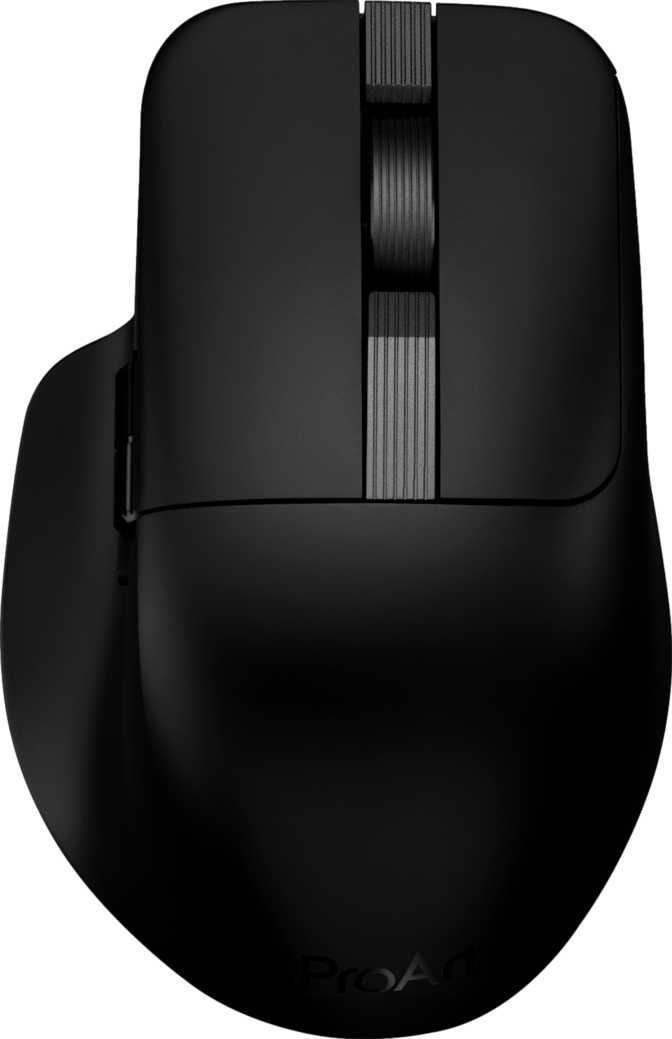
Asus ProArt MD301: An Honest Review for Creative Professionals
MiceThere's a quiet tension in most creative professionals' setups: the mice marketed to them look like toys, and the mice that perform well look like they belong on a neon-lit gaming desk. The Asus ProArt MD301 is a direct answer to that frustration. Sitting at the intersection of Asus's creative-focused ProArt ecosystem and genuinely capable input hardware, this mouse makes a case for itself not on flashy promises but on a thoughtful combination of features that matter during long, focused work sessions. Whether you're navigating a sprawling Premiere Pro timeline, making fine selections in Photoshop, or simply refusing to compromise on pointer feel during an eight-hour workday, the MD301 deserves your full attention before you decide.
Design and Build: Professional Restraint Done Right
Form Factor and Ergonomics
The MD301 is a right-handed mouse with an ergonomic contour designed to support a natural palm or claw grip. At 114.8mm long, 75.2mm wide, and 46.8mm tall, it sits in the medium-to-large size range — comfortable for average to large hands, though users with smaller hands may find the reach to the side buttons slightly extended during prolonged sessions.
The 100g weight hits a thoughtful middle ground. It's not ultralight in the way competitive gaming mice have trended, but it's far from heavy. For creative work — where consistent, deliberate cursor movement matters more than rapid flick shots — 100g provides satisfying solidity without fatigue. There are no user-removable weight cartridges, which keeps the internal design clean and the form uncluttered.
Aesthetic Philosophy
The absence of RGB lighting is deliberate, and it's the right call for this product's audience. The ProArt line is built around studio environments where a pulsing, color-shifting mouse would be visually distracting and entirely out of place. What you get instead is a clean, professional silhouette that fits equally well on a design studio desk or a focused home office setup.
The 1.8-metre cable covers virtually any desk configuration without tugging, though you're unlikely to use it often given the wireless capabilities. Its primary role is charging and occasional wired fallback — not daily use.
Connectivity: Three Modes, Zero Compromises
The MD301 supports three distinct connection methods, and this flexibility is one of its strongest practical arguments for creative professionals who move across devices throughout their day.
2.4 GHz Wireless
Delivers a low-latency, stable connection with a 1000Hz polling rate — the mouse reports its position one thousand times per second. In any real-world scenario, this is indistinguishable from a wired connection in terms of cursor feel and responsiveness.
Bluetooth 5.0
Pairs to a second device — a laptop, tablet, or secondary workstation — without any dongle. For professionals who switch between machines throughout the day, this is genuinely useful rather than a spec-sheet bullet point.
USB Wired
A plug-and-play fallback that works regardless of battery state. Useful when working on machines where wireless receivers are unavailable or in environments that restrict wireless peripherals entirely.
Sensor Performance: What the Numbers Actually Mean
The PixArt PAW3318 in Context
The MD301 uses the PixArt PAW3318 optical sensor — a capable mid-tier option with a well-established track record for accuracy and consistency across a wide range of surfaces. It is not the flagship sensor found in top-tier competitive gaming mice, but for the ProArt's target audience, that distinction rarely matters in practice.
For creative professionals, sensor accuracy at controlled, deliberate movement speeds is far more relevant than raw peak performance. The PAW3318 tracks cleanly across this use case without jitter or angle snapping artifacts that would compromise fine selection work in image or video editing tools.
DPI Range and What Each Zone Means for Your Work
The sensor spans from 100 DPI at the low end to 8,000 DPI at the top, with full adjustability across that range via a dedicated button on the mouse body. Here's what each range delivers in a real creative workflow:
Precision detail territory — fine pixel selections, careful brush strokes on large canvases, or any task where cursor accuracy over small distances is critical on a high-resolution display.
The daily productivity sweet spot for most users on standard 1080p to 4K displays. This is where the majority of creative professionals will spend the overwhelming majority of their time.
Multi-monitor navigation or very high-DPI display setups where large physical distances need to be crossed quickly. Having the option is valuable; routinely needing this ceiling is rare.
Speed and Acceleration Tracking
The sensor handles up to 100 inches per second of movement speed and up to 20G of acceleration. In practical terms: you would need to move the mouse dramatically faster than any normal human interaction to approach those limits. For creative work, these ceilings are effectively irrelevant — what matters is clean, jitter-free tracking at normal working speeds, and the PAW3318 delivers that consistently.
Battery Life: Measured in Months, Not Hours
The battery is rated to last up to 1,440 hours on a single charge — that's more than three months of typical daily work sessions. Battery anxiety simply doesn't exist with this mouse.
Put another way: if you use the mouse for eight hours a day, five days a week, you'd charge it roughly once every three months. That's the same relationship most people have with a wireless keyboard — charge it occasionally, almost as an afterthought.
The Thumb Scroll Wheel: A Feature That Earns Its Place
Beyond the standard vertical scroll wheel, the MD301 includes a dedicated horizontal scroll wheel positioned for natural thumb operation. This sounds like a minor addition until you use it for a full day in creative applications — then it becomes something you notice immediately in its absence on other mice.
-
Video editing timelines — horizontal scrolling is a constant action in any NLE. The thumb wheel handles it naturally without lifting your hand from working position.
-
Wide spreadsheets and data tables — eliminates the need to reach for a scroll bar or chain keyboard shortcuts just to navigate horizontally.
-
Panoramic image editing — left-right canvas navigation feels immediate and natural, with no awkward modifier-key combinations required.
The primary scroll wheel does not tilt for horizontal input — that axis belongs exclusively to the dedicated thumb wheel. This keeps the main wheel's mechanical design simpler and more reliable over extended use.
Physical Dimensions at a Glance
| Dimension | Measurement |
|---|---|
| Length | 114.8 mm |
| Width | 75.2 mm |
| Height (Thickness) | 46.8 mm |
| Weight | 100 g |
| Cable Length | 1.8 m |
Who Should Buy the Asus ProArt MD301
-
Creative professionals on multi-device setups. 2.4GHz, Bluetooth 5.0, and USB together mean you can pair to a desktop and a laptop simultaneously and switch without rearranging anything on your desk.
-
Users who resent maintenance overhead. Charging once every three months is not a routine — it's an occasional errand. The MD301 effectively vanishes from your upkeep schedule.
-
Designers and editors who value precision over raw speed. The accurate sensor and wide DPI range give you the control needed for meticulous on-screen work without the gaming-focused trade-offs.
-
Professionals in distraction-free environments. Studios, client-facing workspaces, and anyone who finds ambient lighting disruptive will appreciate a mouse that looks exactly as serious as the work it supports.
-
Left-handed users. The ergonomic shaping is strictly right-hand optimized — there is no ambidextrous variant available in this line.
-
Competitive gamers seeking a performance edge. While the 1000Hz polling rate is strong, the PAW3318 is not in the same tier as flagship sensors used in dedicated esports hardware.
-
Users who need profile portability without software. No onboard memory means your customization is tied to Armoury Crate. Machines without it revert to factory defaults.
-
Users with small hands. The medium-to-large footprint may feel slightly oversized and tiring for those with smaller palm dimensions across long sessions.
How It Compares to the Alternatives
The MD301 occupies a specific niche: a professional wireless mouse built for creative workflows with ecosystem software integration. Here's how it stacks up conceptually against the types of mice buyers in this category most commonly compare it against.
| Feature | Asus ProArt MD301 | Typical Creative Productivity Mouse | Typical Wireless Gaming Mouse |
|---|---|---|---|
| Connectivity | 2.4GHz + BT5.0 + USB | Usually BT + USB | Usually 2.4GHz + USB |
| Battery Life | ~60 days | 20–70 days (varies widely) | 2–14 days (varies) |
| Wireless Charging | Yes (Qi) | Rarely included | Occasionally |
| RGB Lighting | None | None | Standard |
| Thumb Scroll Wheel | Yes | Common | Rare |
| Onboard Profiles | None | Usually 2–5 profiles | Usually 3–5 profiles |
| Weight | 100g | 85–130g | 60–110g |
| Sensor Tier | Mid-range optical | Mid-range | Mid to flagship |
Honest Assessment: Strengths and Weaknesses
The MD301 gets a significant number of decisions right. The battery life is genuinely exceptional — not a marketing exaggeration — and wireless charging removes even the small friction of plugging in a cable. The three-mode connectivity is well-implemented and covers real use cases rather than adding Bluetooth purely for specification padding. The thumb scroll wheel is a workflow enhancer that earns every cubic millimetre of its footprint. And the decision to ship without RGB lighting is a statement about the intended audience that the product follows through on consistently.
The weaknesses are real but bounded. No onboard memory is the most meaningful limitation for multi-machine professionals who can't guarantee Armoury Crate availability everywhere they work. The sensor, while accurate and reliable for its intended purpose, won't satisfy anyone stepping down from a high-end gaming mouse who's accustomed to flagship optical performance. The one-year warranty period is shorter than some competing options in this tier, which deserves honest consideration given the non-removable battery.
The right-hand-only design is a constraint, not a flaw — but it must be stated plainly, because it makes the mouse a non-starter for roughly one in ten users before any other factor is considered.
Common Questions Before You Buy
Final Verdict
The Asus ProArt MD301 is a well-considered mouse for creative professionals who want wireless freedom without the maintenance overhead that typically comes with it. Its battery life stands apart from nearly anything in its category, its three-mode connectivity is genuinely practical rather than speculative, and its clean, RGB-free design respects the environment it's built for.
The absence of onboard memory is its most meaningful limitation, and it's worth weighing honestly if you regularly move between computers without guaranteed access to Armoury Crate. But for a designer, editor, or creative professional who works from a consistent primary setup and values a mouse that simply stays out of the way — charging rarely, connecting reliably, tracking accurately, and looking like it belongs next to a color-calibrated monitor — the MD301 makes a coherent and compelling case for itself.
Multi-month battery life, Qi wireless charging, and a professional aesthetic are priorities — and you work primarily from one machine where Armoury Crate is available.
Onboard profile storage, left-handed ergonomics, or flagship-tier sensor performance are non-negotiable requirements for your specific workflow.