Asus ProArt KD300 Full Review: Built for Creative Professionals
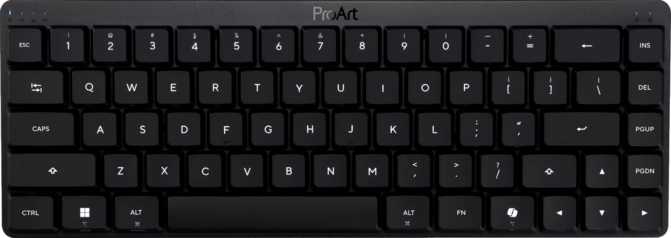
KeyboardsThe Asus ProArt KD300 is a coherent, well-engineered compact keyboard that delivers optical switches, gasket-mount comfort, and genuine multi-device wireless in a package built specifically for creative professionals. It earns its ProArt badge through design rather than branding alone.
Quick Specifications
- Switch TypeLow-Profile Optical
- Layout65% Compact (ANSI)
- ConnectivityUSB-C / 2.4GHz / BT 5.2
- Mount TypeGasket
- ProfileLow-Profile
- Mac SupportYes
- Hot-SwapNo
Design and Build: Premium Where It Counts
A hybrid material approach that earns its portability without sacrificing structural integrity.
The KD300 uses a plastic outer case paired with an aluminum internal plate — the structural component that anchors each switch in position. This is a deliberate choice, not a budget shortcut. A full-aluminum chassis would meaningfully increase both weight and cost; the aluminum plate delivers the rigidity needed for consistent, flex-free keystrokes while keeping the overall weight appropriate for a keyboard that travels.
At its slim dimensions, the KD300 fits into a bag without adding meaningful bulk. The narrow footprint comfortably shares a desk with a drawing tablet or secondary display without encroaching on the workspace. The all-black colorway suits the ProArt aesthetic: understated and professional, nothing that competes visually with the work on-screen.
Adjustable rear feet provide tilt options for typing angle preference. The board's naturally low profile suits flat or minimal-tilt use for most users. No wrist rest is included — the low keyboard height makes one unnecessary for many, but those with specific ergonomic requirements should factor this into their setup plans.
Build Highlights
Gasket Mount System
Silicone isolators suspend the internal assembly inside the case, absorbing keystroke vibration and producing a quieter, softer typing feel. Standard top-mount or bottom-mount designs cannot replicate this. Fitting a gasket mount into a low-profile form factor reflects careful engineering.
Detachable USB-C Cable
Makes packing straightforward and keeps the desk uncluttered when switching to wireless. No proprietary connector to track down or replace.
Per-Key RGB Backlight
Configurable through Armoury Crate software. The aluminum plate and low keycap height produce a clean, contained glow rather than an aggressive light bleed. Includes a full-off mode for professional settings.
Adjustable Tilt Feet
Rear feet raise the board for a more angled typing position. Given the naturally low profile, most users will find flat or near-flat comfortable without adjustment.
ASUS Low-Profile Optical Switches Explained
Optical actuation removes the physical contact that limits conventional mechanical switches — and everything that contact costs you over time.
Most mechanical keyboards register keypresses through metal-on-metal contact: two conductive pieces inside the switch touch, complete a circuit, and the keypress fires — but not instantly. That physical contact creates electrical bounce, which requires firmware to filter and delay the signal before registering it. The ASUS Low-Profile Optical Switch replaces this with an infrared beam. The switch stem interrupts the beam as it descends, and the keypress registers at that exact moment — no contact bounce, no debounce delay.
There is no metal-to-metal fatigue from repeated contact, so the switches maintain consistent behavior well into extended use. For creative professionals who type for hours daily, that consistency is not a minor detail.
Key Limitation
The switches are not hot-swappable. Changing them requires soldering. For the professional audience this keyboard targets, that is an acceptable trade-off — but it is a permanent commitment to the optical linear feel.
What the Optical Design Delivers
Shallow, Fast Actuation
Keys activate at just one millimeter of descent — roughly half the depth of a standard mechanical switch. Your fingers barely move before the keypress registers, making typing and shortcut execution feel noticeably faster.
Smooth Linear Feel
No tactile bump, no audible click. The keystroke travels with uniform resistance throughout. Natural for touch typists; an adjustment for those accustomed to tactile or clicky switches.
Light Actuation Force
At 40 grams of required force, these switches sit below the standard for typical linear mechanicals. Extended typing sessions should feel meaningfully less fatiguing as a result.
Short Total Travel
The complete keystroke covers less than three millimeters from top to bottom. Combined with the early actuation point, each key press feels precise and efficient — not cheap, but fast.
65% Layout: What You Gain and What You Give Up
The 65% format is a deliberate calculation — compact enough to transform a workspace, complete enough for serious daily use.
The 65% layout removes the numpad, function row, and navigation cluster compared to a full-size board, while retaining the main alphanumeric keys and — critically — dedicated arrow keys. What remains covers the vast majority of what most users type every day while occupying roughly half the horizontal desk footprint. Arrow keys are standalone physical keys, not function-layer combinations; this is one of the defining advantages of 65% over 60% designs.
The KD300 uses a standard ANSI (US) layout throughout, meaning key sizes follow the international standard. This matters practically: any ANSI keycap set will fit the board, and aftermarket options are widely available without compatibility hunting.
Function-row inputs and media controls are accessible through key combinations rather than dedicated keys. This is standard at this size class and becomes muscle memory within days. For users running multi-key shortcuts in creative software — Photoshop, Lightroom, DaVinci Resolve, Blender — the layout encourages intentional shortcut use rather than accidental key activations.
Layout At a Glance
-
Dedicated Arrow Keys
Standalone physical keys, not Fn-layer — navigation stays natural and uninterrupted.
-
Standard ANSI Key Sizing
Full compatibility with the widest range of aftermarket keycap sets.
-
Native Mac Layout Support
Mac users are a primary audience, not an afterthought. Key labeling and behavior reflect macOS conventions.
-
N-Key Rollover (NKRO)
Every simultaneous keypress is individually registered — essential for complex creative software shortcuts.
-
No Dedicated Numpad or F-Row
Users who depend on numeric input or function keys as standalone keys should consider a 75% or TKL layout.
Three-Way Connectivity: Wired, 2.4GHz, and Bluetooth
Three independent connection modes, each serving a distinct role in a multi-device professional workflow.
Wired USB-C
Zero-latency response at full polling speed. The detachable cable means switching to wireless is tidy and commitment-free. The right mode when absolute input consistency is the priority.
2.4GHz Wireless
Maintains full polling rate wirelessly — a meaningful distinction from keyboards that reduce input frequency in wireless mode to conserve power. With a clear line of sight to the USB receiver, this mode is functionally indistinguishable from wired in everyday use.
Recommended Daily ModeBluetooth 5.2
Extends the keyboard's reach to a second or third device without consuming a USB port. Bluetooth 5.2 is the current standard for connection stability and low-latency wireless. A desktop on 2.4GHz and a laptop on Bluetooth requires no re-pairing to switch between them.
The Multi-Device Advantage
The three connection modes are designed for the professional who uses multiple devices daily. Wired to a studio workstation for peak precision, 2.4GHz for untethered desk use, and Bluetooth for a laptop during meetings or travel. Transitioning between a 2.4GHz device and a Bluetooth device requires no re-pairing procedure.
Battery Life: Charging Becomes an Afterthought
The KD300's wireless endurance is exceptional — and it is not accidental.
Years
of typical daily use
on a single charge
Asus rates the KD300's wireless battery endurance at a figure that, in practical terms, removes charging from the regular maintenance cycle. For a user working eight or more hours daily, the gap between charges under typical operating conditions is measured in weeks to months — not days.
This endurance is partly structural. Optical switches consume significantly less power than conventional contact-based switches because the infrared beam operates passively rather than completing electrical circuits thousands of times per minute. The wireless radio and backlighting are the primary power draws.
Best Endurance
Backlight off, standard wireless use
Reduced Endurance
Full RGB brightness, continuous wireless
Honest note: The rated figure reflects conservative operating conditions. Running full RGB at maximum brightness every day will reduce wireless runtime significantly. Buyers who keep backlight on at all times should still expect competitive wireless performance — but not the maximum-rated figures.
Feature Set: Focused and Deliberate
The KD300 includes what its target audience needs and deliberately omits several things some buyers will consider essential.
What the KD300 Includes
- N-Key Rollover across all connection modes
- Full 1,000 Hz polling rate on both wired and 2.4GHz wireless
- Per-key RGB backlighting with Armoury Crate software control
- Gasket mount for improved comfort and reduced vibration
- Detachable USB-C cable for clean wireless transitions
- Adjustable rear tilt feet
- Native Mac and Windows layout support
- Bluetooth 5.2 multi-device pairing
Notable Omissions
- No Rapid TriggerNo dynamic actuation reset based on key release. Relevant to competitive gaming; less critical for professional creative use.
- No Adjustable Actuation DistanceThe actuation point is fixed. Users wanting to tune switch behavior are limited to what the switches provide out of the box.
- No QMK, ZMK, or VIA SupportOpen-source firmware customization is not available. All configuration runs through Asus Armoury Crate — capable but closed.
- No Hot-Swap SwitchesSwitch replacement requires soldering. The optical linear feel is a permanent commitment for buyers who do not want to solder.
- No USB PassthroughNo built-in USB port in the keyboard chassis for device pass-through or charging.
- No Included Wrist RestThe low profile makes this a minor omission for most users, but those with ergonomic requirements should plan accordingly.
Who This Keyboard Is For — And Who Should Look Elsewhere
The KD300 knows exactly what it is. Whether it fits your needs depends on what you bring to the desk.
The KD300 Is Built For You If...
- You are a creative professional — designer, illustrator, video editor, architect — who needs a compact, reliable keyboard for multi-device workflows.
- You work primarily on a Mac and want a keyboard where Mac support is a primary design consideration, not a checkbox afterthought.
- You travel or move between workspaces and need portability without sacrificing build quality or connectivity range.
- You run demanding multi-key shortcuts and need every simultaneous keypress registered accurately and reliably.
- Long wireless battery life matters to you and you want a keyboard you rarely need to think about charging.
Look Elsewhere If...
- You play competitive games that depend on rapid trigger, adjustable actuation, or advanced input optimization. The KD300 was not built around those features.
- You are a keyboard enthusiast who wants to experiment with different switch types. Without hot-swap, changing switches means soldering.
- Your workflow depends on a numpad, a dedicated function row, or physical standalone media keys that are always one keypress away.
- You rely on QMK or VIA for deep firmware-level customization or layer management beyond what Armoury Crate provides.
- A one-year warranty period concerns you for a long-term investment — some competitors at a similar price point extend their coverage further.
How the KD300 Compares to the Competition
The low-profile wireless compact mechanical space is competitive. Here is how the KD300 stands against its most direct alternatives.
| Feature | Asus ProArt KD300 | Keychron K3 Pro | Nuphy Air75 | Lofree Flow |
|---|---|---|---|---|
| Switch Type | Low-Profile Optical | Low-Profile Mech. | Low-Profile Mech. | Low-Profile Mech. |
| Layout | 65% | 75% | 75% | 75% |
| Gasket Mount | Yes | No | No | Yes |
| Hot-Swap Switches | No | Yes | Yes | Yes |
| QMK / VIA Support | No | Yes | Yes | No |
| Mac Layout Support | Yes | Yes | Yes | Yes |
| Wireless Modes | USB-C / 2.4GHz / BT 5.2 | USB-C / Bluetooth | USB-C / Bluetooth | USB-C / 2.4GHz / BT |
Competitor feature listings reflect general product knowledge and may vary across hardware revisions. Verify current specifications directly with each manufacturer before making a side-by-side purchase decision.
Strengths and Honest Limitations
A balanced assessment of what the KD300 delivers — and where it falls short of what some buyers will expect.
Where It Wins
The KD300's most compelling quality is coherence. Every design decision serves a clear identity: a professional-grade compact mechanical for multi-device creative workflows. The gasket mount makes typing more comfortable than any spec sheet value would suggest on paper. The optical switches bring consistent, contact-free actuation that does not degrade over extended use. The triple connectivity is a well-executed system — not a checkbox feature, but a genuinely practical architecture for multi-device daily use.
The Mac support deserves direct acknowledgment. Many keyboards claim macOS compatibility as a secondary feature; the KD300 treats Mac users as a primary audience. That distinction shows in the key labeling, layout conventions, and software behavior.
Battery endurance, under realistic conditions, removes wireless power management from daily consideration almost entirely — an advantage that compounds over months of use compared to keyboards requiring weekly or biweekly charging.
Where It Falls Short
The absence of hot-swap support is the most significant shortcoming at this price tier. Keychron and Nuphy have made switch-swapping a standard expectation in this category. Optical linear switches are excellent but divisive — buyers are committed to that feel, and without the ability to swap, there is no way to experiment or adapt.
The lack of QMK and VIA support narrows the keyboard's appeal for anyone who uses their hardware as a programmable input device. Armoury Crate is functional but operates within Asus's boundaries, not the open-source community's. Power users who rely on complex layer management or macro programming will find its depth limiting.
The stock keycap profile is functional and broadly compatible with ANSI aftermarket sets, but it sits below the standard of higher-end profiles available to enthusiasts. For buyers who intend to customize keycap sets over time, ANSI compatibility keeps options open; for those who plan to run the keyboard as-is indefinitely, the stock caps are the weakest element of the tactile experience.
The one-year warranty period is modest. At a premium price point, where several competitors extend their coverage further, this should factor into a long-term ownership calculation.
Common Questions Before You Buy
Answers to what real buyers search for before committing to the KD300.
A Keyboard That Knows What It Is
Our recommendation for the Asus ProArt KD300
The Asus ProArt KD300 is a well-engineered, deliberately focused compact keyboard for creative professionals who value multi-device wireless freedom, optical switch precision, and a refined typing feel in a portable footprint. The combination of gasket mount, optical switches, and full-rate 2.4GHz wireless is unusual at this form factor and represents a real advantage over the most common alternatives in this category.
It is not a universally ideal keyboard. Buyers who prioritize switch customization, open-source firmware, or competitive gaming features will find better-suited options at a similar price. The one-year warranty and the absence of hot-swap support are real limitations that a buyer considering this for long-term ownership should weigh honestly.
For its intended audience — the designer moving between a Mac workstation and a travel laptop, the illustrator who needs a quiet, responsive compact board on a crowded desk, the professional who connects to two or three devices daily and cannot be bothered managing wireless battery levels — the KD300 is a strong and specific recommendation.
Buy It If
Multi-device wireless performance, optical switch consistency, and typing comfort from day one are your primary requirements. This is a keyboard that delivers on those priorities without compromise.
Hold Off If
Switch flexibility, deep firmware customization, or hot-swap capability are on your checklist. Alternatives like the Keychron K3 Pro will serve those needs more completely, even if their footprint is larger.