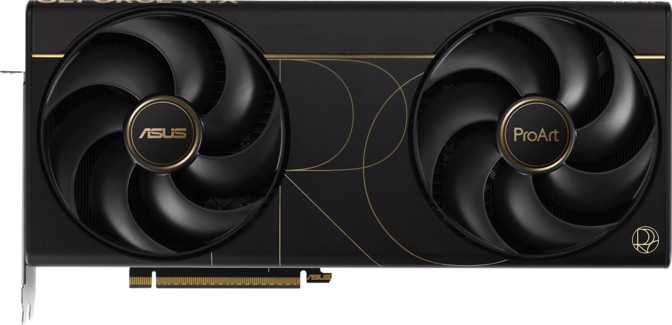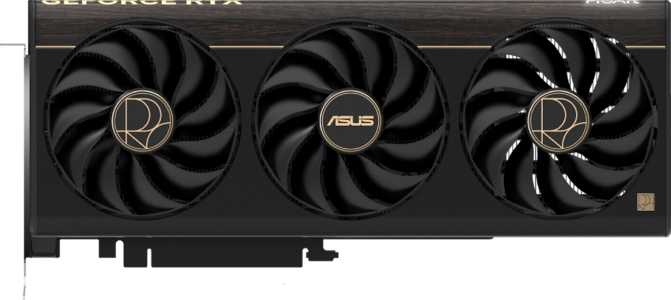
Asus ProArt GeForce RTX 5080 OC Edition: Full Review
Graphics CardsKey Specifications at a Glance
Blackwell Architecture — Asus ProArt OC Edition
When Professional and Enthusiast Stop Being Separate
The GPU market has long drawn a clean line between workstation cards and gaming cards. On one side: the dependable precision of Quadro-class hardware aimed at professionals who rarely care about frame rates. On the other: the raw horsepower of gaming flagships built for people who care about almost nothing else. The Asus ProArt GeForce RTX 5080 OC Edition refuses to respect that line.
Built on NVIDIA's Blackwell architecture and dressed in Asus's ProArt aesthetic — a design language historically aimed at creators, color-sensitive professionals, and workstation-adjacent users — this card doesn't ask you to choose between worlds. Whether you're rendering 3D product visualizations by day and running demanding games at night, or building a single-workstation pipeline for video production and computational work, the RTX 5080 OC Edition is designed to follow you across every one of those contexts without compromise.
The Verdict in Brief
A rare GPU that earns its ProArt badge without sacrificing enthusiast-grade gaming performance. The right buyer will find it deeply capable. The wrong buyer will find it expensive overkill.
Creators 4K Gamers ML Practitioners
Design, Build Quality, and Physical Experience
ProArt Aesthetics on Serious Hardware
Asus's ProArt line has a distinct personality compared to the brand's ROG lineup. Where ROG leans into aggressive angles and maximum RGB spectacle, ProArt takes a quieter approach: clean lines, a restrained color palette, and a visual identity built around workstation credibility rather than gaming bravado. RGB lighting is present, but implemented as accent lighting rather than immersive spectacle — the right call for a professional editing or production environment where visual distraction matters.
The build quality reflects careful material choices throughout: a full-coverage heatsink, a reinforced PCIe connector area, and a backplate that adds structural rigidity across the card's full length. This matters more than it might seem for a card at this weight class. PCIe slot stress from heavy, unsupported GPUs in vertical GPU installations is a real long-term concern, and Asus addresses it properly here.
Cooling is handled entirely through air — no integrated liquid loop or hybrid configuration. For a card drawing up to 360 watts, air cooling carries a significant engineering burden. The quality of Asus's thermal design is the primary factor that separates this card from lower-effort implementations of the same GPU, and it's what determines how consistently the boost clock target is sustained under sustained real-world workloads.
Physical Specifications
- Length
- 304 mm
- Height
- 126 mm
- Slot Profile
- ~3-slot
- Cooling Type
- Air-cooled
- RGB Lighting
- Yes (accent)
- Backplate
- Full-cover
The Blackwell Architecture: Why It Matters
To understand what this card can actually do, you need to understand what Blackwell represents. Built on a 5-nanometer manufacturing process, the RTX 5080 OC Edition packs approximately 45.6 billion transistors onto its die. Transistors are the fundamental switching elements in any processor — more transistors at a finer process node means more computational capability in a given physical space, better power efficiency per operation, and greater headroom for the features that define real-world performance.
Blackwell brings architectural improvements not just in raw throughput but in how workloads are processed — particularly for ray tracing, AI-accelerated rendering, and compute-heavy professional tasks. This is not simply more of the same from the prior generation; it represents genuine architectural advancement in the areas that matter most to this card's target audience.
Core Performance Analysis
Transforming raw specifications into real-world meaning
Computational Throughput
Clock Speeds and the OC Edition Advantage
Bars show clock speeds relative to each other. OC Edition ships pre-tuned above NVIDIA reference — no manual tuning or warranty risk required.
The "OC Edition" designation means Asus ships this card with its boost clock target set higher than NVIDIA's reference specification — out of the box, with no manual tuning required. The boost clock represents the peak speed the GPU sustains under realistic gaming and compute loads, and at 2700 MHz, this card runs meaningfully faster than a reference RTX 5080 from day one.
A well-engineered cooler — which this card needs to justify its OC Edition status — keeps the GPU as close to its boost target as possible, as consistently as possible. The gap between base and boost reflects the card's dynamic behavior: brief light activity allows it to clock very high; sustained load settles at a thermal equilibrium the cooling system can maintain.
Memory Configuration: 16GB GDDR7
Why memory speed matters as much as the capacity number
VRAM Capacity in Practice
Sixteen gigabytes of video memory is the relevant figure for determining what workloads this card can handle without hitting a wall. In gaming, VRAM capacity determines whether high-resolution texture packs, ultra-quality shadow maps, and multiple render targets can coexist in memory simultaneously. At 4K with maximum texture quality settings, modern titles can push into double-digit gigabyte VRAM utilization — meaning 16GB provides a comfortable margin rather than a razor-thin edge.
For creative professionals, the story is even more direct. High-resolution video editing — particularly RAW 4K, 6K, or multi-stream workflows — benefits substantially from a larger frame buffer. Complex 3D scene rendering with high-poly assets and large texture atlases will exhaust a smaller buffer and force the GPU to rely on slower system memory. With 16GB, more data stays on-die, where the GPU can reach it at full speed.
Where GDDR7 Changes Everything
The technically interesting story is how fast this memory operates. GDDR7 — the latest generation of graphics memory — delivers nearly one terabyte of data transfer per second across the memory bus. The GPU can move the equivalent of an entire Blu-ray disc's worth of data in and out of memory in roughly 50 milliseconds. This bandwidth directly feeds the GPU's shaders, textures, and render targets — and a bandwidth bottleneck can throttle even the fastest GPU cores, making this figure one of the most practically meaningful in the spec sheet.
Memory Specifications
| Memory Type | GDDR7 |
|---|---|
| Capacity | 16 GB |
| Peak Bandwidth | 960 GB/s |
| Effective Speed | 30,000 MHz |
| Bus Width | 256-bit |
| ECC Support | Yes |
ECC Memory: The Professional Differentiator
Error-Correcting Code memory detects and corrects single-bit memory errors on the fly, preventing data corruption in long-running compute workloads. This matters in medical imaging, financial simulation, and scientific computing — and its inclusion signals that this card genuinely targets professional use, not just the professional aesthetic.
Feature Set and Connectivity
From AI-powered rendering to four-display output
Ray Tracing
Hardware-accelerated ray tracing simulates the physical behavior of light — reflections, shadows, ambient occlusion, and global illumination — in real time. Blackwell's dedicated ray tracing hardware eliminates the catastrophic frame rate penalties of first-generation implementations, making physically-based lighting a practical choice rather than a showcase feature.
DLSS
Deep Learning Super Sampling uses a trained neural network to reconstruct higher-resolution output from a lower native render. At 4K, enabling DLSS Quality mode can effectively double frame rates while maintaining image quality that most viewers cannot distinguish from a natively-rendered frame — a practical performance multiplier, not a compromise.
API Compatibility
Full DirectX 12 Ultimate support covers the entire modern rendering feature set. OpenGL 4.6 and OpenCL 3 ensure compatibility with professional creative and compute applications that rely on these mature APIs alongside newer pipelines — critical for the mixed software environments most professional users operate in.
Multi-Display Support
Up to four simultaneous displays are supported, covering everything from a single ultra-high-resolution primary monitor to a four-screen trading or media production setup. HDMI 2.1b enables 4K at 144Hz and 8K output for TV-connected setups or professional reference monitors requiring that interface.
PCIe 5.0 + Resizable BAR
PCIe 5.0 doubles the interface bandwidth ceiling of PCIe 4.0, future-proofing the card for increasingly data-intensive workloads over its usable lifetime. Intel Resizable BAR lets the CPU access the full GPU frame buffer simultaneously, eliminating a legacy bottleneck that previously limited how efficiently games and applications stream assets to the GPU.
ECC Memory
Error-correcting memory detects and corrects single-bit errors on the fly, preventing data corruption during long compute runs. Irrelevant to gamers; critically important for scientific computing, financial modeling, and medical imaging workflows where corrupted output is not an acceptable failure mode.
Output Port Configuration
| Port | Count | Specification |
|---|---|---|
| HDMI | 1 | HDMI 2.1b — 4K@144Hz, 8K capable |
| DisplayPort | 2 | Current-generation DisplayPort |
| USB-C | 1 | DisplayPort Alt Mode output |
| Max Simultaneous Displays | 4 | |
The USB-C output enables direct connection to portable monitors, high-resolution ultrawide panels, and professional reference displays that support DisplayPort Alt Mode — eliminating the need for a separate adapter in most professional monitor setups.
DVI outputs: none. This is expected and appropriate at this performance tier — DVI is a legacy format with no relevance to high-refresh, high-resolution displays.
Power Consumption: 360 Watts Is a Commitment, Not a Flaw
Understanding what 360W actually demands from your build
The RTX 5080 OC Edition operates with a 360-watt thermal design power rating. This is the primary trade-off the card asks you to accept, and it warrants an honest assessment. A modern high-end system with this card, a current-generation processor, NVMe storage, and standard peripherals will draw somewhere in the 500–600 watt range under sustained gaming or compute load.
For case cooling, 360 watts of heat dissipation demands that your case maintains reasonable airflow. A case with blocked ventilation, too few intake fans, or poor hot-air exhaust will cause the GPU's fans to work harder, run louder, and potentially force the card to thermally throttle — pulling clock speeds down to protect the hardware. The ProArt card's air cooling system has to expel that heat somewhere; your case and fan layout need to cooperate.
That said, 360 watts sits within the context of this performance tier. You are not paying a disproportionate power cost for what this card delivers — you are paying the entry fee for a GPU at this level. Expecting this performance at 200 watts is not achievable on any GPU currently available.
PSU Recommendation Guide
| PSU Wattage | Verdict |
|---|---|
| 650W | Not Recommended |
| 750W | Absolute Minimum |
| 850W | Recommended |
| 1000W+ | Ideal Headroom |
Who Should Buy This Card — and Who Should Pass
Honest audience matching based on real-world use cases
The Right Buyer
- Creator-gamer hybrids — 3D rendering by day, 4K gaming at night, on a single machine without compromise or mode-switching.
- Video editors and motion designers running RAW 4K, 6K, or multi-stream workflows who benefit directly from the high-bandwidth GDDR7 frame buffer.
- ML practitioners and developers working on inference tasks, fine-tuning, or compute-accelerated workflows who need workstation-grade ECC and DPFP without a full Quadro-class budget.
- Enthusiast 4K gamers who want best-in-tier performance without the extreme cost or power demand of the flagship tier above.
Who Should Pass
- 1080p or 1440p-only gamers — the performance headroom exists, but a significantly less expensive card delivers the same frame rates at those resolutions.
- ISV-certification-dependent professionals — Autodesk Maya, Siemens NX, and similar tools require proper Quadro-class certification that this card, despite its capabilities, does not provide.
- Buyers with constrained system environments — an inadequate PSU, poor case airflow, or an underpowered CPU will all limit what this card can actually deliver in practice.
- Workflows that regularly exceed 16GB VRAM — very large generative AI models or exceptionally dense 3D scene files may push against this ceiling and require the RTX 5090's 32GB.
How It Compares to the Alternatives
Understanding the competitive landscape at this performance tier
| Card | Architecture | VRAM | Target TDP | Primary Audience |
|---|---|---|---|---|
| Asus ProArt RTX 5080 OC Edition | Blackwell | 16GB GDDR7 | ~360W | Pro / Enthusiast Crossover |
| RTX 5080 Reference / Other AIBs | Blackwell | 16GB GDDR7 | ~360W | Enthusiast Gamers |
| RTX 5090 (various) | Blackwell | 32GB GDDR7 | ~575W | Ultra-Enthusiast / Pro |
| RTX 4090 (previous generation) | Ada Lovelace | 24GB GDDR6X | ~450W | Enthusiast / Pro (prior gen) |
vs. Standard RTX 5080 Variants
The silicon and memory are functionally the same. The ProArt OC Edition differs in design language, build quality positioning, factory overclock, and professional target audience. Pure gaming buyers may find a standard variant equally satisfying at a lower price point.
vs. RTX 5090
The 5090 adds a significant VRAM advantage (32GB vs 16GB) and additional compute headroom at dramatically higher power draw and price. For most users — even demanding ones — the 5080 tier does not create a bottleneck that the 5090 alone would solve.
vs. RTX 4090 (Previous Gen)
The 4090 carries 24GB of VRAM — a genuine advantage for very large 3D scenes and certain AI workloads. The RTX 5080 OC counters with GDDR7 memory bandwidth and the architectural improvements of the Blackwell generation over Ada Lovelace.
Honest Strengths and Limitations
What It Does Well
The combination of architecture, memory bandwidth, and compute capability at this tier is genuinely difficult to fault. The GDDR7 memory configuration represents a generational step forward in how quickly data reaches the GPU's cores — for the workflows this card targets, bandwidth matters enormously, and the 960 GB/s ceiling it provides is reflected in real-world responsiveness.
The factory overclock is not a gimmick. It extracts real additional performance from hardware that is already capable, and the ProArt cooler is engineered to sustain those higher clocks rather than immediately throttling back under load. The claimed boost frequency is achievable under real workloads, not only in brief benchmark peaks.
ECC memory support, DPFP capability, and a design ethos genuinely aimed at professional environments give this card a legitimacy in mixed-use workstation builds that a gaming-focused variant of the same GPU cannot quite replicate — even at similar raw performance figures.
Where It Falls Short
360 watts demands a capable system around it. A thoughtful power supply, good case airflow, and the expectation that this card's fans will be audible under sustained load — in a way that a water-cooled or hybrid-cooled alternative would not be. Buyers sensitive to fan noise in a quiet editing or production environment should factor this into their decision before purchasing.
The 16GB VRAM ceiling should not be minimized. For most workflows today, it is sufficient — but for very large generative AI models, multi-layer video compositing at extreme resolutions, or exceptionally complex 3D scene files, there are moments where 16GB will require workflow adjustments that 24GB or 32GB would have avoided. Not a daily frustration for most users, but a genuine architectural ceiling.
Buyers seeking the lowest price per gaming frame will find that standard RTX 5080 variants likely deliver nearly identical frame rates for less money. The ProArt premium reflects build quality, professional features, and positioning — not raw gaming frame rate leadership alone.
Common Questions Before You Buy
Answers to what real buyers search for before purchasing
Precision Hardware for a Specific Kind of Buyer
The Asus ProArt GeForce RTX 5080 OC Edition earns its position in the market by refusing to be just a gaming card with a different sticker. ECC support, DPFP capability, professional design language, and workstation-credible build quality collectively create something that a creator or technical professional can invest in with a different level of confidence than a gaming-only card provides.
The underlying Blackwell architecture and GDDR7 memory configuration ensure the card is fully capable in high-demand gaming scenarios — it does not sacrifice frame rate performance for its professional credentials. The card asks for a real commitment: a capable power supply, adequate case airflow, and a budget reflecting a premium-tier GPU. In return, it offers a machine that handles demanding creative software, accelerates AI workloads, renders complex 3D scenes without memory bottlenecks in most scenarios, and plays games at 4K with authority.