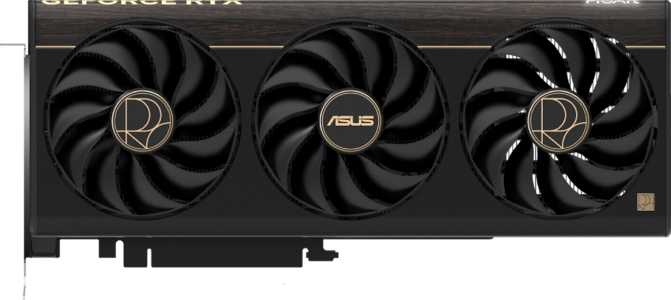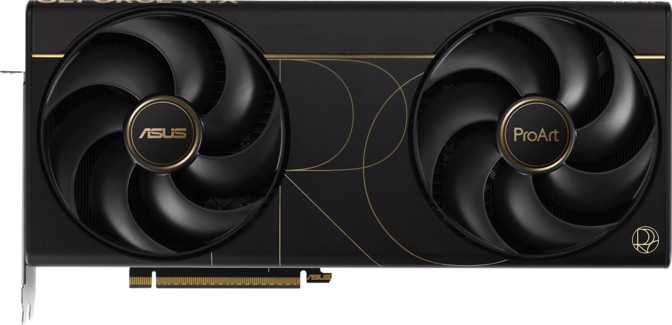
Asus ProArt GeForce RTX 5080 Review: Built for Creators Who Also Game
Graphics CardsAt a Glance
The graphics card market has long forced a quiet compromise on creative professionals: buy a workstation GPU optimized for content creation and sacrifice gaming performance, or grab a gaming card and accept its limitations in professional applications. The Asus ProArt GeForce RTX 5080 is a direct challenge to that trade-off. Built on Nvidia's Blackwell architecture and dressed in Asus's creator-focused ProArt identity, this card aims to be a genuine dual-purpose powerhouse — one that handles 3D rendering, video production, and GPU-accelerated workflows without blinking, then switches to high-refresh gaming without a second thought.
Whether it delivers on that promise depends on how closely you match its intended audience. This review breaks down every meaningful aspect of what this card does, what it demands from your system, and whether it belongs in your build.
Design and Build
The ProArt Identity in Hardware Form
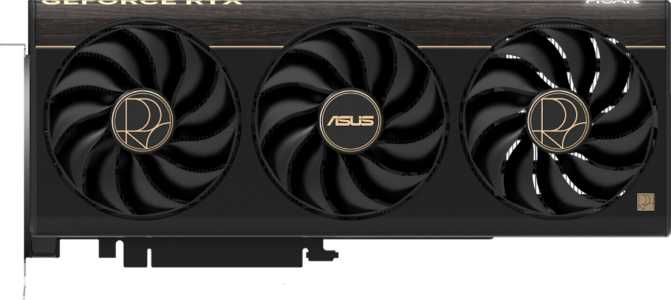
Asus's ProArt line carries a distinct visual philosophy: understated, professional, and built for environments where restraint is a virtue. Unlike the company's ROG Strix or TUF Gaming variants, the ProArt GeForce RTX 5080 skews toward clean aesthetics — muted tones, precise construction, and an overall presence that fits as naturally in a studio workstation as it does in a gaming rig behind a glass panel.
At 304mm in length and 126mm in height, this is a large card by any measure. Verifying case clearance before purchasing is essential — mid-tower cases with drive cage obstructions may present a tight fit. The footprint places it squarely among enthusiast AIB designs, where thermal performance is prioritized over compactness.
Cooling and Thermal Management
The ProArt RTX 5080 uses an air-cooling solution — no water block, no hybrid setup. Given the 360-watt thermal envelope this chip operates within, the cooling apparatus is substantial. Asus has engineered the shroud to handle the full thermal load of Blackwell under extended, sustained workloads, which matters more for creators running hours-long renders than for gamers who stress a GPU in shorter, more variable bursts.
RGB lighting is present, though applied with the same restraint that defines the ProArt aesthetic — configurable via Asus Armoury Crate software, but not the card's defining personality the way it would be on a ROG product. Build quality throughout is solid: the card feels dense and precisely assembled, consistent with the premium positioning of this SKU.
Case Clearance Advisory: At 304mm, verify your case supports this length before ordering. Many mid-tower enclosures fit this card, but storage-cage configurations may need modification or removal.
Core Performance
What Blackwell Means in Practice
Architecture and Compute Muscle
The RTX 5080 sits on Nvidia's Blackwell architecture, fabricated on a 5-nanometer process. This die packs approximately 45.6 billion transistors — a figure that dwarfs the transistor counts from GPUs just two generations prior. Greater transistor density at a tighter process node means more computing capability per watt, which is exactly what a 360W card needs to justify its power draw.
The shading unit count — the part of the GPU handling the actual math of rendering — lands at 10,752. This is a meaningful jump over RTX 4080-class hardware and puts the 5080 in clear performance territory below only the RTX 5090. For creative workloads like GPU rendering in Blender, Octane, or Redshift, this raw compute count directly translates to faster frame times per render pass.
Floating-Point Performance and Why It Matters
The card delivers just over 56 teraflops of single-precision floating-point throughput. In practical terms, this is what accelerates AI denoising in render engines, real-time viewport shading in 3D software, and fluid simulation calculations. For gamers, this figure correlates directly with raw rendering throughput — the headroom needed to sustain high frame rates at 4K or push demanding titles at maximum settings.
Double-precision floating-point capability is also confirmed, benefiting scientific computing, certain CAD applications, and any workflow requiring numerical precision beyond what standard game rendering demands. Most gaming cards at this tier quietly omit DPFP support; its presence here is a meaningful signal about the ProArt's broader ambitions.
Pixel and Texture Throughput
With 112 render output units delivering a pixel output rate exceeding 290 gigapixels per second, the RTX 5080 has no practical bottleneck at 4K resolution and handles ultrawide and high-refresh-rate monitors without constraint. The 336 texture mapping units exceed 879 billion texels per second, keeping highly detailed environments and complex 3D material networks rendering at smooth, consistent rates.
- ArchitectureBlackwell
- Process Node5nm
- Transistors45.6 Billion
- Shader Units10,752
- Texture Units (TMUs)336
- Render Output Units112
- FP32 Compute56.28 TFLOPS
- Pixel Rate293.1 GPixels/s
- Texture Rate879.3 GTexels/s
- Base / Boost Clock2295 / 2617 MHz
- Double Precision (DPFP)
Memory System
Where This Card Pulls Away from Most Alternatives
- VRAM Capacity16GB
- Memory TypeGDDR7
- Effective Speed30,000 MHz
- Max Bandwidth~960 GB/s
- Bus Width256-bit
- ECC Support
16GB GDDR7 — The Right Capacity at the Right Speed
Sixteen gigabytes of video memory sits at the intersection of adequate and comfortable for current 4K gaming, and genuinely sufficient for mid-scale professional work. High-resolution texture packs, large Stable Diffusion models, complex 3D scenes with 4K texture assets, and multi-layer video timelines all benefit from this headroom. This isn't theoretical future-proofing — 16GB is actively useful today in professional applications, and it's the point at which GPU memory stops being a hard constraint for most creator workflows.
The memory type — GDDR7 — represents a generational step forward from the GDDR6X used in prior-generation flagships. The effective operating speed translates to a memory bandwidth figure approaching 960 gigabytes per second across a 256-bit memory bus. Previous-generation high-end cards were operating in the 700–800 GB/s range. This bandwidth increase directly reduces the frequency with which the GPU sits idle waiting on memory — a real bottleneck in bandwidth-hungry tasks like ray tracing, AI inferencing, and video processing.
Bandwidth in Context: Generational Comparison
ECC Memory — A Professional Extra
ECC (Error-Correcting Code) memory support is enabled — uncommon in consumer GPUs and usually reserved for workstation-class hardware. For creative professionals running long, unattended render jobs where data integrity matters, ECC provides a layer of protection against memory errors corrupting output. For gamers, it's irrelevant but entirely harmless.
Key Features Explained
What These Technologies Actually Do for You
DLSS
DLSS uses dedicated AI hardware to render a game at a lower internal resolution and reconstruct a sharper, higher-resolution image in real time — at quality that competes with native rendering. The practical result: games run faster without a visible sacrifice in image quality. At 4K with demanding titles, DLSS allows the RTX 5080 to maintain frame rates that raw hardware alone could not achieve at native resolution.
Hardware Ray Tracing
Ray tracing simulates how light actually behaves — reflections, shadows, ambient occlusion — rather than approximating it with shortcuts. Blackwell's dedicated ray tracing cores handle this more efficiently than prior generations, making full ray tracing in supported games a realistic, sustained option rather than a demonstration mode. 3D artists benefit directly in viewport previews and final renders alike.
DirectX 12 Ultimate
The current high-water mark for Windows gaming API support, enabling mesh shaders, variable rate shading, and sampler feedback — features modern game engines use to extract more efficiency from available hardware. OpenGL 4.6 and OpenCL 3.0 support ensures compatibility with professional creative software including DCC tools, CAD applications, and scientific computing environments.
Resizable BAR
Intel Resizable BAR allows the CPU to access the full contents of the GPU's video memory in a single operation rather than in constrained chunks. In optimized titles, this produces measurable frame rate improvements — typically a few percent, occasionally more. The feature is supported and any compatible Intel or AMD platform benefits automatically once enabled in the system BIOS.
Multi-Display Support
Up to four displays simultaneously: two via DisplayPort, one via HDMI 2.1b, and one via USB-C. HDMI 2.1b supports 4K at 144Hz or 8K at 60Hz — fully capable of driving current high-end gaming monitors and professional displays. The USB-C output adds flexibility for newer display standards and portable monitors that accept video input over USB-C.
ECC + DPFP
Error-Correcting Code memory and Double-Precision Floating Point support are genuine professional features absent from most gaming cards. ECC protects data integrity during long unattended renders. DPFP enables numerically precise computation for scientific and CAD workflows. Together, they significantly expand this card's useful range beyond what gaming-oriented alternatives cover.
Output Ports at a Glance
Power and System Requirements
What Your System Needs to Support This Card
360 watts is a serious power commitment. This isn't unusual for the current top tier of consumer GPUs — it reflects where the performance ceiling of air-cooled consumer silicon currently sits — but it demands careful system planning.
A power supply of at least 850 watts is the practical minimum for a system built around this card, with 1000 watts the more sensible target when paired with a high-end CPU. The PCIe 5.0 interface is worth noting: while PCIe 4.0 platforms remain compatible, a PCIe 5.0 slot ensures maximum data throughput between CPU and GPU, which matters in workloads that move large datasets to and from the GPU repeatedly.
16-Pin Power Connector (12VHPWR)
Current Nvidia flagship cards use a 16-pin 12VHPWR connector. A PSU with a native 16-pin output is strongly recommended — adapter cables are available but add a potential failure point in a high-wattage connection. Factor this into your PSU selection before purchasing.
System builders should treat power delivery and PCIe generation as part of the performance equation, not afterthoughts. A current-generation platform with PCIe 5.0 and a high-quality 1000W PSU is the foundation this card deserves.
- Card TDP360W
- Minimum PSU850W
- Recommended PSU1000W
- Power Connector16-pin 12VHPWR
- Native PCIe VersionPCIe 5.0
- PCIe 4.0 Compatible
Who This Card Is For
Real-World Usage Scenarios and Audience Fit
-
3D Artists & Motion Graphics Designers
GPU-accelerated render engines benefit directly from the compute capacity, 16GB GDDR7, ECC support, and DPFP capability. Long render sessions and complex material networks run measurably faster.
-
Video Editors & Colorists
Editors handling 4K or 8K footage in DaVinci Resolve or Premiere Pro benefit from bandwidth headroom and VRAM capacity. GPU-accelerated effects, noise reduction, and color grading pipelines run faster with more memory bandwidth.
-
AI & ML Practitioners
Local model inference and moderate training tasks benefit from DPFP support, the 16GB VRAM pool, and ECC capability — features absent from most consumer gaming alternatives.
-
Creator-Gamers
The hybrid user who games at 4K on a high-refresh display and renders projects on the same machine will find this card serves both roles without compromise.
-
You're a Pure Gamer
If you have no professional creative workload, the ProArt's premium positioning adds cost without proportional gaming benefit. A ROG Strix or TUF Gaming RTX 5080 will deliver a nearly identical gaming experience at a lower price.
-
You're Budget-Conscious
The RTX 5070 Ti or RTX 4080 Super remain competitive for 4K gaming at significantly lower cost if professional workloads aren't part of your use case.
-
You Need Maximum VRAM for AI
For users running cutting-edge large language models at full weights or handling massive scene asset pipelines, the RTX 5090's 32GB VRAM configuration is worth the significant premium.
-
You Have a Small Form Factor Build
At 304mm and 360W, this card demands a full-size case and a robust power solution. Compact ITX and small mATX builds will face significant challenges accommodating it.
Competitive Positioning
How the ProArt RTX 5080 Stacks Up Against Logical Alternatives
| Card | Architecture | VRAM | Bandwidth | TDP | Primary Audience |
|---|---|---|---|---|---|
| Asus ProArt RTX 5080 | Blackwell (5nm) | 16GB GDDR7 | ~960 GB/s | 360W | Creator / Gamer Hybrid |
| RTX 5090 | Blackwell (5nm) | 32GB GDDR7 | ~1.8 TB/s | 575W | Enthusiast / Professional |
| RTX 4090 | Ada Lovelace (5nm) | 24GB GDDR6X | ~1 TB/s | 450W | Prev-Gen Enthusiast |
| RTX 4080 Super | Ada Lovelace (5nm) | 16GB GDDR6X | ~736 GB/s | 320W | Mainstream High-End |
Honest Assessment
-
GDDR7 Memory Platform
Approaching 960 GB/s of memory bandwidth is the headline differentiator that most benchmarks understate. In bandwidth-sensitive workloads — ray tracing, AI inferencing, video processing — this is a substantial leap over prior-generation hardware.
-
ECC and DPFP: Real Professional Features
These are not checkbox additions. ECC protects unattended render output. DPFP enables numerically precise computation. Together they meaningfully expand the card's useful application range beyond a gaming-focused alternative with identical silicon.
-
Blackwell Architecture Efficiency
The 5nm Blackwell die delivers meaningful improvements in AI acceleration and ray tracing efficiency over Ada Lovelace — not just incremental clock speed gains. The architectural delta is real and noticeable in workloads that exercise these units.
-
ProArt Aesthetics and Build Quality
The understated design and solid construction are legitimate advantages for users in studio environments where the ROG aesthetic would feel out of place. The build quality is consistent with premium AIB positioning.
-
16GB VRAM Ceiling
For workloads involving very large scene files, high-resolution multi-layer compositing, or local large language model inference at full weights, 16GB may eventually become a constraint. Evaluate this honestly against your specific pipeline — today and over the coming years.
-
360W Power Draw
Manageable with proper system planning, but not a trivial number. Environments with strict power budgets, compact builds, or aging power infrastructure need to factor this in seriously — especially when combined with a high-end CPU.
-
Premium Price Over Gaming AIBs
The ProArt variant commands a premium over standard gaming-focused RTX 5080 AIBs. For users who don't need ECC, DPFP, or the ProArt aesthetic, that premium may not be justified by gaming performance alone.
Common Buyer Questions
Answers to What People Search Before Purchasing
Final Verdict
Our Recommendation on the Asus ProArt GeForce RTX 5080
The Asus ProArt GeForce RTX 5080 is one of the most coherent products in the current GPU lineup — a card that is clear about what it is and delivers on that identity without compromise.
If you are a creative professional who also games, or a gamer building toward a content creation workflow, this is one of the few consumer GPUs that genuinely serves both halves of that profile. The GDDR7 memory system is the standout technical advantage over prior-generation hardware, the Blackwell architecture's AI and ray tracing improvements are real, and the ProArt-specific additions — ECC, DPFP, restrained aesthetics — add meaningful value for professional use cases.
The 16GB VRAM ceiling is the one specification to evaluate honestly against your workload. For most users, including most creative professionals working at standard professional scales, it is sufficient. For those running cutting-edge AI models locally or handling unusually large scene assets, the RTX 5090 is worth the premium.
Bottom Line
At its tier, the Asus ProArt GeForce RTX 5080 earns a strong recommendation for its intended audience. If you need a single card that handles demanding professional creative work and high-end gaming without asking you to choose, this is one of the best answers currently available.