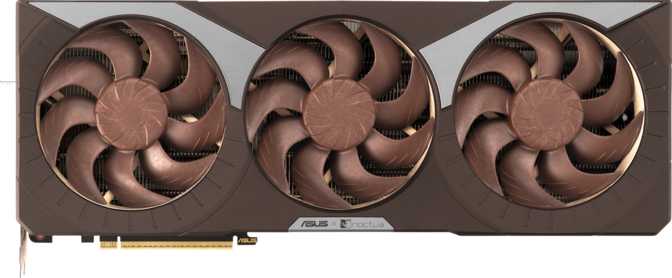
Asus GeForce RTX 5080 Noctua OC Edition: Full Performance Review
Graphics CardsAt a Glance
The quietest flagship GPU on the market. Built for builders who demand Blackwell-tier performance without compromising on acoustic comfort.
Category Ratings
Design and Build Quality
Physical design, dimensions, and the philosophy behind the Noctua cooling partnership
A Card That Commands Attention — and Space
The first thing you will notice about the RTX 5080 Noctua OC Edition is its size. At 385mm long and 151mm tall, this is a large card by any measure. Before purchasing, verify your case can accommodate it — most mid-tower and full-tower cases handle it comfortably, but compact or small form factor builds will need to look elsewhere. The 151mm height also means checking CPU cooler clearance and any adjacent PCIe slot usage.
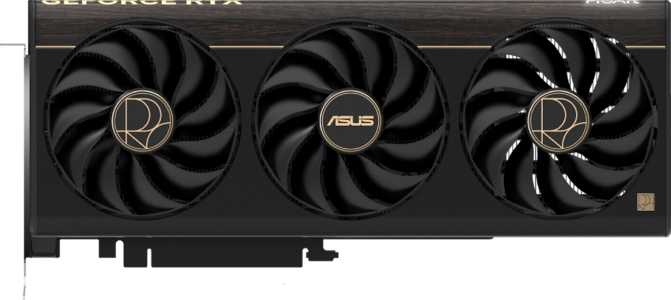
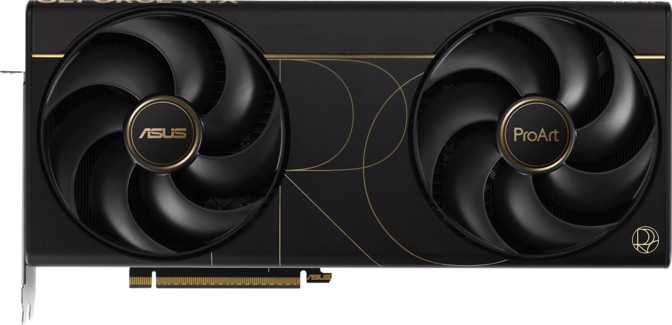
The visual identity is unmistakable. Noctua's signature brown-and-tan fan aesthetic is present — polarizing for some, beloved by others, and always distinctive. This is not a card that tries to disappear inside a build. If your aesthetic skews dark and minimal, this card has a strong visual personality that will define your build's interior look.
Build quality feels dense and premium. The heatsink assembly is substantial, engineered not just for cooling performance but for long-term structural rigidity. RGB lighting is present for those who want it, handled tastefully without overwhelming the card's identity.
Length: 385mm. Height: 151mm. Measure your case's maximum GPU clearance and check for obstructions from front radiators, storage drives, or structural braces before purchasing.
Cooling Philosophy
There is no liquid cooling loop, no hybrid system, and no external radiator required. This is a pure air-cooled card — deliberately so.
The Noctua collaboration is built on the premise that expertly designed air cooling, done right, can match the acoustic performance of liquid solutions without maintenance concerns, leak risks, or installation complexity. For most users in most environments, that premise holds.
- Pure air cooling — zero liquid maintenance or leak risk
- High static pressure fans optimized for low rotational speed
- Dense, structurally rigid heatsink assembly
- Optional RGB lighting — tasteful, not overwhelming
- Factory-assembled by Asus — full manufacturer warranty intact
Performance: What Blackwell Architecture Means in Practice
Architecture analysis, clock speed context, and raw compute throughput explained for gamers and creators alike
The Architecture Underneath
The RTX 5080 Noctua OC Edition is built on NVIDIA's Blackwell architecture, manufactured using a 5nm process node. Smaller semiconductor process nodes allow more transistors to be packed into the same die area, improving power efficiency and enabling higher performance ceilings. This chip contains approximately 45.6 billion transistors — a figure that reflects the sheer density of compute resources available.
For everyday users, the architecture translates directly: games load faster, frame rates climb higher, and future-proofed features like hardware ray tracing and AI-based upscaling are handled natively and efficiently.
Clock Speeds and Raw Throughput
Under sustained workloads, the card reaches a boost frequency of 2,700 MHz — and it sustains that frequency, not just peaks at it briefly. The floating-point throughput of approximately 58 TFLOPS places this GPU firmly in the upper tier of consumer graphics cards. Creative professionals doing GPU-accelerated video rendering, 3D simulation, or machine learning inference will feel that compute headroom as tangibly reduced processing times.
The texture processing rate exceeds 907 billion texels per second and the pixel fill rate surpasses 302 billion pixels per second. Texture-heavy, high-resolution scenes found in modern open-world games and cinematic titles are handled without bottlenecking the rendering pipeline.
PCIe 5.0 — Future-Proofed Connectivity
This card uses the current-generation PCIe 5.0 interface. If your motherboard only supports PCIe 4.0, the card still functions correctly — PCIe 4.0 bandwidth is not a bottleneck for this GPU at this time. PCIe 5.0 support simply means the card is positioned well for the years ahead, requiring no platform upgrade to unlock its full potential on current-generation hardware.
Professional note: Double Precision Floating Point (DPFP) support is included, extending usability into scientific computing and simulation workloads that require high numerical precision — territory typically reserved for workstation-class GPUs.
- Boost Clock2,700 MHz
- Compute Power58.06 TFLOPS
- Texture Rate907 GT/s
- Pixel Rate302 GP/s
- Shading Units10,752
- TMUs336
- ROPs112
- Process Node5nm
- Transistors45.6B
- PCIe Version5.0
Memory: Speed, Capacity, and Bandwidth Explained
Why GDDR7 at 16GB changes the equation for 4K gaming and professional workloads
The 16GB of GDDR7 memory operates at an effective speed of 30,000 MHz, delivered across a 256-bit bus — producing a memory bandwidth of 960 GB/s. Previous-generation high-end cards often required wider 384-bit buses to achieve similar bandwidth figures. GDDR7 achieves comparable throughput on a narrower bus, reducing die complexity and heat without sacrificing the data throughput that high-resolution gaming demands.
For gamers, 16GB of VRAM is sufficient for 4K gaming today and will remain so for the foreseeable future. Modern titles with ultra-texture settings can approach 12–14GB at 4K; the 16GB ceiling provides meaningful headroom. For content creators running large AI models, complex scene files, or high-bitrate video projects, this capacity will feel comfortable without constant memory management workarounds.
ECC Support — For Those Who Need It
Error-Correcting Code (ECC) memory support detects and corrects single-bit memory errors in real time. Most gamers will never need to think about it — but it matters significantly to anyone running scientific simulations, financial modeling, or any workload where memory integrity is non-negotiable. The inclusion of ECC on this consumer card speaks directly to the overlap between this product and professional-adjacent use cases.
4K VRAM Reality Check
Demanding 4K titles at maximum texture settings currently use 10–14GB of VRAM. The 16GB ceiling provides meaningful headroom and helps future-proof against upcoming titles with higher texture budgets. Running out of VRAM causes visible stuttering — 16GB ensures that boundary stays well clear.
- Total VRAM16 GB
- Memory TypeGDDR7
- Effective Speed30,000 MHz
- Bus Width256-bit
- Max Bandwidth960 GB/s
- ECC SupportYes
Key Features: What They Actually Do for You
Core technologies explained with real-world meaning — not raw spec values
DLSS AI Upscaling
AI renders at a lower internal resolution then reconstructs a sharp image at your target output resolution. At 4K, a title running at 60fps natively can reach 90–120fps or higher with DLSS Quality mode — with visual differences that are difficult to detect in motion. For competitive gaming or VR, this headroom directly translates to a smoother, more responsive experience.
Hardware Ray Tracing
Simulates physically accurate light behavior — reflections, refractions, and shadows — using dedicated hardware rather than consuming the GPU's primary compute resources. In supported titles: global illumination that responds accurately to the environment, shadows with correct spread, and reflections that show the actual scene. Paired with DLSS, the performance cost becomes manageable even at high resolutions.
Display Connectivity
Five physical outputs — two HDMI 2.1b and three DisplayPort — support up to four simultaneous displays. HDMI 2.1b handles 4K at very high refresh rates and 8K output, covering both gaming monitors and high-end televisions.
No USB-C output. If your display connects via USB-C or Thunderbolt, plan for an active adapter before purchasing.
Intel Resizable BAR
Allows the CPU to access the GPU's full memory pool simultaneously rather than a restricted window at a time. The practical result is a 5–15% frame rate uplift in many modern games depending on title and resolution. Requires a compatible motherboard with the feature enabled in BIOS — supported by most current-generation Intel and AMD platforms.
DirectX 12 Ultimate
Full DirectX 12 Ultimate compliance means every cutting-edge rendering feature the current Windows gaming ecosystem requires is handled at the hardware level — variable rate shading, mesh shaders, sampler feedback, and DirectX Raytracing all included without software emulation or performance penalties.
Multi-Display Support
Up to four independent displays running simultaneously. Whether you are running a triple-monitor gaming setup, a productivity multi-screen workspace, or streaming to a secondary display, the card handles it natively without adapters or daisy-chaining workarounds. The five physical ports give flexibility in which four you connect.
Power and Thermal Reality
What 360W actually means for your build — and what "silent cooling" does not mean
360 Watts — Understanding the Commitment
A 360W Thermal Design Power figure means this card, under sustained full load, draws up to 360 watts from your power supply. To run this card comfortably, plan for a power supply of at least 850W from a reputable brand — 1000W gives meaningful headroom if you are pairing it with a high-performance modern CPU.
At full load, combined system power draw can comfortably exceed 600W when accounting for the CPU, storage, and peripherals. A quality 1000W PSU is the responsible choice for a build centered on this card.
PSU Recommendations
- Minimum: 850W from a reputable brand
- Recommended: 1000W for high-performance CPU pairings
The Acoustic Advantage — Stated Honestly
The core promise of the Noctua collaboration is lower noise, not lower temperatures. The card still consumes full flagship-tier power; the Noctua cooling system simply dissipates that heat more quietly. In most implementations, the card will run at comparable or slightly higher temperatures than an aggressively fan-speeded competitor — but fan noise will be noticeably, measurably lower.
For users in quiet rooms, open-frame setups, or environments where others can hear the PC, the acoustic reduction is a genuine quality-of-life improvement that becomes apparent within minutes of a gaming session.
Users who run their system inside a heavily sound-dampened case may find the acoustic benefits less transformative. In that scenario, the card remains excellent — you are simply paying a premium for a feature the case is already partially providing.
Case Ventilation Note
The Noctua cooler is not a substitute for adequate case airflow. A well-ventilated case amplifies the acoustic benefit; a poorly ventilated one undermines it by forcing fans to speed up to compensate for trapped heat.
Who This Card Is For — and Who Should Look Elsewhere
An honest assessment of the ideal buyer profile and the scenarios where alternatives make more sense
- 4K gamers targeting high, sustained frame rates
Built for 4K performance, with GDDR7 memory configuration ensuring texture-heavy titles have the bandwidth they need.
- Content creators in GPU-accelerated applications
Video editors, motion graphics artists, and 3D rendering professionals benefit from the floating-point compute headroom and VRAM capacity.
- Quiet PC enthusiasts
If you have invested in a quiet case, CPU cooler, and fans, the Noctua GPU completes that system rather than undoing it.
- Open-frame and workstation builds
Without a case to dampen sound, a conventional flagship GPU can be intrusive. The Noctua cooler addresses that directly.
- Professional-adjacent users requiring memory integrity
ECC support makes this card usable in environments where data correctness matters — scientific simulation, financial modeling, and similar workloads.
- Small form factor builders
At 385mm, this card does not fit most SFF cases. Do not purchase without confirming physical compatibility in advance.
- Budget-constrained buyers targeting 1080p
At 1080p, this card's capabilities are dramatically underutilized. Far more affordable options deliver excellent 1080p performance.
- Liquid cooling devotees
If you plan to install a waterblock, the Noctua premium is wasted. Buy a different AIB card and spend that budget on the waterblock itself.
- Users with USB-C monitor dependencies
The absence of native USB-C output is a real constraint if your display chain relies on it without adapter accommodation.
- Users indifferent to fan noise
If acoustic comfort is not a meaningful concern in your setup, the Noctua premium is difficult to justify over a standard RTX 5080 AIB card.
Competitive Positioning
How the RTX 5080 Noctua OC Edition stacks up against its closest alternatives
| Factor | RTX 5080 Noctua OC This Review |
Typical RTX 5080 AIB | RTX 5070 Ti |
|---|---|---|---|
| GPU Architecture | Blackwell | Blackwell | Blackwell |
| VRAM | 16GB GDDR7 | 16GB GDDR7 | 16GB GDDR7 |
| Memory Bandwidth | 960 GB/s | 960 GB/s | Lower |
| Boost Clock | 2,700 MHz | Varies by model | Lower |
| Acoustic Priority | Very High | Moderate | Varies |
| Physical Size | Very Large | Large | Moderate-Large |
| Power Draw | 360W | 360W | Lower |
| USB-C Output | No | Varies | Varies |
The RTX 5080 Noctua OC Edition occupies a specific niche: it is not the fastest RTX 5080 available, but it is arguably the quietest. Against standard RTX 5080 variants, core rendering performance is nearly identical — the differentiation is entirely acoustic and aesthetic. Against the RTX 5070 Ti, the RTX 5080 offers meaningfully higher memory bandwidth and compute throughput, which becomes relevant at 4K and in heavily GPU-bound creative workloads.
Honest Strengths and Weaknesses
Where this card genuinely leads and where it falls short — stated plainly
The acoustic engineering is the clearest standout — this is one of the quietest ways to run a flagship GPU, full stop. The Noctua collaboration is not marketing; the acoustic character of this card is demonstrably different from conventional RTX 5080 designs, and it is immediately noticeable in a quiet environment.
The GDDR7 memory configuration delivers bandwidth that comfortably handles 4K gaming and content creation workloads alike. DLSS support means the raw performance ceiling can be extended further through AI upscaling without meaningful image quality trade-offs.
The factory overclock provides a modest but real performance advantage over reference-clocked versions. ECC support extends usability into professional-adjacent environments. And the build quality is unambiguously premium — this card is engineered to last.
The card is very large — 385mm creates genuine installation constraints that catch buyers off guard. Measure your case before ordering. This is the most common source of buyer regret with oversized GPUs and it is entirely avoidable with five minutes of research.
Running it quietly does not make it run cooler. The 360W power draw demands adequate case ventilation, and without it, temperatures climb and the acoustic advantage partially reverses as fans compensate. The Noctua cooler and a poorly ventilated case work against each other.
The absence of USB-C display output is a real gap for some users. And the Noctua premium means you are paying above the base RTX 5080 market price purely for acoustic engineering — if noise is not a meaningful concern in your setup, that premium is genuinely hard to justify.
Questions Real Buyers Ask Before Purchasing
Direct answers to the most common concerns and pre-purchase searches about this card
Final Verdict
Our complete purchase recommendation
A Deliberate, Excellent Product for a Specific Buyer
The Asus GeForce RTX 5080 Noctua OC Edition is a genuine enthusiast product designed for a specific buyer who has thought carefully about what they want. If that buyer is you — someone who demands flagship Blackwell performance, runs an open or minimally dampened system, values acoustic comfort, and has a large modern case — this card delivers on every promise it makes.
The Noctua collaboration is not marketing. The acoustic character of this card is demonstrably different from conventional RTX 5080 designs, and for the right user in the right environment, that difference is felt every single time they sit down at their PC.
If your priorities lie elsewhere — if you are cost-sensitive, space-constrained, indifferent to fan noise, or dependent on USB-C display output — there are better-suited options in the RTX 5080 lineup and beyond. The verdict is not simply "buy this GPU." The verdict is: if this is the GPU built for you, buy it without hesitation.
You prioritize acoustics, run an open or lightly dampened build, and need 4K flagship performance.
Space is limited, noise is not a concern, you plan to watercool, or your display chain requires USB-C.
Standard RTX 5080 AIB for pure performance value. RTX 5070 Ti for lower power draw and smaller footprint.