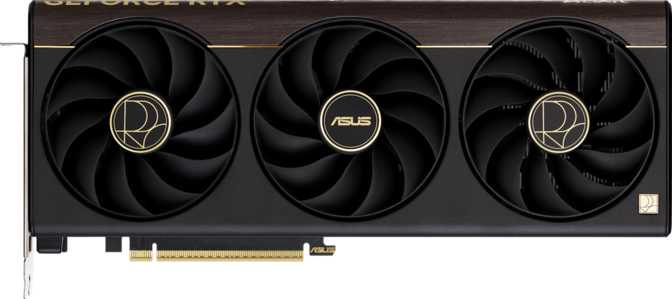
Asus ProArt RTX 5070 Ti OC Edition: An Honest Full Review
Graphics CardsMost high-end graphics cards shout for attention — garish RGB, aggressive shroud designs, and branding bold enough to embarrass a gaming peripheral. The Asus ProArt RTX 5070 Ti OC Edition takes a different philosophy entirely: raw computational power without aesthetic baggage, packaged for creators and enthusiast gamers who demand professionalism at this performance tier. The question worth asking is not whether this card is fast — it clearly is — but whether its particular blend of tuning, memory, and design identity justifies its place against equally capable competitors.
Design and Build: The ProArt Identity in Practice
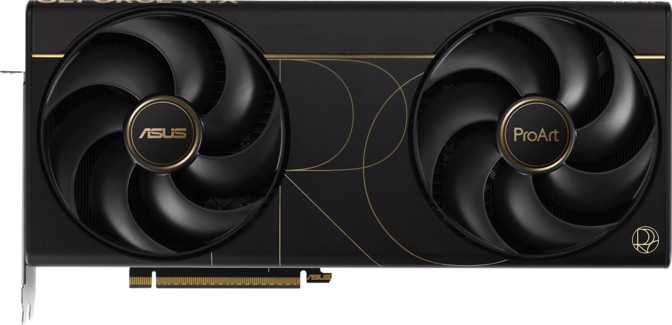
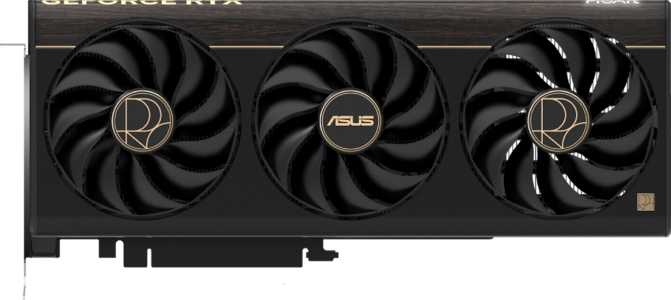
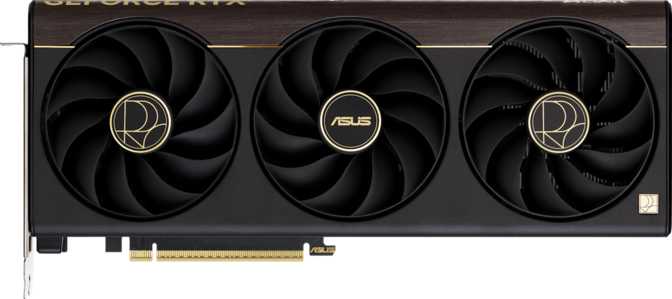
Asus's ProArt sub-brand serves one type of buyer: someone building a workstation or creator-focused system who does not want their hardware looking like a Las Vegas billboard. The ProArt RTX 5070 Ti OC Edition carries that identity faithfully — neutral tones, clean lines, and accent RGB lighting rather than the full underglow spectacle of Asus's ROG Strix line. The lighting is controllable through Asus's Aura Sync ecosystem for those who want more expression, but the default presentation is restrained and professional.
At 304 mm in length and 126 mm in height, this card occupies a substantial footprint across three expansion slots. Full-tower and large mid-tower cases are its natural home — plan your build accordingly and verify clearance before purchasing.
Cooling is handled entirely through air. Triple-fan configurations with high-density heatsink fins and direct-contact heatpipes are standard at this power class, and Asus's ProArt implementation is no exception. No hybrid water loop means installation stays straightforward and maintenance-free. In a well-ventilated enclosure this design handles sustained workloads without issue — in a cramped or restrictive case, positive airflow becomes non-negotiable.
Physical At-a-Glance
- Card Length
- 304 mm
- Card Height
- 126 mm
- Slot Width
- 3-Slot
- Cooling Solution
- Air (Triple Fan)
- RGB Lighting
- Yes — Aura Sync
- PCIe Interface
- PCIe 5.0
- GPU Architecture
- Blackwell (5 nm)
The Blackwell Architecture: What the Foundation Actually Means
The RTX 5070 Ti OC Edition is built on NVIDIA's Blackwell GPU architecture, manufactured at the 5-nanometer process node. Fitting more transistors into a smaller physical space allows NVIDIA to pack substantially more computational logic onto the die without a proportional increase in power draw. This card carries over 45 billion transistors — a figure that would have been unthinkable on a sub-flagship card just two generations ago.
Blackwell brings architectural improvements to ray tracing hardware, AI acceleration via dedicated Tensor Cores, and the latest generation of DLSS upscaling technology. These are not incremental refinements — the jump to Blackwell represents a meaningful generational shift in how the GPU handles AI-assisted rendering and real-time lighting simulation.
For buyers coming from two or more generations back, the performance difference in ray-traced titles and AI-accelerated workloads will feel significant. For those upgrading from the immediately preceding generation, gains are most impactful at higher resolutions and in workloads that specifically leverage the new tensor and ray tracing hardware.
Architecture Highlights
- 5 nm process node — exceptional compute-per-watt ratio
- 45.6 billion transistors on a single die
- 3rd-generation RT Cores for real-time ray tracing
- Latest-generation Tensor Cores powering DLSS
- Double Precision Floating Point support included
Core Performance Analysis
Raw Compute Power
The OC Edition runs its boost clock at 2,588 MHz — meaningfully above NVIDIA's reference specification for the 5070 Ti. Asus achieves this through factory overclocking, meaning the card ships pre-tuned for higher performance without requiring any manual adjustment. Combined with 8,960 shader processors, this translates to approximately 46.4 TFLOPS of single-precision floating-point throughput — enough to handle 4K gaming at high framerates in demanding titles, accelerate video encoding and AI-assisted image processing, and manage real-time ray tracing without the severe framerate penalties of earlier implementations.
The pixel fill rate of roughly 248 billion pixels per second and texture throughput exceeding 724 billion texels per second are the figures that matter most at 4K, where the GPU must process four times the pixels of 1080p. These rates determine whether a card holds consistent framerates in texture-heavy environments — and on both counts, this card performs at the top of its class.
Handles massively parallel workloads across 4K gaming and professional GPU-rendering tasks simultaneously
724.6 GTexels/s throughput drives detail density in complex, texture-heavy environments
248.4 GPixel/s fill rate sustains 4K output without pixel-processing bottlenecks
Memory: The 16 GB GDDR7 Argument
The 16 GB of GDDR7 VRAM, connected via a 256-bit memory bus, delivers a maximum bandwidth of 896 gigabytes per second. That bandwidth figure is critical — it represents how fast data moves between the GPU's processor and its memory pool. Modern AAA titles at 4K with maximum texture settings regularly demand 12 GB or more of VRAM. The 16 GB allocation provides meaningful headroom as games and engines continue to push texture budgets higher — a card that runs short on VRAM begins stuttering as it offloads data to system RAM, a problem this card avoids comfortably in any currently available title.
For creative professionals, this bandwidth enables real-time GPU rendering in applications like Blender and DaVinci Resolve, and handles AI image generation pipelines without constant memory pressure. The card also supports ECC (Error-Correcting Code) memory — a feature typically reserved for professional workstation GPUs. ECC detects and corrects single-bit memory errors in real time, which matters for professionals running long computational jobs where data integrity is non-negotiable.
Key Features Explained
Raw specifications only tell part of the story. Here is what each major feature of the ProArt RTX 5070 Ti OC actually means for day-to-day use.
DLSS Upscaling
NVIDIA's AI-powered upscaling uses dedicated Tensor Cores to reconstruct a high-resolution image from a lower-resolution render. On Blackwell, the latest DLSS generation delivers 4K visual quality at framerate-friendly rendering loads. In many scenarios it is visually indistinguishable from native resolution — and often the preferred mode of play at 4K where the framerate gains are substantial.
Ray Tracing
Third-generation RT Cores simulate physically accurate light behaviour in real time — reflections that accurately represent their surroundings, shadows with natural falloff, and global illumination that gives scenes physical depth. Ray-traced 4K gaming at smooth, competitive framerates is an achievable reality on this card, especially with DLSS active to offset the rendering cost.
DirectX 12 Ultimate
Full DX12 Ultimate compliance exposes every modern rendering feature: mesh shaders, variable rate shading, sampler feedback, and hardware-accelerated ray tracing. OpenGL 4.6 and OpenCL 3 extend compatibility to professional creative and scientific software that relies on these APIs — important for users whose workflow extends beyond gaming into visualisation or GPU-accelerated computation.
Display Connectivity
Two DisplayPort outputs handle high-refresh-rate monitors up to 4K 144 Hz. The HDMI 2.1b port supports 4K 144 Hz and 8K 60 Hz output to televisions. A USB-C port adds flexibility for newer monitors and VR headsets. Up to four displays can run simultaneously — a meaningful feature for content creators who run primary monitors alongside reference displays or preview windows.
Intel Resizable BAR
Resizable BAR allows the CPU to access the full GPU frame buffer directly, rather than in limited chunks as older standards required. In supported games — a list that continues to grow — this reduces CPU-GPU transfer bottlenecks and delivers measurable framerate improvements of 5–15%. Requires a compatible motherboard with the feature enabled in BIOS.
PCIe 5.0 Interface
PCIe 5.0 doubles the available bandwidth over PCIe 4.0. In current applications, GPU performance is rarely limited by PCIe bandwidth — even PCIe 4.0 offers more than enough throughput for gaming. The real value is future-proofing: as GPU compute demands grow, PCIe 5.0 ensures the interface never becomes the bottleneck in high-throughput workloads.
Power Requirements and Thermal Behaviour
The card carries a 300 W Thermal Design Power rating — the sustained draw under full load across any demanding gaming session or rendering workload. At this level, a quality power supply of at least 750 W is required, though 850 W or higher is the pragmatic recommendation when accounting for a modern high-core-count CPU and other system components.
The 300 W TDP is notably efficient relative to the performance on offer. Previous generations at this performance tier drew considerably more power, which meant more heat, louder fans, and higher electricity costs over time. Blackwell's 5 nm fabrication process contributes directly to this improved efficiency — more computation per watt is a core architectural achievement of this generation.
In well-ventilated enclosures, expect GPU temperatures to remain in the mid-60°C to low-70°C range under sustained load — well within safe operating parameters. In restrictive cases, temperatures will climb and the fans will respond by spinning faster and louder. This card is not unusually loud for its class, but it is not a whisper-quiet design either. Case airflow quality directly determines the thermal and acoustic experience.
Power at a Glance
Who Should Buy This Card — and Who Should Not
Built For
-
4K Gaming EnthusiastsDemanding titles at maximum settings with consistent high framerates, particularly in ray-traced environments where the Blackwell architecture shines.
-
Content Creators and ArtistsGPU-accelerated rendering in Blender, DaVinci Resolve, or AI image tools — needing VRAM headroom, compute throughput, and ECC data integrity.
-
Professional-Adjacent UsersECC memory, clean aesthetics, stable professional-grade features — all in a gaming GPU package without workstation pricing.
-
Multi-Monitor Workstation BuildersUp to four simultaneous displays for primary monitor, reference display, preview window, and task screen — with HDMI 2.1b covering 8K TV output as well.
-
Long Hardware Cycle Buyers16 GB of GDDR7 ensures VRAM does not become the limiting factor for four or more years as game and application memory demands climb.
Not the Right Fit For
-
1080p GamersAt 1080p, this card's capabilities are vastly over-specified. A mid-range card delivers identical gameplay at a fraction of the cost — the compute power is simply wasted.
-
Budget-Constrained BuyersThe ProArt positioning and premium memory configuration carry a price premium. Other RTX 5000 cards offer better price-per-frame value at lower resolutions.
-
Compact System BuildersAt 304 mm, this card does not fit mini-ITX or many micro-ATX enclosures. Verify case clearance before purchasing — there is no compact variant of this model.
-
Older Platform UsersSystems without PCIe 4.0 or newer will function correctly but leave PCIe 5.0 bandwidth and some platform-level features on the table.
Competitive Positioning
The ProArt RTX 5070 Ti OC Edition sits in a clearly defined gap — outpacing standard RTX 5070-class cards by a meaningful margin in memory bandwidth and compute, while undercutting the RTX 5080 tier in power draw. The ProArt variant differentiates further through its design language and ECC support, pushing it toward creative professionals rather than pure gamers.
| Specification | ProArt RTX 5070 Ti OC This Card | RTX 5070 Class | RTX 5080 Class |
|---|---|---|---|
| VRAM | 16 GB GDDR7 | 12 GB GDDR7 | 16 GB GDDR7 |
| Memory Bandwidth | 896 GB/s | ~672 GB/s | ~960 GB/s |
| Compute Performance | ~46.4 TFLOPS | ~30–35 TFLOPS | ~55–60 TFLOPS |
| Power Draw (TDP) | 300 W | ~250 W | ~360 W |
| ECC Memory | Yes | Typically No | Typically No |
| Design Target | Creator / Professional | Gaming | Gaming / Enthusiast |
| Display Outputs | 4 (HDMI 2.1b, 2x DP, USB-C) | Varies | Varies |
Honest Assessment
Genuine Strengths
The factory overclock is not a token gesture — the boost clock exceeds reference specification by a margin that translates into measurable performance gains without any manual tuning. Buyers are getting a tangibly differentiated product, not a reference card in a different shroud.
The GDDR7 memory implementation, particularly its bandwidth, sets this card apart from alternatives at similar price points. ECC support is rare at this tier and genuinely valuable for professionals who cannot afford computational errors in long rendering or scientific workloads — it is a real differentiator, not a checkbox feature.
The port selection is comprehensive and forward-looking. HDMI 2.1b handles 8K output to televisions, two DisplayPort outputs cover high-refresh QD-OLED and IPS monitors, and USB-C adds flexibility for VR and next-generation displays.
The design philosophy is genuinely refreshing at this performance tier. Creators and professionals will find the ProArt aesthetic a welcome departure from aggressive gaming visuals, and the Aura Sync integration satisfies anyone who wants the option of more expression without it being forced.
Honest Limitations
A 300 W power draw is not trivial. Users with older or modestly rated power supplies will need to budget for an upgrade — and 850 W is the sensible baseline, not a ceiling. This is a real cost consideration that should factor into the total purchase budget.
The air-only cooling solution, while adequate in good conditions, leaves thermal performance more sensitive to case environment than a hybrid water-cooled alternative would be. In restrictive enclosures, fan noise under sustained load will be noticeable. Buyers who prioritise near-silence should plan their case and airflow setup carefully.
At 304 mm, case compatibility is a genuine constraint that should not be ignored. Mini-ITX and many micro-ATX builders need not apply — there is no compact version of this card.
The absence of AMD FSR and Intel XeSS support means buyers relying on non-DLSS titles have no alternative upscaling path on this card. DLSS game support is extensive at this stage, but it is not universal — buyers with very specific game libraries should verify DLSS availability in their titles beforehand.
Questions Buyers Commonly Ask
A Near-Ideal Card for Creators and 4K Enthusiasts
The Asus ProArt GeForce RTX 5070 Ti OC Edition is a card that knows exactly what it is and delivers on that identity with confidence. It occupies the high-performance tier without the extreme power draw of a true flagship, offers memory capacity and bandwidth that few competitors at this level can match, and wraps the package in a professional aesthetic that creators and dual-use builders have rarely been served by at this performance level.
The factory overclock means buyers receive a tangibly tuned product. The ECC memory support is a genuine professional differentiator. The GDDR7 implementation is among the strongest in its class. For 4K gaming enthusiasts and creative professionals who use a single machine for both pursuits, this is a deeply capable, intelligently differentiated card — and the minor trade-offs in thermal sensitivity and physical size are the predictable cost of that capability at this tier.
Buy It If You Are:
- A 4K gamer or creator running a single-machine workflow
- Someone who values professionalism and ECC-grade reliability
- Building a long hardware cycle where VRAM headroom matters
- Running a multi-monitor creative or gaming workstation setup
Look Elsewhere If You Are:
- Gaming primarily at 1080p or 1440p on a limited budget
- Building in a compact or space-constrained enclosure
- Seeking maximum raw performance with no regard for design identity
- Working exclusively in non-DLSS titles and needing FSR or XeSS