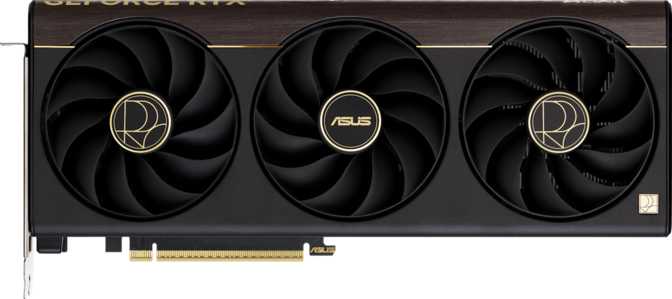
Asus ProArt GeForce RTX 5070 Ti Review: Built for Creators Who Game
Graphics CardsWhere Professional Creation Meets Enthusiast Gaming
The GPU market has long forced a choice: buy a workstation card built for creators but neutered for gaming, or buy a gaming card that handles creative work as an afterthought. The Asus ProArt GeForce RTX 5070 Ti refuses that compromise. Built on Nvidia's latest Blackwell silicon and wrapped in Asus's understated ProArt aesthetic, this card is engineered for people who render architectural visualizations in the morning, edit 4K video at noon, and play at the highest fidelity in the evening — all on the same machine.
It is not the fastest card money can buy. It is, however, one of the most thoughtfully configured cards at its tier, and for a specific type of buyer, that distinction matters enormously.
- Architecture
- Blackwell
- VRAM
- 16GB GDDR7
- Bandwidth
- 896 GB/s
- TDP
- 300W
- Compute
- 43.9 TFLOPS
Key Specifications at a Glance
Design and Build Quality
The ProArt Philosophy in Physical Form
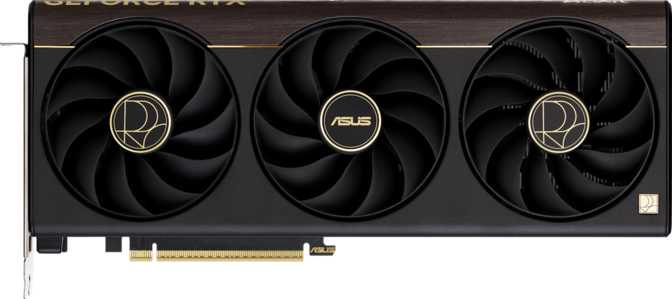
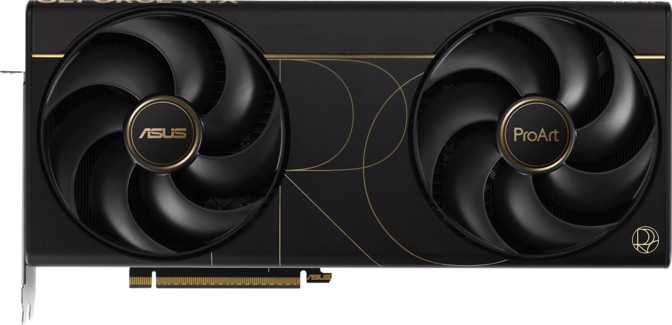
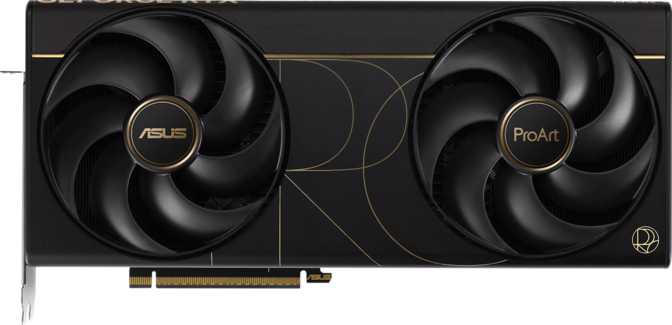
Asus's ProArt product line has always prioritized restraint over showmanship, and the RTX 5070 Ti variant is no exception. Where most high-end graphics cards arrive dressed in aggressive angular shrouds and maximum-brightness RGB, this card carries itself differently. The aesthetic is deliberately clean — professional enough to sit in a workstation build without visual contradiction, yet modern enough not to look out of place in a gaming rig with a windowed side panel.
At 304mm in length and 126mm in height, it occupies the space of a substantial card. Most full-tower and mid-tower ATX cases accommodate it without issue, but checking clearance against drive cages and front-panel radiators is time well spent before committing to a build.
RGB Lighting and Cooling Architecture
RGB lighting is present, but implemented with ProArt's characteristic restraint. The lighting is fully configurable through Asus's Aura Sync software — synchronized with other compatible components, set to static white for a studio-equipment aesthetic, or disabled entirely. Creators who want a professional-looking system without giving up the option to personalize it have exactly what they need here.
The card relies entirely on air cooling, with no liquid cooling integration or hybrid thermal solution. For a 300W thermal envelope, this demands a well-engineered heatsink and fan array. The ProArt cooling solution has historically delivered low noise alongside competitive temperatures, but a case with good airflow is not optional — it is a requirement. A quality 850W PSU is the practical minimum; 1000W gives comfortable headroom when paired with other demanding components.
Physical Dimensions
- Length
- 304 mm
- Height
- 126 mm
- Cooling
- Air Only
- RGB
- Aura Sync
Power Requirements
- Card TDP
- 300W
- Minimum PSU
- 850W
- Recommended PSU
- 1000W+
Core Performance: What Blackwell Delivers
Built on 5-nanometer silicon with 45.6 billion transistors, the Blackwell architecture represents a step-change in processing density and per-watt efficiency.
Raw Compute Power, Translated
The card's floating-point throughput sits at approximately 44 TFLOPS — the rate at which the GPU processes the mathematical operations that determine everything from game physics to 3D render calculations. For gaming, this headroom means the card is not working near its ceiling at 4K. It has capacity to spare, which translates directly into higher, more stable frame rates in demanding titles with complex scene geometry and high-resolution textures.
For creators using GPU-accelerated tools like Blender Cycles, OctaneRender, or Redshift, this compute throughput meaningfully reduces render times compared to mid-range hardware. A pixel fill rate of 235 GPixels/s and texture throughput of 686 GTexels/s means the card does not create a processing bottleneck when working with high-resolution assets in game engines or 3D modeling software.
Clock Speeds and Sustained Performance
The GPU operates at a base of 2,295 MHz, boosting under load to approximately 2,452 MHz. The Blackwell architecture's efficiency at the 5nm node means the card reaches and sustains those boost clocks without the aggressive thermal throttling that causes frame-rate inconsistency in less efficient designs.
For gamers, clock speed consistency matters more than peak clock speed. A card that holds its boost clock under sustained load delivers smoother, more predictable performance than one that peaks higher but throttles under pressure.
Memory: The Professional Differentiator
Memory specification is where the ProArt RTX 5070 Ti most clearly separates itself from the middle of the market, and where it earns its value proposition for professional users in particular.
16GB VRAM Capacity
Video editors working with 4K or 8K footage, 3D artists with complex scenes, and texture artists with high-resolution assets all benefit from keeping their full workload in GPU-local memory — where it belongs. A card with 8GB runs out of headroom and offloads to slower system RAM. For gaming, 16GB provides meaningful futureproofing as modern titles at 4K with high-resolution texture packs already push 10–12GB in some cases.
GDDR7 and 896 GB/s
GDDR7 is the newest generation of graphics memory. Compared to GDDR6X, it achieves significantly higher data transfer rates per pin — which is precisely how this card delivers near-900 GB/s of bandwidth from a 256-bit bus. On GDDR6X, reaching that bandwidth would require a 384-bit bus: a considerably larger and more expensive memory implementation. Memory bottlenecks are simply not a constraint for any current workload.
ECC Memory Support
Error-Correcting Code memory detects and corrects certain classes of memory errors automatically. This feature is standard in professional workstation GPUs and is rarely found in consumer gaming cards. Its presence here signals that Asus and Nvidia are taking the ProArt positioning seriously for users whose work cannot tolerate a corrupted render or a data error mid-calculation. It is an unusually professional inclusion for a consumer-positioned product.
Memory Configuration at a Glance
| Specification | Value | What It Means in Practice |
|---|---|---|
| Capacity | 16 GB | Handles 4K/8K video editing, complex 3D scenes, and demanding AI workloads |
| Generation | GDDR7 | Fastest consumer memory standard, offering superior speed-per-pin over GDDR6X |
| Bus Width | 256-bit | GDDR7 achieves bandwidth that would require a 384-bit GDDR6X implementation |
| Bandwidth | 896 GB/s | Memory bottlenecks are eliminated for all current workloads at every resolution |
| Effective Speed | 28,000 MHz | Effective clock rate accounting for GDDR7 data rate multiplier |
| ECC Support | Memory error correction — standard in workstation GPUs, rare in consumer cards |
Features That Matter in Real Use
DLSS AI Upscaling
Nvidia's AI-driven upscaling renders at a lower internal resolution and reconstructs a higher-quality output using dedicated AI hardware. In supported games, DLSS can transform 80fps at native 4K into 140fps with minimal visual compromise — making 4K image quality and high-refresh-rate responsiveness viable simultaneously. Blackwell's AI hardware runs the most capable generation of this technology.
Hardware Ray Tracing
Dedicated RT cores simulate the physical behavior of light — accurate reflections, shadow softness based on light source size and distance, and bounce lighting that makes indoor environments feel physically real. For 3D artists using real-time viewport rendering in Blender EEVEE or Unreal Engine 5, hardware ray tracing dramatically improves lighting preview accuracy during the creative process.
DirectX 12 Ultimate
The highest current tier of Microsoft's graphics API enables hardware ray tracing, variable-rate shading, mesh shaders, and sampler feedback. Games designed for this tier unlock capabilities that older API versions cannot access. OpenGL 4.6 and OpenCL 3.0 support covers professional visualization software, scientific computing tools, and open-standard workflows well beyond gaming.
Resizable BAR
Intel Resizable BAR allows the CPU to access the full GPU frame buffer directly, eliminating the data transfer bottleneck of older PCIe configurations. In supported games and applications, this typically yields 5–15% performance improvements. Whether your specific system benefits depends on having a compatible CPU, motherboard, and an up-to-date BIOS configuration.
PCIe 5.0 Interface
PCIe 5.0 is the latest expansion bus generation. Current gaming and creative workloads have not saturated even PCIe 4.0's bandwidth capabilities, so the practical difference today is negligible. The benefit is forward-looking: as workloads evolve, PCIe 5.0 eliminates any future interface bottleneck. Boards with PCIe 4.0 still work through backward compatibility at full PCIe 4.0 speeds.
Four-Display Support
Up to four monitors can be driven simultaneously. The port configuration — HDMI 2.1b, two DisplayPort outputs, and one USB-C port — covers every modern display standard. HDMI 2.1b handles 4K at 144Hz and 8K at 60Hz over a single cable. The USB-C port enables direct connection to USB-C compatible monitors, useful for creators pairing reference displays or portable secondary screens.
Display Outputs and Connectivity
| Port | Count | Standard | Notes |
|---|---|---|---|
| HDMI | 1 | HDMI 2.1b | 4K @ 144Hz / 8K @ 60Hz |
| DisplayPort | 2 | DisplayPort | Primary PC monitor standard |
| USB-C | 1 | USB-C | Direct USB-C monitor support |
| Mini DisplayPort | 0 | — | Not included |
| DVI | 0 | — | Legacy; active adapter required |
Multi-Monitor and High-Refresh Details
The clean port configuration and four-display capability make this a practical hub for complex multi-monitor setups. The USB-C port enables direct connection to USB-C compatible monitors — particularly useful for creators using high-resolution reference displays or portable screens as secondary output.
HDMI 2.1b's bandwidth supports the latest generation of 4K gaming televisions and monitors at full refresh rates with HDR enabled over a single cable. DisplayPort outputs serve PC monitors and remain the preferred connection standard for high-refresh competitive displays. The complete absence of legacy DVI is the correct decision for a current-generation product; users with older DVI monitors will need an active adapter.
Who This Card Is For — and Who Should Look Elsewhere
-
Professional creators who also game
Motion graphics artists, video editors, and 3D artists who need GPU-accelerated rendering all day and want to play titles at 4K in the evening. This card resolves that tension directly and without compromise.
-
4K gamers planning to hold hardware for 5+ years
The 16GB VRAM and Blackwell efficiency mean this card ages gracefully. Buyers who upgrade infrequently benefit most from the headroom built into this configuration.
-
3D artists and architects using real-time engines
Unreal Engine 5, Twinmotion, and similar tools benefit directly from the compute throughput and VRAM capacity. ECC memory support adds professional-grade reliability unusual in consumer hardware.
-
Multi-display productivity users
Up to four simultaneous displays, a clean modern port selection, and restrained RGB make this well-suited for professional multi-screen environments.
-
A pure gaming buyer focused on performance-per-dollar
Gaming-positioned RTX 5070 Ti variants may offer better frames-per-dollar if the professional features — ECC memory, ProArt tuning, creator optimizations — are irrelevant to your use case.
-
Competitive esports players chasing maximum frame rates
Gaming at 1080p or 1440p for maximum frame rates in titles like CS2 or Valorant does not require this level of hardware. Mid-range cards drive 240fps+ in those titles at significantly lower cost.
-
Users requiring ISV-certified drivers
Professionals who need certified driver support for AutoCAD, Solidworks, or Maya in contractual environments should evaluate the Nvidia RTX Professional line. The ProArt card is not ISV-certified.
-
Small form-factor builders
At 304mm, ITX and smaller micro-ATX cases may not accommodate this card. Careful compatibility research is essential before purchasing both case and card together.
Competitive Positioning
All RTX 5070 Ti board partner cards share the same Blackwell GPU die — but differ meaningfully in design intent, feature set, and intended audience.
| Consideration | Asus ProArt RTX 5070 Ti | Gaming RTX 5070 Ti | Previous-Gen High-End |
|---|---|---|---|
| VRAM | 16GB GDDR7 | 16GB GDDR7 | 16–24GB GDDR6X |
| Target Audience | Creator + Gamer | Gamer-First | Gamer or Creator |
| ECC Memory | Rare | ||
| Aesthetic | Professional / Restrained | Gaming-Aggressive | Varies |
| RGB Lighting | Subtle / Disableable | Heavy | Varies |
| Memory Generation | GDDR7 | GDDR7 | GDDR6X |
| ISV Certification | RTX Pro Only | ||
| Cooling Type | Air, ProArt-Tuned | Air, Gaming-Tuned | Air or Hybrid |
Honest Assessment: Strengths and Limitations
What It Gets Right
-
16GB GDDR7 is not marketing inflation. It is a meaningful specification for creators and for buyers who hold hardware for four or more years. The memory capacity and bandwidth leave room to grow into increasingly demanding workloads.
-
ECC memory on a consumer card is genuinely exceptional. Its presence shows Asus is taking the professional positioning seriously — and gives users whose work cannot afford errors a meaningful reliability advantage over standard gaming hardware.
-
The ProArt aesthetic fills a genuine market gap. No other broad segment of the GPU market addresses buyers who want high-end hardware without gaming-brand visual maximalism. Subtle RGB, a restrained shroud, and clean lines give this card real differentiation.
-
Blackwell efficiency on 5nm delivers compute headroom without extreme power demands. 44 TFLOPS from a 300W envelope represents genuinely efficient silicon design compared to previous high-end generations.
Where It Falls Short
-
300W is not trivial. This is a high-end card that demands a properly rated power supply and genuine case airflow. Buyers who overlook either will experience thermal or stability issues — and should size their PSU accordingly before purchasing.
-
Air-only cooling limits the absolute ceiling for near-silent operation. System integrators who want the quietest possible long-duration loads may prefer cards with liquid cooling options, or must be deliberate about case airflow design.
-
No ISV certification. Professional environments where software vendor certification is a contractual requirement cannot rely on this card. The RTX Professional line is the appropriate choice for those deployments.
-
Pure gaming buyers pay a premium for features they don't use. The ProArt's professional feature set carries a price above gaming-positioned RTX 5070 Ti cards. If gaming is the only use case, that premium delivers no functional benefit.
Questions Real Buyers Ask
Final Recommendation and Verdict
The Asus ProArt GeForce RTX 5070 Ti earns a clear recommendation — and being specific about who it is for matters more than a generic verdict.
If your use of a graphics card involves both demanding creative work and high-fidelity gaming, this is one of the most coherently designed options at the upper-mid to high-end tier. The GDDR7 memory with near-900 GB/s bandwidth, the 16GB capacity with ECC support, the Blackwell architecture's AI and ray-tracing capabilities, and the measured ProArt aesthetic form a package that no other segment of the GPU market addresses this directly.
If gaming is your only use case, evaluate gaming-positioned cards at this tier before committing — you may find better clock speeds or lower pricing in exchange for features you do not need. If professional certification is a hard requirement, the RTX Professional line is the correct alternative.
For everyone else — the hybrid user, the creator who games, the enthusiast building a system that needs to look professional and perform without compromise — the ProArt RTX 5070 Ti is exactly the card the market has been underserving, and Asus has executed it well.
- Performance
- 5 / 5
- Memory Config
- 5 / 5
- Design / Build
- 4.5 / 5
- Features
- 4.5 / 5
- Value for Target User
- 4 / 5