Asus ProArt B850-Creator Wi-Fi Neo: An Honest Review for Creators
MotherboardsAt a Glance
Not every motherboard wears its intentions on its sleeve. The Asus ProArt B850-Creator Wi-Fi Neo does. The ProArt lineup has long been Asus’s answer to creative professionals who need workstation-grade reliability without the enterprise price tag — and this B850-based board carries that mission forward on AMD’s latest AM5 platform. It sits at an intriguing intersection: a mid-range chipset paired with creator-focused feature density, Wi-Fi 7 connectivity, and a dual-GPU-capable slot configuration. If you’re building a content creation rig, a high-throughput editing workstation, or a prosumer system that needs to handle both gaming and professional workloads without compromise, this board demands a close look.
Design and Build Quality
Physical Presence and Layout
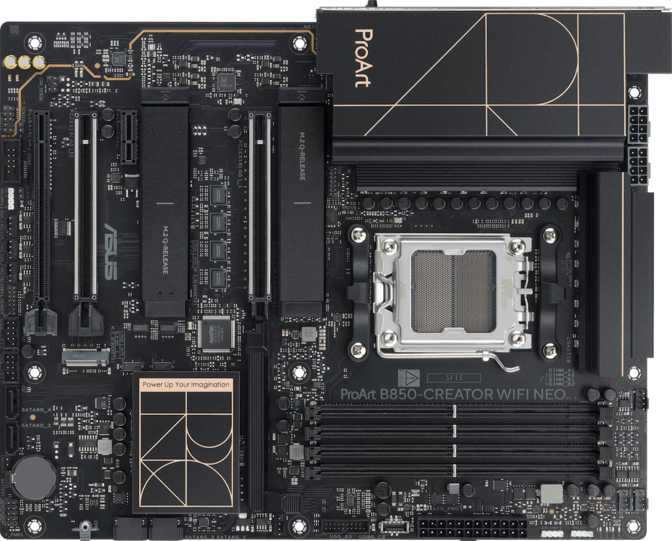
The ProArt B850-Creator Wi-Fi Neo follows the standard ATX form factor, measuring 305 mm wide by 244 mm tall — the familiar full-size footprint that fits any mid-tower or full-tower case without compatibility headaches. For buyers upgrading from a micro-ATX or ITX build, this is a meaningful step up in expansion room, and the board uses that space purposefully rather than padding it out.
Asus’s ProArt aesthetic leans professional rather than flashy. RGB lighting is present — a nod to the enthusiast crowd — but tasteful and not the centerpiece. The board presents a clean, dark theme consistent with the ProArt identity, which is more at home in a studio environment than a LAN party case with a glass side panel. Asus’s Aura Sync ecosystem means integration with compatible peripherals and cooling is straightforward for those who want it.
Build quality across the ProArt line has historically been a strong point. Reinforced PCIe slots, premium capacitors, and robust VRM heatsink coverage are standard ProArt expectations — the spec configuration here supports that tradition, though buyers should verify heatsink coverage specifics before finalizing their CPU cooler selection.
Notable Omissions
Two feature absences stand out and deserve clear communication before a purchase decision is made.
No Clear CMOS Button
There is no dedicated BIOS reset button on the rear I/O panel . For most users, this is invisible — but for overclockers pushing memory speeds aggressively, a failed boot requires clearing settings by jumper on the board itself, which is less convenient than a single button press.
No Dual BIOS
A failed BIOS update or corruption event has no backup chip to fall back on. For a creator-positioned board where downtime is expensive, this is the one omission that feels genuinely contrary to the ProArt ethos. It rarely happens — but when it does, you’ll wish it were here.
Platform and CPU Compatibility
AM5 and Long-Term Platform Value
The B850-Creator Wi-Fi Neo is built on AMD’s AM5 socket, supporting current Ryzen 7000 and Ryzen 9000 generation processors. AMD has indicated long-term support for the AM5 socket, which means a board purchased today has a realistic path to future CPU upgrades without replacing the motherboard — an important consideration for any workstation built to last.
The B850 chipset occupies the upper end of AMD’s mid-range stack, sitting below X870/X870E but above B650. B850 brings more PCIe 5.0 bandwidth distribution and enhanced overclocking support versus B650 — a more capable foundation for high-throughput storage and next-generation GPU installations.
Overclocking Support
The board is rated easy to overclock, correlating with well-tuned automatic profiles in the BIOS, AI-assisted overclocking utilities, and sufficient VRM headroom. Manual tuning is fully supported for builders who want granular control. The B850 platform’s overclocking headroom is notably superior to what B650 offered at launch.
- CPU SocketAM5
- ChipsetB850
- CPU Sockets1
- Integrated CPUNot Included
- Integrated GraphicsNone (CPU-dependent)
- Overclock-ReadyYes
- Clear CMOSNo Button
- Dual BIOSNo
- Warranty3 Years
Memory Performance and Capacity
DDR5 — The New Foundation
This board requires DDR5 memory, the correct choice for any serious AM5 build today. DDR5 delivers substantially higher bandwidth than DDR4, which translates directly into real-world throughput for memory-intensive professional applications — high-resolution video editing timelines, large Photoshop documents, complex 3D scene files, and data science workloads all benefit measurably.
Four memory slots let you start with a 2×16 GB or 2×32 GB kit and expand later. The board’s 256 GB maximum capacity positions it comfortably for even demanding professional workloads for years ahead. Reaching that ceiling requires 64 GB DIMMs, which remain premium purchases — but the headroom is there when you need it.
Speed: Rated vs. Overclocked
At standard JEDEC specifications, the board runs memory at speeds fast enough to avoid bottlenecking modern Ryzen CPUs in professional applications. The more interesting figure for enthusiasts is the overclocked ceiling achieved through EXPO profiles or manual tuning — a level that puts this board among the more capable B850 options for memory performance.
Memory speed has a measurable impact on rendering and compute throughput with AMD’s Ryzen architecture, making this headroom practically meaningful for creator workflows.
Expansion Slots and GPU Configuration
PCIe 5.0 — Future-Proofed GPU and Storage Lanes
Two PCIe 5.0 x16 slots are present — unusual for a B850 board and a direct reflection of the ProArt’s professional positioning. PCIe 5.0 doubles the bandwidth of PCIe 4.0, and while today’s GPUs do not saturate even PCIe 4.0 x16, next-generation graphics cards will. A GPU installed in either primary slot will face no bandwidth constraint now, and no slot-induced bottleneck for at least two GPU generations ahead.
A single PCIe 4.0 x16 slot (electrically x4 in most B850 implementations) rounds out the array. This third slot is best reserved for add-in capture cards, RAID controllers, professional audio interfaces, or other expansion peripherals.
Dual-GPU Support for Compute Workflows
The board formally supports dual-GPU configurations across both PCIe 5.0 x16 slots. This has specific relevance for creative workflows: GPU rendering engines, AI-assisted video upscaling, and OpenCL/CUDA compute workloads can distribute across two cards for meaningful throughput gains. Traditional multi-GPU gaming has largely faded — this feature speaks directly to professional users.
| Slot Type | Count | Purpose |
|---|---|---|
| PCIe 5.0 x16 | 2 | Primary / Secondary GPU |
| PCIe 4.0 x16 | 1 | Capture / Expansion Cards |
| PCIe 3.0 / 2.0 | 0 | N/A |
| Legacy PCI | 0 | N/A |
Storage: Speed, Capacity, and Redundancy
M.2 and SATA — A Well-Balanced Array
Three M.2 sockets provide the primary high-speed storage backbone. NVMe drives deliver sequential speeds that make loading large project files, working directly with video proxies, and running virtual machines substantially faster than traditional SATA-based storage. Three slots enables a practical creator workflow configuration: one drive for the operating system, one for active project storage, and a third for overflow or a scratch disk.
Four SATA 3 connectors round out the configuration for bulk capacity — high-capacity HDDs for archival storage, older SSDs from previous builds, or additional working drives. Four ports is adequate for most workstation configurations without being excessive.
RAID Support: Professional Data Protection
All four major RAID modes are supported. RAID 5 in particular requires a minimum of three drives and provides the best balance of capacity efficiency and single-drive failure protection — the preferred configuration for local project storage arrays that cannot afford data loss.
This RAID support suite exceeds what most gaming-focused B850 boards include and is a clear signal that Asus took the Creator branding seriously rather than using it as a marketing label on an otherwise undifferentiated product.
RAID Mode Comparison
| RAID Level | Purpose | Min. Drives | Protection | Supported |
|---|---|---|---|---|
| RAID 0 | Maximum speed via striping | 2 | None | |
| RAID 1 | Full mirroring for redundancy | 2 | 1 drive failure | |
| RAID 5 | Distributed parity — efficiency sweet spot | 3 | 1 drive failure | |
| RAID 10 | Mirroring + striping (speed + safety) | 4 | Multiple drives | |
| RAID 0+1 | Reverse of RAID 10 | 4 | — |
Connectivity: Ports, Networking, and Wireless
Rear I/O Ports
4 × USB 2.0
Keyboards, mice, dongles, and low-bandwidth peripherals. Speed is not a limitation for these use cases.
2 × USB 3.2 Gen 2 Type-A (10 Gbps)
Fast external SSDs, high-speed card readers, professional audio interfaces requiring sustained throughput.
2 × USB 3.2 Gen 2 Type-C (10 Gbps)
Modern peripherals, external monitors, and newer mobile devices. Type-C form factor adds broad compatibility.
HDMI 2.1 + 1 × DisplayPort
Active only when paired with a Ryzen CPU with integrated graphics. No onboard GPU is present on this board.
Dual RJ45 Ethernet Ports
Two LAN jacks allow simultaneous connections — NAS on one port and internet on another, or link aggregation for doubled throughput to a compatible switch. A standout feature for creators moving large files.
Internal Headers
USB 3.2 Gen 2x2 Front-Panel Connector
Supports 20 Gbps USB-C on the front of compatible cases — fast enough for direct NVMe enclosures.
2 × USB 3.2 Gen 1 + 4 × USB 2.0 Headers
Standard front-panel and internal device connectivity for most mid-tower case configurations.
6 × Fan Headers
Manage CPU fans, multiple case fans, and an AIO pump header simultaneously — no separate fan controller needed.
TPM Connector
Windows 11 compatible. Supports BitLocker and hardware security module integration for enterprise environments.
Wi-Fi 7 and Bluetooth 5.4
The wireless module is the most current generation available. Wi-Fi 7 (802.11be) supports multi-link operation — simultaneous use of multiple frequency bands — delivering the best real-world throughput available in congested wireless environments. It is backward compatible with all prior Wi-Fi standards.
Bluetooth 5.4 brings improved connection stability, lower peripheral power consumption, and better coexistence with Wi-Fi compared to older revisions. Note: aptX audio codec is not supported, which is only relevant for aptX-capable wireless headphones routed directly through the board.
Audio Quality
The onboard audio delivers a 120 dB signal-to-noise ratio on the DAC output — a figure representing genuinely high-fidelity reproduction for a motherboard-integrated solution. Background hiss and interference noticeable on budget audio implementations are effectively inaudible at this SNR level. The subsystem supports 7.1 surround channel output, suitable for both professional monitoring and immersive gaming.
Three analog audio jacks cover the standard headphone/speaker output, microphone input, and line-in. There is no S/PDIF optical output — an absence that matters for routing audio to an external DAC, home theater receiver, or professional interface via optical. If your workflow depends on digital optical output, plan for a USB or PCIe audio solution.
Who Is This Board For?
Real-world usage scenarios — and honest guidance on who should look elsewhere.
Ideal Builds
Video Editor / Motion Graphics
A Ryzen 9 paired with 64–128 GB DDR5, a PCIe 5.0 NVMe for active projects, and a high-end GPU represents the board’s sweet spot. Dual LAN handles NAS transfers in parallel with regular network activity. RAID 5 covers local archive redundancy. USB Gen 2 rear ports handle fast card readers directly.
3D Rendering and Visualization
The dual PCIe 5.0 x16 slot configuration is specifically attractive for GPU rendering workflows. Two cards — for real-time viewport rendering and final renders, or AI denoising acceleration — can be installed without bandwidth compromise.
Prosumer Gaming / Streaming Hybrid
Wi-Fi 7 for wireless flexibility, strong onboard audio, and GPU slots that won’t throttle next-gen cards. Streaming benefits from USB 3.2 Gen 2 rear ports for external capture devices and the front-panel Gen 2x2 header for fast storage access.
Look Elsewhere If…
Pure Gaming on a Budget
If gaming is your sole use case, a B650 board performs identically for gaming workloads at a lower cost — freeing budget for a faster GPU or more storage. The ProArt’s professional features carry a premium that gaming alone does not justify.
ECC Memory Required
If your application demands error-correcting memory — scientific simulation, financial modeling, or any context where a single bit flip cannot be tolerated — look at AMD’s Threadripper platform or a dedicated workstation board supporting Ryzen Pro with ECC.
Compact Build Enthusiasts
This is a full ATX board. Micro-ITX or small-form-factor builds cannot use it. If case size is a constraint, look at B850 or B650 boards in micro-ATX or mini-ITX form factors instead.
Competitive Positioning
How the ProArt B850-Creator Wi-Fi Neo stacks up against logical alternatives in the same price and feature range.
| Feature | ProArt B850-Creator Wi-Fi Neo | Typical B650 Creator Board | X870E Enthusiast Board |
|---|---|---|---|
| Chipset | B850 | B650 | X870E |
| PCIe 5.0 x16 Slots | 2 | 1 | 2 |
| Wi-Fi Generation | Wi-Fi 7 | Wi-Fi 6E typical | Wi-Fi 7 |
| Dual LAN | Rare at tier | Common | |
| RAID 5 Support | Varies | ||
| M.2 Slots | 3 | 2–3 | 4–5 |
| Dual BIOS | Varies | Common | |
| ECC Support | |||
| Price Tier | Mid-High | Mid | High–Premium |
The ProArt B850-Creator Wi-Fi Neo positions itself above typical B650 creator boards in PCIe 5.0 availability and wireless capability, while undercutting X870E boards on price — at the cost of fewer M.2 slots and the absence of dual BIOS. For the majority of creator workstation configurations, that trade-off lands well.
Honest Assessment
The dual PCIe 5.0 x16 slot configuration is genuinely uncommon at this chipset tier and provides meaningful future-proofing. Wi-Fi 7 is the right choice at this price point — anything less would feel like a compromise by the time the board is installed in a build that will run for several years. Dual Ethernet is practical and thoughtful. The full RAID suite including RAID 5 signals that Asus took the Creator branding seriously rather than using it purely as marketing differentiation.
The memory overclocking ceiling is also impressive. Reaching toward 9000 MHz on DDR5 requires premium kits and careful tuning, but the fact that the board can get there puts it alongside B850 boards that typically charge more for equivalent memory performance.
The dual BIOS omission is a glaring gap for a professional-positioned product. A corrupted BIOS update on a content creator’s primary workstation translates to downtime and potentially missed deadlines. The missing Clear CMOS button is a smaller irritant but adds to the same theme: some quality-of-life details that make a professional board genuinely comfortable to own are absent here.
The lack of S/PDIF optical output and the absence of aptX Bluetooth support won’t affect most users but will be felt by specific audio-centric workflows. The three-year warranty is standard for the category — appropriate for the price tier, neither a differentiator nor a concern.
Common Buyer Questions
Answers to the questions buyers search for before purchasing this board.
Final Verdict
Asus ProArt B850-Creator Wi-Fi Neo
Recommended for Creator Workstations
The Asus ProArt B850-Creator Wi-Fi Neo earns its recommendation for the buyer it’s designed for: a creative professional building a capable, forward-looking AM5 workstation who needs professional features without crossing into X870E price territory. The dual PCIe 5.0 x16 slots, Wi-Fi 7, dual Ethernet, full RAID suite, and generous memory headroom form a genuinely coherent package around the ProArt mission.
The dual BIOS omission is a real concern for a professional board and the primary reason not to recommend it without reservation. If that risk is acceptable — and for most users it will be, given how rarely BIOS corruption occurs — the rest of the board’s feature set justifies the purchase confidently.
Buy It If…
You’re a creator building on AM5, value dual-GPU compute potential, want the best wireless available, and work with multi-drive storage configurations.
Skip It If…
Dual BIOS redundancy is non-negotiable for your workflow, you need ECC memory, or you’re building a gaming-only system where a B650 board would serve you identically at lower cost.