Honor MagicPad 3 Pro Full Review: Power Without Compromise
TabletsAt a Glance
Everything that matters, before you read a word
Expert Score
The large-format Android tablet market is crowded with devices that promise a lot and deliver somewhere between "adequate" and "almost great." The Honor MagicPad 3 Pro is trying to change that equation by pairing one of the most powerful mobile processors available with a display that punches well above its price class. For anyone who has been waiting for a 13-inch Android tablet that doesn't force painful compromises between performance and screen quality, this one demands attention.
What makes it interesting — and what this review unpacks — is that it succeeds in some areas so thoroughly that its limitations feel all the more deliberate. Understanding where Honor chose to invest and where they held back is the key to knowing whether this is the right tablet for you.
Design and Build Quality
Slim, Substantial, and Purposefully Minimal
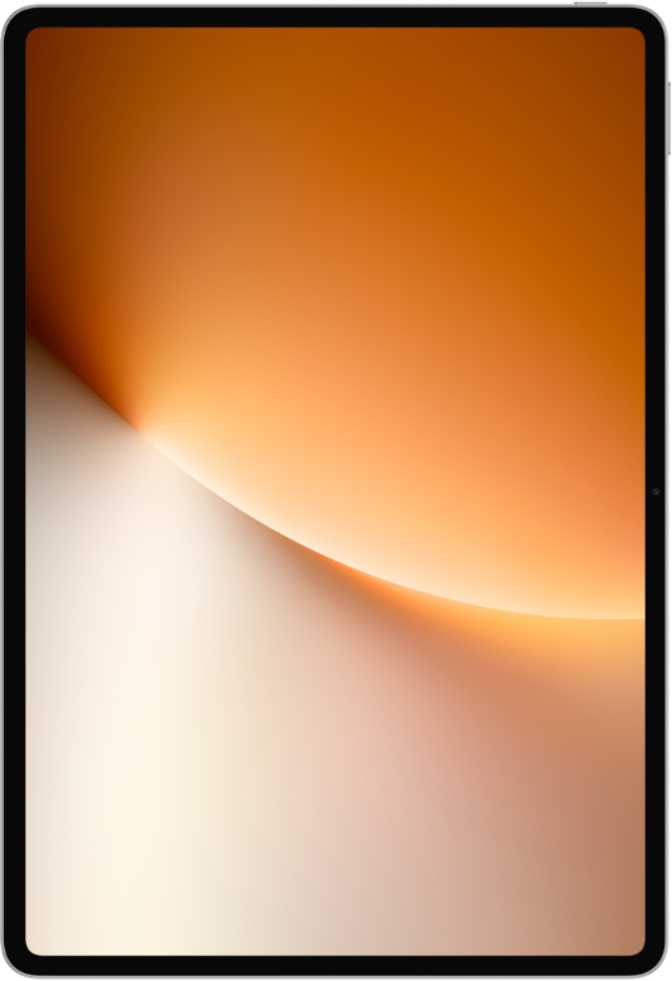
At 5.8mm thin, the MagicPad 3 Pro is exceptionally svelte for a 13-inch device. Many hardcover books are thicker. The slimness gives it an immediate premium feel in the hand, and at 595 grams, it sits in a reasonable range for its screen size — not featherlight, but balanced and stable when held horizontally with two hands during extended reading or video sessions.
The overall footprint — roughly 294mm wide by 201mm tall — puts it firmly in laptop-replacement territory. This is not a device you'll casually palm one-handed; it's one you set up at a desk, prop on a lap, or hold deliberately. Honor's design language here is clean and angular, leaning into a professional aesthetic rather than anything flashy.
One area where the design makes a notable statement: there is no headphone jack. Users who prefer wired audio will need a USB-C adapter or commit to wireless listening. The USB-C port itself is USB 3.2 — fast data transfers and display output capabilities that most mid-range tablets simply don't offer.
Physical Specifications
- Height
- 201.4 mm
- Width
- 293.9 mm
- Thickness
- 5.8 mm
- Weight
- 595 g
- USB Port
- USB-C 3.2
- Water Resistance
- None
What Is Not in the Box
The MagicPad 3 Pro ships without a stylus and without a detachable keyboard. Both can likely be purchased separately, and Honor has historically offered companion accessories. If you're planning to use this tablet as a drawing surface or as a laptop replacement from day one, factor in accessory costs from the start. The hardware is fully capable — but neither tool comes in the package.
Display: A 13.3-Inch Panel That Earns Its Real Estate
Resolution, Sharpness, and the 165Hz Advantage
The MagicPad 3 Pro carries a 13.3-inch IPS LCD panel resolving at 3200 by 2136 pixels. At 289 pixels per inch, text and fine detail look sharp and clean at normal viewing distances — web articles, spreadsheets, and ebooks render crisply without any visible pixelation. For reference, most 13-inch laptop displays hover around 166–230 ppi, making this panel meaningfully sharper than the average notebook screen.
The headline specification for display enthusiasts is the 165Hz refresh rate — unusually high for a tablet at any price tier. Scrolling through long documents, social feeds, and websites feels fluid and natural. Animations in the interface respond instantly. For casual gaming or graphically intensive apps, that high refresh rate also reduces motion blur, making fast-moving visuals far easier to track.
IPS LCD: An Honest Assessment
The panel technology here is IPS LCD rather than OLED. IPS delivers accurate, consistent colors across a wide viewing angle — content looks the same whether you're looking straight-on or at an angle from a sofa. However, blacks on an IPS panel will never reach the depth of an OLED display; in a dark room you'll notice a slight grey glow in dark scenes rather than true black.
For most tablet use cases — reading, productivity, video calls, browsing, and streaming — IPS LCD at this resolution and refresh rate is an excellent choice. The display does not support HDR10 or Dolby Vision, so HDR-enabled streaming services will fall back to standard dynamic range output. For users who primarily watch HDR films in dark environments, an OLED alternative would serve that specific priority better.
Display Specifications
- Panel Type IPS LCD
- Screen Size 13.3 inches
- Resolution 3200 × 2136 px
- Pixel Density 289 ppi
- Refresh Rate 165 Hz
- Touch Screen Yes
- HDR10 Support No
- Dolby Vision No
Performance: Snapdragon 8 Gen 3 in a Tablet
What This Chip Actually Means
The Snapdragon 8 Gen 3 is not a mid-range or "tablet-tier" chipset. It is the flagship processor Qualcomm made for premium smartphones. Dropping it into a tablet has a distinct effect: this is one of the fastest Android tablets you can buy, full stop. Tasks that would slow or stutter on lesser hardware simply don't present a challenge here.
The chip's CPU cluster runs two performance cores at just under 4.6GHz and six efficiency cores at around 3.6GHz — a big.LITTLE architecture that simultaneously prioritizes raw speed for demanding tasks and intelligent power management for everything else. In real terms: heavy multitasking, running multiple split-screen apps, processing large documents, editing exports — none of it causes slowdown.
Memory Configuration
Paired with the processor is 16GB of DDR5 RAM running at 5,300MHz over a dual-channel interface, delivering a memory bandwidth exceeding 85 GB/s. For a tablet, this is exceptional. Apps don't get evicted from memory during normal multitasking — you can switch between a browser with ten tabs, a video conference, a document editor, and a media player without losing any state.
The 512GB internal storage is generous enough for years of documents, downloaded media, apps, and local files. There is no microSD slot, so what you see is what you get. Plan accordingly if you store very large local video libraries.
Geekbench 6 Benchmark Comparison
Multi-Core Score — higher is faster (max reference: 12,000)
Single-Core Score — higher is faster (max reference: 4,000)
Benchmark scores shown are Geekbench 6 results from the provided device data. Budget and mid-range reference values are approximate category norms for context.
Graphics & Processing
- GPU
- Adreno 830
- GPU Clock Speed
- 1,200 MHz
- Shading Units
- 1,536
- DirectX Support
- DirectX 12
- Chip Process Node
- 3nm
- Thermal Design Power
- 8.2W
The Adreno 830 GPU supports DirectX 12 and OpenCL 3, positioning it well for GPU-accelerated applications including image editing, video playback, and graphically demanding games. With 1,536 shading units running at 1.2GHz, every current mobile title will run at maximum settings. The 8.2W thermal design power is worth noting in a 5.8mm thin chassis — sustained heavy workloads may cause the device to warm noticeably. This is a physics reality rather than a flaw, and it does not meaningfully affect day-to-day use.
Battery Life: The Endurance Standout
The MagicPad 3 Pro contains a 12,450mAh battery — one of the largest capacities in its class. A typical day that includes several hours of browsing, a video call or two, streaming content, and general productivity work will not drain this tablet. For light users, this could stretch through two full days before needing a charge. For heavier, screen-on-intensive use, a full day comfortably is a realistic expectation.
Fast charging is supported, which reduces the sting of that large capacity's longer charge time. The included battery health monitoring feature provides insight into the battery's condition over time — a small but meaningful detail for longevity-conscious users who plan to keep a device for several years.
No Wireless Charging
Wireless charging is not available on the MagicPad 3 Pro — this is a wired-only device. For most tablet users who charge overnight at a desk or bedside, this is rarely an inconvenience. For those who habitually use wireless charging pads, it is a lifestyle adjustment worth noting before purchase.
Audio and Connectivity
Stereo Speakers and Wireless Audio
Stereo speakers are present, and on a 13-inch chassis there is physical room for speaker grilles to be spaced meaningfully apart — which tends to produce better stereo separation than compact tablets allow. For media consumption and video calls, the physical arrangement works in the device's favor.
For wireless audio, the Bluetooth 6 implementation is paired with aptX Adaptive — a codec that dynamically adjusts audio quality based on connection conditions, providing near-lossless quality when conditions allow and maintaining stability when they don't. aptX HD is also supported for compatible headphones. LDAC, Sony's own high-res wireless codec, is not supported — a consideration for users who own Sony headphones and rely on it specifically.
Bluetooth Audio Codec Support
- aptX AdaptiveDynamic quality
- aptX HDHigh-res
- aptXStandard
- LDACNot supported
- 3.5mm Headphone JackAbsent
Wi-Fi 7 and a Hard Connectivity Limit
The MagicPad 3 Pro supports Wi-Fi 7 (802.11be), the latest generation of wireless networking. On a compatible Wi-Fi 7 router, this enables multi-gigabit wireless throughput — download potential exceeds 10Gbps under optimal conditions. Even on older Wi-Fi 6 and Wi-Fi 5 networks, the tablet connects and performs well. For home and office environments with strong wireless infrastructure, this is genuine future-proofing.
Critical Limitation: No Cellular, No GPS
This is a Wi-Fi-only tablet with no GPS receiver. Mobile data away from known networks requires tethering to a smartphone. Location-based apps that rely on GPS will not function — or will rely only on coarse network-based location approximation. NFC is also absent, which rules out contactless payments and NFC-based accessory pairing.
Connectivity Overview
- Wi-Fi 7 / 6 / 5 / 4 (802.11be/ax/ac/n)
- Bluetooth 6
- USB Type-C (USB 3.2)
- Gyroscope & Accelerometer
- No Cellular (Wi-Fi only)
- No GPS
- No NFC
- No HDMI output
Software Experience: Android 16 with Privacy Depth
Running Android 16, the MagicPad 3 Pro arrives with one of the most current mobile operating systems available. The full productivity toolkit that makes a large-screen Android tablet genuinely functional as a work surface is all here — including split-screen multitasking, picture-in-picture, widgets, dynamic theming, dark mode, and extensive notification controls.
Multi-user support allows the device to be shared between household members with separate profiles — useful for family settings or shared work environments. Offline voice recognition is baked in, meaning voice commands don't require an internet connection to function.
Update Cadence Note
The MagicPad 3 Pro does not receive direct OS updates from the vendor in the conventional flagship manner. Update cadence and long-term support duration are worth monitoring independently for buyers who prioritize sustained software longevity.
Privacy & Productivity Features
- App tracking controls
- Location privacy options
- Camera and microphone access management
- Clipboard warnings
- Split-screen multitasking
- Picture-in-picture (PiP)
- Multi-user profiles
- Offline voice recognition
- Dynamic theming & dark mode
- Extra dim mode
- On-device machine learning
- Child lock support
Camera System: Present and Functional, Not a Priority
The rear camera system consists of a 13-megapixel primary sensor alongside a 2-megapixel secondary sensor. 4K video recording at 30 frames per second is supported, along with touch autofocus, continuous autofocus during video, manual ISO, manual exposure, and manual white balance — enough camera control to give this system genuine utility for document scanning, video calls placed in rear-camera mode, and occasional casual photography.
The front camera is 9 megapixels with a wide f/2.2 aperture — a solid specification for video calls, particularly given the aperture's performance in lower light conditions. It will handle all standard conferencing apps without complaint.
The Honest Camera Positioning
The cameras on the MagicPad 3 Pro are tools, not features. They serve document scanning, whiteboard capture, and video conferencing well. Anyone expecting smartphone-quality photography output from a tablet should recalibrate expectations regardless of which tablet they choose — this is true across the entire category, not specific to this device.
Camera Specifications
- Main Camera13 MP
- Secondary Rear2 MP
- Front Camera9 MP (f/2.2)
- Max Video4K @ 30fps
- Optical ZoomNone
- OISNot present
- Slow MotionNot supported
- Manual ControlsISO, WB, Exposure
- HDR ModeBuilt-in
Who This Tablet Is For — And Who Should Look Elsewhere
Matching the right device to the right person matters more than raw specifications.
Excellent Fit For
-
Home and desk-based workersWork primarily within Wi-Fi coverage and need a fast, large-screen device for documents, video calls, and multitasking.
-
StudentsResearch, note-taking (with separately purchased stylus), and online learning on a sharp, responsive screen.
-
Media consumersLarge, sharp, 165Hz display for streaming, reading, and casual browsing — smooth and comfortable for extended sessions.
-
Mobile gamersFlagship chip with a high-refresh-rate screen handles everything currently on the Android platform at maximum settings.
-
Power users upgrading from slow tablets16GB RAM and 512GB storage provide headroom to last three or more years without performance anxiety.
Think Carefully If You
-
Need mobile data on the goNo cellular radio means you're tethering to a phone whenever you leave a trusted Wi-Fi network.
-
Depend on GPS navigationNo built-in GPS receiver. Location-aware apps won't function accurately without a connected smartphone.
-
Need a stylus immediately out of boxNo stylus is included. Creative and note-taking workflows require a separately purchased accessory.
-
Prioritize OLED contrast depthIPS LCD cannot match true OLED black levels. Dark-room movie watchers who value contrast will feel the difference.
-
Rely on LDAC or a 3.5mm jackSony LDAC codec and wired headphone jack are both absent. Plan your audio setup accordingly.
Competitive Positioning
How the Honor MagicPad 3 Pro stacks up against logical alternatives in the same screen-size category.
| Feature | Honor MagicPad 3 Pro | Typical Premium 13" Android | Mid-Range 13" Android |
|---|---|---|---|
| Processor Tier | Flagship — SD 8 Gen 3 | Flagship | Mid-range |
| Screen Size | 13.3 inches | 12.4–13 inches | 11–12.4 inches |
| Refresh Rate | 165Hz | 120Hz typical | 90–120Hz |
| RAM | 16GB DDR5 | 12–16GB | 8–12GB |
| Internal Storage | 512GB | 128–512GB | 64–256GB |
| Battery Capacity | 12,450mAh | 10,000–11,500mAh | 7,000–9,000mAh |
| Cellular Option | Wi-Fi only | Often available | Often available |
| Stylus Included | No | Sometimes | Rarely |
| Wi-Fi Standard | Wi-Fi 7 | Wi-Fi 6E typical | Wi-Fi 6 |
| Display Type | IPS LCD | OLED or IPS | IPS |
Where it wins clearly: processor performance, storage, battery size, and Wi-Fi 7. Where it gives ground: display technology (OLED alternatives exist at comparable pricing) and the need for cellular independence.
Honest Strengths and Weaknesses
Where It Excels
The MagicPad 3 Pro's strengths are genuinely impressive. The combination of a flagship-grade processor with 16GB of DDR5 RAM and 512GB storage in a 13-inch tablet is rare at any price. The 165Hz display refresh rate sets it apart from essentially the entire Android tablet category. The 12,450mAh battery is a category standout, and Wi-Fi 7 meaningfully future-proofs the wireless experience.
- Flagship Snapdragon 8 Gen 3 chip that won't slow down over years of use
- 165Hz refresh rate is exceptional for this screen size category
- 12,450mAh battery among the largest in the class
- 512GB storage is generous without compromise
- Wi-Fi 7 is ahead of most competing tablets
- 5.8mm profile is impressively slim for a 13-inch device
- Android 16 with deep privacy controls and multi-user support
- USB 3.2 enables fast transfers and external display output
Real Limitations to Know
The weaknesses are real and should not be minimized. The absence of cellular connectivity and GPS is a genuine limitation for on-the-go users — not a theoretical one. The IPS LCD panel, while excellent, cannot compete with OLED for contrast, and the lack of HDR support is a noticeable gap for streaming enthusiasts.
- No cellular radio — strictly Wi-Fi only, no standalone mobile connectivity
- No GPS receiver — location-based apps won't function independently
- IPS LCD cannot match OLED for black depth or contrast in dark conditions
- No HDR10 or Dolby Vision support limits premium streaming content
- No stylus or keyboard included — full productivity setup costs extra
- No fingerprint scanner — biometric security options are limited
- No NFC — contactless payments and NFC accessory pairing unavailable
- No LDAC support for Sony high-res wireless audio
Questions Real Buyers Ask
Answers to the searches people make before pulling the trigger on a large-format tablet.
A Serious Tablet for Serious Users
The Honor MagicPad 3 Pro is a tablet that gets the fundamentals right at a level that many competitors don't. The processor is genuinely top-tier, the display is sharp and unusually smooth, and the battery is large enough that power anxiety shouldn't be part of your daily experience. For the home user, the student, the productivity-focused desk worker, or the media consumer who wants the best possible Android tablet experience within Wi-Fi range, this device delivers on its promise.
The caveat is clear and worth repeating: if mobile data connectivity or GPS are non-negotiable for your lifestyle, this tablet simply isn't the right tool. Similarly, if OLED display quality is your baseline for a premium purchase, alternatives exist that serve that priority better. For users who can work within those constraints — and many genuinely can — the Honor MagicPad 3 Pro offers a hardware configuration that is difficult to match at its price point.
Recommended If
- You work primarily within Wi-Fi coverage
- Maximum Android tablet performance is your priority
- You stream, read, or multitask on a large screen regularly
- Battery life is a high priority for your workflow
- You want a device built to last several years without slowdowns
Skip If
- You travel frequently and depend on cellular connectivity
- GPS or standalone navigation is a core use case
- OLED contrast and HDR are non-negotiable for you
- You need a stylus and keyboard experience out of the box
- LDAC audio or a 3.5mm headphone jack is essential