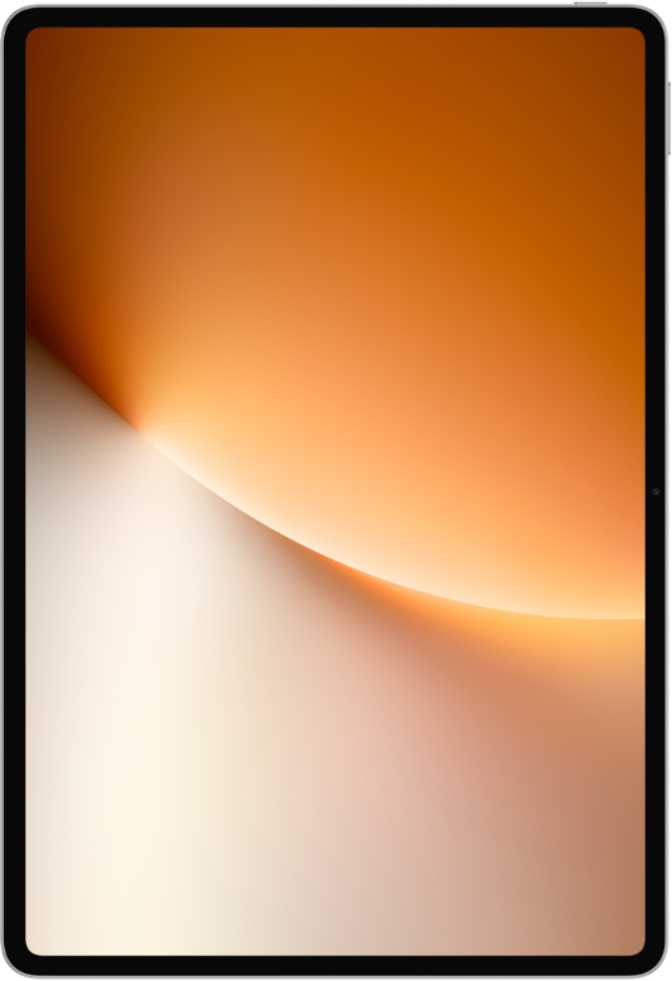
Honor MagicPad 4 Full Review: OLED Power and a Clear Verdict
TabletsEditors' Rating
A flagship-grade OLED tablet that earns its premium positioning on display quality, raw processing power, and next-generation wireless — with a focused set of limitations that affect a specific buyer profile.
At a Glance
Display
12.3" OLED · 165Hz
3000×1920 · 290 ppi
Processor
3nm Flagship SoC
Adreno 840 GPU
Memory
16GB RAM / 512GB
DDR5 · 4800 MHz
Battery
10,100 mAh
Fast charge · No wireless
Wireless
Wi-Fi 7 · BT 6.0
aptX Adaptive · Wi-Fi only
Build
4.8mm · 450g
No IP rating · No stylus
Design and Build Quality
The MagicPad 4's most immediately striking quality is its physical restraint. At 4.8mm thick — roughly the width of four stacked credit cards — it borders on implausible given the hardware packed inside. This is not a marketing rounding trick: picked up alongside most competing tablets, the slimmer profile is tangible from the first moment.
The footprint is generous, as expected for a 12.3-inch device, sitting wider than a standard A4 sheet of paper. At 450 grams, it lands on the lighter side for its screen size — comparable to holding a moderately sized hardcover book. Extended one-handed use will still fatigue most wrists over time, as the physics of a panel this large dictates. In landscape orientation, though, it rests naturally in two hands or on a propped surface with very little bulk to navigate around.
There is no water or dust resistance of any official rating. No IP certification means no protection against spills or brief rain exposure. This is a common omission at this price tier, but it is worth stating plainly: liquids and this tablet do not belong near each other.
No stylus and no keyboard ship in the box. Productivity ambitions — annotation, note-taking, precision illustration — require separately purchased accessories. Whether a first-party Honor stylus is compatible with this model is worth confirming before purchase, and the absence of tilt sensitivity in the specification table narrows the options for digital artists specifically.
4.8mm
Thickness
450g
Weight
273.4mm
Width
178.8mm
Height
No accessories in the box. No stylus, no keyboard, no water resistance. If your workflow depends on any of these, factor in the additional cost before purchasing.
The Display: Where It Earns Its Price
The 12.3-inch OLED panel is the headline feature, and it delivers fully on that status. OLED technology means each pixel generates its own light — blacks are not dimmed backlights but completely switched-off pixels, producing contrast ratios that IPS and LCD panels cannot replicate regardless of their quoted brightness figures.
At 290 pixels per inch across a 12-inch diagonal, text and fine detail appear genuinely sharp at normal viewing distances. Individual pixels are invisible to the naked eye when reading documents or viewing detailed illustrations at full zoom — the kind of sharpness that removes any visual friction from long reading sessions.
A 165Hz refresh rate is exceptional by any tablet standard. Most premium competitors top out at 120Hz; entry-level tablets still ship at 60Hz. The practical effect is that scrolling through long documents, swiping between apps, and playing fast-paced games all appear noticeably smoother than on lower-refresh panels. For anyone who has never experienced a display above 90Hz, the difference is immediately visible.
An anti-reflection coating on the panel surface meaningfully reduces glare in bright environments — offices with overhead lighting, positions near windows, or outdoor use in shade. This is a practical quality-of-life addition that extends comfortable screen use across more conditions than untreated glass allows.
Display Specifications
- Panel Type OLED / AMOLED
- Screen Size 12.3 inches
- Resolution 3000 × 1920 px
- Pixel Density 290 ppi
- Refresh Rate 165 Hz
- Anti-Reflection Yes
- Touch Screen Yes
- Dolby Vision / HDR10 None
HDR certification is absent. Streaming platforms that deliver Dolby Vision or HDR10+ content will not trigger those enhanced modes on this display. The OLED panel's inherent contrast advantage remains intact — but certified peak brightness tiers for premium HDR streaming are not unlocked. Casual viewers will not notice; dedicated home-cinema users will.
Performance: Flagship-Grade Processing
Built around a processor fabricated on a 3-nanometer process — the current frontier of consumer chip manufacturing — the MagicPad 4 delivers more computing output per unit of energy than any previous mobile process node. The practical result is higher sustained performance under load without the thermal throttling that causes older-generation chips to slow after a few minutes of intensive work.
The CPU uses a two-cluster architecture: two high-performance cores running at 3.8 GHz handle demanding tasks like video encoding, complex document processing, and app launches, while six efficiency cores at 3.32 GHz manage lighter background activity. Everyday interactions feel instant while demanding workloads receive full computational attention — and the battery is not penalised for it.
With 16 gigabytes of DDR5 RAM operating across two memory channels at 4,800 MHz — delivering a peak bandwidth of 84.8 GB/s — holding a dozen browser tabs open alongside several active productivity apps while a background process renders is well within this tablet's comfort zone. Competing devices with 8 or 12 GB begin to hesitate in that scenario. This one does not.
The 512GB of internal storage is generous enough to absorb years of accumulated documents, downloaded media, and app data for most users. With no microSD slot available, 512GB is also the ceiling — users who maintain large local video libraries should plan accordingly before purchase.
Geekbench 6 Results
Top-tier territory for any mobile processor currently available
Among the highest scores recorded in any Android tablet
GPU Specification
- GPU Model
- Adreno 840
- Clock Speed
- 1,200 MHz
- DirectX Support
- 12
- OpenGL ES
- 3.2
3nm
Process Node
16GB
RAM (DDR5)
512GB
Storage
84.8
GB/s Bandwidth
Battery Life: Charge Every Two to Three Days
The MagicPad 4 houses one of the most capacious batteries in its class. Under moderate daily use — web browsing, document work, streaming video at controlled brightness — most users should expect to reach for the charger every two to three days rather than every evening. Battery anxiety is simply not a realistic part of the ownership experience here.
Heavy workloads, sustained gaming at high brightness, or continuous 4K playback will compress that estimate, but the battery headroom is substantial enough that a single intensive day should still leave meaningful charge remaining. The 3nm chip's efficiency plays a direct role here: less energy consumed per task means the battery stretches further under identical workloads compared to older-process competitors.
Fast charging via USB-C means a meaningful top-up is recoverable in a short rest period — useful for anyone who forgets to charge overnight. Wireless charging is not supported. All power delivery happens through cable, which requires a minor workflow adjustment for users who routinely charge devices on a wireless pad.
10,100 mAh
Battery Capacity
Fast Charging
Via USB-C
No Wireless
Cable only
Connectivity and Audio
Wireless Networking
Wi-Fi 7 — also called 802.11be — is the newest generation wireless standard, delivering substantially higher throughput and lower latency than Wi-Fi 6 and 6E, with improved performance in environments crowded with competing devices. The MagicPad 4 is also backwards compatible with all previous Wi-Fi generations, so it works perfectly with existing routers today while future-proofing the investment as hardware upgrades.
No cellular connectivity. No 4G LTE, no 5G, no SIM slot. Internet access away from known Wi-Fi requires tethering from a smartphone or a separate hotspot device. For frequent travellers or field workers, this is a firm constraint — not a minor inconvenience.
Bluetooth and Audio
Bluetooth 6.0 pairs with aptX Adaptive — the highest tier of Qualcomm's wireless audio codec stack — which dynamically adjusts bitrate to preserve near-lossless audio quality over Bluetooth with compatible headphones. aptX HD is also included for static high-resolution streaming, and standard aptX ensures broad compatibility with older hardware.
LDAC — Sony's competing high-resolution wireless format — is not supported. Users with Sony or LDAC-optimised headphones fall back to a lower quality tier. There is no 3.5mm headphone jack; wired audio requires a USB-C adapter. Stereo speakers are built in, ensuring directional audio during standard landscape viewing.
Connectivity at a Glance
Wi-Fi 7
SupportedBluetooth 6.0
aptX AdaptiveStereo Speakers
IncludedUSB-C 3.2
Supported5G / LTE
Not Available3.5mm Jack
Not IncludedNFC
Not AvailableGPS
Not AvailableCamera System: Functional, Not a Priority
Tablet cameras exist primarily for video conferencing and document scanning. The MagicPad 4's camera system is calibrated accordingly — it handles those use cases competently without positioning itself as a serious imaging tool.
Rear Camera — 13MP
-
13MP sensor at f/2.0 aperture
A reasonably wide aperture for lower-light tablet photography -
4K video recording at 30fps
Suitable for capturing presentations, lectures, and reference footage -
Continuous autofocus during video
Keeps subjects sharp through panning and subject movement -
Manual controls available
ISO, white balance, focus, and exposure are user-adjustable -
No optical image stabilisation
Handheld video reflects camera shake without compensation -
Single lens — no wide or zoom
Not a camera system for photographers or content creators
Front Camera — 9MP
The 9-megapixel front camera at f/2.2 is well-specified for its primary purpose: video conferencing. At a 12.3-inch screen size this tablet will frequently serve as a video call display, and the resolution is more than adequate for clear, detailed participant video across all major platforms.
- Resolution
- 9 MP
- Aperture
- f/2.2
- Slow-motion video
- Supported
No fingerprint scanner. The device relies on face unlock — not 3D face recognition — which may be less reliable in low-light conditions and is generally considered less secure than a dedicated biometric sensor.
Software, Privacy, and Android 16
The MagicPad 4 ships with Android 16 — the most current major version of the platform. Android 16 brings refinements to multitasking, notification management, and adaptive display behaviour that are particularly relevant to larger-screen devices. The MagicPad 4 takes full advantage with native split-screen multitasking, picture-in-picture mode, and a multi-user account system that keeps professional and personal workspaces separate on a single device.
On-device machine learning enables offline voice recognition and live text extraction from images without requiring a cloud connection for every query — both features that work immediately and privately, without sending data off the device.
A comprehensive set of Android privacy controls is present: camera and microphone access management, app tracking restrictions, location privacy options, and clipboard access warnings. These let technically aware users audit and limit what apps can access while running in the background — a meaningful assurance for privacy-conscious buyers beyond what default Android permissiveness typically provides.
Included Software Features
Who Is the MagicPad 4 For?
A Strong Fit If You...
- Spend extended sessions reading documents, annotating content, or running productivity apps on a large canvas — primarily in Wi-Fi connected environments like home or the office.
- Prioritise display quality above everything — streaming content, graphically immersive gaming, or long-form reading benefit substantially from an OLED panel at this size and refresh rate.
- Multitask heavily across several applications simultaneously and need a chipset that sustains performance rather than throttling after a short burst.
- Value wireless technology that leads the market — Wi-Fi 7 and Bluetooth 6.0 with aptX Adaptive represent the current standard ceiling for tablet connectivity.
- Want a large-screen tablet that is genuinely slim and light — not just acceptable for its size, but impressive by any standard at 4.8mm and 450g.
Look Elsewhere If You...
- Need cellular independence — journalists, field workers, and travellers who rely on a tablet with its own SIM slot away from known Wi-Fi networks will find this a firm limitation.
- Are a digital artist expecting a bundled stylus with tilt sensitivity or full pressure graduation out of the box — neither is included or specified.
- Depend on Dolby Vision or HDR10 certification for premium streaming — the display will not unlock those modes on compatible platforms such as Netflix or Prime Video.
- Use Sony LDAC headphones as your primary wireless audio setup — the codec is absent and those headphones will fall back to a lower-quality tier.
- Need independent GPS navigation or location tracking away from Wi-Fi — with no cellular and no dedicated GPS module, this tablet cannot determine its own position.
How It Compares to the Competition
The table below positions the MagicPad 4 against the typical specification profile of competing 12-inch Android tablets in the same performance and price bracket.
| Feature | Honor MagicPad 4 | Typical 12" Android Rival |
|---|---|---|
| Display Technology | OLED / AMOLED | IPS LCD (most common at this size) |
| Refresh Rate | 165 Hz | 120 Hz (most competitors) |
| Chipset Generation | 3nm flagship-grade | 4nm or 5nm mid-range (varies) |
| RAM | 16GB DDR5 | 8–12GB typical |
| Wi-Fi Generation | Wi-Fi 7 | Wi-Fi 6 or 6E |
| Bluetooth | 6.0 with aptX Adaptive | 5.3 typical |
| Cellular Option | Not Available | Often available as a variant |
| Stylus Included | Not Included | Varies (usually separate) |
| Water Resistance | None | Varies (IP68 on some flagships) |
| HDR Certification | Not Certified | HDR10 on many rivals |
Honest Assessment
Where It Excels
The MagicPad 4's strengths cluster around the areas a user interacts with most — and feels most directly. The OLED panel at 165Hz is not incrementally better than competing displays in this size category; it is categorically better in most daily use scenarios. Shadow detail in films, contrast in dark-mode interfaces, and the fluid response of a 165Hz panel combine into a screen experience that typical IPS tablets simply cannot replicate regardless of resolution or brightness spec.
The chipset ensures this tablet will not feel sluggish as application demands grow over the coming years. At the 3nm process node, with DDR5 memory bandwidth that rivals some desktop configurations, heavy sustained multitasking is comfortable rather than conditional on how warm the device has become.
Wi-Fi 7 and Bluetooth 6.0 with aptX Adaptive set a wireless foundation that most competing tablets have not reached. Together with the impressively thin and light chassis, these specifications represent a genuine engineering achievement at this display size — not a spec sheet exercise.
Where It Falls Short
The absence of cellular connectivity is the most significant constraint — and uniquely, there is no cellular variant to fall back on. This closes the door entirely on independent connectivity for a meaningful category of buyer. Combined with the lack of GPS, the MagicPad 4 cannot navigate or track location at all without a Wi-Fi or paired device.
The omission of HDR10, HDR10+, and Dolby Vision certification means streaming services that deliver certified HDR content will not trigger those enhanced modes. The OLED's inherent advantages persist, but users paying for premium HDR streaming tiers will not receive the full benefit they expect on platforms designed to serve it.
The lack of a fingerprint scanner — replaced by basic (not 3D) face unlock — leaves biometric security meaningfully weaker than a dedicated sensor. No water resistance means liquid exposure carries real risk. The missing stylus limits the creative potential of a canvas this large and sharp. And the absence of LDAC narrows the high-resolution wireless audio ecosystem available to MagicPad 4 owners.
Frequently Asked Questions
Final Verdict
Our recommendation on the Honor MagicPad 4
The Honor MagicPad 4 is a genuinely impressive Android tablet that earns its premium positioning through a coherent combination of display quality, processing power, and connectivity generation — not through marketing momentum. The OLED panel at 165Hz, the 3nm flagship chipset, Wi-Fi 7, and an impressively thin 4.8mm chassis form a package that leads the field in its most important categories.
The buyer who gets the most from this device spends real time consuming media, working on documents, and multitasking across applications in environments with reliable Wi-Fi. The limitations — no cellular, no included stylus, no HDR certification, no LDAC, no GPS — are real and bounded. They affect specific user profiles, not the typical buyer this device is clearly aimed at.
If your usage falls within its strengths, it is genuinely difficult to point elsewhere at this display size and performance tier. If one of the key omissions is a dealbreaker for your specific workflow, identify it clearly before purchase — because the hardware itself makes no concessions on quality, and deserves to be matched to a buyer whose needs it can fully serve.
Overall Rating
Verdict
Highly RecommendedBest For
Media, productivity, and gaming in Wi-Fi environments
Standout Feature
12.3" OLED panel at a class-leading 165Hz
Key Limitation
No cellular connectivity — Wi-Fi only, no SIM option