Portronics Vader X Review: Full Specs, Real-World Performance & Honest Verdict
MiceThe Portronics Vader X enters a crowded budget gaming mouse market with a named sensor, six fully programmable buttons, and a wide DPI range — features that typically cost more. This review cuts through the spec sheet to tell you exactly what you are getting and whether it matches your needs.
Quick Score Breakdown
Design and Build: Who This Mouse Is Built For
Ergonomics, dimensions, cable & physical experience
Shape, Size, and Ergonomics
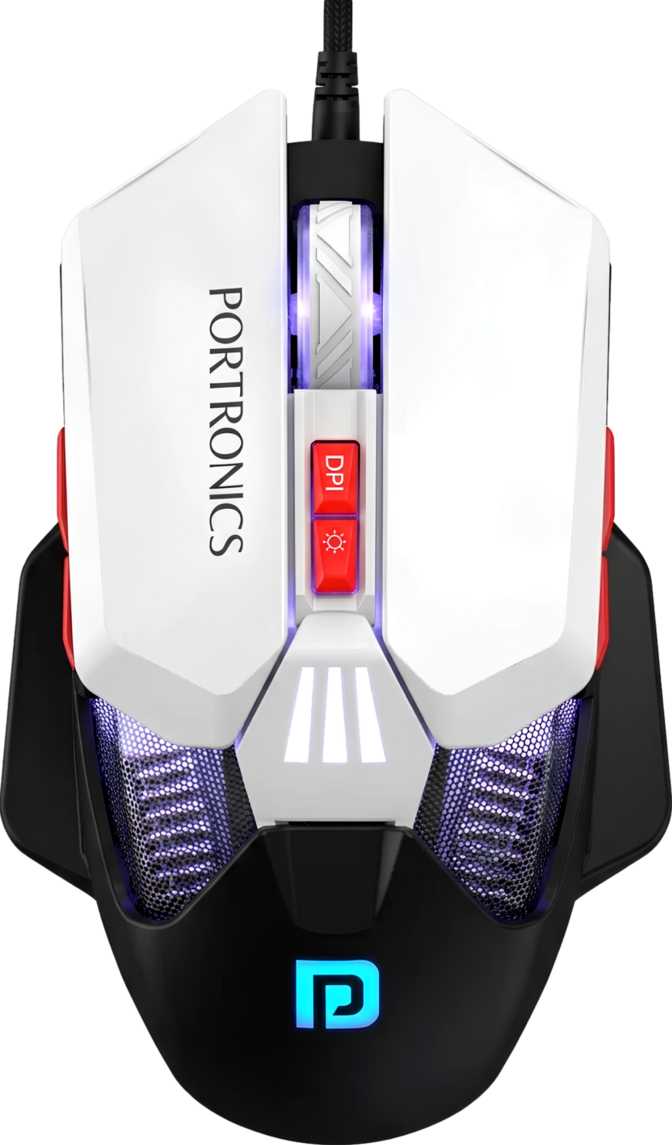
The Vader X is built exclusively for right-handed users. This is a deliberate ergonomic choice — the asymmetric shell cradles the right hand with a pronounced thumb rest along the left flank and a contoured top surface that supports both palm and claw grips comfortably.
At 125mm long, 80mm wide, and 45mm tall, it occupies the mid-size category — longer and wider than compact travel mice, but not as imposing as large palm-grip designs. Users with medium to large hands will find the proportions familiar. Those with smaller hands may find the length slightly stretching during extended sessions.
The mouse weighs 130 grams, placing it on the heavier side compared to ultralight gaming mice that have become fashionable in competitive circles. However, 130g is entirely normal for a mainstream gaming mouse, and many users prefer the solidity it brings. There are no removable weight cartridges, so if a lighter feel is essential to you, this mouse offers no customization in that direction.
Physical Specifications
- Length
- 125 mm
- Width
- 80 mm
- Height
- 45 mm
- Weight
- 130 g
- Cable Length
- 1.5 m USB
- Orientation
- Right-handed
- RGB Lighting
- Yes
- Extra Weights
- No
Cable and Connectivity
The 1.5-meter USB cable is the accepted standard for desktop wired mice — long enough to reach from a tower or laptop comfortably without pulling taut, and short enough that you are not managing excess slack.
One genuine convenience: the mouse remains fully operational while connected. There is no forced downtime, no pairing process. Plug it in and it works immediately.
RGB Lighting
The Vader X includes RGB lighting — a common expectation at this price tier that adds visual personality to a desk setup. If you prefer a clean, unlit workspace, this is worth noting before purchasing.
Lighting control depends on software rather than onboard hardware, which ties into the broader programmability discussion covered further below.
Sensor Performance: What the Numbers Mean in Practice
Instant A825 sensor — tracking speed, acceleration & DPI explained plainly
The Instant A825 Sensor
The Vader X uses the Instant A825 optical sensor. For buyers unfamiliar with sensor tiers: this is a competent mid-range sensor capable of handling everyday gaming and productivity tasks reliably. It is not the high-end flagship sensor found in premium esports mice, but it is a meaningful step above the generic, uncertified sensors found in the cheapest peripheral options.
Tracking Speed and Acceleration
The sensor tracks movement at up to 60 inches per second — wide enough to cover everything from slow, deliberate cursor work to fast, sweeping gestures across a large mousepad. You would need to be a competitive FPS player making extremely rapid, exaggerated swipes to challenge this ceiling. For the vast majority of gaming and desktop use, this is more than sufficient.
The 20G acceleration ceiling means the sensor accurately tracks the mouse even when snapping quickly from a standstill — the kind of motion that happens when you shift aim from one target to another in a shooter. Again, a solid specification for the intended audience.
Polling Rate in Plain Terms
The mouse communicates with your PC 500 times per second, meaning every movement is reported every 2 milliseconds. High-end competitive mice offer 1000Hz or higher, halving that to 1ms — but the practical difference is imperceptible to all but elite competitive players. For casual to mid-level gaming and all productivity tasks, 500Hz is completely adequate.
DPI Range at a Glance
Precision / Sniping 12,800 DPI
Large Displays
Most users settle between 800–3200 DPI. The Vader X's wide window means you can tune to your exact preference.
Sensor Quick Facts
- Named sensor — Instant A825
- 60 IPS max tracking speed
- 20G max acceleration
- 500 Hz polling rate (2ms latency)
- On-the-fly DPI switching button
Real-World Usage: Who Gets the Most from This Mouse
Honest targeting — match yourself before you buy
-
Casual to mid-level PC gamers
MOBAs, RPGs, strategy games, or casual shooters where sensor precision matters but competitive millisecond advantages do not. -
First-time gaming mouse buyers
Upgrading from a basic office mouse — you get adjustable DPI, programmable buttons, and a purposeful feel without a steep learning curve. -
Home office users who also game
Six programmable buttons pull double duty — productivity shortcuts during the day, game actions in the evening. -
Medium to large hands
The right-handed ergonomic shell and comfortable dimensions suit palm and claw grips equally well. -
Budget-conscious buyers
Legitimate gaming features — real sensor, RGB, full programmability — without flagship brand pricing.
-
Left-handed users
The asymmetric right-hand-only design makes this mouse uncomfortable and impractical for southpaws. -
Competitive FPS or esports players
1000Hz polling, sub-100g weight, and a flagship-tier sensor are what high-level play demands. The Vader X is not built for that use case. -
Multi-machine users
Without onboard memory, your custom settings stay on the host PC. Moving between computers means reverting to defaults. -
Small-handed users
The 125mm length may cause stretch fatigue during long sessions for those with smaller hands. -
Wireless-only buyers
This is strictly a wired mouse. If cable-free freedom matters to you, look elsewhere.
How It Stacks Up Against the Alternatives
Portronics Vader X vs typical budget gaming mouse competitors
| Feature | Portronics Vader X | Typical Budget Competitor |
|---|---|---|
| Sensor | Named — Instant A825 | Often generic / unlisted |
| Polling Rate | 500 Hz | 125 Hz – 500 Hz (varies) |
| DPI Range | 600 – 12,800 DPI | 800 – 3,200 DPI (typical) |
| Programmable Buttons | 6 of 6 | 2 – 4 (typical) |
| Onboard Memory | None | None (common at tier) |
| Weight | 130 g | 90 – 150 g (varies widely) |
| RGB Lighting | Yes | Yes (near universal) |
| Side Buttons | 2 | 2 (standard) |
| Warranty | 1 Year | 1 Year (standard) |
The Vader X's named sensor and wider DPI range give it a technical edge over direct rivals using unspecified optical components. Full six-button programmability is stronger than most competitors at this tier offer.
Strengths and Weaknesses: An Honest Assessment
What this mouse genuinely delivers — and where it concedes ground
Where the Vader X Shines
The Instant A825 sensor provides tracking accuracy that exceeds what its price implies. Competing products at the same budget tier frequently ship with unbranded optical components that offer no transparency on performance specifications. Knowing the sensor name matters — it means you can research its actual capability rather than guessing.
The 600–12,800 DPI window is genuinely wide — wider than many budget competitors bother to engineer. Having every single button be programmable is a thoughtful design choice that elevates the mouse's usefulness beyond pure gaming into daily productivity workflows.
The ergonomics are well-executed for the intended user. The shell dimensions hit a comfortable middle ground that serves the most common hand sizes without compromise. The build feels solid and intentional — not hollow or creaky in the way that some budget peripherals present themselves.
Where the Vader X Shows Its Limits
No onboard memory is the most practical limitation for buyers who use more than one computer. Your configurations live on your PC, not in the mouse — a constraint that matters more than most buyers initially realize until they try to use the mouse elsewhere.
The 130-gram weight, while comfortable for extended sessions for most users, will feel heavy to anyone who has experienced modern ultralight designs. It is not a dealbreaker, but it is a genuine perception difference.
The 500Hz polling rate is perfectly functional, but it does sit below the 1000Hz that has become table stakes in mid-range and above gaming mice. For casual gamers, this is invisible. For serious players, it is a measurable step down.
Left-handed users are entirely excluded. The asymmetric design makes no accommodation for southpaws, which is simply a hard stop for a meaningful segment of the buying audience.
Common Questions Buyers Ask Before Purchasing
Answers to what real shoppers search for — no fluff
Final Verdict
Should You Buy the Portronics Vader X?
The Portronics Vader X makes a clear and honest case for itself. It is a wired, right-handed gaming mouse that punches above its price class in sensor quality, DPI range, and programmable button count. It is not trying to be an esports weapon — and it should not be judged as one.
Judged for what it actually is — an accessible, feature-complete entry into real gaming mouse territory — it delivers well. The named Instant A825 sensor, genuinely wide DPI window, and full six-button programmability are real advantages over the generic budget competition. The solid ergonomics and plug-and-play wired simplicity make the ownership experience straightforward.
The limitations are real but predictable for the price: no onboard memory, no wireless option, a weight that competitive players will notice, and exclusion of left-handed users. None of these are fatal for the core audience. Buy it if you game casually, want programmable controls, and stay at one desk. Look elsewhere if you compete seriously, switch machines often, or game with your left hand.
Recommended
For casual gamers & home office users