Portronics ToadGo Review: Built for Multi-Device Productivity
MiceHow the ToadGo Rates
Design and Build Quality
Physical experience, dimensions, and what it actually feels like to use daily.
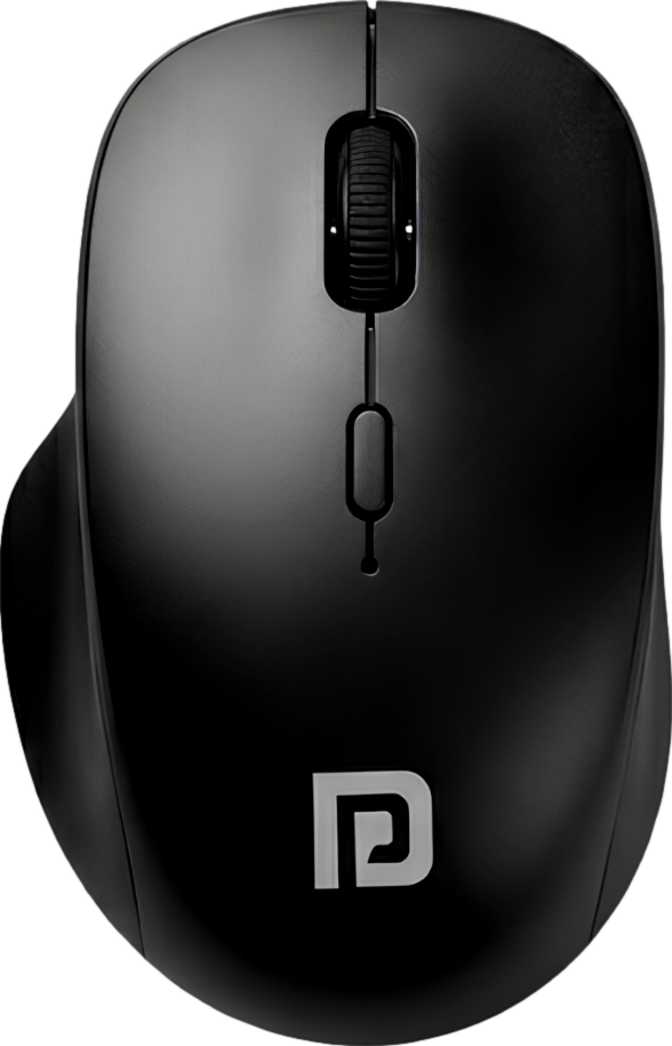
The ToadGo takes a no-frills approach to design that will feel either refreshingly clean or slightly plain depending on your expectations. There is no RGB lighting, no aggressive angular styling, and no detachable weight system. What you get instead is a compact, right-handed shell shaped around a conventional palm-or-fingertip grip.
At 85 grams, it sits in a comfortable middle ground — light enough that extended sessions do not fatigue your wrist, but with enough mass to feel deliberate and controlled under the hand. Featherweight ultralight mice in the 50–60g range often feel hollow; the ToadGo avoids that impression entirely.
The physical dimensions place it firmly in the small-to-medium category. Users with larger hands may find the reach slightly cramped over long hours, while those with average or smaller hands will likely find the fit natural. The scroll wheel is a standard single-axis design — vertical only, no lateral tilt — which is standard for this category. Overall the build communicates reliability over luxury, and that is exactly the right priority for a daily productivity tool.
| Length | 120 mm |
| Width | 75 mm |
| Height | 45 mm |
| Weight | 85 grams |
| Orientation | Right-handed only |
| RGB Lighting | None |
| Scroll Wheel | Single-axis (vertical only) |
| Charging Cable | 1 metre, included |
Connectivity: The Real Reason to Buy This Mouse
The ToadGo's standout feature is its dual-mode wireless setup — it pairs over both a 2.4GHz USB receiver and Bluetooth 5.0, and you can switch between them instantly without re-pairing.
2.4GHz USB Receiver
The preferred mode for the most responsive feel. This wireless standard consistently delivers near-wired response times for everyday tasks, making it the right choice at a fixed workstation or primary desktop machine.
Requires one USB-A port. If your machine only has USB-C, a separate adapter will be needed — it is not included.
Bluetooth 5.0
Bluetooth 5.0 is meaningfully better than older BT 4.0 or 4.2 connections — more stable pairing, less signal dropout, and lower power consumption. This mode suits laptops, iPads, Android tablets, and any device where plugging in a receiver is inconvenient or impossible.
How dual wireless changes your daily workflow
If your work desktop uses the USB receiver for a lag-free connection, you can flip to Bluetooth when you pick up your laptop or tablet — without touching cables or re-pairing anything. One mouse handles two machines with instant switching. This removes the need for two separate pointing devices or a KVM solution for something as simple as moving a cursor between screens.
Performance: What the Numbers Actually Mean
A plain-language breakdown of the sensor, DPI range, polling rate, and real-world tracking behaviour.
Sensor and Tracking
The ToadGo uses an optical sensor, tracking surface movement through an LED light. For productivity use, this is the right choice — optical sensors perform consistently on fabric mousepads, wooden desks, and standard desk mats, without the over-sensitivity to surface imperfections that laser sensors can sometimes exhibit.
Polling Rate
The mouse reports its position to your computer 125 times per second. For document editing, web browsing, and casual creative tasks, this is entirely sufficient. Competitive gamers and users who perform rapid precision cursor movements may notice a difference compared to 1000Hz gaming mice, but the average productivity user will not feel it.
Speed and Acceleration
The sensor handles movement at up to 30 inches per second with a ceiling of 10G of acceleration. In plain terms, you would need to sweep the mouse with genuinely aggressive speed to trigger any tracking failure. Normal — even energetic — daily use will never come close to these limits.
DPI Settings — What Each Level Is Best For
| DPI Setting | Best Use Case |
|---|---|
| 600 DPI | Large displays, precise clicking, deliberate slow-paced work |
| 1200 DPI | General office and web use on a standard monitor |
| 2400 DPI | Multi-monitor setups, fast navigation across large screen real estate |
Battery Life: Charge It Once, Forget About It
Endurance, real-world weekly charging expectations, and what use-while-charging actually means.
The internal rechargeable battery delivers up to 70 hours per charge. To make that tangible: if you work eight hours a day, five days a week, you are looking at roughly one and a half to two weeks between charges under normal usage. Light users may stretch that further.
The mouse charges via the included one-metre cable and, crucially, remains fully functional while plugged in and charging. Running out of battery is never a reason to stop working — plug in and keep going. This detail is absent on many budget wireless mice, and its inclusion here is a genuine quality-of-life advantage.
Who Should Buy the Portronics ToadGo
Matching the mouse to the right user — and being direct about who it will disappoint.
- Professionals who regularly switch between two devices — a work desktop and a personal laptop, or a desktop and a tablet — and want one mouse that handles both without hassle.
- Students or remote workers who carry their mouse between locations and value a compact, lightweight form factor that travels easily.
- Anyone upgrading from a basic wired mouse who wants wireless freedom without spending heavily on a premium device.
- Right-handed users with average or smaller hands who prefer a conventional grip style and clean, distraction-free aesthetics.
- Left-handed users — the right-handed-only ergonomic shape makes it uncomfortable for southpaw use, with no ambidextrous alternative available.
- Gamers or anyone who needs a polling rate above 125Hz, a DPI ceiling beyond 2400, or hardware-level profile memory stored in the device.
- Large-handed users who rely on a deep full-palm grip — the compact 120 mm shell may feel cramped during extended sessions.
- Users who need saved button profiles that travel between computers without relying on software installation on each individual machine.
How It Compares to the Competition
The ToadGo competes where Logitech, Microsoft, and several Indian-market brands all offer dual-wireless options at similar prices. Here is where it stands on the key differentiators.
| Feature | Portronics ToadGo | Typical Competitor |
|---|---|---|
| Dual wireless (2.4GHz + Bluetooth) | Yes | Common at this tier |
| Bluetooth version | 5.0 | Often 4.0 – 5.0 |
| Battery life | ~70 hours | Typically 30 – 90 hours |
| Use while charging | Yes | Not always included |
| Max DPI | 2400 | Usually 1600 – 4000 |
| Programmable buttons | All 6 | Often 2 – 4 |
| Onboard memory | None | Rare at this price |
| RGB lighting | None | Rarely included |
| Weight | 85g | 80 – 100g typical |
| Warranty period | 1 year | Standard for category |
Competitor data reflects general market averages across the same price tier and is not based on any single competing product.
Honest Assessment: Strengths and Weaknesses
What the ToadGo genuinely gets right — and where it concedes ground.
What It Gets Right
The dual-mode connectivity is genuinely useful and not a gimmick — it solves a real workflow problem for multi-device users. The Bluetooth 5.0 standard specifically matters because it ensures a stable, efficient pairing that older-generation connections simply cannot match in day-to-day reliability.
Battery endurance is strong enough that charging becomes a fortnightly errand rather than a daily ritual. The use-while-charging capability, while a small detail, is the kind of practical decision that separates thoughtful product design from cost-cutting. You are never forced to stop working while the battery recovers.
All six buttons being programmable punches above the expected price point. Competing mice at the same tier often lock down two to four buttons. Having full control over every input — including the DPI toggle — gives power users more flexibility than they might expect from a mouse at this level.
Where It Falls Short
The absence of onboard memory is the sharpest limitation for multi-computer users. Custom button configurations exist only within the driver software on your machine. Move to a new computer or a system where you cannot install the companion app, and your remapping is gone — the mouse reverts to factory defaults.
The right-handed-only design excludes a meaningful portion of potential buyers outright. There is no ambidextrous version and no practical workaround — if you are left-handed, this is the end of the evaluation.
The 2400 DPI ceiling is perfectly adequate for productivity, but users running ultra-high-resolution displays at large physical screen sizes may occasionally wish for a slightly higher ceiling to reduce the physical travel needed for full-screen cursor movement. It is a niche concern, but a real one for certain setups.
Common Questions Buyers Ask
Answers to what real shoppers search for before purchasing.
Final Verdict
The Portronics ToadGo earns its place as a practical, well-rounded wireless productivity mouse built specifically for the multi-device user.
It does not chase specifications it does not need, it does not pad the feature list with RGB lighting or hollow design flourishes, and it delivers the connectivity flexibility that modern work setups increasingly demand. The combination of dual wireless modes, Bluetooth 5.0, all-button programmability, and use-while-charging is a compelling package at this price point.
If you work across two devices daily and want a single, lightweight wireless mouse that handles the switch without drama — and you do not need settings to persist independently of your computer — the ToadGo is a confident recommendation.
If you need onboard profile storage, left-handed ergonomics, or performance specs that push beyond productivity territory, look elsewhere. But for its intended buyer, this mouse is genuinely good at its job.
Regularly switch between two wireless devices and want one reliable mouse to handle both modes without cables, re-pairing, or carrying a second device.
Are left-handed, need onboard memory, use a full palm grip on a large mouse, or require performance specs beyond everyday productivity use.