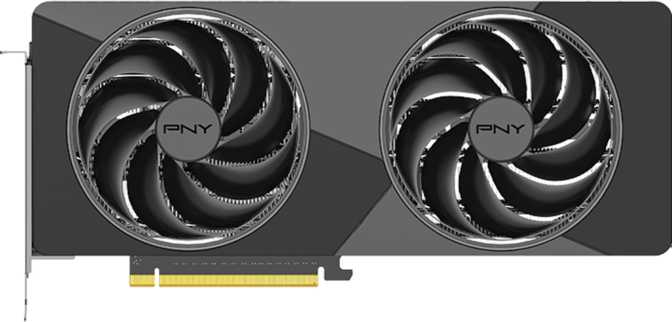
PNY GeForce RTX 5070 Slim Dual Fan: Full Review and Honest Verdict
Graphics CardsThe mid-to-high-end GPU segment is where most serious PC builders spend their money and lose the most sleep. Spend too little and you are chasing frame rates six months later; spend too much and you have bought headroom you will never use. The PNY GeForce RTX 5070 Slim Dual Fan positions itself as the answer to that anxiety — a card built on NVIDIA's latest Blackwell architecture that targets high-fidelity gaming and creative workloads without the physical bulk or price tag of a flagship. Here is everything you need to make a confident decision before committing.
Editorial Score
Design and Build Quality
Where the "slim" designation actually pays off in practice
A Footprint That Fits Reality
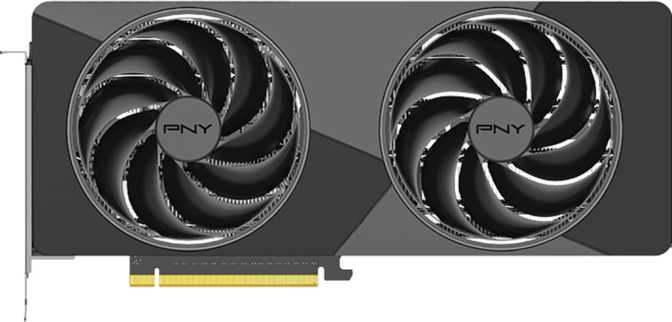
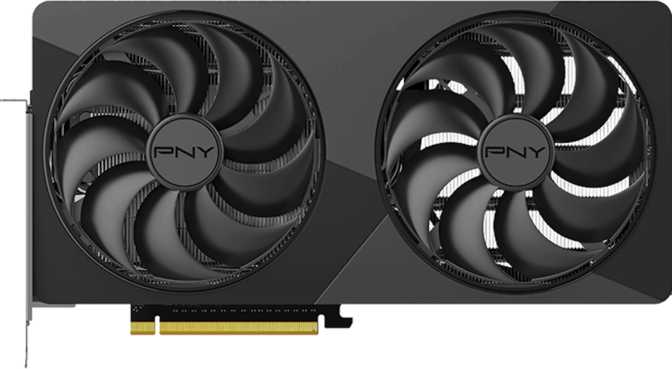
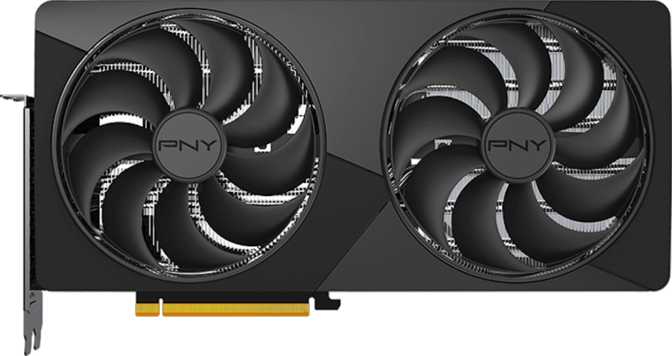
At 290mm long and 128mm tall, the RTX 5070 Slim Dual Fan occupies noticeably less physical space than the triple-fan, oversized coolers that have become standard in this performance class. For builders working with mid-tower cases, smaller ITX enclosures, or compact HTPC-style builds, that difference is not cosmetic — it directly determines which cases are compatible and how airflow behaves inside the chassis.
The dual-fan configuration is a deliberate engineering trade-off. Two fans cooling a 250-watt card work harder than three fans would on the same load. In practice this means the fans will spin faster and potentially louder under sustained gaming or rendering sessions compared to a triple-fan card of equivalent TDP. That is not a dealbreaker, but it is a real consideration for anyone prioritizing silence in a workstation or home theater build.
Aesthetics and Finishing
PNY includes RGB lighting on this card for windowed-case builds without making it the visual centerpiece. The implementation is understated relative to some competitors, which suits builders who want the option without committing to an LED showcase. The overall design aesthetic skews functional — this is a working tool that happens to look clean.
Physical Specifications
Blackwell Architecture: Why It Changes the Calculus
The silicon foundation underneath the RTX 5070 Slim
The Foundation Underneath
The RTX 5070 Slim is built on NVIDIA's Blackwell GPU architecture, fabricated at 5 nanometers. A smaller manufacturing process allows more transistors to fit in less physical space, which translates directly to better power efficiency and higher performance per watt than previous generations. This card packs over 31 billion transistors into its die — a figure that would have been flagship territory just a few years ago.
Blackwell is not simply a speed bump over the previous Ada Lovelace generation. It introduces architectural improvements across the entire rendering pipeline — particularly in how ray tracing and AI-accelerated rendering are handled. For buyers, this matters because it means the RTX 5070 has structurally different performance characteristics in modern workloads, not just higher clock frequencies on aging foundations.
The Core Rendering Pipeline
The card houses 6,144 shader processors — the parallel compute units that handle the millions of calculations required to render each frame. Paired with 192 texture mapping units and 80 render output units, this pipeline is configured for high-resolution rendering. At peak, the texture subsystem pushes over 480 billion texture operations per second, meaning complex surfaces, shadows, and layered material effects process without the bottlenecks that appear in heavily detailed scenes. The boost clock reaches 2,512 MHz under load — a meaningfully high operating frequency for a GPU of this performance class, contributing directly to per-frame speed in workloads that are not perfectly parallelized.
Core Silicon Specifications
- Architecture
- Blackwell
- Process Node
- 5 nm
- Transistor Count
- 31.1 Billion
- Shader Processors
- 6,144
- Texture Units
- 192
- Render Outputs
- 80
- Base Clock
- 2,325 MHz
- Boost Clock
- 2,512 MHz
Memory System: 12GB GDDR7 Analyzed
Speed over raw capacity — and what that trade-off means for you
The GDDR7 Speed Advantage
The GDDR7 standard is significantly faster than the GDDR6X used in many previous-generation cards. Running at an effective rate equivalent to 28,000 MHz, the memory subsystem delivers 672 gigabytes per second of total bandwidth — a substantial leap over what GDDR6X achieved on comparable bus widths, and it meaningfully compensates for the 192-bit bus being narrower than the 256-bit configurations found on higher-end cards.
Think of it this way: a narrower road with much faster-moving traffic can often outperform a wider road where vehicles move slowly. The GDDR7 implementation here is fast enough that memory bandwidth is no longer the bottleneck it once was on similarly-configured buses. Bandwidth-hungry workloads — complex textures, high-resolution rendering, GPU-accelerated video — benefit immediately from this generation jump.
The 12GB Conversation
Twelve gigabytes of VRAM is sufficient for the vast majority of gaming scenarios at 1440p and competent at 4K — with the caveat that some of the most texture-heavy titles at absolute maximum quality settings can approach or occasionally exceed this ceiling. For creative workloads like 3D rendering and AI-assisted image generation, 12GB is functional but will become a constraint before 16GB or 24GB alternatives would.
Worth Flagging Before You Buy
Buyers running high-parameter AI diffusion pipelines locally, or planning to keep this card through several generations of increasingly demanding 4K titles at maximum settings, should weigh the VRAM ceiling carefully before committing.
Key Features Explained
What the technology actually does for you — beyond the marketing names
DLSS AI Rendering
DLSS renders internally at a lower resolution and uses a trained AI model to reconstruct a high-quality final image. The result is significantly higher frame rates with a visual quality trade-off that is genuinely difficult to detect in motion at Quality mode. On Blackwell, this has matured into a real performance multiplier — not a workaround. Support is now near-universal in major releases.
Hardware Ray Tracing
Dedicated RT cores simulate physically accurate lighting, shadows, and reflections. At 1440p with DLSS active, ray tracing delivers noticeably more immersive environments in supported titles without frame rates collapsing. Full path tracing at 4K remains demanding regardless of GPU tier, but 1440p with DLSS in Quality or Balanced mode handles it with reasonable composure.
Display Output Layout
One HDMI 2.1b output and three DisplayPort outputs support up to four simultaneous displays. HDMI 2.1b handles 4K at 144Hz and 8K at 60Hz over a single cable — fully compatible with current high-refresh gaming monitors and modern televisions without adapters. The three DisplayPort outputs serve multi-monitor workstation setups. USB-C video output is absent.
PCIe 5.0 Interface
The card connects via PCI Express 5.0, the latest interface standard. Current games and applications do not approach the bandwidth limits of even PCIe 4.0, so this is forward-looking rather than an immediate performance factor. It ensures the card is optimally positioned for next-generation motherboards without any interface bottleneck over its ownership lifespan.
Intel Resizable BAR
Resizable BAR allows the processor to access the full GPU memory pool directly rather than in smaller fixed chunks. On compatible Intel-platform systems with ReBAR enabled in firmware, this can improve performance in select titles by a few percentage points. It is a small but entirely free gain for eligible builds — requiring no additional configuration beyond a firmware toggle.
API & Software Support
Full DirectX 12 Ultimate support unlocks mesh shading, variable rate shading, and sampler feedback alongside ray tracing — the complete modern rendering toolkit. OpenGL 4.6 and OpenCL 3.0 compatibility covers professional and compute use cases. Stereoscopic 3D and multi-display output round out the feature portfolio for specialized setups.
Power and Thermal Considerations
What to plan for before you finalize your build
At 250 watts TDP, this card sits in a demanding but not extreme position on the power draw spectrum for its performance class. Builders should plan for a power supply with at least 750 watts of total system capacity — 850 watts is the more comfortable margin, particularly when paired with a modern high-core-count processor that adds its own substantial draw.
The dual-fan cooler manages this thermal load across a 290mm card body, and most standard mid-tower cases will accommodate it without issue. That said, builders should verify their case's stated GPU length clearance before purchasing, as some compact cases top out at 280mm or less. The 128mm card height clears most standard PCIe slot positions without interfering with adjacent components or M.2 heatspreaders.
Cooling is entirely air-based, which keeps installation simple and maintenance-free over years of use. The practical implication is that fan speed — and therefore noise — will be higher than a triple-fan card handling the same load. A case with good positive airflow helps the card breathe and measurably reduces both operating temperature and noise floor during extended sessions.
Power Planning Guide
Who This Card Is For — and Who It Is Not
Match your actual use case before spending
The Ideal Buyer
- 1440p high-refresh-rate gamers who want to run demanding titles at high-to-maximum settings at 144Hz or beyond. This is where the RTX 5070 Slim is most at home.
- 4K gamers who use DLSS and are willing to accept DLSS Quality mode rather than native rendering to maximize frame rates.
- Compact build enthusiasts who want high-end performance but cannot or will not fit a 320mm+ triple-fan card in their case.
- Content creators running video editing, 3D modeling, or GPU-accelerated rendering at moderate-to-high complexity — GDDR7 bandwidth helps here directly.
- Prosumers with mixed workloads who need capable hardware without moving to workstation-tier products and their associated costs.
Consider Alternatives If...
- You want native 4K ultra without DLSS and maximum VRAM headroom for the long term — a card with 16GB or more will serve you better over a five-plus year window.
- You run heavy AI or machine learning workloads locally with large models or high-parameter diffusion pipelines — 12GB fills up faster than the GPU's compute capability does.
- Silence under sustained load is non-negotiable — a triple-fan card with more thermal headroom will run meaningfully quieter during long gaming or rendering sessions.
- You rely on USB-C video output for monitors or VR headsets that expect a USB-C signal path — this card's port layout does not include one.
Competitive Positioning
How the RTX 5070 Slim stacks up against the most logical alternatives at a similar price point
| Card | Architecture | VRAM | Bus Width | Peak Compute | Form Factor |
|---|---|---|---|---|---|
| PNY RTX 5070 Slim Dual FanThis Card | Blackwell 5nm | 12GB GDDR7 | 192-bit | ~30.9 TFLOPS | Compact dual-fan |
| RTX 5070 Ti class | Blackwell 5nm | 16GB GDDR7 | 256-bit | Higher | Larger triple-fan |
| RTX 4070 Super class | Ada 4nm | 12GB GDDR6X | 192-bit | ~30.1 TFLOPS | Various |
| RX 7800 XT class | RDNA 3 | 16GB GDDR6 | 256-bit | ~37.3 TFLOPS | Various |
Against the previous generation's equivalent, the RTX 5070 delivers meaningfully better performance per watt and substantially faster memory, making the upgrade case straightforward for anyone still on a card two or more generations back. Against the AMD alternative at a similar price point, the trade-off is real: the competing card offers more VRAM and a wider bus, while the RTX 5070 counters with DLSS, stronger ray tracing performance, and Blackwell's architectural efficiency advantages. Neither wins cleanly for every buyer — it depends on which workloads and features you weight most heavily.
The Slim form factor is the RTX 5070's most genuine differentiator. Very few cards at this performance tier ship in a compact dual-fan configuration, which means for small-case builders the real competitive set is considerably narrower than it appears on a spec sheet.
Honest Strengths and Weaknesses
A balanced assessment of what this card gets right and where it falls short
Where It Excels
Architectural efficiency
Blackwell delivers more per watt than Ada Lovelace did. The performance-per-watt ratio represents a genuine step forward, not just incremental gains on the same foundations.
GDDR7 memory bandwidth
The generational leap in memory speed is significant enough that the 192-bit bus is far less of a concern than it was on previous iterations. Bandwidth-constrained workloads benefit immediately without any configuration required.
Polished, mature DLSS
DLSS at the Blackwell generation is polished enough to function as a genuine performance multiplier rather than a workaround. In Quality mode, the visual trade-off is difficult to detect in motion, and support in major releases is now near-universal.
290mm compact profile
A legitimately differentiated form factor at this performance tier. For small-case builders, this is not a compromise — it is the specific reason to choose this card over equally-specced alternatives with larger coolers.
Three-year warranty
Notably generous for a consumer GPU. This signals manufacturing confidence and gives buyers meaningful protection on a significant purchase — more than the one-year coverage common at this tier.
Where It Falls Short
Fan noise under sustained load
Two fans cooling a 250-watt card work harder than three fans on the same thermal load. In long gaming sessions or extended rendering jobs, the noise difference versus a triple-fan card is audible and not trivial in a quiet room.
12GB VRAM ceiling
Adequate for the vast majority of workloads today. However, VRAM budgets in AAA titles continue to grow, and buyers expecting to game at 4K ultra settings for five or more years may encounter this ceiling in the later part of that window.
No USB-C video output
An increasingly relevant omission for users of USB-C monitors or modern VR headsets that expect a USB-C signal path. An adapter or a different card may be necessary for these setups.
Limited headroom for heavy AI workloads
12GB fills quickly when running large local AI models or high-parameter image generation pipelines. The GPU's compute capability is not the bottleneck here — the memory is, and it will be felt before other limitations surface.
Questions Real Buyers Ask
Direct answers to the things people search before purchasing this card
Final Verdict
PNY GeForce RTX 5070 Slim Dual Fan
The PNY GeForce RTX 5070 Slim Dual Fan's most compelling case rests on the intersection of performance and physical restraint. Blackwell's architectural efficiency means more done per watt than the previous generation, the GDDR7 memory system makes bandwidth no longer a meaningful bottleneck at this bus width, and DLSS at this generation is polished enough to amplify the card's effective output significantly in supported titles — which is most of them. For anyone upgrading from a card two or more generations back, the performance step forward is substantial and immediately felt.
The compact dual-fan cooler is simultaneously the card's signature advantage and its most honest limitation. In long gaming sessions or sustained rendering jobs, you will hear the fans working. And 12GB of VRAM is comfortable today but is not the most future-proof ceiling at the upper end of 4K gaming ambitions. These are real trade-offs worth pricing against the next tier up before deciding — they are not catastrophic, but they are present.
Buy This Card If You...
- Game at 1440p with aspirations toward 4K
- Are building in a compact or mid-tower case
- Want modern AI-rendering support through DLSS
- Are upgrading from a GPU two or more generations old
Look Elsewhere If You...
- Need maximum VRAM for AI workloads or native 4K ultra
- Require near-silence under sustained heavy workloads
- Rely on USB-C video output for monitors or VR headsets