Score Breakdown
What the RTX Pro 2000 Blackwell Actually Is
Most graphics cards shout for attention with RGB lighting, triple-fan coolers, and clock speeds measured in bragging rights. The Nvidia RTX Pro 2000 Blackwell does the opposite. It fits inside workstations that live under desks in architecture studios, medical imaging suites, and financial data centers. It draws less power than some desk lamps. And then it quietly outperforms expectations in every professional task you put in front of it.
This is not a gaming card wearing a suit. It is a purpose-built professional GPU, and understanding that distinction is the single most important thing before reading any further. If you need a workstation GPU that handles complex 3D scenes, precision visualizations, AI-assisted workflows, and massive datasets — reliably, efficiently, and in a compact footprint — keep reading.
Design and Build: The Anti-Gaming GPU
Physical Presence
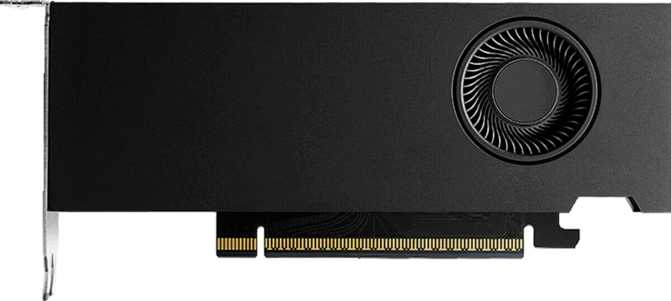
Measuring under 168mm in length and just under 69mm tall, this card occupies a remarkably small footprint. A typical consumer gaming card at this performance tier runs 250–300mm or longer and demands two to three expansion slots. The RTX Pro 2000 Blackwell is built for compact professional workstations — the kind of slim, tower-adjacent machines used in space-constrained office environments.
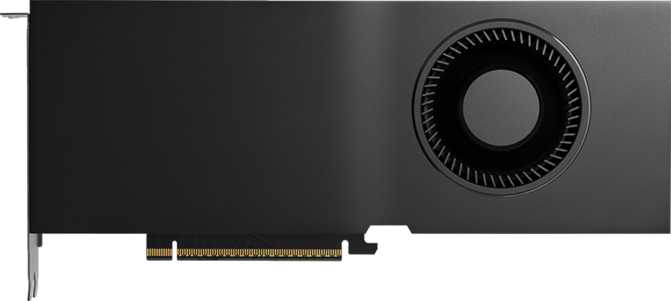
The absence of RGB lighting is a deliberate professional choice, not a cost-cut. In enterprise and workstation deployments, visual flair is noise. The card's aesthetic is functional: a clean, understated shroud for environments where the machine is a tool, not a statement.
There is no bundled air or water cooling solution beyond what is integrated into the card itself. It relies on chassis airflow in well-ventilated workstation cases, meaning it is not suited for passively-cooled enclosures or cramped mini-ITX builds with poor airflow.
Connectivity: Mini DisplayPort Everywhere
The output configuration demands attention: four Mini DisplayPort connectors, with no HDMI, no full-size DisplayPort, and no USB-C video output. This is professional workstation standard. If your monitors use full-size DisplayPort or HDMI, adapters are required. Passive adapters work at most resolutions — but plan for it before the card arrives.
The upside is real: four simultaneous display outputs from a half-height card. For financial traders, CAD engineers, and data analysts who live on multi-screen layouts, this is a meaningful advantage over many consumer alternatives.
Port Configuration
- 4x Mini DisplayPort outputs
- 4 simultaneous displays supported
- No HDMI output — active adapter required for HDMI monitors
- No full-size DisplayPort
- No USB-C video output
Performance Analysis: What Blackwell Delivers
Architecture Foundation
The Blackwell architecture, built on a 5-nanometer fabrication process, packs approximately 21.9 billion transistors into this compact die. That density is what allows the card to deliver professional-tier performance at just 70 watts — enabling deployment in workstations with restricted power delivery and limited thermal headroom where previous-generation professional cards simply could not fit.
Compute Throughput
At roughly 17 trillion floating-point operations per second, this card carries substantial headroom for real-time 3D rendering, parametric modeling previews, and visualization pipelines. More critically, it retains full Double Precision floating-point capability — something consumer gaming GPUs deliberately cripple at this price tier. For engineering simulations and scientific computation requiring FP64 numerical accuracy, that distinction matters directly.
Memory: The Standout
Sixteen gigabytes of next-generation GDDR7 memory delivers up to 288 GB/s of bandwidth — competitive with wider-bus cards using older memory technology. For large CAD assemblies, multi-layer photogrammetry, and high-resolution texture workflows, that headroom means fewer crashes and no fallback to system RAM. ECC support silently corrects single-bit errors before they corrupt a result that looks correct but is not.
What the Numbers Mean in Practice
Key Features Explained for Real-World Work
Ray Tracing
In professional visualization, ray tracing delivers physically accurate lighting for architectural walkthroughs and product design previews. The dedicated hardware accelerates these renders meaningfully compared to software-based alternatives — reducing the time between a design change and a client-ready output.
DLSS Beyond Gaming
DLSS — deep learning upscaling — applies in professional 3D viewports as well as games. It maintains smooth navigation through complex scenes by rendering internally at lower resolution and reconstructing a higher-quality image, reducing the interactive lag that frustrates engineers working in dense assemblies.
ECC Memory
Error-Correcting Code memory silently detects and fixes single-bit memory errors before they corrupt results. For financial modeling, medical data, and engineering simulation, this is non-negotiable — a flipped bit that produces an incorrect result indistinguishable from a correct one is more dangerous than an outright crash.
Resizable BAR
Intel Resizable BAR allows the CPU direct access to the full VRAM pool rather than transferring data in small chunks. For workloads that stream large assets frequently — complex scene files, high-resolution texture banks — this reduces CPU-to-GPU transfer bottlenecks in a measurable, application-dependent way.
Quad Display Support
Four simultaneous outputs from a half-height card. For financial traders, CAD engineers, and data analysts running multi-screen setups — including 4K across all four monitors — the card handles the full pixel count without the degradation that consumer-tier hardware sometimes exhibits under heavy multi-monitor configurations.
PCIe 5.0 Ready
The card runs on the current-generation expansion bus standard and is fully backward compatible with PCIe 3.0 and 4.0 workstations. PCIe 5.0 support means no upgrade compatibility concern when the next wave of workstation platforms arrives — the card grows with the infrastructure around it.
Power Efficiency: The 70-Watt Advantage
A 70-watt Thermal Design Power rating is exceptional for the level of professional performance this card delivers. This is not a marketing number — it changes what workstations this card can live in, how much heat it adds to shared spaces, and what it costs to run across a fleet of machines.
No External Power Required
In many configurations the card runs from slot power alone — no PCIe power connectors needed, no minimum PSU requirements to factor in during procurement.
Office-Friendly Heat Output
Low heat dissipation keeps workstations in open offices and trading floors quieter and cooler without specialized chassis airflow or active cooling upgrades.
Fleet-Scale Savings
Organizations running dozens or hundreds of workstations see the efficiency dividend compound significantly across electricity bills and cooling infrastructure costs.
Architectural Efficiency
The 70W envelope is achieved through the 5nm Blackwell design — genuine architectural efficiency, not hobbled performance. Previous-generation cards consumed considerably more power for comparable professional output.
Who Should Buy the RTX Pro 2000 Blackwell
- CAD and 3D Design ProfessionalsWorking in mid-complexity assemblies and visualization. The 16GB GDDR7 handles large scene files comfortably while the compact form factor fits standard workstation towers.
- Architects and Visualization ArtistsNeeding real-time ray-traced previews in tools like Enscape or Lumion without paying for high-end hardware they don't fully utilize day to day.
- Financial and Data AnalystsRunning multi-screen setups with compute-assisted modeling. Quad-display support, ECC reliability, and full FP64 accuracy in a low-power package covers their exact requirements.
- Enterprise IT TeamsDeploying standardized workstation hardware fleets — consistent thermal output, no power connector complexity, and ECC assurance for reliability at scale.
- Small Form Factor Workstation UsersFor whom larger cards are physically incompatible. Few alternatives at this performance level and memory capacity exist in the compact professional segment.
- GamersNo HDMI limits monitor compatibility, no consumer gaming optimizations are present, and the professional driver stack prioritizes stability over raw frame-rate throughput. Consumer RTX cards deliver better value for gaming.
- Video Content CreatorsShould evaluate whether the absence of HDMI suits their monitoring setup and whether the available shader throughput covers their GPU-accelerated video encoding requirements.
- High-End Visualization StudiosHandling extremely dense scenes, large-format rendering farms, or GPU-compute-heavy simulation. Nvidia's higher-tier professional lineup provides the additional headroom those workflows demand.
- HDMI Monitor UsersMini DisplayPort-only output requires active adapters for HDMI connectivity. Manageable, but worth factoring into the budget and setup plan before ordering.
Head-to-Head: Competitive Positioning
The RTX Pro 2000 Blackwell occupies a position that is genuinely difficult to fill with alternatives. Here is how it compares against the most logical substitutes a buyer in this category would consider.
| Specification | RTX Pro 2000 Blackwell | Mid-Range Consumer GPU | Entry Professional (Prev-Gen) |
|---|---|---|---|
| VRAM | 16 GB GDDR7 | 8–12 GB GDDR6X | 8 GB GDDR6 |
| ECC Memory | Varies by model | ||
| Double Precision (FP64) | Varies by model | ||
| Thermal Design Power | 70 W | 150–200 W | 70–100 W |
| Memory Generation | GDDR7 | GDDR6X | GDDR6 |
| Display Outputs | 4x Mini DisplayPort | HDMI + DP mix | 4x Mini DP typical |
| Prof. Driver Certification | |||
| RGB Lighting | None | Common | None |
Competitor specifications represent typical category ranges and are not sourced from any specific product.
Honest Assessment: Strengths and Limitations
Where It Excels
The RTX Pro 2000 Blackwell earns its value through specificity. Sixteen gigabytes of GDDR7 memory with ECC support is exceptional for this power envelope — most competing cards at this thermal budget offer less VRAM on slower memory technology, without the data integrity guarantees ECC provides.
The full Double Precision floating-point capability is a genuine differentiator. Consumer cards at comparable price points artificially restrict FP64 performance to push buyers toward more expensive professional SKUs. Getting unrestricted FP64 here is meaningful for any workflow requiring numerical accuracy over raw speed.
The compact 167mm length and 70-watt power draw make this card deployable in workstation categories that other professional GPUs cannot enter. That physical flexibility has real enterprise value for IT teams standardizing on slim-tower configurations.
Where It Falls Short
The 128-bit memory bus is the limitation that matters most to users who stress the memory subsystem. GDDR7 compensates substantially for the narrower bus, but workloads that are bandwidth-limited rather than VRAM-capacity-limited will hit a ceiling earlier than they would on a wider-bus card from a competing tier.
At approximately 17 TFLOPS of shader compute, there is a ceiling to the scene complexity this card handles gracefully. It is not built for overnight render farms or GPU-heavy simulation pipelines. Users whose workloads push those boundaries will find themselves wanting more headroom within a year.
The Mini DisplayPort-only output is a specific inconvenience for users arriving from a consumer monitor ecosystem. Active adapters for HDMI connectivity add cost and an extra link in the signal chain. Manageable — but it should not be a post-purchase discovery.
Frequently Asked Questions
A Clear Recommendation — for the Right Buyer
Exceptional for professional workstations
The Nvidia RTX Pro 2000 Blackwell is a card that delivers exactly what it promises to exactly the right buyer. It makes no attempt to be a generalist product — and that focus is precisely its strength.
For professional workstation users who need reliable, accurate GPU compute — with ECC memory protection, Double Precision floating-point support, 16GB of fast next-generation VRAM, and a compact thermal footprint — this is a well-executed, purpose-appropriate choice. It brings Blackwell's architectural efficiency into a professional tier that previously had to settle for older designs or pay considerably more for comparable memory specifications.