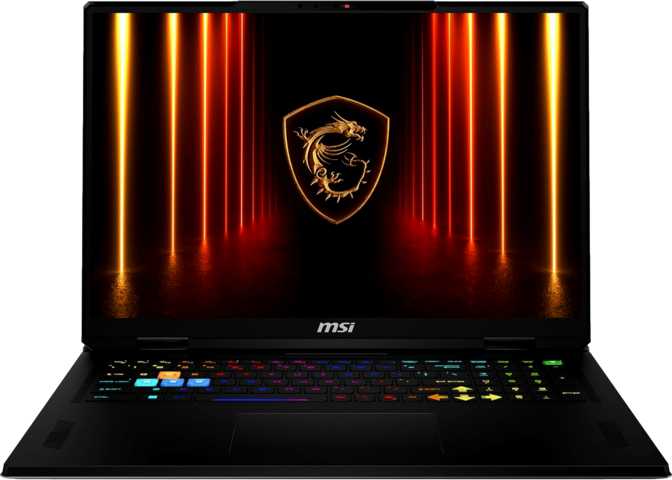
MSI Vector 18 HX AI A2XW: Full Review of a Next-Gen Powerhouse
LaptopsQuick Verdict
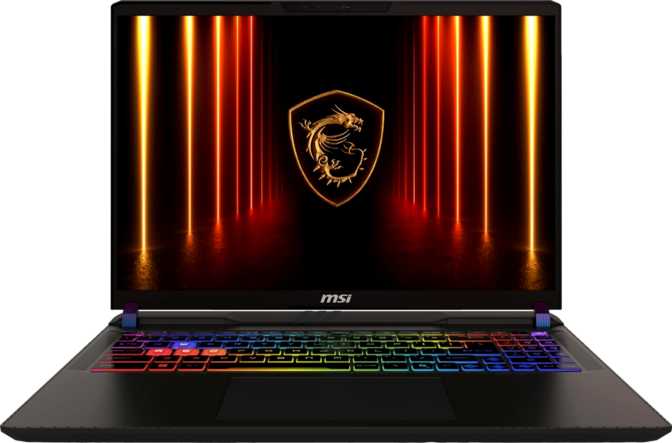
The MSI Vector 18 HX AI A2XW refuses to make the usual compromises. Its Blackwell-generation GPU with 24GB of GDDR7 memory, 24-core hybrid CPU, and 240Hz 18-inch display form a system with no internal bottlenecks. The only meaningful shortfalls are a missing Ethernet port, an absent anti-reflection display coating, and no biometric login — genuine gaps rather than minor footnotes.
Design and Build Quality
Disciplined engineering for an 18-inch powerhouse
At 3.6 kilograms, the Vector 18 HX AI is not a laptop you will forget is in your bag. That weight is the honest cost of an 18-inch chassis with the thermal infrastructure required to sustain this level of hardware. Compared to other 18-inch machines in this performance tier, 3.6kg is competitive rather than excessive — the relevant comparison here is not to a 15-inch laptop.
What stands out is the footprint discipline. At just 24 millimeters thick, this chassis is genuinely slim for a machine housing the cooling hardware required to manage both the processor and a full-power discrete GPU simultaneously. MSI has clearly prioritized a clean, considered aesthetic over the overtly angular approach common to gaming laptops of this caliber.
The keyboard is backlit, as expected at this tier. Active cooling is essential — the fans will be audible under full load, and buyers should accept that as inherent to the hardware inside rather than a design flaw. The Vector 18 HX AI is not weather-sealed or ruggedized; it is a premium consumer device built for controlled environments: desks, studios, hotel rooms, and conference tables.
- Weight3,600 g
- Width404 mm
- Depth307 mm
- Thickness24 mm
- Backlit KeyboardYes
- Fanless DesignNo
- Weather SealedNo
Display Analysis
Where 18 inches and 240Hz actually make sense together
Resolution and Pixel Density
The 18-inch IPS panel runs at 2560×1600 — a resolution that sits between standard 1080p and full 4K. At 167 pixels per inch, text and interface elements appear sharp and well-defined at normal viewing distances. 4K at this screen size and typical desk distance is visually indistinguishable from this resolution, while the lower pixel count lets the GPU sustain higher frame rates without working as hard.
The 16:10 aspect ratio adds meaningful vertical screen real estate compared to the 16:9 gaming standard. For gaming this means more of the scene visible above and below; for productivity it means substantially more content on screen without scrolling.
The display supports up to four connected screens simultaneously via the machine's port configuration — a genuine productivity advantage for engineers or creators who anchor multi-monitor workstations around a single laptop.
Refresh Rate Performance
At 240 frames per second, motion on screen appears exceptionally fluid and input lag feels effectively absent. The GPU in this machine is more than capable of delivering frame rates that actually utilize this refresh rate in most titles — which is not always true of high-refresh panels paired with underpowered hardware. Here the panel and the GPU are genuinely matched.
Display Limitations Worth Knowing
- No anti-reflection coating — glare will be noticeable in brightly lit rooms and near windows, a real day-to-day issue in variable lighting environments.
- Non-touch panel — no stylus or tablet-style interaction for users who expect that.
- Panel type: IPS LCD — excellent color accuracy and viewing angles, but not the deeper blacks of an OLED display.
Performance Analysis
A system where no single component holds another back
The Processor
The CPU uses Intel's hybrid architecture — eight high-performance cores that can push to 5.4GHz under turbo conditions paired with sixteen efficiency cores running at a lower base frequency. The total of 24 threads maps one-to-one to physical cores, with no hyperthreading involved. Built on a 4-nanometer process, this architecture delivers excellent power efficiency relative to raw output.
The 36MB of L3 cache and 40MB of L2 cache are substantial figures. Large caches reduce how often the processor must wait on slower system memory — a critical factor in latency-sensitive workloads like gaming, real-time audio, and video processing. The 95-watt thermal ceiling gives this chip room to sustain high performance rather than throttling to preserve battery.
In CPU-intensive workloads — 3D rendering, video encoding, scientific computation — expect performance that rivals many desktop systems from recent generations. The single-thread PassMark result of 4,723 is equally important for gaming and legacy applications that depend on single-core speed rather than core count.
The Graphics Hardware
The discrete GPU is built on NVIDIA's Blackwell architecture — the most current generation of mobile GPU technology available. The 24 gigabytes of GDDR7 graphics memory operating across a 256-bit bus delivers 811.5 GB/s of memory bandwidth. Most gaming laptops at even the premium tier offer roughly half that bandwidth, and the VRAM capacity alone exceeds what many desktop GPUs carry.
This matters across three distinct use cases. For gaming, a large VRAM pool prevents texture pop-in and supports heavily modded or visually detailed game environments. For AI-accelerated workloads — image generation, local language model inference, video upscaling — 24GB provides real headroom that 8GB or 16GB cards simply cannot match. For professional GPU compute tasks, ECC memory support (a feature normally associated with workstation hardware) adds precision-critical data integrity assurance.
The GPU supports ray tracing natively and pairs with DLSS — NVIDIA's AI-powered upscaling and frame generation system. Games that support DLSS can render at a lower internal resolution and use AI to reconstruct a sharper image, boosting frame rates without a visible quality penalty. Combined with the 240Hz display, this enables smooth gameplay even in demanding ray-traced titles. Intel Resizable BAR is also enabled, providing additional frame-rate improvements in supported games.
- ArchitectureBlackwell
- VRAM24 GB GDDR7
- Compute Performance31.8 TFLOPS
- Memory Bandwidth811.5 GB/s
- Memory Bus Width256-bit
- Shader Units10,496
- Ray TracingSupported
- DLSSSupported
- ECC MemoryYes
- Resizable BAREnabled
System Memory and Storage
64 GB DDR5 RAM
Running at 6,400MHz in dual-channel mode, both memory sticks communicate with the processor simultaneously — halving effective memory latency compared to a single-stick setup. At 64GB, this machine comfortably handles a modern game, a browser with dozens of tabs, a video call, and background recording software simultaneously, without memory pressure — scenarios where 16GB or 32GB configurations begin to struggle noticeably.
Two memory slots support expansion up to 96GB total for users who require it in the future.
2 TB NVMe PCIe 4.0 SSD
The 2TB NVMe drive on PCIe 4.0 delivers sequential speeds that make large game installations, video project files, and OS operations feel nearly instantaneous. Two terabytes accommodates a substantial game library without constant file management — modern AAA titles average 60–100GB each. Flash-based storage also contributes to overall system responsiveness in ways that older storage technologies cannot replicate.
Additional M.2 slots may be present for storage expansion, though buyers should verify the final configuration.
Connectivity
Forward-looking ports with one notable omission
What's Included
The two USB4 40Gbps ports support the highest-bandwidth peripherals currently available — external SSDs sustaining over 3 GB/s, high-resolution external displays at 8K, and USB4-compatible docks that carry video, data, and power over a single cable. Two traditional USB Type-A ports at 10 Gbps handle mice, keyboards, drives, and headsets at speeds fast enough for any standard accessory.
HDMI 2.1 supports external 4K displays at 144Hz or 8K at 60Hz, making the Vector 18 a capable hub for a high-performance external monitor setup. Wi-Fi 7 (802.11be) is the current wireless ceiling — lower latency and higher throughput than Wi-Fi 6E, backward-compatible with all older networks. Bluetooth 5.4 covers the latest wireless audio and peripheral standards.
| Port / Interface | Specification | Count |
|---|---|---|
| USB4 (USB-C, 40Gbps) | 40 Gbps — docks, drives, displays | 2 |
| USB 3.2 Gen 2 (Type-A) | 10 Gbps — peripherals & drives | 2 |
| HDMI Output | HDMI 2.1 — 4K@144Hz / 8K@60Hz | 1 |
| Memory Card Slot | External — photographers & creators | 1 |
| 3.5mm Audio Jack | Combined headset socket | 1 |
| Wi-Fi | Wi-Fi 7 (802.11be) + backward-compatible | |
| Bluetooth | 5.4 — latest standard |
What's Missing
No Wired Ethernet (RJ45)
For a machine at this performance tier targeting serious gamers, the absent Ethernet port is a genuine inconvenience. Wired connections eliminate the latency variability of wireless networks. Competitive online gamers will need a USB-to-Ethernet adapter or a USB4 dock with integrated LAN as a permanent workaround.
No Biometric Login
No fingerprint scanner and no 3D facial recognition. Windows Hello authentication is limited to PIN or password — an increasingly unusual omission at this price tier.
USB4 vs. Thunderbolt 4
These USB4 40Gbps ports function equivalently to Thunderbolt 4 for the vast majority of practical uses — displays, high-speed drives, and docks. The main distinction is that Thunderbolt 4 certification guarantees compatibility with TB4-branded accessories; USB4 may have occasional nuances with specific peripherals. For most users, this difference is academic.
Battery Life
The reality of powering next-generation hardware
The 99Wh battery pack pushes right to the limit permitted on commercial flights under international aviation regulations — MSI has deliberately maximized capacity within what is legally allowed in carry-on luggage. This is a thoughtful engineering choice for a machine that consumes power at this scale.
Under light productivity use — document editing, web browsing, video calls — expect respectable portable working time. Under gaming or heavy GPU load, runtime drops sharply. This is fundamental physics rather than a product deficiency: no battery chemistry can sustain 31.8 TFLOPS of compute output for extended periods. The 99Wh ceiling is simply the maximum that form factor and regulations permit.
Sleep-and-charge functionality means certain ports continue charging connected devices even when the laptop is sleeping or powered off — useful for keeping a phone charged overnight without leaving the machine running.
Who Should Buy This?
Real-world buyer profiles and honest usage scenarios
- Serious gamers who also work professionallyThe GPU power and 64GB memory let this machine anchor both a high-performance gaming rig and a professional workstation. Content creators, engineers, and game developers who want one machine for everything will find the specification breadth unusually complete.
- AI and machine learning practitioners24GB of GDDR7 VRAM with ECC support enables running local large language models, training small neural networks, and accelerating inference workloads at scale — genuinely beyond what standard gaming laptops can offer at any price.
- 3D artists and visual effects professionalsGPU rendering engines benefit directly from both the VRAM capacity and raw TFLOPS figure. The 2TB NVMe provides working space for large project files, and ECC memory adds professional-grade data integrity.
- Desktop replacement seekersBuyers who want desktop-class performance with occasional portability. This machine excels on a permanent desk and can be carried when needed — it was never designed to be a daily commuter laptop.
- Wired-first competitive gamingThe missing Ethernet port is a real and persistent friction point. Competitive online gamers who rely on wired connections for minimum-latency play will need an adapter as a permanent part of their setup — that cost and inconvenience adds up.
- Daily transit portability3.6kg plus a substantial power brick is not a commuter-friendly load. This machine suits occasional trips and carries between rooms — not a daily bag in a packed train or airport.
- All-day battery life away from an outletIf the machine will routinely spend long periods away from a power source, this is fundamentally the wrong tool. The hardware inside makes extended battery life physically impossible at this performance tier.
- Bright or glare-prone work environmentsThe absent anti-reflection coating will be a genuine daily irritation for users who work in sunlit offices or near large windows. This is not a minor gripe — it affects usability meaningfully and consistently.
Competitive Positioning
How the Vector 18 HX AI stands against the competition
The MSI Vector 18 HX AI A2XW competes in the 18-inch ultra-high-performance gaming and mobile workstation segment — a narrow but intensely contested category. The table below reflects how it compares to typical high-end 18-inch competitors across the factors that matter most to serious buyers.
| Factor | MSI Vector 18 HX AI A2XW | Typical 18" High-End Competitor |
|---|---|---|
| Display Size & Resolution | Advantage18", 2560×1600 (16:10) | 17.3"–18", 1920×1080 or 2560×1440 |
| Refresh Rate | 240Hz | 144Hz–240Hz |
| GPU Memory | Advantage24 GB GDDR7 | 8 GB–16 GB GDDR6 |
| System RAM | Advantage64 GB DDR5 @ 6,400MHz | 16 GB–32 GB DDR5 |
| Wi-Fi Standard | AdvantageWi-Fi 7 (802.11be) | Wi-Fi 6 or Wi-Fi 6E |
| Wired Ethernet | GapRequires adapter | Often built-in (RJ45) |
| High-Speed USB | USB4 40Gbps × 2 | USB 3.2 / Thunderbolt 4 varies |
| GPU ECC Memory | AdvantageSupported | Rarely available |
The clearest competitive differentiator is VRAM — 24GB of GDDR7 in a laptop is uncommon at any price point and positions the machine notably ahead for AI workloads and future game requirements. The Ethernet omission is where many direct competitors will score points against it with wired-network buyers.
Strengths and Weaknesses
An honest assessment — no spin, no omissions
The Vector 18 HX AI's strengths are not incremental — they are categorical. Pairing every major component at its highest specification tier creates a system where nothing is holding anything else back, which is rarer than it should be.
- Blackwell GPU with 24GB GDDR7 — a generational leap in laptop graphics performance, ahead of virtually all current alternatives
- 31.8 TFLOPS of GPU compute — closer to desktop GPU territory than any previous mobile GPU generation
- 24-core hybrid CPU with 5.4GHz turbo — elite-tier PassMark results in both single and multi-thread workloads
- 64GB DDR5 at 6,400MHz — expandable to 96GB, no component bottlenecks another
- 240Hz 2560×1600 IPS panel — well-matched for the GPU's frame-rate output at this resolution
- USB4 40Gbps × 2 and Wi-Fi 7 — connectivity that stays current rather than dated at the point of purchase
- ECC memory support on the GPU — workstation-grade data integrity in a gaming chassis
- 24mm thin at this performance tier — genuine thermal engineering discipline, not just a marketing claim
The weaknesses are fewer but specific and real. These are not performance compromises — they are convenience and connectivity gaps that buyers should weigh honestly against their own daily workflows.
- No wired Ethernet port — a meaningful gap for competitive gamers and corporate network users; requires an adapter as a permanent workaround
- No anti-reflection display coating — glare in bright rooms and near windows will be a real and recurring irritation for affected users
- No biometric login — neither fingerprint nor facial recognition, increasingly unusual at this tier
- 3.6kg carry weight — not a flaw given the screen size and hardware, but a reality for anyone moving with it daily
- Audible fan noise under load — active cooling is inherent to this hardware configuration; a headset eliminates it as a gaming concern, but it remains present in quiet environments
Frequently Asked Questions
Answers to the questions buyers search for before committing
Final Verdict
MSI Vector 18 HX AI A2XW (18", 2025)
The MSI Vector 18 HX AI A2XW earns its place at the top of the mobile gaming and mobile workstation market through specification depth rather than marketing language. The Blackwell GPU with 24GB GDDR7, paired with a 24-core CPU and 64GB of fast memory, creates a system where no single component holds back another — and that balance is rarer than it should be at any price point.
The 240Hz 18-inch panel is the right display for this hardware: large enough for genuinely immersive gaming, fast enough to surface the GPU's frame-rate output, sharp enough for serious productivity work. The weaknesses — missing Ethernet, absent anti-reflection coating, no biometrics — are real and specific, not deal-breakers for the intended buyer, but they are gaps that anyone spending at this level deserves to know about clearly before purchasing.
Buy It If...
- You need the most capable 18-inch laptop currently available
- GPU compute headroom matters — for AI, rendering, or large VRAM workloads
- You want 240Hz gaming sustained at high frame rates in demanding titles
- This machine will live primarily on a desk, not daily in a commuter bag
Skip It If...
- Wired Ethernet without an adapter is genuinely non-negotiable
- All-day battery life away from a power outlet is a core requirement
- Daily commuting and transit portability are central to how you work
- Your primary workspace involves challenging glare or bright lighting conditions
For performance-first buyers who demand the most from an 18-inch laptop — whether for elite gaming, AI workloads, or professional rendering — the MSI Vector 18 HX AI A2XW sets the standard for what this category can achieve. For everyone else, examine the alternatives carefully against your specific priorities.