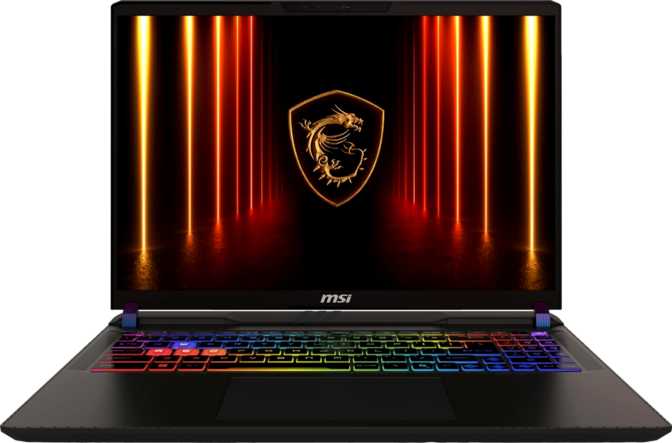
MSI Vector 16 HX AI A2XW (2025) - Full Gaming Laptop Review
LaptopsNot every laptop release signals a meaningful hardware shift. The MSI Vector 16 HX AI A2XW does. It arrives with NVIDIA’s Blackwell GPU architecture — the most significant discrete graphics generation to land in a portable chassis in several years — paired with Intel’s latest hybrid processor and memory hardware running at the ceiling of what the platform supports. The result is a gaming laptop that competes on paper with some desktop build configurations from just a couple of years ago, while fitting inside a machine you can carry to a LAN event. Whether that combination justifies its position at the top of the 16-inch gaming laptop tier depends on what you actually need from a machine — and that is exactly what this review works out.
Design and Build: Purposeful, Not Performative
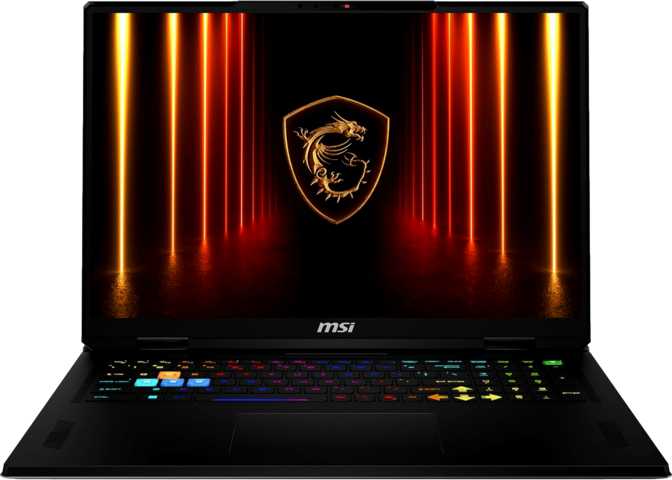
The Vector 16 HX AI carries the physical dimensions you’d expect from a machine designed around thermal performance rather than showroom appeal. At 357 by 284 millimeters in footprint and just 22 millimeters thick, it occupies roughly the desk space of a large hardcover book. The 22mm profile is notably restrained for a high-performance gaming chassis, suggesting MSI’s thermal engineering had to work efficiently rather than simply throwing volume at heat management.
The weight sits at 2.7 kilograms — firmly in the “needs its own backpack” category, but competitive against similarly specced alternatives in the 16-inch tier, some of which push past three kilograms. The backlit keyboard handles low-light gaming and late-night sessions without issue. There is no fingerprint reader, but 3D facial recognition fills that gap effectively and is generally faster in practice for routine unlocking.
This is not a weather-sealed or rugged-rated machine — it is built for home desks, clean LAN tables, and careful travel. The active cooling system is substantial and necessary: a processor rated at 95 watts thermal design power and a high-end discrete GPU do not run cool. Expect audible fans under sustained gaming load; the chassis prioritises thermal management and performance output above all else.
- Thickness
- 22 mm
- Footprint
- 357 × 284 mm
- Weight
- 2.7 kg
- Keyboard
- Backlit
- Fingerprint
- Not included
- Biometrics
- 3D Face ID
- Cooling
- Active
The Display: When Resolution and Refresh Rate Work Together
The 16-inch IPS panel runs at 2560 by 1600 pixels — QHD+ at a 16:10 aspect ratio rather than the conventional 16:9 widescreen format. That taller proportional shape delivers more visible vertical content in everything from browser windows to video editing timelines, and makes this machine more capable as a daily productivity driver than a 16:9 competitor at the same resolution. Pixel density reaches 188 pixels per inch, sitting in a productive sweet spot: sharper than 1080p at normal viewing distance, while placing meaningfully lower rendering demand on the GPU than 4K.
Perceptibly smoother than 144Hz in competitive gaming
No visible pixels at normal laptop viewing distance
More vertical space than 16:9 — better for productivity
Adequate in dim rooms; limited under bright ambient light
The panel supports up to four simultaneous external displays via HDMI and USB4 outputs, making it a capable multi-monitor hub for desktop battle stations when docked.
What the “HX AI” Architecture Actually Means
The internals represent a convergence of Intel’s and NVIDIA’s most current laptop-class hardware. The result eliminates bottlenecks at every layer of the stack — the processor does not limit the GPU, and the GPU does not wait on memory bandwidth.
The Processor
Intel’s hybrid core architecture pairs eight high-performance cores with sixteen efficiency cores — 24 cores total, one thread each. The performance cores handle gaming, compilation, and any task requiring raw single-threaded speed. The efficiency cores manage background processes, secondary threads, and tasks that benefit from high core count.
The peak boost reaches 5.4GHz on the performance cores — the clockspeed that matters most for gaming. A 36MB L3 cache and 40MB L2 cache give the chip a large staging area for active data, directly reducing load hitching in open-world games with heavy streaming demands.
The GPU
The graphics processor is built on NVIDIA’s Blackwell architecture — the current leading edge of discrete GPU design. It carries 24GB of GDDR7 video memory delivering over 811 GB/s of bandwidth, placing this laptop GPU in direct proximity to recent-generation high-end desktop discrete cards.
Blackwell brings hardware-accelerated ray tracing and DLSS — NVIDIA’s AI-powered upscaling that reconstructs near-native image quality at performance-friendly render resolutions. At 2560×1600, DLSS output is sophisticated enough that most users cannot distinguish it from fully native rendering. Intel Resizable BAR is active, reducing GPU pipeline stalls.
Memory & Storage
The 32GB of DDR5 RAM operates at 6,400MHz — the absolute maximum speed supported by this platform — in a dual-channel configuration. For gaming this is more than current-generation adequate and future-proof for several years. Two memory slots offer a path to 96GB for memory-intensive professional workloads.
The 1TB NVMe SSD on PCIe 4 delivers fast boot times and quick game loading. One terabyte fills quickly in a modern game library; expansion via USB4 and the built-in card reader extends practical capacity at additional cost.
Real-World Gaming Performance
At the machine’s native 2560×1600 resolution, the Blackwell GPU has the compute capacity to drive the 240Hz panel in competitive and esports titles. In graphically intensive AAA titles at maximum settings with ray tracing active, DLSS becomes the practical path to smooth frame rates — and the AI upscaling quality at this resolution is sophisticated enough that the output is indistinguishable from fully rendered native frames by most users.
The 24GB VRAM is tangibly useful today for modded titles with high-resolution texture packs, 4K gaming via an external display, and creative applications that load large assets into GPU memory. Its primary gaming value is forward-looking: as engine demands escalate, machines with larger VRAM pools stay viable longer without the GPU becoming the bottleneck.
At 1080p connected to a high-refresh external monitor, or at 4K for cinematic single-player experiences via HDMI 2.1, the GPU scales well in both directions. CPU-bottlenecked gaming scenarios are effectively off the table — the single-core PassMark score of 4,723 reflects per-core speed that outpaces many desktop gaming chips from recent generations.
Gaming Highlights
- 240Hz ceiling usable in esports and competitive titles
- DLSS maintains near-native quality at high frame rates
- Hardware ray tracing for physically accurate lighting in supported titles
- 24GB VRAM handles modded games and 4K external display gaming
- Intel Resizable BAR reduces GPU pipeline inefficiency throughout
Battery and Power: Desk-First Priorities
Near the maximum allowed on commercial flights
The 90-watt-hour battery is near the practical limit for portable electronics on commercial flights, where most airlines cap lithium-ion batteries at 100Wh. MSI has used nearly all of that allowed capacity — a genuine attempt to maximise runtime within the constraint, not an oversight.
For a buyer using this as both a daily laptop and a gaming rig, the 7-hour light-use figure provides practical flexibility for travel and desk work between sessions. Gaming enthusiasts generally plan around wall power; those who want a machine that games comfortably unplugged will find the battery behaviour restrictive. Sleep-and-charge USB ports keep peripheral devices topped up even when the laptop is in standby — a useful convenience for travel.
Ports and Connectivity: Modern, With One Real Gap
The connection options on the Vector 16 HX AI reflect current standards throughout — with one notable exception that gaming-focused buyers should weigh carefully before purchasing.
- 2 × USB4 40Gbps (USB-C)Equivalent to Thunderbolt 4 bandwidth — drives displays, high-speed storage, and peripherals simultaneously
- 2 × USB 3.2 Gen 2 Type-A (10Gbps)Full-size USB-A for controllers, mice, keyboards, and external drives without adapters
- HDMI 2.1 OutputSupports 4K at 120Hz or 8K at 30Hz for external monitors and TV setups
- Wi-Fi 7 + Bluetooth 5.4Latest wireless standard — lower latency and better performance in congested multi-device environments
- SD Card SlotDirect media access for photographers and content creators
- 3.5mm Audio Jack + Sleep-Charge USBHeadset connectivity and peripheral charging while in standby
- No Wired Ethernet (RJ45)The most significant omission for a gaming laptop. Wired connections deliver lower latency and zero interference that Wi-Fi cannot match. A USB adapter resolves it, but adds an accessory and a permanent dependency.
- No Built-In DisplayPortAvailable via USB-C adapters through the USB4 ports, but monitors with only DisplayPort inputs require an additional adapter. HDMI 2.1 covers most modern display inputs natively.
The absent Ethernet port is a real inconvenience in apartments with dense wireless congestion or shared housing situations. Wi-Fi 7 narrows the gap considerably, but it does not eliminate the wired-versus-wireless performance difference that matters in high-stakes online play.
Features Worth Knowing About
3D Facial Recognition
Windows Hello authentication uses a 3D sensor rather than a basic infrared camera, providing reliable unlocking across varied lighting conditions. It compensates well for the missing fingerprint reader and is faster in practice for routine unlocking throughout a workday.
1080p Webcam
The front camera captures 1080p video at 30 frames per second — sufficient for video calls and basic streaming overlays. Content creators building a dedicated setup will still want a USB webcam or capture card for broadcast-quality output.
Stereo Speakers
On-board stereo speakers handle casual audio output adequately. Dolby Atmos is absent, which limits built-in processing compared to some competitors. For gaming, the 3.5mm headset jack remains the practical route to immersive audio regardless of speaker quality.
ECC Memory Support
An unusual inclusion for a gaming laptop. Error-Correcting Code memory detects and automatically fixes single-bit memory errors — a workstation-grade capability that adds stability for data science, financial modelling, or any mission-critical compute task running alongside gaming workloads.
4-Display Output
The machine simultaneously drives up to four connected displays using the combination of HDMI, two USB4 outputs, and the built-in screen. For desktop battle stations with two or three external monitors, the hardware capacity is present without requiring a dedicated dock.
Wi-Fi 7 Wireless
Wi-Fi 7 (802.11be) is the most current home networking standard available. In homes with a compatible router it delivers lower latency and higher aggregate bandwidth than Wi-Fi 6E, with improved performance in congested multi-device households where many devices compete for airtime.
Who This Laptop Is For — and Who Should Look Elsewhere
- You want the most current GPU architecture with 24GB GDDR7 VRAM for future-proof gaming and creative workloads
- You do substantial creative work alongside gaming — video editing, 3D rendering, AI image generation, or local LLM inference
- You play competitive titles where 240Hz makes a perceptible difference and your game catalog pushes frame rates high enough to use it
- You operate primarily at a fixed desk with AC power and controlled lighting conditions
- You want to drive multiple external monitors for a multi-display battle station without a separate dock
- Wired Ethernet is non-negotiable for competitive gaming and you don’t want to manage a permanent adapter
- You regularly work near windows or in variable bright lighting, where 305 nits without anti-glare creates consistent visibility issues
- Display vibrancy and contrast are top priorities — competitors offering OLED panel options will outperform this IPS screen visually
- You need extended portable gaming sessions away from a power outlet
- Weight is a primary concern and you travel frequently with minimal bag space
How It Compares to the Competition
In the 16-inch high-performance gaming tier, the Vector 16 HX AI competes directly against the ASUS ROG Strix SCAR 16, Razer Blade 16, Alienware m16, and Lenovo Legion Pro 7i. The differentiating factors are GPU generation, VRAM capacity, display quality, and connectivity.
| Specification | MSI Vector 16 HX AI | Typical Tier Competitors |
|---|---|---|
| GPU Generation | Blackwell (current) | Ada Lovelace or Blackwell, depending on model and timing |
| GPU Video Memory | 24GB GDDR7 | 8–16GB typical; 16GB in some flagships |
| Display Refresh Rate | 240Hz at 2560×1600 | 240–360Hz across the tier, varying resolutions |
| RAM Speed | DDR5-6400 (platform max) | DDR5-5600 to DDR5-6400 |
| Wireless | Wi-Fi 7 | Wi-Fi 6E to Wi-Fi 7 |
| Wired Ethernet | Not included | Included on most competitor models |
| Display Brightness | 305 nits | 400–600 nits in premium options |
| OLED Display Option | Not available | Available in select Razer Blade 16 configurations |
Honest Assessment: Where It Excels and Where It Falls Short
The Vector 16 HX AI’s core appeal is unambiguous: it carries the most current GPU architecture available in a portable chassis, paired with a CPU that eliminates processor bottlenecks from gaming and professional workloads, and a memory subsystem operating at its platform maximum. The 24GB GDDR7 GPU memory is not just a benchmark point — it directly determines which workloads this machine can run without artificial limitation, and sets a headroom ceiling that keeps the machine relevant as software demands escalate over the coming years.
The DDR5-6400 memory operates at the absolute ceiling of the platform’s supported speed, and the 811 GB/s of GPU memory bandwidth places this laptop in direct proximity to recent-generation high-end desktop discrete cards. These are not incremental improvements — they produce genuine real-world performance differences in demanding gaming and creative scenarios.
The 31.8 teraflops of GPU compute throughput paired with 10,496 shading units makes this one of the fastest mobile GPUs available in any portable form factor. For AI workloads, local model inference, and creative rendering, the capability gap between this machine and mid-range alternatives is substantial and immediate.
The display is the machine’s most significant compromise. At 305 nits without anti-reflection coating, it is adequate for controlled environments and falls short in bright conditions. For a machine at this price point, the panel brightness trails what several competitors offer, and buyers expecting display quality to match the GPU and CPU specifications will notice the gap in any non-ideal lighting scenario.
The absent Ethernet port will be a genuine inconvenience for competitive players in environments with wireless congestion. Battery behaviour confirms this is a desk-first machine — the 90Wh cell delivers 7 hours of light use, but sustained gaming load reduces that to a fraction. This is a physical reality of high-power hardware, not a flaw to minimise, but it deserves to be stated plainly.
Questions Real Buyers Are Asking
Final Verdict
The MSI Vector 16 HX AI A2XW answers a specific question with unusual clarity: what does the best-specced 16-inch gaming laptop look like when built around the current hardware generation without compromise on GPU architecture or VRAM capacity? The answer is a machine that sits at the top of its tier for GPU performance throughput, eliminates CPU bottlenecks from gaming and professional workloads, pairs that performance with the fastest available wireless standard, and delivers a 24GB GDDR7 memory pool that sets a headroom ceiling few laptops in any category can match.
The trade-offs are real: a display that struggles in bright ambient light, no built-in wired Ethernet, and battery behaviour that anchors the machine to a power outlet during gaming. Buyers for whom any of these represent a primary use-case requirement should examine specific competitors before committing. This machine earns its recommendation in the dimensions that matter most to serious gamers and performance-first buyers — just go in knowing where it made its trade-offs, and decide whether those trade-offs fit how you actually use a laptop.