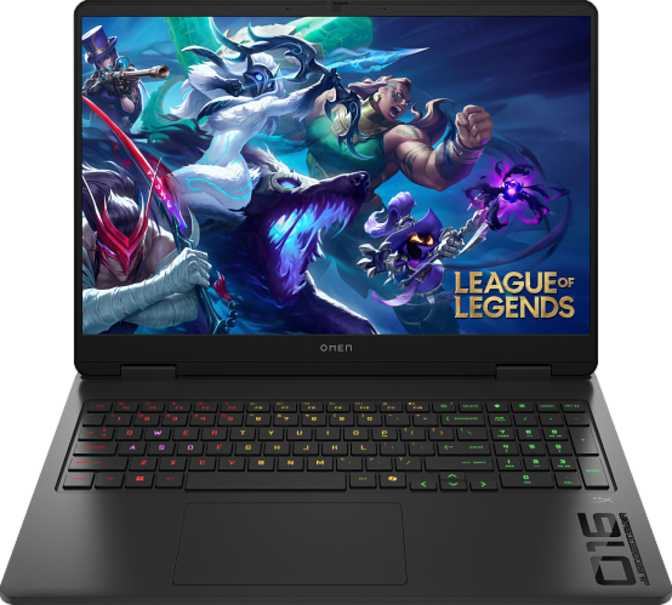
HP Omen Slim 16 (2025) Review: Full-Power Gaming in a Slim 16-Inch Laptop
LaptopsThe HP Omen Slim 16 (2025) is built for buyers who refuse to choose between portability and gaming power. At just 19mm thin, it houses a next-generation Blackwell GPU, 64GB of DDR5 memory, and a 4TB NVMe drive — a configuration that most gaming laptops twice its thickness struggle to match. This review covers every layer of that promise honestly.
Editor's Score
Best slim gaming laptop for daily carry
Design and Build Quality
Chassis, portability, and physical experience
Dimensions and Portability
At 19mm thin and weighing approximately 2.4 kilograms, the Omen Slim 16 sits comfortably in the category of gaming laptops you can carry daily without dreading the commute. The average gaming laptop of this screen size typically hovers around 2.5 to 2.8 kilograms and 22 to 25mm thick — so HP has shaved meaningful real-world bulk here.
The footprint — roughly 357mm wide by 269mm deep — is compact for a 16-inch machine. It slides into a standard laptop sleeve without the bulk overhang you get from traditional gaming chassis. This is not a rugged, military-spec build, and it is not weather-sealed, so it is not a machine for outdoor use in demanding conditions. It is designed for the student, the creative professional, and the gamer who wants a single device that crosses between those worlds without looking conspicuously "gamer" in a meeting room.
Keyboard and Input
The backlit keyboard is standard for this segment, and given the Omen branding, expect per-key lighting customizable through HP's Omen Gaming Hub software. Active cooling is present — this is not a fanless design, which matters because it means the system can sustain high performance loads over time without thermal throttling cutting the experience short.
Physical Specifications
- Width
- 357 mm
- Depth
- 269 mm
- Thickness
- 19 mm
- Weight
- 2.42 kg (5.34 lbs)
- Type
- Gaming Laptop
- Keyboard
- Backlit
- Cooling
- Active Fan
- Weather Sealed
- No
Genuinely Portable
Lighter and thinner than most 16-inch gaming competitors by a meaningful margin
Active Cooling
Fan-cooled system sustains gaming loads rather than throttling to protect thermals
Backlit Keyboard
Per-key lighting controllable via HP's Omen Gaming Hub software
Display: 16 Inches of Practical Sharpness
Resolution, refresh rate, and visual quality
Resolution and Clarity
The 16-inch IPS LCD panel runs at 1920×1200 pixels rather than the more common 1920×1080. That extra 120 vertical pixels might sound trivial, but the 16:10 aspect ratio it produces makes a meaningful difference in daily use — you see more of a webpage, a spreadsheet, or a code editor without scrolling. For gaming, it fills your peripheral vision slightly more naturally than a widescreen 16:9 panel.
At 141 pixels per inch, text is sharp and images look clean. This is not a 4K panel, which is actually an intentional advantage: the GPU does not need to push four times the pixels per frame, which translates directly into smoother performance in games at native resolution.
Refresh Rate and Motion Clarity
A 144Hz refresh rate means the panel can display up to 144 frames per second — twice the motion clarity of a standard 60Hz laptop screen. In fast-paced games, this eliminates the choppy, smearing motion that plagues slower displays. Competitive shooters and action titles feel noticeably more responsive. For productivity, the higher refresh rate also makes scrolling and cursor movement look smoother in a way that is hard to un-see once experienced.
The anti-reflection coating is a practical inclusion that not every laptop in this category bothers with. Gaming under mixed or bright ambient lighting is genuinely more comfortable — no fingerprint smears, no competing reflections from overhead lights.
Display Specifications
| Screen Size | 16 inches |
| Resolution | 1920 × 1200 (16:10) |
| Pixel Density | 141 ppi |
| Panel Type | IPS LCD, LED-backlit |
| Refresh Rate | 144 Hz |
| Anti-Reflection | Yes |
| Touch Screen | No |
| External Displays | Up to 4 simultaneous |
Processing Power: What the CPU Actually Delivers
Architecture, core configuration, and real-world implications
Architecture and Core Configuration
The processor inside this machine uses Intel's hybrid core design — a combination of performance-focused cores clocked higher and efficiency cores running at lower speeds, all managed intelligently by the chip's scheduler. This design means the laptop can coast through light tasks like browsing and document editing without spinning up to full power, then ramp up hard when gaming or rendering demands it.
With 14 physical cores, 16 processing threads, and a peak burst speed of 5.1GHz, this CPU is well above what most games actually need. The 24MB of shared cache — the fast memory the processor keeps close at hand — allows it to hold large datasets in play without repeatedly fetching from slower system RAM, which matters in complex simulations, large project files, and certain AI workloads.
Real-World CPU Performance
The PassMark multi-core score of approximately 30,756 places this processor firmly in the upper tier of current laptop chips. Single-core performance — the metric that most directly affects how games, creative apps, and general software feel in day-to-day use — comes in at around 4,373, which is competitive for a 45W mobile processor running within the thermal constraints of a slim chassis.
The 45W thermal envelope is the specification to understand here. It means this chip operates within a carefully engineered thermal budget that the active cooling system is designed to sustain. A slim chassis cannot use the same cooling infrastructure as a thick gaming laptop — performance under sustained heavy loads may be slightly lower than a thick-chassis machine using the same chip, though this is a characteristic shared by every slim gaming design on the market.
CPU Specifications
- Architecture
- Intel Hybrid
- Cores / Threads
- 14C / 16T
- Peak Boost Clock
- 5.1 GHz
- Process Node
- 5 nm
- L3 Cache
- 24 MB
- TDP
- 45W
- Multithreading
- Yes
PassMark Benchmarks
Multi-Core Score
Single-Core Score
Scores contextualized against current-generation laptop chip tier — upper-tier multi-core, competitive single-core for a 45W mobile processor.
Graphics Performance: Blackwell Architecture in a Slim Form Factor
GPU capabilities, VRAM, DLSS, and ray tracing
Architecture and Efficiency
The discrete GPU in this system is built on NVIDIA's Blackwell architecture — the most recent generation of GPU design at the time of writing. Blackwell brings meaningful efficiency improvements over its predecessor, delivering more rendering power within the same or lower thermal budget. For a slim machine like this, that efficiency gain is not just a marketing point — it is the technical reason a machine this thin can run a GPU competitive with larger designs.
Raw Graphics Capability
The GPU carries 8GB of next-generation GDDR7 video memory, capable of moving data at an effective rate that far exceeds what GDDR6 memory achieved at comparable specifications. Peak memory bandwidth exceeds 440GB per second — enough to keep the GPU fed with texture and geometry data even in visually complex scenes.
The GPU's floating-point throughput approaches 9.7 TFLOPS — placing it decisively in the mid-to-high tier of current laptop discrete graphics hardware. Texture processing capacity exceeds 151 billion texels per second, which translates directly into how richly detailed game environments can be rendered at speed.
At its core, the GPU contains 3,328 individual shader processors. These are the computational units that shade pixels, handle physics, process lighting, and manage the mathematical work of rendering every frame. The boost clock reaches approximately 1,455MHz — the peak frequency at which those processors operate when under full load and thermal headroom allows.
GPU Specifications
| Architecture | Blackwell |
| VRAM | 8GB GDDR7 |
| Memory Bus | 128-bit |
| Max Bandwidth | 448 GB/s |
| Boost Clock | 1,455 MHz |
| Shader Units | 3,328 |
| Floating-Point | 9.684 TFLOPS |
| DirectX | DirectX 12 Ultimate |
| Ray Tracing | Supported |
| DLSS | Supported |
DLSS Upscaling
AI-powered frame reconstruction — more FPS, minimal visual cost
Ray Tracing
Hardware-accelerated realistic lighting, reflections, and shadows
Why DLSS Changes the Performance Picture
DLSS uses AI-accelerated upscaling to render frames at a lower internal resolution, then reconstruct a sharper full-resolution image the eye largely cannot distinguish from native rendering. In practice, a game struggling to hit 60fps at native resolution can often reach 90 or higher with DLSS enabled. For a slim gaming laptop where the GPU operates at reduced power limits compared to a thick-chassis equivalent, DLSS is the technology that closes the performance gap and makes this machine punch well above its thermal weight class.
Memory and Storage: No Compromises at the Top
64GB DDR5 and 4TB NVMe — what it means in practice
64GB of Fast System RAM
This configuration ships with 64GB of DDR5 memory running across a dual-channel configuration. For gaming, 64GB is well beyond what any current title requires — most games are well-served by 16GB. Where this capacity becomes genuinely useful is in creative workloads: video editing timelines, large Photoshop documents, virtual machines, browser-heavy development environments, and 3D rendering all benefit meaningfully from that headroom.
The motherboard accepts speeds significantly faster than the base configuration. Users who wish to upgrade can install faster DDR5 kits to extract more bandwidth from the system — the ceiling is well beyond what the machine ships with.
4TB NVMe Storage
A 4TB NVMe SSD on PCIe 4.0 is a generous allocation. PCIe 4.0 solid-state drives transfer data at speeds that make mechanical hard drives of previous generations look prehistoric — large game installations load in seconds rather than minutes, system startup is nearly instant, and file transfers complete before you've set your coffee cup down.
4TB is enough for an extensive game library, a full media production workflow, and a complete system backup without ever needing an external drive for routine use. This is a specification that was considered high-end server territory not many years ago; its presence in a consumer gaming laptop is a meaningful usability upgrade.
64GB
DDR5 RAM
4TB
NVMe SSD
PCIe 4
SSD Interface
2-Slot
RAM Upgradable
Connectivity: Practical Without Being Cutting-Edge
Port selection, wireless, and what's missing
Port Configuration
| Port Type | Qty | Notes |
|---|---|---|
| USB-A 3.2 Gen 2 | 3 | Fast data transfer, backward compatible |
| USB-C 3.2 Gen 2 | 1 | 10Gbps speed; not Thunderbolt 4 |
| HDMI | 1 | For external displays and TVs |
| RJ45 Ethernet | 1 | Wired network for gaming |
| 3.5mm Audio Jack | 1 | Headset and headphone compatible |
| Thunderbolt 4 | 0 | Not included |
Three USB-A ports is a generous count for a slim machine — most thin-and-light laptops trim this to one or two to preserve chassis space. Having three means a gaming mouse, USB hub, and USB storage can all connect simultaneously without an adapter.
Wireless Connectivity
-
Wi-Fi 6 (802.11ax)
Lower latency, better performance in crowded wireless environments -
Wi-Fi 5 / Wi-Fi 4
Full backward compatibility with older routers -
Wired Ethernet (RJ45)
Best choice for competitive gaming — consistent, low-latency connection
Audio & Camera
-
Stereo Speakers
Dual-channel audio output -
Front Camera
For video calls and conferencing -
Single Microphone
Functional for calls; not ideal for streaming audio
Battery and Power: Setting Realistic Expectations
What to expect from daily battery life on a gaming machine
The system includes sleep-and-charge USB functionality — at least one USB port continues to deliver power to connected devices even when the laptop is asleep or shut down, useful for keeping a phone or tablet topped up without waking the system.
A gaming laptop at this performance level will typically see battery life measured in hours rather than the all-day figures achievable with an ultrabook. The GPU and CPU draw significant power under load, and even at idle, cooling and display power consumption are real factors. This machine behaves like a desk-adjacent gaming system that benefits from proximity to a charger during extended sessions.
For productivity-only tasks — document editing, light browsing, video streaming — the hybrid CPU architecture delivers meaningfully better battery endurance than gaming use, since the efficiency cores handle those workloads at a fraction of the full-chip power draw. Expect a real difference between gaming sessions and office-mode use.
Power Features
-
Sleep-and-Charge USB
Charges devices when laptop is asleep or off -
Hybrid CPU Power Management
Efficiency cores extend battery during light tasks -
No MagSafe Connector
Standard proprietary charging; cable management as expected for a PC
Who Should Buy the HP Omen Slim 16 (2025)
Real-world user profiles — matched and mismatched
This Machine is For
-
Students and professionals who game
If you carry a laptop to class or work and also want to game at night, this form factor serves both without forcing a compromise on either end.
-
Gamers upgrading from older or entry-level hardware
The GPU architecture here represents a generational jump over anything built before 2024.
-
Content creators who also game
64GB RAM and 4TB NVMe make serious video editing, 3D work, and streaming fully viable alongside gaming.
-
Buyers who want future-resistant hardware
The storage, RAM, DDR5 standard, and GPU architecture are all current-generation. This machine will remain relevant for several years of software evolution.
This Machine is NOT For
-
Hardcore competitive esports players
A thicker chassis with a higher-TDP GPU will deliver higher average frame rates in demanding titles. The slim design means the GPU operates within power limits that cap its ceiling.
-
Buyers needing Thunderbolt 4
If your workflow depends on Thunderbolt docks, external GPU enclosures, or Thunderbolt-only peripherals, this machine does not have that port.
-
Budget-conscious buyers
A machine configured with 64GB RAM, 4TB storage, and a Blackwell GPU commands a premium price. Mid-range alternatives exist for those who do not need the full specification.
-
Outdoor or field users
No weather sealing, no ruggedized construction. This is a controlled-environment machine built for indoor carry between desk and desk.
How It Compares to the Competition
Competitive positioning against logical alternatives
The Omen Slim 16 occupies the space between the ultrabook and the full gaming laptop. It does not beat a thick gaming machine in peak thermal headroom, and it does not beat an ultrabook for battery life. What it does better than either is deliver a genuine, current-generation GPU in a chassis that belongs in both environments.
| Feature | HP Omen Slim 16 (2025) | Thick-Chassis Gaming Laptop | Ultrabook / Slim Pro |
|---|---|---|---|
| Chassis Thickness | 19mm | 25–28mm | 14–17mm |
| Weight | ~2.4kg | 2.6–3.0kg | 1.2–1.8kg |
| GPU Architecture | Blackwell (discrete) | Blackwell or older | Integrated only |
| DLSS Support | Yes (NVIDIA) | ||
| RAM (this config) | 64GB DDR5 | 16–32GB typical | 16–32GB typical |
| Storage | 4TB NVMe | 1–2TB typical | 512GB–1TB typical |
| Display Ratio | 16:10 | 16:9 typically | 16:10 typically |
| Thunderbolt 4 | Varies | ||
| Battery Life | Moderate | Moderate to poor | Excellent |
Honest Assessment: Strengths and Weaknesses
A balanced look at what this machine does well and where it compromises
Where It Excels
The 16:10 display format is one of those quality-of-life decisions that instantly improves daily use — more content visible, less scrolling, better proportions for productivity work. Pairing it with a 144Hz IPS panel and anti-reflection coating rounds out a display package that is genuinely good rather than merely acceptable.
The hardware configuration at 64GB RAM and 4TB NVMe is unusually generous for a slim gaming machine, and it removes the storage anxiety that plagues users of lighter-specified systems. Most rivals in the slim gaming category make you choose between adequate RAM and adequate storage — this machine does not force that trade-off.
The Blackwell GPU with DLSS support means gaming performance is higher than raw benchmark numbers suggest — DLSS-enabled frame rates in supported titles will consistently outperform what a pure native-resolution benchmark implies. The three USB-A ports and wired Ethernet jack are also practical choices that many slim gaming laptops drop to save chassis space.
Where It Falls Short
The slim chassis physically limits how aggressively the GPU can operate. Extended, intensive gaming sessions may see the system manage thermals by reducing GPU and CPU power targets — a behavior standard across all slim gaming designs, but worth setting expectations around before purchase. If sustained, uncapped GPU performance across hours of continuous play is the priority, a thicker machine wins.
The absence of Thunderbolt 4 limits future-proofing for dock-dependent users. As external GPU docks, Thunderbolt displays, and high-speed peripheral ecosystems become more common in professional setups, not having that port is a genuine consideration rather than a minor footnote.
The single microphone, no fingerprint reader, and absence of facial recognition make the security and communication setup feel somewhat minimal for a machine at this price tier. Streamers and frequent video call participants will likely want an external USB microphone to compensate.
Answers to Common Buyer Questions
What real buyers search for before purchasing
Final Verdict
The HP Omen Slim 16 (2025) makes a compelling case for the buyer who refuses to maintain two separate laptops — one for work and one for gaming. It is genuinely thin enough to carry everywhere, genuinely powerful enough to run current-generation games with DLSS-assisted performance, and genuinely configured with enough RAM and storage to serve as a primary workstation without compromise.
It is not the absolute fastest gaming laptop available. A thicker machine with more thermal headroom will sustain higher GPU performance in prolonged heavy loads. If maximum gaming performance at any cost is your only priority, this is not the place to look.
But if you want a single machine that belongs in every environment — a conference room on Monday, a gaming desk on Friday night — the Omen Slim 16 (2025) is one of the most balanced options in its category. The 16:10 display, the Blackwell GPU, the DLSS support, and the generous storage make it a thoughtfully assembled product that earns its asking price.
Overall Score
Highly Recommended