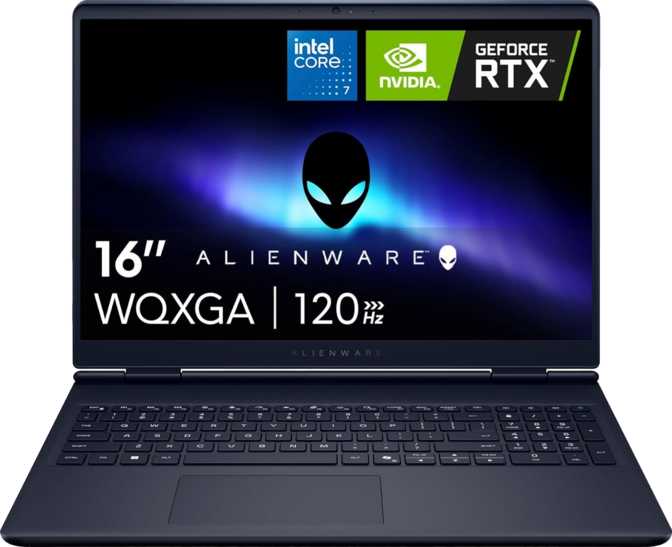
Dell Alienware 16 Aurora (2025): Blackwell Power, Real-World Verdict
LaptopsA Slim Gaming Machine Built Around Nvidia's Newest Architecture
The Alienware brand has long carried a specific promise: desktop-caliber gaming performance in a portable form. The Aurora 16 is Dell's attempt to deliver on that promise with a redesigned chassis and a GPU built on Nvidia's latest Blackwell architecture — the same generation powering high-end desktop cards. Whether that ambition translates into a laptop worth your money depends heavily on what kind of gamer you are, and this review breaks all of it down.
At a Glance
Dell Alienware 16 Aurora (2025) — Editorial Score Breakdown
Overall Score
Category Ratings
Blackwell GPU
GDDR7 • 9.7 TFLOPS
16″ QHD+ Display
2560×1600 • 120Hz
Wi-Fi 7
Next-gen wireless
1TB PCIe 5 NVMe
Ultra-fast SSD
Design and Build Quality
Slim Enough to Mean It
For a gaming laptop, the Aurora 16 makes a genuinely surprising first physical impression. At roughly 2.5 kg and just 22 mm thick, it sits in a category that used to be occupied exclusively by productivity machines. You can carry this in a standard backpack without feeling like you are hauling a portable power station.
The footprint — 356 mm wide by 265 mm deep — is compact enough to fit comfortably on most desks and lap tables. The volume the entire machine occupies is roughly equivalent to a thick hardcover novel, which is a meaningful engineering achievement given the hardware inside.
The keyboard is backlit, which is expected at this price tier but welcome nonetheless. The lighting does what it needs to do for low-light gaming sessions without being the primary feature.
22mm
Chassis Thickness
2.5kg
Total Weight
1yr
Included Warranty
Trade-offs in the Pursuit of Thinness
Thinness comes with acknowledged trade-offs. This is not a rugged machine — it is not weatherproofed against spills or drops. It uses an active cooling system (fans) rather than passive cooling, which means thermal management will have audible consequences under load. This is standard for performance laptops, but worth knowing if you expected silent operation.
There is no fingerprint scanner and no 3D facial recognition. Login authentication is handled through conventional means. For a machine in this class, that is a notable omission from a convenience standpoint.
Display: Where Things Get Nuanced
Resolution and Aspect Ratio
The 16-inch panel runs at 2560×1600 pixels in a 16:10 aspect ratio — taller than the standard 16:9 screens found on most gaming laptops. That extra vertical real estate matters more than it sounds. In games, you see more of the world. In browsers and documents, you scroll less. The pixel density lands at a point where text and images look sharp without needing any scaling adjustments.
Refresh Rate: The Honest Conversation
The display runs at 120Hz. For context: this is double the refresh rate of a standard monitor but below the 144Hz, 165Hz, and 240Hz panels found on competing gaming laptops at similar and lower price points. In fast-paced competitive shooters where frame rate is everything, that ceiling will matter to serious players. For RPGs, strategy games, open-world titles, and cinematic experiences, 120Hz is entirely sufficient and the sharpness of the resolution more than compensates.
The brightness peaks at 300 nits. This is workable indoors, but next to a window in daylight or in a bright room, you will notice the limitations. The anti-reflection coating on the panel is genuinely useful and does reduce glare more than glossy alternatives, but it does not overcome a fundamentally modest brightness ceiling. This is not a machine for outdoor gaming sessions.
The panel supports up to four simultaneous external displays — a detail that makes more sense for a power user who docks this machine at a desk with a multi-monitor setup.
Where the display shines
Sharp 2560×1600 resolution, 16:10 aspect ratio for extra vertical space, anti-reflection coating, and support for up to four external monitors.
Where it falls short
120Hz refresh rate is below category-standard for this price tier. 300 nits brightness limits outdoor and bright-room usability.
Performance: The Blackwell Advantage
CPU: Efficiency Architecture in a Gaming Chassis
The processor uses a hybrid core design — a blend of performance-oriented cores clocked around 2.5 GHz in normal operation and efficiency-focused cores running at 1.8 GHz. Under load, the performance cores push past 5 GHz in short bursts. The total thread count of 16 gives the system enough headroom to handle background tasks, streaming software, and demanding game engines simultaneously without bottlenecking.
The chip is built on a 5 nm process, which contributes to the slim thermal profile of the machine. The CPU's maximum thermal threshold is set at 100°C — high but standard for mobile processors — and a 45W power envelope keeps sustained heat output manageable for a thin chassis.
A 24 MB L3 cache feeds frequently accessed game data to the processor quickly, reducing stutters during open-world traversal and asset loading. Multithreading is enabled, meaning the system distributes workloads across all available threads efficiently.
24,546
PassMark Multi-Core
3,821
PassMark Single-Core
5.2GHz
Turbo Boost
16
CPU Threads
GPU: Blackwell Enters the Laptop
The graphics processor is the headline component. Built on Nvidia's Blackwell architecture — the newest generation available — it brings forward architectural improvements that go beyond simple clock speed gains.
The GPU houses 3,328 programmable shader units working in concert with 104 texture mapping units and 32 render output units. In practice, this configuration delivers approximately 9.7 TFLOPS of raw floating-point performance. For reference, this comfortably exceeds what was considered mid-range desktop territory just two hardware generations ago.
The memory configuration is where this GPU stands apart from its predecessors most dramatically. Rather than GDDR6 memory found on older mid-range GPUs, this machine ships with GDDR7 — a newer memory standard that enables the 8 GB video buffer to deliver nearly 450 GB/s of memory bandwidth. That bandwidth figure is competitive with cards that have significantly wider memory buses but slower memory types. GDDR7 partially offsets the narrower 128-bit bus width in a meaningful way.
The GPU boosts to approximately 1,455 MHz under sustained load — modest in absolute clock terms, but Blackwell's architectural efficiency per clock is substantially improved over its predecessors.
Intel Resizable BAR is enabled, allowing the CPU to access the full GPU frame buffer directly rather than in small chunks. In supported games, this produces measurable performance improvements at no additional hardware cost.
GPU Specification Snapshot
9.7
TFLOPS (FP32)
448 GB/s
Memory Bandwidth
3,328
Shader Units
GDDR7
Memory Type
Ray Tracing and DLSS
Both ray tracing and DLSS are supported, and on Blackwell, DLSS in particular has taken a meaningful step forward. The latest iteration of DLSS allows the GPU to render fewer frames natively and use AI-assisted reconstruction and frame generation to produce a smooth, high-frame-rate output. In practical terms: games that would push this hardware close to its limits at native resolution become significantly more playable with DLSS active, and the visual quality difference at recommended settings is minimal.
DirectX 12 Ultimate support ensures compatibility with the full range of modern rendering features including hardware-accelerated ray tracing and mesh shaders.
Memory and Storage
RAM: The Most Significant Limitation
The Aurora 16 ships with 16 GB of DDR5 memory running at 5,600 MHz. The memory controller supports speeds up to 6,400 MHz, so there is some headroom if you upgrade modules.
Critical Buyer Warning: 16 GB Hard Ceiling
The maximum supported RAM on this machine is 16 GB. The two memory slots cannot be loaded with more than 16 GB total. In the current environment, where modern AAA games frequently recommend 16 GB and where video editing, streaming software, and background applications add overhead on top of that, this ceiling will feel tight for power users within a product's typical ownership cycle. If you plan to run this machine as both a gaming and a content creation workstation simultaneously, this limitation is a real one. There is no upgrade path beyond the installed capacity on this machine.
For dedicated gaming sessions without heavy multitasking, 16 GB is currently adequate for the majority of titles.
Storage: Fast and Spacious
The 1 TB solid-state drive uses the NVMe interface on a PCIe 5 connection — the fastest storage interface available on consumer laptops. Boot times, game load screens, and file transfers will feel noticeably faster than older machines.
1 TB provides meaningful room for a game library, though heavy digital game collectors will want to track usage over time.
Connectivity
What You Get
| Port / Feature | Details |
|---|---|
| USB-C (high-speed) | 2 ports, USB 3.2 Gen 2 — 10 Gbps each |
| USB-A (standard) | 2 ports, USB 3.2 Gen 1 — 5 Gbps each |
| Video Output | HDMI 2.1 — supports 4K at high refresh rates |
| Wired Networking | 1 gigabit Ethernet (RJ45) |
| Wireless | Wi-Fi 7, backward compatible with Wi-Fi 6E, 6, 5, and 4 |
| Audio | 3.5 mm headset jack, stereo speakers, single microphone |
What's Missing
There are no Thunderbolt ports on this machine. For buyers who rely on Thunderbolt for external GPU enclosures, ultra-fast external storage, or docking stations that consolidate multiple peripherals into a single cable, this omission is significant. The USB-C ports operate at 10 Gbps — fast enough for most peripherals and external drives, but not in the same league as the 40 Gbps Thunderbolt 4 connections found on competing premium laptops.
There is no SD card slot or other external memory expansion.
Wi-Fi 7 is a forward-looking inclusion. Most routers in homes today are Wi-Fi 6 or 6E, but if your router supports Wi-Fi 7, you will benefit from substantially faster and more reliable wireless throughput — particularly useful for online gaming where latency matters. The sleep-and-charge functionality on the USB ports allows you to top up your phone or other devices even with the laptop in sleep mode, a small but practical convenience.
Battery and Power
No battery capacity figure is provided in the specification data, and no battery life claims will be made here without that foundation. What the hardware profile implies: a discrete Blackwell GPU, a 10-core processor, and a high-resolution display are collectively significant power draws. Gaming laptops of this performance tier typically require the power adapter for sustained gaming sessions.
Expect battery life during active gaming to be limited, and light usage — browsing, video playback with the discrete GPU inactive — to last considerably longer. The machine does not use a MagSafe-style proprietary connector.
Who This Laptop Is For
This machine suits you well if…
- You want a gaming laptop that is genuinely portable — not one that requires a separate bag just for the power brick and the machine.
- You prioritize image quality (resolution, sharpness, detail) over raw frame rate supremacy.
- You play a mix of single-player narrative titles, RPGs, open-world games, and moderate competitive play.
- You plan to dock the machine at a desk with external monitors — the multi-display support and HDMI 2.1 port accommodate up to four screens.
- You value cutting-edge GPU architecture and want DLSS 4 and ray tracing capability without paying for the absolute top tier.
This machine is not the right fit if…
- You play competitive shooters at the highest level and need 165Hz, 240Hz, or higher refresh rates to maintain a genuine performance edge.
- You require 32 GB or more of RAM for content creation, video editing, or running virtual machines alongside games.
- You need Thunderbolt connectivity for external GPU enclosures or specialized hardware.
- You frequently work outdoors or near bright windows — the display brightness will frustrate you.
- You expect more than one year of warranty coverage without purchasing an extended plan.
How It Competes
The Aurora 16 occupies a specific and contested position: a slim gaming laptop with a next-generation GPU at a mid-to-upper price point. Its closest competition comes from machines like the Asus ROG Zephyrus G16, the Razer Blade 16, and the Lenovo Legion Slim 5i.
| Consideration | Aurora 16 (2025) | Typical Mid-Range Competitor |
|---|---|---|
| GPU Generation | Blackwell (newest) | Varies — many still Ada Lovelace |
| Memory Bandwidth | GDDR7, ~450 GB/s | GDDR6, typically 240–288 GB/s |
| Refresh Rate | 120Hz | 144–165Hz common |
| Max RAM | 16 GB (no upgrade) | 32–64 GB common |
| Thunderbolt | Not included | Often included at this tier |
| Wi-Fi Standard | Wi-Fi 7 | Wi-Fi 6E common |
Honest Assessment
Where It Delivers
The Blackwell GPU is the Aurora 16's strongest argument for itself. Nvidia's newest architecture brings real improvements in power efficiency per frame and AI-assisted rendering that make a tangible difference in supported games. Paired with GDDR7 memory delivering bandwidth that outclasses GDDR6 configurations on older mid-range GPUs, the graphics subsystem punches above what the VRAM capacity alone might suggest.
The form factor is a genuine achievement. At 22 mm thick and 2.5 kg, this is a machine you will actually take places. The 16:10 display is better for productivity than the 16:9 screens many competitors use, and the anti-reflection coating is practical rather than cosmetic.
Wi-Fi 7 and PCIe 5 storage represent legitimate future-proofing — these are components that will age well even as other parts of the platform reach their limits.
Where It Falls Short
The 16 GB RAM maximum is the hardest limitation to accept. While 16 GB is technically sufficient for gaming today, it provides no room for growth, no headroom for simultaneous workloads, and no upgrade path. A premium gaming laptop should not carry this ceiling.
The 120Hz display is underwhelming at this price. Competitors are shipping 165Hz and 240Hz panels in the same form factor. If you play games where frame rate directly affects competitive performance, you will notice this ceiling.
The absence of Thunderbolt is the kind of omission that a certain type of buyer will discover only after purchase and resent thereafter. If you need Thunderbolt, check this box before committing.
A one-year warranty on a premium gaming machine is the minimum the market offers, not a premium. Extended coverage through Dell's support tiers is worth considering at point of purchase.
Answers to Common Pre-Purchase Questions
Final Verdict
Dell Alienware 16 Aurora (2025)
The Dell Alienware 16 Aurora (2025) makes a compelling case for buyers who want the latest GPU architecture in a chassis they can actually travel with. The Blackwell GPU and GDDR7 memory genuinely advance what a slim gaming laptop can do graphically, and the 16:10 display with its sharp resolution rewards both gaming and everyday use.
The limitations are real and should not be minimized. The 120Hz display ceiling, the hard 16 GB RAM cap, and the absence of Thunderbolt are not minor footnotes — they are concrete restrictions that will matter to specific buyers. The one-year warranty on a premium product is also worth scrutinizing.
Buy this machine if…
You want Blackwell-generation gaming performance in a portable form factor and you play games where visual fidelity matters more than maximum competitive frame rate.
Look elsewhere if…
You need a higher refresh display for competitive play, expect to exceed 16 GB of RAM, or rely on Thunderbolt in your workflow. Competing laptops offer more flexibility in these areas, even if they carry an older GPU generation.
The Aurora 16 is a focused machine — confident in what it does best, honest in its limitations once you know where to look.