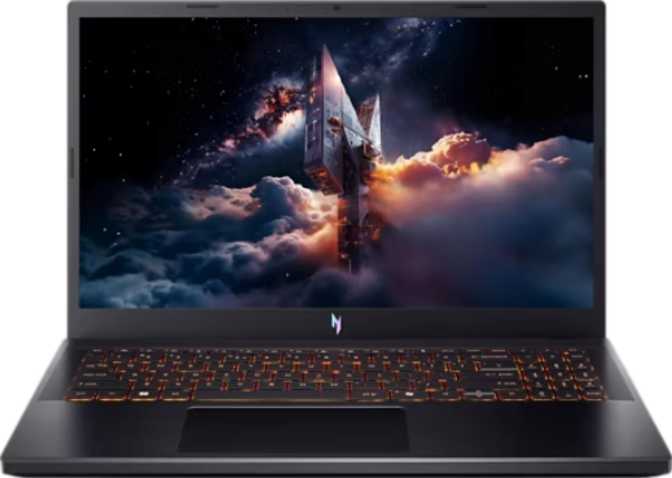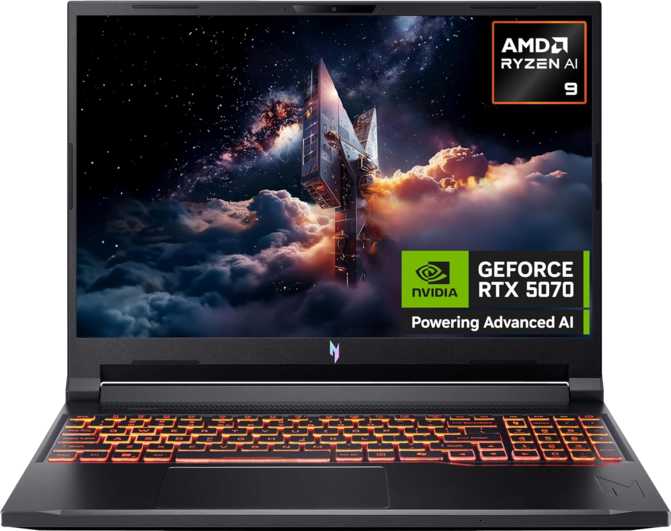
Acer Nitro V 16 AI (2025) Review: Next-Gen GPU at a Mid-Range Price
LaptopsThe gaming laptop market at the mid-range price point has historically forced buyers into uncomfortable trade-offs: get the GPU power and sacrifice the display, or get the build quality and accept a crippled graphics card. The Acer Nitro V 16 AI (2025) enters this crowded bracket with a specification sheet that reads more like a premium machine — a next-generation GPU architecture, a 16:10 display with a smooth refresh rate, and 32 gigabytes of fast memory as standard. Whether those numbers translate into a genuinely satisfying ownership experience is what this review is here to determine.
GPU Architecture
Blackwell
Display
180Hz · 16:10 IPS
Standard RAM
32GB DDR5
Storage
1TB NVMe PCIe 4
Video Memory
8GB GDDR7
Battery
76 Wh
Design and Build: Purposeful, Not Pretty
Physical dimensions · keyboard · daily carry experience
Physical Profile
The Nitro V 16 AI is a gaming laptop that looks like one. At 24mm thin and weighing just under 2.5 kilograms, it sits in a comfortable middle ground — not ultraportable, but noticeably lighter than the thick-and-heavy gaming rigs of five years ago. Most users will carry it in a backpack without trouble, though it will not slip into a slim messenger bag.
The 360mm width keeps the machine manageable on a standard desk without feeling cramped. At 24mm thick, the chassis is deep enough to house meaningful thermal headroom while staying clear of the dated chunky aesthetic of older gaming laptops.
The build is designed to survive everyday use rather than abuse. It carries no splash resistance or hardened chassis certification — the correct expectation at this price tier. Think of it as a well-made everyday laptop, not field equipment. The active cooling system is both present and necessary.
Keyboard and Input
The backlit keyboard is a welcome inclusion for late-night gaming or study sessions. Gaming laptops without keyboard illumination feel oddly compromised, and Acer avoids that mistake here.
There is no fingerprint scanner and no facial recognition — both absent at this price tier. Windows Hello login will rely on a password or PIN. For gaming-first buyers, this is a minor inconvenience rather than a dealbreaker, but it is worth knowing before purchase.
- Width360 mm
- Height276 mm
- Thickness24 mm
- Weight2.44 kg
- Backlit KeyboardYes
- Touch ScreenNo
- Fingerprint ScannerNo
- Weather SealedNo
Display: The 16:10 Advantage in a Gaming Context
Resolution · refresh rate · aspect ratio · panel quality
Why 1920×1200 Matters More Than 1920×1080
The Nitro V 16 AI uses a 1920×1200 pixel resolution rather than the standard 1920×1080 found on most gaming laptops. That extra 120 pixels of vertical height — the 16:10 aspect ratio versus the more common 16:9 — gives you more usable screen space in every application. Web pages, code editors, spreadsheets, and in-game UIs all feel slightly less cramped. For a machine used across gaming and productivity, this is genuinely meaningful.
At 16 inches diagonal, the panel delivers a pixel density of 141 pixels per inch. Text is sharp, game assets look clean, and the screen never appears blurry. It is not a 4K panel — which means the GPU does not need to push four times as many pixels, a significant practical benefit for maintaining high frame rates.
180Hz: The Right Refresh Rate for This GPU
The IPS LED-backlit panel refreshes 180 times per second. The standard laptop display runs at 60Hz; mid-range gaming laptops typically offer 144Hz. At 180Hz, motion in fast-paced titles — first-person shooters, racing games, fighting games — appears noticeably smoother and more responsive. Critically, the GPU inside this machine is capable of actually reaching and sustaining those frame rates in many popular titles at native resolution, which makes this pairing sensible rather than aspirational.
Display Limitations to Know
The panel does not include an anti-reflection coating. In brightly lit rooms or near windows, screen glare becomes a genuine nuisance. This is a cost-cutting measure common at this price tier — arranging the workspace with the screen angled away from direct light sources largely resolves it.
The display does not support touch input. This is a non-issue for a dedicated gaming machine but worth noting for anyone considering this as a dual-purpose device.
- Screen Size16 inches
- Resolution1920 × 1200
- Aspect Ratio16:10
- Pixel Density141 ppi
- Refresh Rate180 Hz
- Panel TypeIPS LED
- Anti-ReflectionNo
- Touch ScreenNo
- External DisplaysUp to 4
Productivity Tip
The 16:10 aspect ratio shows roughly 10% more vertical content than a 16:9 panel at the same diagonal size — noticeably more document, code, or timeline on screen without scrolling.
Performance: A Next-Generation GPU at a Mid-Range Price
GPU architecture · benchmarks · CPU · memory · storage
The GPU: Blackwell Architecture with GDDR7 Memory
This is the most important part of the specification sheet. The discrete GPU inside the Nitro V 16 AI is built on NVIDIA's Blackwell architecture — the same generation powering the current top-tier desktop cards. Having Blackwell in a laptop at this price point is a significant development; previous generations typically saw entry-level laptop GPUs running architectures one or two cycles behind the desktop flagship.
The GPU carries 8 gigabytes of GDDR7 video memory — the latest memory generation, offering substantially higher bandwidth than the GDDR6 found in most comparable laptops. This means the GPU can feed its processing units with data faster, reducing bottlenecks in memory-hungry workloads like high-resolution textures, ray-traced lighting, and AI-driven upscaling. Memory bandwidth exceeds 400 GB per second on a 128-bit bus, enabled by GDDR7's efficiency advantages over its predecessor.
The GPU boosts to over 2,500 MHz at peak, with a base clock of 2,235 MHz — strong numbers suggesting meaningful power headroom rather than an aggressively throttled thermal budget.
Benchmark Snapshot
| Benchmark | Score | What It Means |
|---|---|---|
| Geekbench 6 (Single-Core) | 2,533 | Reflects strong per-core speed; the 5GHz peak turbo delivering in practice |
| Geekbench 6 (Multi-Core) | 12,581 | Solid parallel throughput across 10 cores and 20 threads |
| PassMark CPU | 29,482 | Competitive overall CPU output for gaming and content creation workloads |
| PassMark G3D (GPU) | 19,987 | Upper-mid tier; comfortably above previous-generation mid-range GPUs |
| GPU Compute (TFLOPS) | 23.22 | Competitive with previous-gen upper-mid desktop GPUs in raw processing power |
Ray Tracing and DLSS: Both Present, Both Useful
Hardware Ray Tracing
The Blackwell GPU includes dedicated RT hardware substantially improved over previous generations, making ray-traced visuals achievable at playable frame rates. Games adding ray tracing support in the future can still run well on this hardware, extending its useful life meaningfully.
DLSS AI Upscaling
AI-powered frame generation and upscaling recovers performance lost to demanding settings or ray tracing. For a 180Hz display at 1200p, DLSS Quality mode is a powerful tool to maintain smooth frame rates without visible quality loss — and it compounds the GPU's generational advantage.
The CPU: Capable and Well-Matched
The processor packs 10 cores and 20 threads, built on a 4-nanometer manufacturing process. The base clock sits at 2GHz but surges to 5GHz on demanding single-threaded workloads. The 50W thermal design supports sustained performance without immediate throttling — though under extended combined CPU and GPU load, some frequency management occurs, as is standard for all gaming laptops.
A substantial 24MB of L3 cache reduces latency for frequently accessed data — an advantage in both gaming and productivity tasks that does not appear in headline spec sheets but is felt in everyday responsiveness.
Memory and Storage
32GB DDR5 Standard
32 gigabytes of DDR5 RAM as standard is a genuine differentiator from competitors defaulting to 16GB. DDR5 operates well beyond DDR4 speeds, and the platform supports up to 7,500 MHz for performance configurations. Expansion is possible to an extraordinary 256GB — a ceiling that points toward professional workload capability far beyond gaming.
1TB NVMe PCIe 4 SSD
The 1TB NVMe SSD uses PCIe Gen 4, delivering sequential speeds that make game load times and file transfers feel nearly instantaneous compared to older SATA storage. 1TB handles most gaming libraries with selective installation; heavy users with large collections should monitor storage usage over time.
Battery Life and Power: Realistic Expectations
76 Wh capacity · productivity endurance · gaming reality
The 76 watt-hour battery is a solid capacity for a gaming laptop. For general productivity tasks — browsing, documents, video playback — expect roughly five to seven hours on a charge depending on screen brightness and wireless activity. This is workable for a full day of light work, with the power adapter reserved for the evening gaming session.
Under active gaming, the battery depletes quickly. This is true of every gaming laptop on the market — the GPU and CPU together draw far more power than any reasonably sized battery can sustain at peak performance. Serious gaming is a plugged-in activity with this machine, as with all competitors in this category.
The sleep-and-charge USB ports allow connected devices like smartphones to charge from the laptop even when it is in sleep mode — a convenient practical detail for desk-based setups.
- Capacity76 Wh
- Productivity Estimate5 – 7 hours
- Gaming EstimatePlugged-in
- Sleep-and-Charge USBYes
- MagSafeNo
Connectivity: Functional But With Clear Limitations
Port layout · Wi-Fi 6E · Bluetooth · what is missing
Port Layout
| Port Type | Count | Speed |
|---|---|---|
| USB-A | 3 | 5 Gbps each |
| USB-C | 1 | 5 Gbps |
| HDMI | 1 | Video out |
| RJ45 Ethernet | 1 | Wired LAN |
| 3.5mm Audio Jack | 1 | Headset combo |
| Memory Card Slot | 1 | External media |
Three USB-A ports is a practical count for a desk setup — mouse, keyboard, and an external drive can all be connected simultaneously without a hub. The USB-C port adds flexibility for modern peripherals and display output. The wired Ethernet port is an important inclusion for gaming; wireless is always subject to latency variance and Ethernet eliminates that variable entirely for competitive play.
Where Connectivity Falls Short
Connectivity Limitations
- No Thunderbolt 3 or 4 — rules out external GPU enclosures and high-speed audio interfaces
- No USB 4 support — maximum USB speed is 5 Gbps on all ports
- No dedicated DisplayPort output — additional displays require a USB-C hub with video output
- 5 Gbps USB speed can bottleneck transfers to fast external SSDs
Wireless: Wi-Fi 6E Is the Right Call
Wi-Fi 6E support means the laptop can operate on the 6GHz wireless band — less congested than 2.4GHz and 5GHz in environments with many competing devices. In practice, this delivers more consistent speeds and lower latency on a compatible router, particularly in apartments or shared spaces with many overlapping networks.
- Wi-Fi StandardWi-Fi 6E (802.11ax)
- 6GHz Band SupportYes
- Bluetooth5.3
- Ethernet (RJ45)Yes
Real-World Usage: Who This Laptop Is Built For
Target users · use case match · who should avoid it
1080p/1200p Gamers
The Nitro V 16 AI is optimized for gaming at its native 1920×1200 resolution. The Blackwell GPU paired with DLSS comfortably handles current-generation titles at high to maximum settings. Frame rates in the 100–180fps range are achievable in many games, making genuine use of the 180Hz display. For esports titles — Valorant, Counter-Strike 2, Apex Legends, Rocket League — this machine is particularly well-matched.
Students and Hybrid Users
The 32GB of DDR5 memory, 10-core processor, and 16:10 display aspect ratio make this a credible workstation for video editing, photo editing, and light 3D work alongside daily study tasks. The 16:10 ratio adds visible productivity benefit — more of a timeline, more of a document, more of a canvas visible without scrolling.
Mid-Range Upgraders
Buyers upgrading from older mid-range laptops will experience a clear generational leap in GPU technology. Blackwell and GDDR7 will remain relevant longer than the previous-generation hardware most competitors ship — meaning this machine has longer before it feels dated than alternatives at a similar price.
Who Should Look Elsewhere
- Ultra-portable carry: At 2.44kg and 24mm, this is not a slim daily bag laptop. Ultrabooks serve that need better.
- Thunderbolt-dependent professionals: External GPU enclosures, high-bandwidth audio interfaces, and Thunderbolt storage arrays are not possible without Thunderbolt ports.
- 4K external gaming: The 8GB VRAM and 128-bit memory bus are not architected for 4K gaming with demanding settings. Expect performance trade-offs on a 4K monitor.
Competitive Positioning
How the Nitro V 16 AI stacks up against typical mid-range alternatives
| Feature | Acer Nitro V 16 AI (2025) | Typical Competitor A | Typical Competitor B |
|---|---|---|---|
| GPU Generation | Blackwell (latest) | Ada Lovelace (prev.) | Ada Lovelace (prev.) |
| GPU Memory Type | GDDR7 | GDDR6 | GDDR6 |
| Display Refresh Rate | 180 Hz | 144 Hz | 165 Hz |
| Aspect Ratio | 16:10 | 16:9 | 16:9 |
| Standard RAM | 32GB DDR5 | 16GB DDR5 | 16GB DDR5 |
| Max USB Speed | 5 Gbps | 10 Gbps | 10 Gbps |
| Thunderbolt | No | Sometimes | Sometimes |
| Weight | ~2.44 kg | ~2.3–2.6 kg | ~2.5–2.8 kg |
The Nitro V 16 AI's defining competitive edge is its GPU generation advantage — Blackwell and GDDR7 represent a meaningful step over machines still shipping previous-generation hardware. The 32GB standard memory configuration is a secondary differentiator where most competitors force buyers to pay for an upgrade. The primary trade-off is slower USB infrastructure and absent Thunderbolt, features that mid-tier competing machines sometimes include at similar prices.
Honest Assessment: Strengths and Weaknesses
A balanced look at where the Nitro V 16 AI earns its marks and where it compromises
- Current-generation GPU: Blackwell with GDDR7 is genuinely new silicon, not a rebadged product. Over 400GB/s of memory bandwidth is real performance substance behind the marketing.
- Display pairing logic: 180Hz at 1200p with a 16:10 aspect ratio is a thoughtful decision. The GPU can actually hit those frame rates, and the 16:10 format adds productivity value that a 16:9 panel at this size cannot.
- 32GB DDR5 standard: Shipping with 32GB removes the friction of paying for a memory upgrade later. It also future-proofs the machine against increasing demands from games and operating systems.
- DLSS and ray tracing together: The combined presence of hardware RT and DLSS AI upscaling extends the usable life of the GPU beyond what the raw hardware tier alone would suggest.
- Wi-Fi 6E and wired Ethernet: Both wireless and wired networking are handled with current-generation capability — the 6GHz band for wireless and a dedicated Ethernet port for latency-critical gaming.
- 5 Gbps USB limit: Every USB port — including the Type-C — tops out at 5 Gbps. Transfers to fast external SSDs will be bottlenecked well below those drives' capabilities. No Thunderbolt support makes certain professional peripherals unavailable.
- No biometric login: No fingerprint reader, no facial recognition. Inconvenient rather than a dealbreaker, but notably absent compared to what competing machines above this price tier offer.
- No anti-reflection coating: Screen glare in brightly lit environments is a real issue. Workspace positioning can mitigate it, but it cannot be entirely eliminated.
- Basic audio ecosystem: Single microphone with no Dolby Atmos processing. Audio input for streaming and video calls is functional at best. External equipment is worth considering for regular content creation.
- Fan noise under load: The active cooling runs audibly during extended gaming. Expected for a machine at this performance level in a 24mm chassis, but headphone users should factor this into their setup plan.
Common Buyer Questions
Answers to the questions real buyers search for before purchasing
Final Verdict
Acer Nitro V 16 AI (2025) — Our Recommendation
The Acer Nitro V 16 AI (2025) is a well-considered gaming laptop for buyers who want current-generation GPU capability, a generous memory configuration, and a 180Hz 16:10 display without paying premium-tier prices. The GPU generation advantage over competing machines at similar prices is the defining argument in its favor — Blackwell and GDDR7 will remain relevant longer than the previous-generation hardware many competitors continue to ship.
Pair that with 32GB of standard memory and the connectivity compromises narrow in practical impact for the target buyer. The USB speed limitation and absent Thunderbolt are real, but they affect a specific subset of workflows. For the gaming-primary buyer with occasional productivity needs, they rarely surface.
Buy it if you are:
- A 1080p/1200p gamer wanting high-frame-rate performance with ray tracing and DLSS
- A student or hybrid user needing both productivity and evening gaming capability
- Upgrading from an older mid-range laptop and want a clear generational GPU step
Skip it if you need:
- 10 Gbps+ USB speed for regular high-speed external storage transfers
- Thunderbolt for external GPU enclosures or professional hardware
- Ultra-portability — this is a carry-when-needed machine