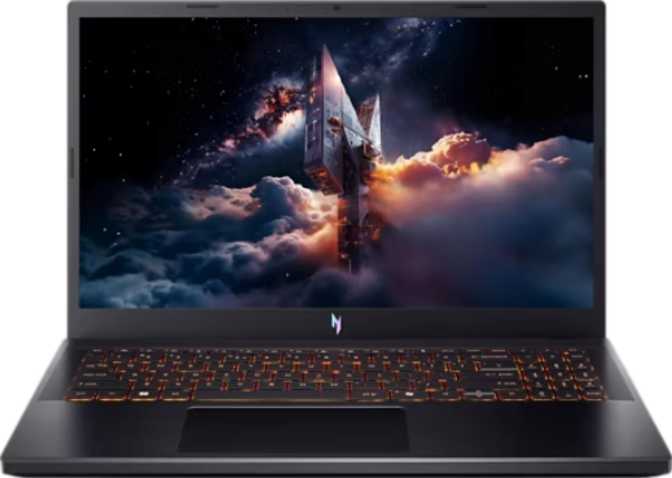
Acer Nitro V 15 (2025) Full Review – Real-World Gaming Performance
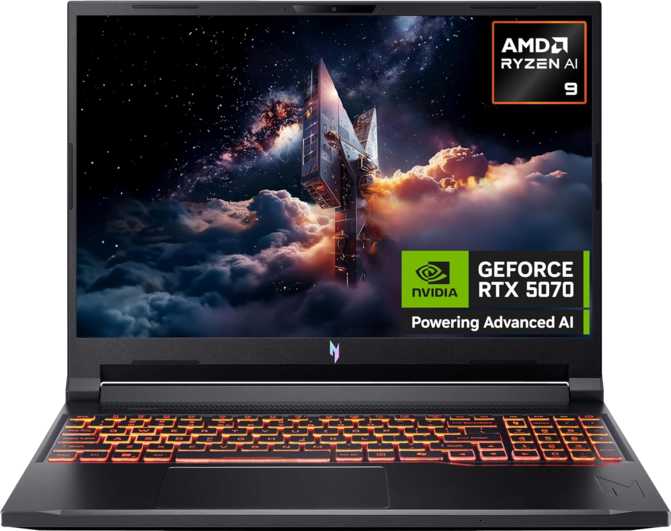
LaptopsThe Acer Nitro V series has long held a clear role in the gaming laptop market: meaningful performance without the price tag that defines the enthusiast tier. The 2025 15.6-inch model pushes that value proposition further than any previous generation, pairing NVIDIA's Blackwell-architecture discrete GPU — current generation — with a 14-core Intel hybrid processor and a 165 Hz IPS display. At this price tier, buyers typically settle for last-generation hardware. This configuration breaks that pattern.
Boost to 5.4 GHz
1920 × 1080
8 GB GDDR7
Upgradeable to 64 GB
PCIe Gen 4
~8 hr Light Use
Design and Build Quality
Form Factor and Physical Experience
At 362 mm wide, 239 mm deep, and 23 mm thick, the Nitro V 15 sits squarely in the category of laptops you carry to a desk rather than a café. The weight lands just above 2.1 kg — roughly 4.6 pounds — competitive for a machine that packs active cooling and a full-size 76 Wh battery. Moving it between rooms takes no effort; daily commuting in a padded bag is practical. Calling it ultraportable would mislead you, and calling it heavy would be equally inaccurate.
The total chassis volume comes in just under two liters — a figure that represents real engineering density given the hardware inside. Active fan cooling is exactly the right call for a gaming machine at this performance level. Fanless designs achieve quiet operation by throttling the processor and GPU under sustained load; this machine doesn't need to make that trade-off.
Keyboard, Biometrics, and Practical Details
The backlit keyboard spans the full width of the 15.6-inch chassis, giving the key layout proper spacing. Backlighting earns its keep in darker gaming environments and makes this genuinely usable during late-night work sessions. A fingerprint scanner handles biometric login via Windows Hello; 3D facial recognition is absent, so the fingerprint reader is the fast-access primary option.
The Nitro V carries no weather sealing and no ruggedized construction. For the target buyer gaming at a desk or transporting the machine in a bag between locations, neither of these is a practical concern. If outdoor use or rough physical handling matters to you, this machine is not designed for that.
| Type | 15.6″ Gaming Laptop |
| Width | 362 mm |
| Depth | 239 mm |
| Thickness | 23 mm |
| Weight | 2,110 g (4.65 lb) |
| Chassis Volume | ~1,990 cm³ |
| Cooling | Active fan-cooled |
| Keyboard | Backlit, full-width |
| Biometrics | Fingerprint scanner |
| Weather Sealed | No |
| Ruggedized | No |
Display: Fast, Sharp, and Built for Gaming
The Panel Explained
The 15.6-inch IPS LCD runs at 1920 × 1080 — a pixel density of 141 pixels per inch. At standard viewing distances of 18 to 24 inches, the image is sharp and text reads cleanly. This resolution is the correct choice here: the GPU inside is optimized to push high frame rates at exactly this resolution, not to struggle at 4K or 1440p where the generational performance advantages would be diminished.
The IPS panel type delivers consistent color accuracy across wider viewing angles than older TN gaming panels. For gaming this matters when showing the screen to others beside you. For photo editing, video work, or any color-sensitive creative task, IPS is measurably more capable — and it's the better long-term choice for a multi-purpose machine.
A standard display refreshes 60 times per second, showing each frame for roughly 16 milliseconds. This panel refreshes 165 times per second — each frame on screen for under 7 milliseconds. The result is motion that appears visibly smoother and more immediate in every fast-moving scene. At frame rates above 100 fps, the gap between a 60 Hz and 165 Hz screen is not subtle — you see it within seconds of switching, and you feel it in the responsiveness of every cursor movement.
The display surface is uncoated. In a dark gaming room, this is irrelevant. Near a window or under bright overhead lighting, reflections become genuinely distracting. It's a cost trade-off common at this price tier — and the practical solution is positioning the screen away from direct light sources. Know this before you buy rather than being surprised after.
| Screen Size | 15.6 inches |
| Resolution | 1920 × 1080 (FHD) |
| Pixel Density | 141 ppi |
| Panel Type | IPS LCD, LED-backlit |
| Refresh Rate | 165 Hz |
| Touch Screen | No |
| Anti-Reflection | No |
| Multi-Display | Up to 4 outputs |
Performance: Two Engines Working Together
The Processor — Hybrid Architecture
The CPU uses a hybrid core architecture: six high-performance cores clocked at 2.6 GHz base and eight energy-efficient cores running at 1.9 GHz base, totaling 14 physical cores and 20 threads. Under peak demand — exporting video, loading large game worlds, compiling code — individual cores boost up to 5.4 GHz.
In practical terms, this CPU handles multitasking that would have required a workstation processor a few years ago. Streaming via OBS while gaming, running multiple applications, encoding video in the background — all of these scenarios benefit directly from having 14 cores distribute the load. The eight efficiency cores absorb background tasks so the six performance cores stay available for whatever you're actively doing.
Built on a 5-nanometer process, this chip achieves more computational work per watt than older 7 nm or 10 nm designs, all within a 45-watt thermal envelope — the right specification for a gaming laptop with genuine cooling headroom.
Benchmark Results
Multi-Core
Single-Core
Overclocked
The multi-core score of 27,599 places this CPU comfortably in the upper tier of laptop processors at this price point. The single-core result of 3,746 reflects the day-to-day responsiveness you feel in app launches, browser speed, and game loading — a healthy figure for a 45-watt mobile processor.
The Discrete GPU — NVIDIA Blackwell Architecture
The dedicated graphics processor is built on NVIDIA's Blackwell architecture — the current generation. This is not a renamed or recycled previous-generation design; it brings genuine improvements in both rasterization performance and AI-powered rendering. The GPU houses 3,328 shading units handling the mathematics behind every rendered frame, alongside 104 texture mapping units and 32 render output units responsible for surface detail and final pixel output.
The 8 GB of GDDR7 video memory connected over a 128-bit bus delivers 448 GB/s of bandwidth. Previous-generation GDDR6 at comparable configurations typically offered 192–256 GB/s. GDDR7 closes a bandwidth gap that used to limit how well 8 GB cards handled high-detail texture packs and complex game scenes. At 1080p with high settings, 8 GB GDDR7 is genuinely sufficient.
DLSS, Ray Tracing, and Resizable BAR
DLSS (Deep Learning Super Sampling) uses AI to render frames at a lower internal resolution and reconstruct them at near-native quality. In supported games, enabling DLSS can nearly double frame rates with minimal visible quality loss at 1080p — turning the 165 Hz display from a theoretical ceiling into a consistently reachable target.
Hardware ray tracing is present via dedicated RT cores, enabling realistic real-time lighting, reflections, and shadows. At 1080p with DLSS enabled, medium ray tracing settings in supported titles remain within playable frame-rate ranges on this hardware.
Intel Resizable BAR is supported, allowing the CPU to access the full video memory pool directly rather than in chunks. In compatible games, this reduces CPU-side bottlenecks and can improve frame rates automatically — no user configuration required.
The Iris Xe integrated GPU handles display output during light tasks, extending battery life by routing through a more power-efficient path when the discrete GPU isn't needed. Under gaming load, the NVIDIA Blackwell GPU takes over automatically — no manual switching required.
Memory and Storage
Sixteen gigabytes is now the practical floor for modern gaming — not a luxury but a baseline. The dual-channel DDR4 configuration ensures the CPU and GPU are fed data efficiently, with a maximum supported speed of 5,200 MHz across two memory channels.
For pure gaming and general productivity, 16 GB is workable. Video editors handling 4K timelines, 3D artists, or developers running virtual machines will eventually benefit from more.
The 1 TB NVMe SSD uses PCIe Gen 4, the current standard for high-speed solid-state storage. Game installation times, application launches, and file transfers all benefit from this interface over older SATA SSDs. Windows loads fast, large games open promptly, and storage bottlenecks stay out of the way.
One terabyte accommodates a healthy library of installed games alongside the operating system and productivity applications. As libraries grow, expansion is possible via the NVMe slot.
| Spec | RAM | Storage |
|---|---|---|
| Capacity | 16 GB (current) | 1 TB |
| Standard | DDR4 | NVMe SSD |
| Interface | Dual-channel | PCIe Gen 4 |
| Max Speed | 5,200 MHz | PCIe 4.0 bandwidth |
| Max Capacity | 64 GB | Expandable via NVMe slot |
| Channels | 2 memory channels | Flash storage |
Battery Life and Power
Runtime Expectations — Set Realistically
The 76 Wh battery is among the largest cells available in a gaming laptop at this size class. Acer rates it at up to 8 hours of use — a figure that deserves honest context. Eight hours is achievable under light workloads: document editing, video streaming, web browsing, with screen brightness reduced and the discrete GPU parked in favor of integrated graphics.
Under active gaming with the NVIDIA discrete GPU running, expect runtime measured in the 90-minute to two-hour range depending on the game's intensity. This is not a criticism specific to the Nitro V — it is a physics reality for any gaming laptop with an active discrete GPU drawing significant wattage. The larger 76 Wh cell simply means you get more runtime than competitors shipping 48–60 Wh batteries in similarly priced machines.
Treat the Nitro V 15 as a desk machine that happens to be portable. Keep it plugged in during gaming sessions. The battery life figure becomes relevant when commuting or working between outlets on light tasks — and 8 hours of light productivity runtime is genuinely useful in that context. Two use modes; two different expectations.
| Battery Capacity | 76 Wh |
| Rated Battery Life | Up to 8 hours |
| Gaming Runtime | ~90 min – 2 hr |
| Sleep-and-Charge USB | No |
| MagSafe Adapter | No |
| CPU TDP | 45 W |
Connectivity: Well-Equipped for a Gaming Laptop
The three USB-A ports solve the peripheral problem that plagues thinner gaming laptops — you can connect a mouse, a headset receiver, and an external hard drive simultaneously without reaching for a hub. The USB-C port at Gen 2 speeds handles fast external storage or alternate display output. The HDMI port connects directly to a monitor, TV, or projector.
Wi-Fi 6 is the current mainstream wireless standard, offering lower latency and better performance on congested networks compared to Wi-Fi 5. For online gaming, Wi-Fi 6 on a compatible router delivers a measurable improvement in connection stability. The wired Ethernet port exists for those who want the lowest-latency connection possible — for serious competitive gaming, a cable is always the right answer.
DisplayPort Note: Dedicated DisplayPort output is absent on this model. External monitor connection routes through HDMI or the USB-C port depending on monitor compatibility. The GPU supports up to four simultaneous displays, so multi-monitor setups are possible — verify your monitor's input options before purchasing.
| Connection | Detail |
|---|---|
| USB-A (Gen 1) | 3 ports — full-size |
| USB-C (Gen 2) | 1 port — fast transfer |
| HDMI | 1 port |
| Ethernet | RJ45 — wired network |
| Wi-Fi | Wi-Fi 6 (802.11ax) |
| Bluetooth | Version 5.1 |
| Audio Jack | 3.5 mm combo headset |
| Memory Card | No SD slot |
| DisplayPort | No dedicated output |
| Thunderbolt 4 | Not available |
Audio and Camera
Built-in Audio
Stereo speakers cover casual media consumption and in-game audio when a headset isn't available. The 3.5 mm combo audio jack supports headsets with both audio and microphone in a single plug — the connection type that most gaming headsets use. Dolby Atmos spatial audio processing is absent on this model.
For music listening and serious gaming audio, a dedicated headset connected via the 3.5 mm jack will significantly outperform any built-in speaker array at this price tier. The speakers cover the basics; a headset is where audio quality lives on a gaming laptop.
Webcam and Microphone
A front-facing webcam handles video calls and streaming use cases. A single built-in microphone covers voice chat when headset use isn't practical. Neither component is the primary attraction on a gaming laptop at this price level, but both exist and function for their intended purpose.
Who the Acer Nitro V 15 (2025) Is For
The Blackwell GPU with GDDR7 memory is optimized for exactly this workload — high settings, high frame rates, at the resolution that matches the display.
DLSS multiplies frame rates in supported games. On a 165 Hz screen, that headroom translates directly into smoother gameplay you can see and feel.
A 14-core CPU handles creative workloads, productivity software, and multitasking alongside gaming sessions without switching between devices.
Memory expandable to 64 GB, a PCIe Gen 4 NVMe slot — the hardware has room to grow alongside your needs.
Three USB-A ports, USB-C, HDMI, Ethernet, and Wi-Fi 6 — covered without buying a dock on day one.
Portable when needed, but designed for desk use where performance runs unconstrained and plugged in.
Under active gaming load with the discrete GPU running, battery life is measured in 90 minutes to two hours. That figure is a physics reality for this hardware class.
At 23 mm thick and 2.1 kg, this is not an ultrabook. The hardware inside demands the physical footprint it occupies.
The 1080p panel is a fixed choice on this model. If resolution is a priority for creative work or gaming, a higher-end configuration is necessary.
Neither interface is present. Professional workflows tied to Thunderbolt docks or high-bandwidth peripherals require a different platform.
No weather sealing, no ruggedized construction. Field work, outdoor use, or rough handling scenarios require a machine built for those conditions.
How It Compares to the Alternatives
The Nitro V 15 competes in a busy segment. Here is how its specifications stack up against the categories a buyer at this price range would consider.
| Feature | Acer Nitro V 15 (2025) | Typical Budget Alternative | Premium Mid-Range Laptop |
|---|---|---|---|
| GPU Generation | Blackwell — current gen | Often Ada Lovelace (prev gen) | Blackwell or Ada Lovelace |
| Video Memory | 8 GB GDDR7 | 6–8 GB GDDR6 | 8–12 GB GDDR7 |
| Display Refresh | 165 Hz IPS | 144 Hz IPS or TN | 165–240 Hz IPS |
| System RAM | 16 GB DDR4 (upgr. to 64 GB) | 8–16 GB, sometimes soldered | 16–32 GB DDR5 |
| Battery Capacity | 76 Wh | 48–60 Wh typical | 72–99 Wh |
| USB-A Ports | 3 × USB 3.2 Gen 1 | Usually 2 | 2–3 |
| Wired Ethernet | Yes — RJ45 | Often absent at thin tier | Yes |
| Weight | ~2.1 kg | 1.8–2.3 kg | 2.0–2.6 kg |
Strongest competitive argument: Current-generation Blackwell GPU and GDDR7 bandwidth at a price point where budget alternatives still ship last-generation discrete graphics. The 76 Wh battery also exceeds budget competition that frequently compromises on cell size to cut cost.
Where it concedes ground: DDR4 versus the DDR5 platform found in higher-priced configurations. No 240 Hz panel option. These are genuine trade-offs that explain the pricing — not oversights.
Honest Assessment
At this price tier, current-generation discrete graphics are unusual. The Blackwell architecture brings genuine generational improvements — not a badge refresh — with DLSS and ray tracing capabilities that extend the useful life of this hardware.
The 448 GB/s bandwidth from GDDR7 substantially outpaces GDDR6 alternatives at comparable configurations, reducing the memory bottlenecks that previously limited 8 GB cards in demanding scenes.
Streaming, encoding, running background applications while gaming — this CPU distributes workloads across its core configuration without the performance collapses that older quad-core gaming laptops suffered.
No mismatch between a high-refresh screen and an underpowered GPU. DLSS enables the frame rates where this display's refresh rate becomes a genuine daily advantage.
Mouse, headset receiver, and external storage connected simultaneously. Most thinner competitors ship two ports and expect you to buy a hub.
Outpaces budget alternatives that frequently cut battery size to reduce cost. More capacity means more light-use runtime and a larger buffer for mixed workloads.
DDR5 offers higher bandwidth for CPU-intensive workloads and is standard on more expensive configurations. DDR4 is fully functional today, but the gap will matter more as workloads grow memory-hungry. This is how the pricing is made possible.
In bright rooms or near windows, the uncoated display surface reflects ambient light visibly. In a dark gaming environment, irrelevant. In any other environment, a real practical limitation worth knowing before purchase.
~90 minutes to two hours under discrete GPU gaming load. This is not a design flaw — it's a physical constraint of running high-performance hardware on a battery. The larger 76 Wh cell helps compared to budget competition, but the ceiling is firm.
The fastest USB-C port tops out at USB 3.2 Gen 2 (10 Gbps). Thunderbolt docks, external GPU enclosures, and high-bandwidth peripherals that require Thunderbolt 4 or USB4 are not compatible without a different platform.
Questions Buyers Ask Before Purchasing
Answers to the real questions that appear in search results before a purchase decision.
The Acer Nitro V 15 (2025): A Confident Recommendation
For 1080p gaming at high frame rates, this machine delivers more than its price suggests.
The Nitro V 15 (2025) earns its recommendation through a specific and well-executed value proposition: a current-generation Blackwell GPU with GDDR7 memory, a 14-core hybrid processor with genuine multitasking headroom, a 165 Hz IPS display that complements the GPU's frame-rate capability, and practical connectivity that doesn't require a hub on day one.
The compromises — a DDR4 memory platform, no anti-reflection coating, limited battery life under gaming load — are the honest cost of the machine's pricing. None of them will surprise you now that you know what to expect.
Your priority is 1080p gaming at high settings with consistent high frame rates, and you want to run current games well into the next few years without a hardware upgrade.
You need DDR5 memory for bandwidth-intensive creative workflows, require Thunderbolt 4 for professional peripherals, or need extended unplugged gaming sessions.
Current-generation GPU. Matching 165 Hz display. Real CPU headroom. Honest connectivity. At this price tier, this combination represents genuine value — and it will remain capable well into the next wave of game releases.