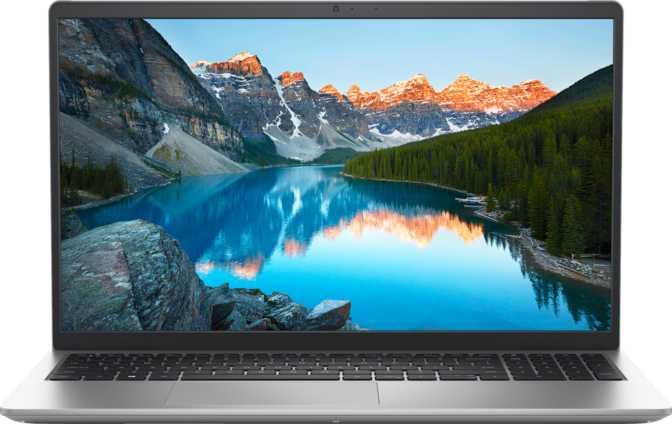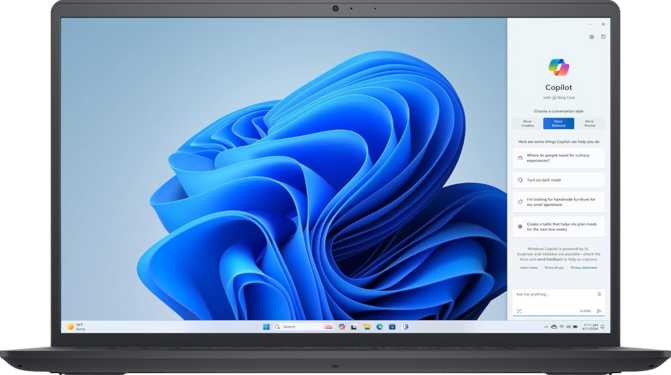
Dell 15 DC15255 (2025) Full Review: Power Where It Counts
LaptopsThe Dell 15 DC15255 occupies a specific, deliberate position in the laptop market: a productivity-first machine that prioritizes raw computing headroom and storage capacity over portability perks and premium finishes. With a configuration that would have been considered workstation-class just a few years ago now packaged into an accessible 15.6-inch chassis, it makes a compelling argument for users whose work demands serious multitasking muscle without a professional-tier price tag. The trade-offs are real — and understanding them before you buy is the entire point of this review.
Design and Build Practical Over Polished
Physical Footprint
At just under 1.9 kilograms, the Dell 15 DC15255 sits comfortably in the middle ground for a 15.6-inch laptop. It will not strain your shoulder on a daily commute, but it is equally not the kind of machine you will forget is in your bag. The 18mm profile is genuinely slim for the feature set it packs — many competing machines with comparable internals run noticeably thicker.
The chassis dimensions are proportioned sensibly for the screen size, giving the keyboard and trackpad enough real estate to feel spacious without the deck becoming unwieldy on a lap or small desk.
Build Considerations
- No backlit keyboard. A meaningful omission for anyone working in dim environments — late evenings, darkened meeting rooms, or overnight travel.
- No biometric security. No fingerprint scanner or facial recognition means no Windows Hello — a password or PIN is required on every login.
- No weather sealing or rugged build rating. This is a desk and office laptop, not a field companion.
- Active cooling fan. Internals sustain performance under load without throttling. Audible during intensive tasks, but thermal management is functional rather than compromised.
Display Brighter on Paper Than in Sunlight
Panel Quality and Everyday Viewing
The 15.6-inch IPS panel delivers wide viewing angles and consistent colour reproduction — making shared-screen moments comfortable whether presenting to a colleague or working at an angle. Spreadsheets, documents, and web content all look clean from multiple positions.
The 120Hz refresh rate is a welcome inclusion at this price tier. Scrolling through long documents, navigating between browser tabs, and moving windows around the desktop all feel noticeably smoother than a standard 60Hz screen — an improvement that is immediately apparent once experienced.
The display does not support touch input, which aligns with the productivity-desktop positioning of the machine.
Brightness and Outdoor Limitations
The anti-reflection coating reduces glare from overhead lights and keeps the image readable in typical indoor conditions, but it cannot compensate for the brightness ceiling under high ambient light.
Users who have previously owned laptops with 300–400+ nit panels will notice the difference immediately. In a well-controlled office with consistent lighting, 250 nits is workable. Anywhere else, it becomes a regular annoyance.
Performance Where This Machine Genuinely Surprises
Processing Power in Real-World Terms
The processor at the core of this Dell is an eight-core, sixteen-thread AMD chip built on a 7-nanometre manufacturing process, operating within a 15-watt thermal envelope. The base operating speed is designed for sustained, efficient multitasking, while the boost capability climbs to 4.5GHz during bursts of intensive work — compiling code, rendering documents, or processing complex spreadsheet formulas.
Sixteen threads make parallel workloads feel genuinely unconstrained. Running a video call while simultaneously exporting a report, managing thirty or more browser tabs with active web apps, or keeping a virtual machine running alongside daily workflow are all within comfortable reach.
ECC (Error-Correcting Code) memory support — unusual in consumer laptops — silently corrects single-bit memory errors during normal operation. For financial data, scientific computing, or development work where silent data corruption matters, this is a meaningful reliability differentiator normally reserved for workstation hardware.
Benchmark Scores
Memory
Sixty-four gigabytes of DDR4 in dual-channel configuration is not a specification you typically encounter in a consumer laptop at this price. Most competing machines ship with 16GB or 32GB at best.
What this unlocks in practice: running multiple virtual machines simultaneously, keeping entire development environments open alongside communication tools, and processing large datasets without memory pressure.
64GB DDR4-3200 — Platform maximumStorage
The 2-terabyte NVMe solid-state drive communicates directly with the processor via PCIe 3, delivering speeds that make traditional SATA storage feel antiquated. Application launches, file transfers, and system boot all respond with immediacy.
Two terabytes is genuinely spacious. Even users who store large media libraries, development repositories, or extensive project archives locally are unlikely to fill this drive in normal use.
2TB NVMe PCIe 3 — Fast and capaciousGraphics
The Radeon Vega 8 integrated GPU handles display output and light visual tasks capably: video playback, photo editing, and casual creative work. It supports DirectX 12 and OpenCL 2.2, satisfying compatibility requirements for modern creative software.
It does not support ray tracing, DLSS, or AMD XeSS upscaling. GPU-accelerated workloads like video transcoding, AI inference, or machine learning training will receive minimal acceleration versus a dedicated card.
Integrated only — No dedicated GPUConnectivity Functional but Conservative
Port Selection
| Port / Feature | Available | Notes |
|---|---|---|
| USB-C (3.2 Gen 1) | 5 Gbps — solid for modern peripherals | |
| USB-A (3.2 Gen 1) | 5 Gbps — standard desk peripheral speed | |
| USB-A (2.0) | Legacy speed — keyboards, mice, basic devices | |
| HDMI Output | HDMI 1.4 — 4K@30Hz or 1080p@120Hz max | |
| SD Card Slot | External memory expansion | |
| 3.5mm Audio Jack | Headphone and microphone combo | |
| Ethernet (RJ45) | Not available — adapter required | |
| Thunderbolt / USB4 | Not available | |
| DisplayPort | Not available |
Wireless and Display Output
Strong across current home and office router infrastructure. Does not support Wi-Fi 6 or Wi-Fi 6E — in environments with upgraded networking hardware, some performance is left unrealised in dense, high-traffic scenarios.
Battery Life The Most Significant Trade-Off
With a 15-watt processor that spikes higher under load and a 120Hz display drawing constant power, realistic battery life under productive use will fall well short of a full working day. There is no fast-charging system noted in the specifications.
For users who work at a fixed desk or in environments where power access is reliable — home offices, corporate workstations — this limitation is manageable. For anyone who frequently moves between locations, travels for work, or needs to operate untethered for extended periods, the battery constraint will create genuine daily friction.
Real-World Usage Scenarios Who This Is For — and Who It Is Not
This Laptop Serves Well
Daily professional tasks — documents, spreadsheets, email, video calls, and web-based tools — feel effortless, with genuine headroom to grow as workloads increase.
64GB of RAM enables multiple containers, virtual machines, and IDEs running simultaneously without memory pressure. The 2TB NVMe provides ample space for repositories, dependencies, and build artifacts.
Large datasets in Python, R, or Excel are handled without memory pressure. ECC support adds a layer of reliability relevant to precision-critical computation.
Computing, data science, engineering, and architecture programs demanding heavy local computation will find this machine capable for coursework that would overwhelm a standard consumer laptop.
Look Elsewhere If You Are...
The battery capacity makes all-day untethered work impractical. Regular movement between locations without reliable power access will create consistent, daily frustration.
The integrated Radeon Vega 8 is not a gaming GPU. Modern titles will not run at acceptable settings, and the absence of DLSS, XeSS, or ray tracing confirms this machine was never designed for gaming.
No backlit keyboard means working in dim conditions requires strong touch-typing skills or supplemental lighting — a daily friction point for evening workers and night-shift users.
Anyone who regularly works near windows or outdoors will find the 250-nit display uncomfortably dim. Users accustomed to brighter panels will notice the difference immediately and constantly.
Competitive Positioning How It Compares to the Alternatives
At this specification level, the Dell 15 DC15255 occupies a narrow but valuable niche. Competitors with higher battery capacity and more complete port selections typically sacrifice RAM or storage to reach a similar price. The table below shows precisely where the hardware budget was — and was not — spent.
| Feature | Dell 15 DC15255 | Typical Mid-Range 15" Rival |
|---|---|---|
| RAM | 64GB DDR4 | 16–32GB |
| Storage | 2TB NVMe | 512GB–1TB NVMe |
| Display Refresh Rate | 120Hz | 60Hz (common at this tier) |
| Battery Capacity | 41 Wh | 50–72 Wh |
| Ethernet Port | No | Often included |
| Wi-Fi Version | Wi-Fi 5 | Wi-Fi 5 or Wi-Fi 6 |
| Biometric Login | No | Often included |
| Keyboard Backlight | No | Often included |
Honest Assessment Strengths and Weaknesses in Plain Terms
The Dell 15 DC15255's greatest strength is the combination of memory and storage at its price point. Finding 64GB of RAM and a 2TB NVMe drive in the same affordable chassis is unusual — and for users whose productivity is genuinely constrained by memory or disk space, this machine removes both bottlenecks in a single purchase.
The 120Hz display and competent multi-core processor round out a core specification that handles professional workloads without compromise. The ECC memory support and 16-thread processor add enterprise-grade reliability to what remains a consumer price point.
For desk-based power users, software professionals, and researchers, this machine delivers genuine value that competing configurations at similar prices simply cannot match on internal specifications alone.
The 41Wh battery is the most consequential weakness — not a minor shortcoming, but a fundamental characteristic of how this machine must be used. It is a desktop replacement that happens to be portable, not a mobile workstation. That distinction matters enormously to the wrong buyer.
The absence of backlit keys, biometric security, Ethernet, and Wi-Fi 6 are individually small frustrations but collectively signal a machine that exhausted its budget before addressing quality-of-life refinements that most competing machines include as standard.
The 250-nit display brightness ceiling deserves particular emphasis. In well-controlled office lighting it is workable; in any other setting — near windows, in open-plan spaces, outdoors — it becomes a consistent daily annoyance that no software setting can fix.
Common Buyer Questions Answered Directly
Final Verdict
The Dell 15 DC15255 is a specialist machine that will genuinely impress the right buyer and disappoint the wrong one.
If your work is memory-intensive — software development, data analysis, virtual machines, large-scale document management — and you need substantial local storage without spending workstation money, this laptop delivers a configuration that is hard to find at this price. The 120Hz display and capable processor add quality where it matters most for desk-based productivity workflows.
But if you frequently work away from power outlets, require a full working day of battery life, depend on wired networking, or do any computing in low-light conditions, the compromises here will become daily friction points that no amount of RAM can resolve.
Memory and storage capacity are your primary driver, and you will be using this machine primarily at a desk with reliable power access.
Battery endurance, connectivity breadth, or quality-of-life features like keyboard backlighting and biometric login are important to your daily workflow.
- Best For
- Desk-based power users, developers, analysts
- Avoid If
- Mobile work, gaming, low-light environments