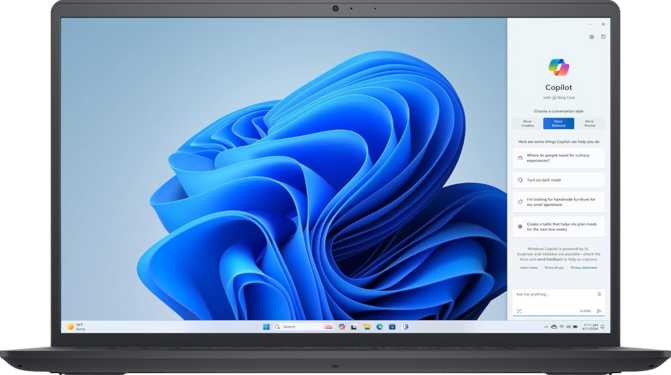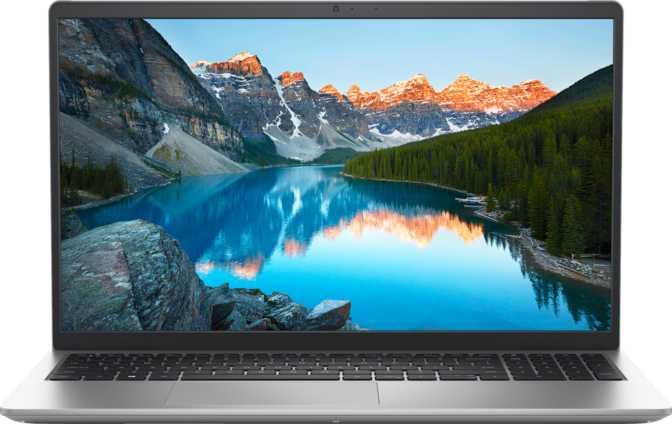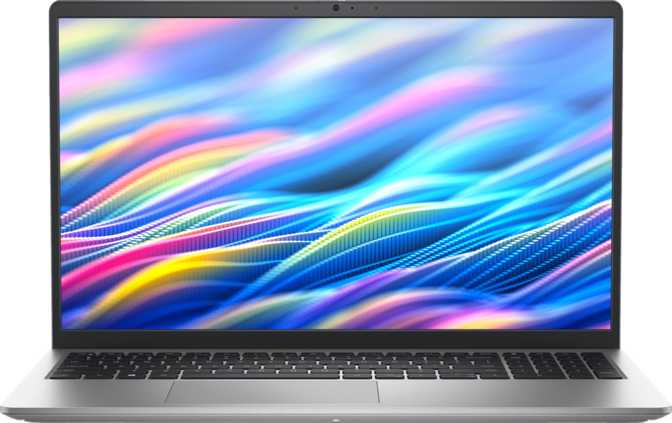
Dell 15 DC15250 (2025) Full Review: Focused Productivity, Fair Price
LaptopsThe 15.6-inch laptop market is crowded with machines that promise everything and deliver something muddier. The Dell 15 DC15250 takes a different approach — deliberate, specific choices that won't suit every buyer, but for the right person add up to something genuinely useful. This is a productivity-first machine built around a hybrid processor architecture, a smooth 120Hz display, and enough storage and memory to handle real working loads without a midday panic about headroom. Understanding where it succeeds — and where it stops trying — is the whole point of this review.
Review Ratings
Scored across six key categories for the productivity buyer
120Hz IPS with anti-glare; limited to 250 nits brightness
Hybrid architecture handles productivity workloads confidently
Slim 18mm chassis at 1.9kg — practical and portable for its class
No Ethernet, no Thunderbolt; Wi-Fi 6 and dual USB-C present
54Wh capacity; adequate for a mixed-use working day
16GB + 1TB at this price point represents strong factory configuration
Design and Build: Understated, Functional, and Thinner Than Expected
Physical experience & chassis quality
At roughly 1.9 kilograms, the Dell 15 DC15250 sits in a comfortable middle ground for a 15.6-inch laptop. It is not featherweight — you will notice it in a backpack over a long commute — but it is meaningfully lighter than older machines in this screen class, many of which pushed past 2.2 kilograms. Paired with an 18mm profile, it slides into a sleeve without the bulk that used to define large-screen productivity laptops.
The footprint measures 358mm wide by 235mm deep, which is standard for the screen size and means it fits on most desk setups and economy tray tables without drama. The volume of just over 1.5 liters speaks to how efficiently Dell has packaged the internals.
This is not a rugged machine and carries no weather sealing. It is designed for office environments, home desks, and coffee shop tables — not construction sites or outdoor fieldwork. The build reflects that: clean lines, a practical aesthetic, no theatrical gaming-inspired vents or RGB accents.
The backlit keyboard is the kind of feature budget machines cut first — working in low-light conditions without it is genuinely frustrating. The fingerprint scanner adds a practical layer of biometric security that speeds up login in everyday use without requiring a password every time.
- Width358 mm
- Depth235 mm
- Thickness18 mm
- Weight1.9 kg
- Backlit KeyboardYes
- Fingerprint ScannerYes
- Weather SealedNo
- Rugged BuildNo
Display: The 120Hz Surprise in a Budget Productivity Machine
Screen performance & visual experience
The 15.6-inch IPS LCD panel delivers a 1920×1080 resolution, which works out to approximately 141 pixels per inch at this screen size. That is a sharp-enough pixel density that individual pixels are not discernible at normal viewing distances, and text renders cleanly for reading, document editing, and coding.
Why 120Hz Matters for Non-Gamers
Most productivity laptops in this price range ship with 60Hz panels, where every scroll, animation, and cursor movement looks comparatively sluggish once you have experienced higher refresh rates. At 120Hz, the display feels noticeably more fluid — window dragging, browser scrolling, and even spreadsheet navigation carry a crispness that reduces eye fatigue over long sessions. This is not a gaming feature that happens to be included; it is a genuine quality-of-life improvement for anyone spending hours in front of the screen.
The anti-reflection coating is practical and important. At 250 nits of brightness, this panel is comfortable in dim indoor environments — a typical office or home setup — but will struggle under direct sunlight or near bright windows. Users who primarily work indoors will not encounter this limitation. Those who frequently work outdoors or near large, sun-facing windows should weigh this carefully.
The panel supports up to four simultaneous external displays. The HDMI 1.4 output handles external monitors up to 1080p/60Hz, and the USB-C ports support display output for additional screens — making the DC15250 capable as a docking-station hub for multi-monitor desk setups. There is no touch capability, which is the right call for a productivity-focused machine.
- Screen Size15.6 inches
- Resolution1920 × 1080
- Pixel Density141 ppi
- Panel TypeIPS LCD
- Refresh Rate120 Hz
- Peak Brightness250 nits
- Anti-Glare CoatingYes
- Touch ScreenNo
- Max External Displays4
Performance: A Hybrid Processor That Thinks Smart, Not Just Fast
CPU architecture, benchmark results & memory analysis
CPU Architecture Explained
The processor inside the DC15250 uses a hybrid core design — two performance cores running at one speed and eight efficiency cores running at a lower base speed, all coordinating through an intelligent scheduler that assigns tasks to the right core type automatically. This architecture was pioneered in mobile chips and represents how modern laptop processors balance sustained performance against battery drain.
The performance cores handle the heavy lifting: video calls with background blur, compressing files, rendering documents. The efficiency cores keep the system responsive during lighter tasks — reading emails, browsing tabs, playing music — without burning through power unnecessarily. With a turbo speed reaching 5GHz on peak demand, the processor accelerates briefly for burst tasks without sustaining that power draw continuously.
At a 15-watt thermal design power rating, this chip is tuned for sustained efficiency rather than uncapped performance. Under prolonged heavy load, it will not match the raw throughput of a higher-wattage chip in a thicker chassis — but for the workflows this machine targets, it rarely needs to. The cooling system is active, not fanless, which is the right engineering call for a processor that boosts to those peak speeds.
- Core ArchitectureHybrid big.LITTLE
- Core Config2P + 8E Cores
- Total Threads12
- Peak Boost Speed5.0 GHz
- Process Node10 nm
- Thermal Envelope15 W TDP
- MultithreadingYes
- 64-bit SupportYes
Benchmark Results in Context
In Geekbench 6, the processor scores approximately 2,458 in single-core tasks and 7,122 across all cores simultaneously. In PassMark, the single-thread result lands around 3,436, with an overall score approaching 14,300. Single-core performance is strong enough for responsive everyday tasks, while the multi-core result is competitive for a 15-watt efficiency-class chip. Workloads like browser-based work, Office suite documents, video conferencing, and light creative tasks run without hesitation. Extended 4K video exports or large batch editing operations will take longer than on a higher-powered machine — that is an honest limitation of this power envelope.
Geekbench 6 Results
Strong for everyday responsiveness; competitive in its efficiency class
Good multi-threaded throughput for a 15W chip; handles parallel workloads well
PassMark Results
Above-average single-thread; applications feel snappy and responsive
Solid overall throughput for a productivity-class laptop at this power envelope
Memory and Storage
Sixteen gigabytes across a dual-channel configuration is the right amount for a modern productivity machine. It is enough to keep a full browser session with many tabs, a video call, a document editor, and a music application all open simultaneously without the system reaching for virtual memory.
The dual-channel arrangement doubles memory bandwidth versus single-channel, which particularly benefits the integrated GPU that shares system memory. The system supports up to 64GB, leaving significant upgrade headroom for the long term.
NVMe storage of this generation loads applications quickly, boots the operating system in seconds, and handles large file transfers without bottleneck. One terabyte covers a full software installation, several years of documents, a music library, and a modest photo archive before hitting limits.
PCIe 4 connectivity provides the fastest data pathways available on modern platforms, ensuring the drive is never a bottleneck for the system's other components during everyday use.
Graphics Capability
The integrated Intel Iris Xe graphics with 96 execution units handles display output and GPU-adjacent tasks. It supports DirectX 12 and OpenGL 4.6, making it capable for general-purpose computing, light creative applications, and hardware-accelerated video playback. With 768 shader units and 24 render output units, it covers the full range of daily productivity demands.
This GPU will not run modern 3D games at acceptable frame rates — it is not designed to. For the workflows this machine targets, it is well-matched: smooth video playback, display rendering, and basic photo editing stay within its competence. Ray tracing and AI-based upscaling features fall outside this machine's intended scope and are not supported.
Connectivity: Practical Ports With One Real Gap
Port selection, wireless & audio capabilities
Port Layout
| Port Type | Count | Notes |
|---|---|---|
| USB-C (USB 3.2 Gen 1) | 2 | Data and display output capable |
| USB-A (USB 3.2 Gen 1) | 1 | Standard peripheral transfer speed |
| USB 2.0 Type-A | 1 | Legacy devices, lower transfer speed |
| HDMI Output | 1 | Version 1.4 — up to 1080p / 60Hz external |
| SD Card Slot | 1 | External memory card support |
| 3.5mm Audio Jack | 1 | Combined headphone / headset in-out |
| Ethernet (RJ45) | 0 | Adapter required for wired network |
| Thunderbolt (any gen) | 0 | No eGPU or Thunderbolt dock support |
802.11ax support delivers improved throughput, better performance in congested environments — offices and apartments with many devices — and lower latency than Wi-Fi 5. Fully backward compatible with Wi-Fi 5 and Wi-Fi 4 networks for broad compatibility across older routers.
- SpeakersStereo
- MicrophoneSingle built-in
- Front CameraYes
- Dolby AtmosNo
- Sleep-and-Charge USBYes
Battery Life: A Sensible Capacity for a Working Day
Endurance, charging behavior & power management
The 54Wh battery is a midpoint capacity for a 15.6-inch productivity laptop — neither the smallest nor the largest in the category. Combined with the 15-watt processor's efficient power management and the display's ability to moderate brightness, real-world endurance falls somewhere between six and nine hours under typical mixed-use conditions: web browsing, document editing, video calls, and occasional media playback.
Sustained workloads — extended video rendering, running many applications simultaneously, or keeping screen brightness high — will compress that range downward. Light-use sessions with the display dimmed extend it upward.
The machine is not fanless, which means the cooling fan engages during heavier workloads. In quiet environments, this is audible. The thermal ceiling for the processor is standard for this chip class and is managed by active cooling rather than passive measures. The sleep-and-charge feature keeps connected devices charging even when the laptop is sleeping — a small but genuinely convenient detail for everyday use.
Who Should Buy the Dell 15 DC15250
Matching this machine to the right buyer
- Remote and hybrid workers who need a reliable machine for video calls, Office suite productivity, and browser-heavy workflows without overspending
- Students who want enough storage for years of coursework, enough RAM to multitask without frustration, and a smooth display for long study sessions
- Small business users who need a manageable, no-nonsense laptop for documentation, light data work, and client-facing presentations
- Secondary machine buyers who want something competent and portable as a complement to a desktop workstation
- Multi-monitor desk users who plan to connect external displays and appreciate the docking potential of the dual USB-C setup
- Video editors and motion graphics artists who need dedicated GPU memory and significantly higher processor thermal headroom
- Gamers — the integrated graphics cannot sustain modern 3D titles at meaningful quality settings
- Thunderbolt users who require high-speed external storage arrays or eGPU enclosures — no Thunderbolt ports of any generation are present
- Wired-network professionals who need Ethernet as a fixed part of their workflow and do not want to carry an adapter
- Outdoor workers who frequently operate in bright sunlit environments, where 250 nits of display brightness creates visible limitations
How It Compares to the Alternatives
Competitive positioning at this price point and screen size
Against gaming-budget competitors in the same price range, the DC15250 trades the discrete GPU for a lighter chassis, more system RAM from the factory, and a larger NVMe drive. If your work does not require a dedicated GPU, the Dell's configuration is the more practical allocation of that budget. Against thin-and-light ultrabooks, the DC15250 offers a larger screen, more storage, and more RAM at a lower price — at the cost of additional weight and thickness. The 120Hz display is unusual in this price segment regardless of category.
| Feature | This DeviceDell 15 DC15250 | Gaming Budget Rival | Thin & Light Rival |
|---|---|---|---|
| Display Refresh | 120Hz IPS | 144Hz IPS | 60Hz IPS |
| RAM | 16GB DDR4 | 8–16GB DDR5 | 8–16GB LPDDR5 |
| Storage | 1TB NVMe PCIe 4 | 512GB–1TB | 256GB–512GB |
| GPU | Integrated Xe 96EU | Dedicated GPU | Integrated |
| Weight | ~1.9 kg | ~2.2–2.5 kg | ~1.2–1.5 kg |
| Battery | 54 Wh | 45–54 Wh | 50–72 Wh |
| Ethernet | No | Often Yes | Rarely |
| Thunderbolt | No | Sometimes | Often Yes |
Honest Assessment: Strengths and Limitations
A balanced look at where the DC15250 excels and where it falls short
The DC15250 earns genuine respect for the combination it assembles at this price point. Sixteen gigabytes of RAM paired with a terabyte of fast NVMe storage, a 120Hz IPS display with anti-glare coating, Wi-Fi 6, and a backlit keyboard — individually none of these are rare, but together at this configuration level they represent strong value for the productivity buyer.
The processor architecture handles everyday workloads well. The hybrid design means the machine feels alive during normal use and does not sip power unnecessarily. The Geekbench and PassMark results confirm it performs exactly where the specifications suggest — above the low end, below the workstation class, precisely where a 15-watt efficiency chip should land.
The 120Hz display alone separates it from most competitors at this price, and the storage and RAM configuration means you are unlikely to outgrow it quickly.
The limitations are real and worth sitting with. The 250-nit panel is a constraint in bright environments — this is a desk and indoor machine. The absence of Ethernet and Thunderbolt narrows the connectivity story, particularly for enterprise environments where wired infrastructure still dominates.
The single microphone is functional but basic. Users who regularly participate in conference calls in noisier environments will benefit from a dedicated headset. The integrated graphics draws a firm line below which no gaming or heavy GPU work is possible.
The display brightness is the one element that feels like a specification bump would have meaningfully improved the machine. Three hundred or three hundred and fifty nits would have broadened its usable environments without dramatic cost impact. As configured, it is strictly a desk and indoor machine.
Frequently Asked Questions
Real questions buyers search before purchasing
The Dell 15 DC15250 Delivers Where It Aims
The Dell 15 DC15250 is a focused, honest productivity machine that delivers where it is aimed. If your days consist of video calls, browser work, document editing, and light data tasks — and if you want a 120Hz display, a terabyte of fast storage, and 16GB of RAM without stretching into premium laptop pricing — this machine earns its place on your desk.
It is not for everyone. The buyer who needs a discrete GPU, wired Ethernet without adapters, or Thunderbolt connectivity will need to look elsewhere. So will anyone who spends significant time working in bright natural light. But for the remote worker, the student, the small business professional — the DC15250 is a well-considered package that does not force unnecessary compromises. Buy it for productivity; it will deliver.