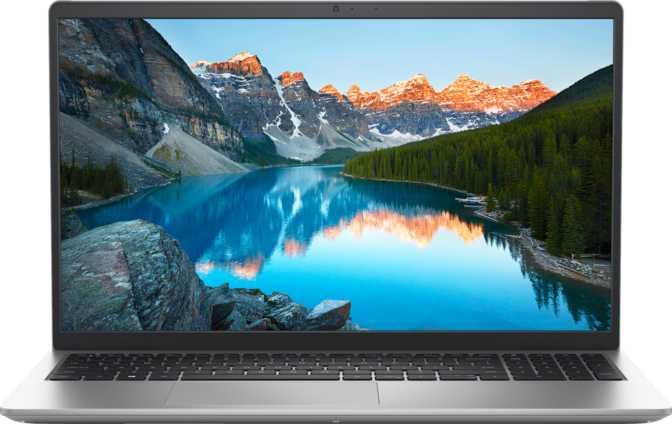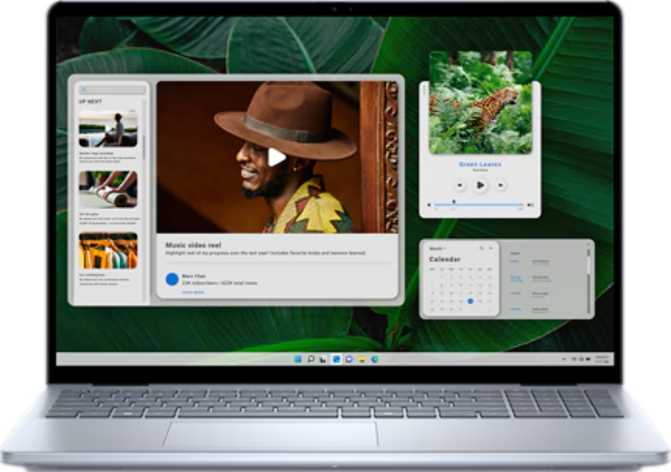
Dell Inspiron 16 5640 (2025): Full Review for Productivity Users
LaptopsOverall Rating
Rating Breakdown
The Dell Inspiron 16 5640 occupies a specific and deliberate position in the laptop market: it is a productivity-first machine built for people who spend their days in spreadsheets, documents, video calls, and browser tabs — not for those who game, edit 4K video professionally, or need a mobile workstation. Understanding that framing upfront saves you from both disappointment and from dismissing a genuinely capable machine because you misread what it was designed to do.
What makes this configuration stand out is the combination of an unusually large memory ceiling, a fast solid-state drive, and a 16-inch display with touch input and a bundled stylus. That combination rarely appears together at this price tier, and it defines the machine's character entirely.
Key Specifications at a Glance
Design and Build: Bigger Than Average, More Purposeful Than It Looks
The 16-inch chassis immediately signals that this is not a machine meant to slip unnoticed into a thin sleeve. Dell has prioritized screen real estate and internal headroom over slim-and-light credentials. The result is a laptop that feels substantive without being punishing to carry — the kind of machine that lives on a desk most of the time but travels without drama when it has to.
The backlit keyboard matters more than it sounds. Working in low light without hunting for keys is a small comfort that adds up across months of use. The fingerprint scanner makes daily login effortless, and its placement follows Dell's typically intuitive design language. There is no 3D facial recognition, so fingerprint is the only biometric login option — which is fine for most users.
The build carries no weather-sealed or rugged certifications. This is a standard consumer productivity machine, not a field device — keep liquids away and avoid drops. The stereo speaker setup and 3.5mm headphone jack round out the physical experience; speakers handle calls and casual media adequately, and the jack means wired headphones connect without an adapter.
Build Highlights
- Backlit KeyboardComfortable typing in all lighting conditions
- Fingerprint ScannerFast biometric login without face unlock
- Stereo SpeakersAdequate for calls and casual media
- 3.5mm Audio JackWired headphones — no adapter needed
- Not Weather-SealedStandard consumer build — handle with care
The Display: 16 Inches of Useful, Honest Screen
Resolution & Proportions
The 1920 × 1200 panel provides meaningful extra vertical space over standard 1080p screens — fitting more rows in spreadsheets and more lines in documents without scrolling. At 16 inches the sharpness level is comfortable for extended reading, even if it falls short of a premium 2K display.
Touch & Stylus
The touchscreen and included stylus open workflows most productivity laptops cannot support: annotating PDFs, sketching diagrams, signing documents, and navigating apps without a mouse. The stylus ships in the box — a first-class feature, not an afterthought.
Anti-Reflection Coating
The anti-reflection treatment reduces glare in office lighting and near windows. For anyone who works near natural light, this coating is worth more than its absence suggests — you stay focused on the content, not repositioning yourself to dodge a reflection.
Multi-Monitor Support
The hardware supports up to four simultaneous displays — a remarkable capability for a machine without a dedicated GPU. Professionals connecting to docking stations with multiple monitors won't hit a hardware ceiling, though a USB-C hub is typically needed to access all outputs.
Performance: What That Processor Actually Means for Your Day
The hybrid processor architecture divides its cores into two groups: a small set of high-performance cores for demanding tasks and a larger bank of efficiency cores for lighter ongoing workloads. The system orchestrates between them automatically — you configure nothing, and the machine adapts its energy use to what you are actually doing.
Geekbench 6 Multi
Mid-to-upper productivity tier
Geekbench 6 Single
Strong everyday responsiveness
PassMark Overall
Clearly above entry-level tier
PassMark Single
Responsive in day-to-day tasks
Memory: The Standout Specification
This configuration ships with 64 GB of DDR5 memory — an amount that, until recently, was associated with professional workstations. For context, 16 GB is considered standard for a modern productivity laptop and 32 GB is considered generous. At 64 GB, dozens of browser tabs, multiple virtual machines, and complex software loaded simultaneously will not cause slowdowns.
The memory operates at DDR5 speeds, benefiting both the processor and the integrated graphics through faster data bandwidth. The upgrade ceiling sits at 96 GB — an unusual maximum for a consumer-grade machine that future-proofs your investment considerably.
Storage: Fast and Genuinely Capacious
The 2 TB NVMe solid-state drive uses the PCIe 4 interface — the current mainstream performance standard for laptop storage. Boot times and application loading feel immediate. There is no waiting for the drive to catch up to your work.
Two terabytes is genuinely generous. Even with full software installations, project archives, and media files, most productivity users will have room to spare for years without managing storage triage.
Graphics: Capable for Its Role, Honest About Its Limits
The Intel Iris Xe integrated graphics are the right choice for this machine's intended purpose — and the wrong assumption if you are hoping to play demanding games or work with 3D rendering at any professional level.
For everything else — light photo editing, 4K video playback, presentations, and casual 2D gaming — the 96-unit Iris Xe performs well. The DDR5 system memory the GPU shares gives it more bandwidth than older integrated solutions, and the 1,300 MHz boost clock provides a noticeable lift during brief moments of demand.
For professionals using engineering tools, scientific visualization software, or creative applications that rely on GPU acceleration, the Iris Xe supports OpenCL 3 and OpenGL 4.6 — compatibility that covers a broad range of professional tools without requiring a dedicated card. The absence of a discrete GPU also contributes to quieter operation and simpler thermal management under moderate workloads.
Know Before You Buy
- No ray tracing support
- No DLSS or AI upscaling
- No dedicated GPU
- Quieter and cooler than GPU laptops
GPU at a Glance
Intel Iris Xe G7 — 96 Execution Units
Boost clock: 1,300 MHz
OpenCL 3.0 / OpenGL 4.6
Powered by shared DDR5 bandwidth
Connectivity: Functional, With One Notable Gap
| Port Type | Count | Notes |
|---|---|---|
| USB-C (High Speed) | 1 | USB 3.2 Gen 2 — fast data, adapter-ready for video |
| USB-A (Standard) | 2 | USB 3.2 Gen 1 — mouse, dongles, and peripherals |
| HDMI Output | 1 | HDMI 1.4 only — limits direct 4K external display connection |
| SD Card Slot | 1 | Useful for photographers and field workers |
| Headphone / Mic Jack | 1 | Standard 3.5mm — no adapter needed |
| Wired Ethernet (RJ45) | 0 | No built-in ethernet — USB adapter required |
| Thunderbolt 4 / USB 4 | 0 | High-bandwidth docking not fully supported |
Wireless Connectivity
Wi-Fi 6 is the current mainstream wireless standard, offering faster throughput and better stability in congested environments — offices, apartment buildings, anywhere many devices share a router. Video calls stay stable, large transfers to a network drive are faster, and the connection holds better when competing with many devices.
Bluetooth 5.3 ensures compatibility with modern wireless headphones, keyboards, mice, and speakers without pairing issues or range frustrations.
Battery and Power: Efficiency as a Design Choice
Battery capacity figures were not published for this specific configuration, so precise runtime claims are not appropriate here. What the hardware does tell us is meaningful: the processor operates at a 15-watt thermal design power level, which is squarely in the efficient range for a 10-core chip.
This processor class is known for respectable runtimes on productivity workloads. Light tasks — writing, browsing, email, and documents — are handled primarily by the efficiency cores, which draw minimal power. During sustained heavy workloads, the performance cores engage and increase draw. The result is a machine that adapts its energy use dynamically rather than running at full power constantly.
Power Profile
15W Processor TDP
Efficient envelope for a 10-core design
Efficiency Core Architecture
Background tasks use less power automatically
Quiet Under Light Loads
Fan stays near-silent during typical work sessions
Who Should Buy This Laptop — and Who Should Not
Built For
- Knowledge Workers & Office ProfessionalsLiving in Office apps, Google Workspace, or web tools — a machine that never slows them down.
- Students & AcademicsRunning research tools, writing software, and reference managers simultaneously with storage to spare.
- Remote WorkersConnecting to external monitors, needing a quiet and dependable machine for calls and document work.
- Creatives Who AnnotateDesigners marking up PDFs, teachers annotating slides, writers sketching ideas using the included stylus.
- Heavy MultitaskersDozens of browser tabs, multiple open applications, background processes — handled without degradation.
Not Right For
- GamersIntegrated graphics cannot handle modern titles at acceptable frame rates. No dedicated GPU in this configuration.
- Professional Video EditorsColor grading 4K footage or managing complex timelines will expose the limits of integrated graphics.
- 3D Artists & CAD ProfessionalsCompute-intensive rendering and real-time 3D viewport work requires dedicated GPU resources this machine lacks.
- Wired-Network Dependent UsersNo built-in ethernet means a USB adapter is required for anyone relying on a physical network connection daily.
- Ultra-Light TravelersA 16-inch chassis is not a featherweight companion. Those prioritizing portability should consider 13–14" alternatives.
How It Compares to the Alternatives
| Feature | Dell Inspiron 16 5640 This Model | 16" With Discrete GPU | 13–14" Ultrabook |
|---|---|---|---|
| RAM Ceiling | 96 GB DDR5 | 32–64 GB typically | 16–32 GB |
| Storage | 2 TB NVMe PCIe 4 | 512 GB–1 TB typical | 256 GB–1 TB |
| Graphics | Integrated Iris Xe | Dedicated mid-range GPU | Integrated |
| Screen Type | 16" Touch + Stylus | 16" — rarely touch-enabled | 13–14" |
| Fan Noise Under Load | Quiet — 15W chip | Audible GPU fans | Very quiet |
| Gaming Viability | Low | Moderate to good | Very low |
| Portability | Moderate | Moderate | High |
Comparison based on typical configurations in each category. Specific models will vary.
Honest Assessment: Where It Excels and Where It Falls Short
Where It Excels
The Inspiron 16 5640's greatest strength is the memory headroom in a mainstream consumer package. Sixty-four gigabytes of DDR5 is genuinely rare at this form factor and price tier, and it fundamentally changes the long-term usefulness of the machine. It will not feel constrained by RAM in three or four years the way most competitors will.
The 2 TB NVMe storage at PCIe 4 speeds is similarly generous. You are unlikely to outgrow this drive quickly or feel bottlenecked by storage performance during any productivity workflow.
The touchscreen and stylus bundle is a genuine differentiator. Most productivity laptops omit this entirely, and the Inspiron 16 5640 treats it as a first-class feature. For annotators, educators, and pen-input users, this alone justifies serious consideration.
Where It Falls Short
The HDMI 1.4 port is a dated inclusion that limits direct 4K monitor connectivity. In a category where most competitors ship HDMI 2.0 or better, this is a genuine limitation to plan around — especially for professionals who rely on a 4K external display at their desk.
The absence of Thunderbolt 4 or USB 4 means high-bandwidth docking station setups and the fastest external storage devices cannot operate at full potential. The connectivity ceiling is real, even if it does not affect casual users.
No ethernet port is an inconvenience for desk-bound professionals where wired connections are standard. And the integrated graphics, while competent for everyday tasks, is a firm ceiling for anyone whose work or leisure leans GPU-intensive.
Common Questions Answered
The Right Machine for the Right Buyer
The Dell Inspiron 16 5640 is a well-configured productivity machine that makes two decisions unusually boldly: it gives you significantly more memory than the category standard, and it includes a touchscreen and stylus in a segment where most competitors ship plain displays. Both choices are meaningful for the right buyer.
If your work is primarily office productivity, research, communications, and document-intensive tasks, this configuration will feel like it has room to spare — now and for years ahead. The efficient processor, generous storage, and capable wireless connectivity make it a dependable daily driver that will age better than most competitors at this tier.
If you need graphics performance, ethernet, Thunderbolt 4, or a machine that excels at GPU-accelerated workloads, look elsewhere — this laptop is not built around those priorities and does not pretend to be. Buy it knowing exactly what it is, and it will earn your trust.
Verdict Score
Excellent for productivity users. Not for gamers or GPU-intensive work.
Recommended Purchase