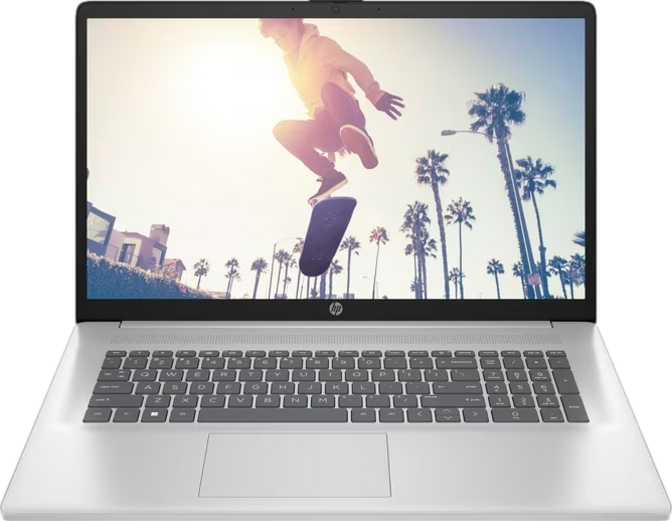
HP Essential 17 (2025) Full Review: Big RAM, Real Trade-offs
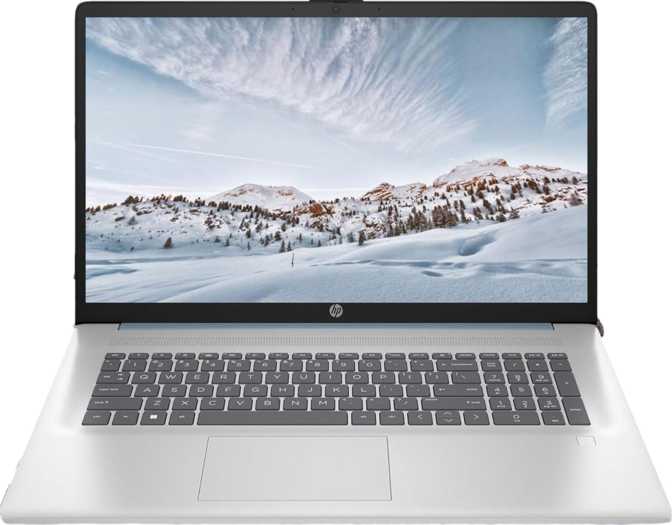
LaptopsMost 17-inch laptops fall into one of two categories: bloated media machines that feel like lugging a small television, or genuine productivity workhorses that simply need more screen to do their job well. The HP Essential 17 (2025) plants itself firmly in the second camp — a large-screen productivity laptop built around serious internal storage, substantial memory, and a touchscreen display that gives everyday computing a more tactile quality. Whether it earns a place on your desk depends heavily on what you need it to do, and more importantly, what you can live without.
Build and Physical Experience
The HP Essential 17 is not a rugged machine, and it makes no pretense of being one. There is no weather sealing, no reinforced chassis, and no military-grade durability certification to speak of. This is a traditional productivity laptop designed for climate-controlled environments — an office, a home desk, or a student workroom. Anyone who needs a laptop that can survive a coffee splash or a bag tossed into a muddy trunk should look elsewhere.
What you do get is a 17.3-inch form factor that provides genuine visual breathing room. The larger footprint accommodates a full-size keyboard layout, and a backlit keyboard means working in dim environments — evening flights, dark offices, late-night sessions — is entirely practical. The backlighting is one of those features that sounds minor until you need it regularly.
Backlit Keyboard
Work comfortably in any lighting condition without straining to see individual keys.
Fingerprint Scanner
Fast biometric login replaces password entry for dozens of daily unlocks without friction.
Full-Size Layout
The wide chassis allows natural key spacing across a complete keyboard layout.
Display: The Screen That Divides Opinion
Size and Resolution
The 17.3-inch touchscreen is the first thing most people notice — and also the first place where the Essential 17 asks for compromise. At 1600×900 pixels, this is an HD+ resolution panel. On a screen of this physical size, that works out to approximately 106 pixels per inch. Modern 1080p displays on 15-inch laptops deliver around 143 ppi, and anything below 120 ppi on a large screen can show visible pixel structure at normal viewing distances — you may notice individual pixels when reading text at arm's length.
For casual web browsing, spreadsheet work, document editing, and video calls, this resolution is functional. For anything requiring sharp, detailed visuals — photo editing, design work, or reading dense technical documents for extended periods — the pixel density is a real limitation worth weighing carefully.
Touchscreen
The touch capability is genuinely useful at this price tier. It allows scrolling, zooming, and navigating Windows quickly without always reaching for the trackpad. A 17-inch touchscreen is harder to use comfortably than one on a smaller convertible — reaching across a large display while seated at a desk gets tiring. Treat it as a supplement to traditional input, not a primary mode of interaction.
Reflection and Glare
The display lacks an anti-reflection coating. In bright environments — near windows, under strong overhead lighting — glare becomes a genuine nuisance. Users who control their lighting environment will find it manageable. Those who frequently work near windows or in variable lighting will find it a persistent frustration.
Refresh Rate
The panel refreshes at the standard 60 Hz. Video playback, office work, and general computing feel perfectly smooth at this rate. For fast-paced gaming or any use case where motion clarity matters, this rate is insufficient — but for a productivity machine, it is entirely appropriate.
- Panel Size17.3 inches
- Resolution1600 × 900 (HD+)
- Pixel Density106 ppi
- Refresh Rate60 Hz
- TouchscreenYes
- Anti-Glare CoatingNo
- Multi-Display SupportUp to 4 screens
Pixel Density Comparison
This laptop — 106 ppi
Typical 15" FHD laptop — ~143 ppi
Higher ppi means sharper text and finer detail at a normal viewing distance.
Performance: More Power Than the Price Suggests
The Processor Architecture
The processor uses a hybrid architecture pairing two higher-performance cores with eight power-efficient cores. The efficient cores handle routine background tasks — email, browser tabs, idle apps — while the performance cores engage for demanding work. Peak speeds reach up to 4.6 GHz under load, which is competitive for this efficiency class of chip.
The 15-watt thermal design means the processor is tuned for heat efficiency rather than raw sustained power. It handles bursts of intensive work well — quick exports, compressing archives, running analyses — but will throttle back during prolonged heavy loads in ways a higher-wattage chip would not. For most productivity users, this distinction is invisible. For sustained rendering or heavy data processing running for hours, it is a relevant constraint.
The chip uses a 10-nanometer manufacturing process with a 12-thread configuration enabled by multithreading support, delivering a favorable balance of performance and efficiency without the heat older chip generations produced at similar performance levels.
Benchmark Results in Context
Solid mainstream tier — handles heavy multitasking with ease
Individual app responsiveness feels smooth and capable
Comparable to capable mid-range productivity machines
Day-to-day snappiness well above entry-level machines
32GB DDR5 RAM
Run dozens of browser tabs, multiple office suites, and background apps simultaneously without slowdown. This is the single specification that most clearly separates the HP Essential 17 from the budget tier — most rivals at comparable prices ship with 8–16GB. The system supports up to 64GB if upgraded later.
2TB PCIe 4 NVMe
PCIe 4 NVMe means system boot, application launches, and file access all happen quickly. For scale, a heavy user accumulates roughly 200–400GB of files and software per year. Two terabytes provides years of headroom without requiring external drives or constant cloud juggling for typical library sizes.
Integrated Xe Graphics
The Intel Iris Xe integrated graphics handles 4K video playback, multi-window layouts, and light photo editing without issue. It can drive up to four displays simultaneously — genuinely useful for multi-monitor workstation setups. There is no discrete card, no ray tracing, and no AI-accelerated rendering.
Connectivity: Useful, But With Notable Gaps
- 2× USB-A at 10Gbps — Fast USB 3.2 Gen 2 ports for external drives, hubs, and peripherals with real-world transfer speed.
- 1× USB-C at 5Gbps — Usable for charging, data transfer, and USB-C peripherals. Functional, but not Thunderbolt.
- Full-Size HDMI Output — Direct connection to external monitors and TVs. No adapter needed for the most common external display use case.
- Wi-Fi 6 (802.11ax) — Faster speeds and better performance in crowded wireless environments compared to Wi-Fi 5 equipment.
- 3.5mm Audio Jack — Standard headphone and headset connectivity, present and practical.
- No Ethernet Port — The most significant omission on a 17-inch productivity machine. Business network environments require a USB adapter.
- No SD Card Slot — Photographers and videographers moving files from cameras will need a separate USB card reader.
- No Thunderbolt — High-bandwidth docks, fast external NVMe enclosures, and Thunderbolt peripherals are not compatible.
- No DisplayPort Output — Connecting to professional monitors without HDMI requires an adapter.
- No USB-C Gen 2 — The available USB-C port operates at 5Gbps rather than the faster 10Gbps tier power users often depend on.
Features Worth Knowing About
Fingerprint Scanner
Fast, reliable biometric login. Once configured, password entry becomes the exception rather than the daily routine.
Stereo Speakers
The wide chassis allows stereo separation that gives audio directionality single-speaker machines simply cannot match.
Front-Facing Camera
Adequate for video calls. The single-microphone setup is functional but limited at background noise rejection.
AirPlay Support
An unusual cross-platform capability. Apple device users can mirror or stream content directly to this Windows machine.
Battery Life: Reading Between the Specifications
Battery capacity is not disclosed in available specifications
Making precise battery life claims without a rated capacity figure would be misleading. Verify HP's official battery rating for your specific model variant before purchasing if endurance is a priority.
What the specifications do confirm: the 15-watt processor thermal profile is significantly more efficient than the high-performance 45-watt chips found in gaming or creator laptops. This efficiency advantage typically translates to meaningfully better endurance under moderate workloads. The HP Essential 17 is also physically large enough to house a sizeable battery cell, which generally favors endurance on larger productivity machines.
However, the 17.3-inch display remains the dominant power drain on any laptop of this size. Real-world endurance varies substantially based on screen brightness, workload intensity, and wireless activity. One practical note: the USB ports do not support sleep-and-charge functionality, so peripheral charging via USB stops when the laptop sleeps or powers down.
Who Should Buy the HP Essential 17 (2025)?
- You spend most of your time in office apps, browsers, email, and video calls
- You want more screen than a 15-inch and primarily work at a fixed desk
- You keep many programs open simultaneously — the 32GB RAM handles this exceptionally well
- You manage large file libraries and don't want to juggle external drives regularly
- You work in a stable, controlled indoor environment where display glare is manageable
- You are upgrading from a four-plus-year-old machine and want a meaningful performance leap
- You need a built-in Ethernet port for business or wired network environments
- You work in graphic design, photography, or video production where display sharpness is essential
- You need sustained heavy compute work for hours — simulations, compiling, or heavy rendering
- You want to play modern 3D games on a capable dedicated GPU
- You frequently work near windows or in variable, bright lighting conditions
- You need Thunderbolt for high-speed docks or fast external storage enclosures
How It Compares to Alternatives
The most glaring trade-off the HP Essential 17 makes is resolution for RAM and storage. Many competing 17-inch machines deliver a full 1080p panel but ship with a fraction of the storage and half the memory. The table below makes that trade-off concrete.
| Feature | HP Essential 17 (2025) | Typical 17" Budget Rival | Typical 15" Midrange |
|---|---|---|---|
| RAM | 32GB DDR5 | 8–16GB DDR4 | 16GB DDR5 |
| Storage | 2TB NVMe | 256–512GB SSD | 512GB–1TB NVMe |
| Screen Size | 17.3" | 17.3" | 15.6" |
| Resolution | 1600×900 HD+ | 1920×1080 FHD | 1920×1080 FHD |
| Touchscreen | Yes | Rarely | Occasionally |
| Ethernet Port | No | Often Yes | Sometimes |
| Wi-Fi Standard | Wi-Fi 6 | Wi-Fi 5 | Wi-Fi 6 |
| Fingerprint Scanner | Yes | Rarely | Sometimes |
Whether 32GB RAM and 2TB of fast storage are worth accepting a lower-resolution display is the central purchase decision this machine forces. For users who hit memory limits constantly and manage large files, the trade is favorable. For anyone who values display quality above all else, it is not.
Honest Assessment
The internal specifications are punching above what this price category typically delivers. Thirty-two gigabytes of DDR5 memory and two terabytes of fast NVMe storage represent a meaningful departure from the under-specced norm at this tier. The system performs well for everyday tasks, handles multitasking with ease, and offers long-term headroom that most competing machines at similar prices simply do not provide.
The backlit keyboard, fingerprint scanner, and touchscreen are all practical additions that improve daily usability in ways you notice after weeks of regular use — not just on unboxing day. Wi-Fi 6 ensures the wireless connection is never the bottleneck in any modern home or office network setup.
The display is where the machine's budget origins show most clearly. A 1600×900 resolution on a 17.3-inch panel is a visible concession, and the absence of an anti-reflection coating limits where you can comfortably use this laptop. In a market where 1080p and even 1440p panels are available at comparable prices, HP is clearly balancing the budget to deliver elsewhere in the spec sheet.
The connectivity omissions — no Ethernet, no SD card slot, no Thunderbolt — reflect the machine's positioning rather than an oversight, but users who expect these ports from a large productivity laptop will need to factor in adapter costs and the inconvenience of carrying them.
Common Questions Before Buying
Final Verdict
The HP Essential 17 (2025) is a genuinely well-specced productivity machine that makes one substantial trade-off: it gives you an unusually large amount of memory and storage for the price, and in exchange, it delivers a screen that falls short of what similarly priced competitors offer in terms of sharpness and glare resistance.
If your daily computing centers on documents, spreadsheets, communications, and multitasking — and if you work at a controlled desk environment — this machine delivers excellent value. The 32GB RAM alone separates it from the crowded budget tier, and two terabytes of fast storage is a real practical advantage users will appreciate for years.
If display quality, Ethernet connectivity, or sustained heavy performance are non-negotiable requirements for your workflow, this particular configuration will disappoint — and the money is better directed toward a machine that prioritizes those attributes instead.
Recommended for: Home office professionals, students in text-heavy disciplines, and productivity-focused users who multitask heavily and manage large file libraries.
Not recommended for: Creative professionals, visual designers, gamers, or anyone requiring wired networking, high pixel density, or Thunderbolt connectivity as a baseline.