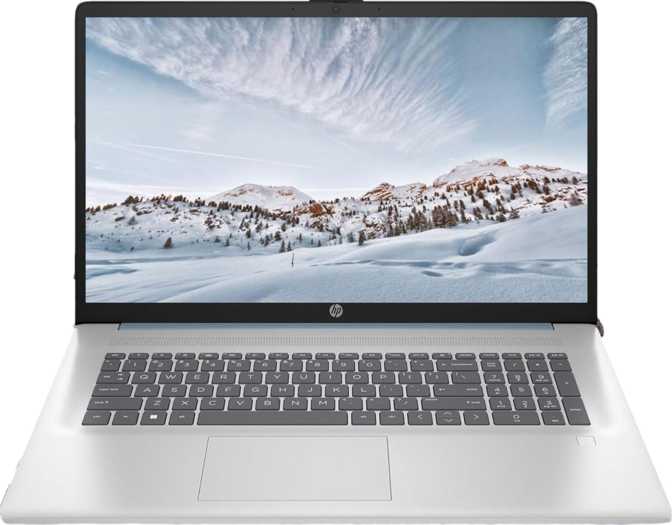
HP 17 (2025) 17.3-Inch Laptop: An Honest Review for Home and Office
LaptopsThere's a clear audience for a 17-inch laptop at this price, and HP knows it well: students who want screen space without squinting, remote workers managing spreadsheets and video calls, older users upgrading from a desktop, and families buying a shared home computer. The HP 17 (2025) is built for that crowd, and understanding who it truly serves — and who it will quietly disappoint — is the most useful thing this review can do. It gets several things genuinely right: a capable processor for everyday tasks, a full terabyte of fast NVMe storage, generous RAM, a touchscreen, and a keyboard you can use in the dark. But it carries a display compromise that will matter more than any other spec on the sheet, depending on your work.
At a Glance
Everything that matters, before you read the full review.
Category Scores
Design and Build Quality
Physical experience, keyboard comfort, materials, and what to expect day-to-day.
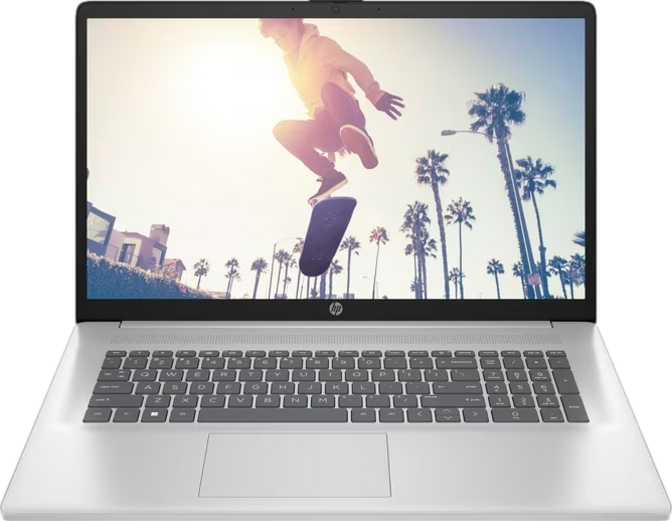
The HP 17 (2025) is not trying to be a fashion statement. At 17.3 inches, it wears its size plainly — this is a desk-and-lap machine, not something you carry to coffee shops. The chassis follows HP's familiar understated aesthetic: clean lines, no aggressive angles, and a build that communicates reliable office tool rather than lifestyle product.
The keyboard is full-sized with a numpad — a genuine advantage at this screen size that smaller laptops cannot offer. Spreadsheet users and data-entry workers will appreciate it immediately. Backlighting means the laptop is usable in dim rooms and evening sessions without strain.
Build quality is honest budget-tier: it won't flex dramatically under normal use, but it lacks the rigidity of a magnesium-alloy chassis. There is no weather sealing and no ruggedized reinforcement. This is a laptop for stable environments — a desk, a dining table, a dorm room — not outdoor fieldwork or rough daily travel.
A fingerprint sensor is built in for quick, passwordless login. The absence of 3D facial recognition means Windows Hello works via fingerprint only, but for most users that is entirely sufficient.
Design Highlights
- Full-Size Backlit Keyboard
Includes numpad — ideal for spreadsheets and data entry - Fingerprint Reader
Quick passwordless Windows Hello authentication - Touch-Enabled Display
Navigate Windows with natural finger-tap interaction - Stereo Speakers + 3.5 mm Jack
Wired headphones work natively — no adapters needed
The Display: The Spec That Demands Your Attention
Before anything else, the screen situation deserves direct honesty.
Key Display Trade-Off
The HP 17 (2025) uses a 1600 × 900 resolution across a 17.3-inch screen. This produces roughly 106 pixels per inch — noticeably softer than the 141 PPI a typical 15.6-inch Full HD laptop delivers. Text edges appear less crisp, and on a screen this large, the difference is visible in everyday use.
Who Will Notice Most
- Anyone reading dense text for extended periods
- Users working with detailed photos or graphics
- Anyone doing creative or design work
- Users coming from a modern smartphone or tablet
Who Will Care Less
- Casual video viewers watching from a distance
- Video callers and general web browsers
- Document managers where size matters over sharpness
- Users upgrading from an older 1366 × 768 screen
The 250-nit brightness is adequate for typical indoor lighting, but it will struggle near windows or in brightly lit rooms. The anti-reflection coating helps reduce glare and partially compensates — but direct sunlight will wash this screen out. The touchscreen is a genuine bonus. Scrolling and navigating Windows with a finger is smooth and practical, especially for users transitioning from tablets or those who find trackpads tiring over long sessions.
Performance: Punching Above Budget Expectations
A six-core AMD processor, 16 GB of DDR4, and a 1 TB NVMe drive — here is what that combination means in practice.
The HP 17 (2025) is powered by a six-core, twelve-thread AMD processor built on a 7-nanometer manufacturing process, with a base clock that handles background tasks efficiently and a turbo speed reaching 4.3 GHz for demanding bursts. The thermal envelope is conservatively tuned at 15 watts, keeping the fan quiet under light loads and preserving battery life — though extended heavy workloads will cause the processor to throttle back from its peak speed.
Twelve threads of simultaneous processing mean the machine handles multiple tasks without significant slowdown. Running a video call while a large file downloads and a browser holds fifteen tabs open is well within its comfort zone.
PassMark Benchmark Scores
Handles everyday productivity with ease — a comfortable margin above the midrange floor.
Per-task responsiveness — app launches and window switching feel acceptably snappy.
Memory and Storage
The 16 GB of DDR4 RAM in dual-channel configuration is a strong choice at this price — twice what many budget laptops ship with, eliminating the most common performance bottleneck. Memory can be expanded to a maximum of 64 GB, giving meaningful long-term headroom.
The 1 TB NVMe SSD delivers file speeds dramatically faster than older SATA drives found in similarly priced machines. Application launches, file transfers, and boot times all benefit directly. A full terabyte comfortably handles years of documents, downloads, photos, and installed software.
Graphics: Capable, Not Powerful
The integrated AMD Radeon graphics handles display output, HD streaming, basic photo editing, and casual 2D tasks without issue. With seven GPU execution units running at up to 1,800 MHz, this is the higher end of what integrated graphics typically offer in this chip class.
What it does not support: gaming, 3D rendering, or video production at high resolutions. Ray tracing and DLSS are unavailable. DirectX 12 compatibility handles modern application requirements, but raw GPU power is limited to light tasks only.
Connectivity: Modern Wireless, Dated Wired Options
What you can plug in, what needs an adapter, and what is missing entirely.
| Connection | Available | Notes |
|---|---|---|
| USB-A Ports | 2 Ports | Standard full-size connector, moderate transfer speed |
| USB-C Port | 1 Port | Moderate speed — no Thunderbolt, no video output |
| HDMI Output | 1 Port | Version 1.4 — supports up to 4K/30Hz or 1080p/60Hz |
| 3.5 mm Audio Jack | Yes | Wired headphones and headsets work natively |
| Ethernet (Wired LAN) | Not Present | USB-to-Ethernet adapter required for wired networks |
| SD Card Slot | Not Present | No built-in memory card reader |
| Thunderbolt | Not Present | No high-speed docking or ultra-fast external storage |
| DisplayPort Output | Not Present | HDMI is the only video output available |
Wireless Connectivity
Wi-Fi 6 is a meaningful inclusion. In congested environments — apartments, offices, and coffee shops with many connected devices — it delivers faster speeds and significantly better performance than older Wi-Fi standards. If your router supports Wi-Fi 6, this laptop makes full use of it.
Bluetooth 5.3 is the current standard, supporting modern wireless peripherals, headphones, and keyboards with low latency and efficient power consumption.
No Ethernet Port
The missing Ethernet port will affect users on corporate networks or environments with unreliable Wi-Fi. A USB-A to Ethernet adapter resolves this cleanly for a few dollars — but it is an extra purchase worth planning for.
Battery Life and Power
What the chip's thermal design tells us about real-world endurance.
HP has not published specific battery capacity figures in the available specifications, so a precise hour-count projection is not possible. What the thermal design tells us is still meaningful: the 15-watt processor envelope is tuned for efficiency. Processors in this power class typically enable all-day use on a single charge under moderate workloads — document editing, web browsing, and video calls — without requiring the charger nearby.
For more intensive sustained tasks, expect faster drain as the processor climbs toward its peak speeds. The laptop does not use a proprietary MagSafe-style connector, so standard charging options are available — but verify charger compatibility at the point of purchase.
Efficiency-Tuned Design
The 15W thermal envelope prioritises quiet operation and battery endurance over sustained peak performance — the right trade-off for an everyday productivity machine.
Who Should Buy the HP 17 (2025)
The right match matters more than any individual specification.
An Excellent Fit For
- Remote Workers and Home Office Users
Documents, browser tabs, video conferencing, and email — the screen size, keyboard comfort, and processing speed are all well-matched to this daily reality.
- Students in Non-Technical Programs
Humanities, business, education, and social sciences — reliable for writing, research, and presentations without overspending.
- Desktop Upgraders
Familiar screen size, numpad, touch navigation, and straightforward Windows operation — no steep learning curve.
- Shared Family Computers
Generous storage for multiple users, a comfortable full-size keyboard, and dependable everyday performance for all ages.
- Casual Multimedia Users
Streaming video, social media, and light photo management all work without friction on the large screen.
Not a Good Match For
- Gamers
Even casual gaming is beyond the integrated graphics. This is not a gaming machine in any configuration.
- Video Editors and Creative Professionals
The display lacks colour accuracy and resolution, and GPU acceleration for creative workloads is simply not there.
- Frequent Travellers
At 17 inches, this is a stay-at-home machine by design — not built for bags, airports, or daily commutes.
- Developers and Power Users
Virtual machines, large compiles, and complex multi-monitor setups exceed this laptop's intended scope.
- Display-Quality Conscious Buyers
Photographers, designers, and anyone who reads dense text for hours will be consistently bothered by the resolution.
How It Compares to the Competition
Where the HP 17 (2025) leads the field, and where rivals hold the edge.
| Feature | HP 17 (2025) | Typical 15.6" Budget Rival | Typical 17.3" Premium Alt. |
|---|---|---|---|
| Screen Size | 17.3 inches | 15.6 inches | 17.3 inches |
| Resolution | 1600 × 900 (HD+) | 1920 × 1080 (FHD) | FHD or higher |
| RAM | 16 GB | Often 8 GB | 16 GB+ |
| Storage | 1 TB NVMe | 256–512 GB SSD | 512 GB–1 TB NVMe |
| Touchscreen | Yes | Rarely | Sometimes |
| Ethernet Port | No | Often Yes | Usually Yes |
| Price Tier | Budget | Budget | Mid-range to Premium |
The most significant competitive gap is display resolution — the majority of competing laptops at similar prices now ship with Full HD as their baseline. Where the HP 17 pulls ahead: the 16 GB of RAM (many rivals still ship 8 GB), the full terabyte of fast NVMe storage, and the included touchscreen are all above average for the budget tier. For buyers who prioritise screen real estate over screen sharpness, the 17-inch size also gives it an immediate advantage over every 15.6-inch alternative.
Honest Assessment: Strengths and Limitations
A balanced look at what genuinely impresses, and what falls short.
What It Gets Right
The HP 17 (2025) makes smart choices where it counts most. The processor handles daily workloads without hesitation — document editing, video calls, and browser-heavy sessions all run smoothly. The NVMe storage makes everything feel fast and responsive in a way that older SATA drives simply cannot match, and the 16 GB of RAM ensures multitasking stays smooth even with many applications open simultaneously.
The touchscreen adds real convenience for casual navigation and makes the laptop feel more modern than its price suggests. The backlit keyboard and fingerprint reader are practical quality-of-life features that competitors sometimes charge more for. The 64 GB memory ceiling also gives this machine meaningful long-term upgrade headroom for users whose workloads grow.
Where It Falls Short
The display resolution is the honest weak point, and it is a significant one. On a 17-inch screen, the gap between HD+ and Full HD is visible and persistent — it is not something you stop noticing. If screen sharpness matters at all to you in principle, look at Full HD alternatives before committing to this model.
The 250-nit brightness is modest; in bright rooms it will occasionally feel dim. The port selection is functional but constrained — no Ethernet, no SD card slot, and no Thunderbolt means adapters or a hub for more complex setups. The HDMI 1.4 output limits external monitor refresh rates for anyone hoping to connect a high-end display.
The build quality is honest for the price point, but it will not satisfy users expecting the feel of a premium chassis. This is a plastic-bodied budget laptop, and it feels exactly like one.
Questions Real Buyers Ask
Honest answers to what people search for before purchasing.
A Capable Everyday Laptop With One Real Compromise
The HP 17 (2025) is a well-rounded productivity laptop for users who prioritise screen real estate, storage space, and everyday computing speed over display sharpness. If you spend your days in documents, browser tabs, and video calls — and you want a large, comfortable machine to do it on without spending a premium — this delivers the core experience reliably and without frustration.
The display resolution is a real limitation that should stop creatives, detail-oriented readers, and anyone who values visual clarity from choosing this model without careful consideration. If that spec bothers you even a little in principle, look at Full HD alternatives before committing. For the right user — the home worker, the student, the family — it is a thoughtful package that gets the important things right. The display is the trade-off you accept in exchange for everything else.