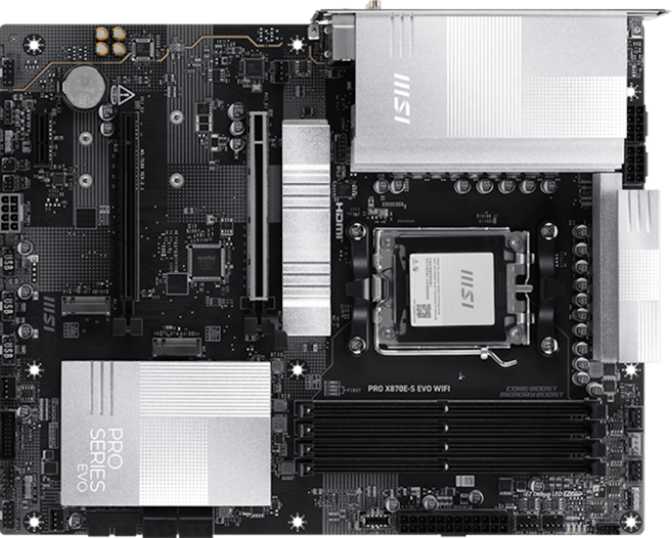
MSI Pro X870E-S Evo Wi-Fi Review: Complete AM5 Platform Analysis
MotherboardsThe X870 chipset occupies an interesting position in AMD's platform hierarchy — sitting directly below the flagship X870E tier in most lineup discussions, yet in practice a well-executed X870 board delivers everything a demanding builder actually needs. The MSI Pro X870E-S Evo Wi-Fi pairs the full bandwidth of AMD's current platform with a connectivity suite that would have been considered extreme on an enthusiast board from just one generation ago.
Built around MSI's Pro series identity — serious capability without unnecessary theatrics — this board targets builders who want current-generation headroom. Whether you're running a high-core-count Ryzen processor today or planning ahead for future AM5 CPUs, the X870E-S Evo provides the platform depth to accommodate either path. Its capability is clear. The question is whether its specific feature combination justifies placement over equally priced alternatives — and that is exactly what this review works through.
Design and Build Quality
PHYSICAL LAYOUT · COMPONENT QUALITY · ATX FORM FACTOR
Physical Presence and Layout
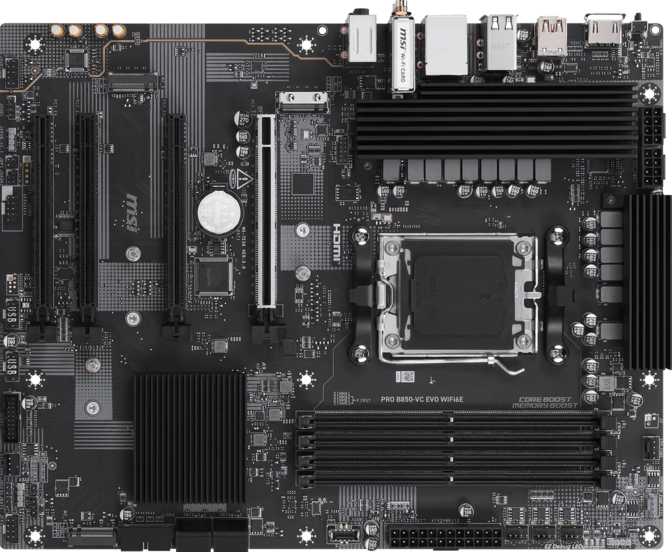
The MSI Pro X870E-S Evo Wi-Fi follows the standard ATX footprint — 304.8mm wide and 243.8mm tall — which means it fits any full-tower or mid-tower case with ATX support without compatibility anxiety. There are no non-standard overhangs or unusual mounting quirks to account for.
MSI's Pro series aesthetic leans toward clean and professional rather than the aggressively styled look of gaming-branded boards. RGB lighting is present but entirely controllable through the BIOS or MSI's software. Builders who prefer understated setups can run this board with zero visual penalty when the lights are off — no frosted plastic diffusers to remind you they're there.
The board's eight fan headers are distributed across the PCB with genuine thought behind their placement. Complex cooling configurations — a six-fan case paired with a large CPU cooler — can connect every fan directly to the motherboard without splitter cables. Each header is tunable independently through the BIOS, enabling precise thermal curves for every zone.
Component Quality Signals
The X870E-S Evo designation and X870 chipset pairing imply a power delivery infrastructure capable of handling AMD's current high-TDP processors without throttling. The board's support for extreme overclocked DDR5 speeds — detailed in the memory section — points to a signal integrity design that doesn't cut corners at the PCB level.
The dual BIOS implementation is a meaningful quality indicator. Two independent firmware chips — primary and backup — provide automatic recovery if a BIOS flash fails due to a power cut, corrupted file, or simple bad luck. This protection costs money to implement and is easy to skip on cost-cut designs. MSI didn't skip it here.
Build Quality Highlights
-
Dual BIOS ProtectionTwo independent firmware chips. If a flash fails for any reason, the secondary chip takes over automatically — no tools, no panic.
-
Clear CMOS ButtonReset to factory defaults without tools, accessible without opening the case — invaluable after an unstable overclock configuration.
-
8 Independent Fan HeadersDistributed across the PCB for clean routing. Every fan in a complex build connects directly — no splitters, no daisy-chaining.
-
Controllable RGB LightingFully manageable via BIOS or MSI software. Completely disableable for clean, light-free builds with no visual penalty.
-
TPM HeaderDedicated connector for a TPM module, supporting hardware-level security and compliance requirements when needed.
Platform and Chipset: What AM5 + X870 Actually Means
AMD AM5 SOCKET · X870 CHIPSET · OVERCLOCKING
The AM5 Foundation
AM5 is AMD's current processor platform, built from the ground up for DDR5 memory and PCIe 5.0 connectivity. Unlike AMD's previous long-lived AM4 platform, AM5 is forward-looking — AMD has committed to supporting it through future processor generations, a track record the company has consistently demonstrated and indicated it intends to continue.
The X870 chipset brings the full PCIe 5.0 allocation to both the primary graphics slot and M.2 storage. You are not giving up connectivity bandwidth to save money at this tier — every lane is current-generation.
One Important Clarification on Display Output
This board has no integrated CPU and no on-board graphics engine. The HDMI 2.1 rear port outputs video only when the installed Ryzen processor includes integrated graphics. Some Ryzen AM5 processors do; others do not. If your CPU lacks integrated graphics, a discrete GPU is required — there is no fallback on the board itself.
Overclocking Accessibility
The board supports simplified overclocking — one-click automated profiles let users without deep BIOS experience push beyond stock speeds with relative safety. Full manual control is available for enthusiasts who prefer to tune every parameter themselves. This dual approach — automated for beginners, fully open for experts — handles overclocking accessibility without patronizing either audience.
Platform Specifications
- CPU Socket
- AM5 (1 socket)
- Chipset
- X870
- Form Factor
- ATX
- Dimensions
- 304.8 × 243.8mm
- Integrated CPU
- None
- Integrated Graphics
- None (CPU-dependent)
- Easy Overclocking
- Yes
- HDMI Output
- HDMI 2.1 (iGPU only)
- Warranty
- 3 Years
Memory Performance and Capacity
DDR5 · 4 DIMM SLOTS · 256GB MAX · UP TO 8200MHz OC
DDR5 at Scale
This board accepts four DDR5 modules across two dual-channel pairs, with a maximum supported capacity of 256GB. That ceiling matters most to workstation users running memory-intensive applications — video editing with large timelines, 3D rendering, scientific simulation, or virtualization environments. For gaming and general-purpose builds, the practical sweet spot sits far below that number, but knowing the infrastructure supports extreme configurations means you're not buying into an artificial limitation.
At stock, memory modules operate using their XMP or EXPO rated profile — the frequency your DDR5 kit was designed to run at, read reliably from the module's own profile data. No manual intervention needed for a well-performing base configuration.
Overclocked Memory Headroom
The overclocked memory ceiling reaches 8200MHz — at or near the top of what any current DDR5 kit can sustain. DDR5 launched with kits in the 4800–5200MHz range. The AM5 sweet spot for performance-per-dollar settled around 6000–6400MHz. Pushing into 7000–8000MHz territory is the domain of enthusiast memory tuners using premium low-latency kits with hand-binned chips.
The 8200MHz ceiling doesn't mean you need to run memory there. It means the board's electrical design and BIOS implementation won't become the bottleneck if you choose to push premium memory hardware to its limits. For most builders, a certified 6000–6400MHz EXPO kit is the practical, value-optimised choice.
DDR5 Speed in Context
Memory Specifications
- DDR Standard
- DDR5
- DIMM Slots
- 4 (Dual-Channel)
- Maximum Capacity
- 256GB
- Native Max Speed
- 5600 MHz
- Overclocked Max
- 8200 MHz
- ECC Support
- No
Storage Architecture
3× M.2 NVMe · 4× SATA 3 · FULL RAID SUPPORT
M.2 Slots: Three Is the Right Number
Three M.2 slots provide the primary storage backbone. M.2 is the format used by modern NVMe solid-state drives — the fast, board-mounted drives that have replaced 2.5-inch SSDs as the default choice for system drives and high-speed secondary storage. Three slots covers a natural build progression: one for the operating system, one for a fast secondary or game library drive, and a third for overflow, backup, or future expansion.
At least one slot draws from PCIe 5.0 lanes directly off the CPU — capable of sequential read speeds at current practical SSD limits, roughly double what the previous PCIe 4.0 generation achieves. PCIe 4.0 drives remain excellent and meaningfully cheaper, so there's no pressure to upgrade immediately. The PCIe 5.0 slot is forward compatibility for when you're ready.
SATA Storage and RAID Configurations
Four SATA 3 connectors accommodate conventional hard drives and SATA SSDs — the high-capacity spinning storage suited for media libraries, backup drives, and archival data. Four connectors is on the lower end relative to boards that offer six. Builds with more than four SATA devices will need an expansion card, which is worth planning for upfront if you're migrating a large existing storage array.
All four RAID configurations with practical application are supported, making this a capable option for creative professionals and home server builders who want hardware-level data protection or performance aggregation without a separate controller card.
| RAID Mode | Min. Drives | Primary Use Case |
|---|---|---|
| RAID 0 | 2 | Maximum speed — no redundancy |
| RAID 1 | 2 | Full mirrored backup |
| RAID 5 | 3 | Redundancy with better space efficiency |
| RAID 10 | 4 | Speed combined with redundancy |
SATA Headroom: With four connectors, NAS-style builds or any configuration exceeding four SATA devices will require a PCIe storage expansion card. Verify your drive count before purchasing.
Connectivity: Rear Panel and Internal Headers
USB4 40Gbps · THUNDERBOLT 4 · WI-FI 7 · FULL PORT BREAKDOWN
Rear Panel Port Layout
HIGH-SPEED USB AND SPECIALTY PORTS
VIDEO AND NETWORKING
WIRELESS AND AUDIO
USB4 and Thunderbolt 4: The Board's Defining Feature
The headline rear connection is the USB4 40Gbps port — the fastest consumer USB specification currently available. At 40 gigabits per second, this single port runs high-speed external NVMe enclosures at their full rated speed, connects Thunderbolt-compatible peripherals, drives external displays at high resolution and refresh rate, and serves as a full-bandwidth docking station connection.
Alongside it sits a dedicated Thunderbolt 4 port — an important distinction. Thunderbolt 4 carries identical 40Gbps bandwidth to USB4 but adds Intel's certification, guaranteeing interoperability with the full Thunderbolt ecosystem: certified docks, storage arrays, and daisy-chaining of up to six devices from a single port. For users with Thunderbolt peripherals, this is the port that matters most.
The USB 3.2 Gen 2x2 port at 20Gbps handles high-speed external SSDs that exceed the capabilities of standard 10Gbps connections. Two 10Gbps Type-A ports manage fast-charging peripherals and standard high-speed devices, while four USB 2.0 ports handle keyboards, mice, audio interfaces, and bandwidth-light peripherals. One gap worth noting: no standalone USB 3.x Type-C ports exist beyond the USB4 and TB4 connections. Devices needing a regular USB-C port will use either of those high-speed ports, which accommodate them perfectly.
USB4 vs. Thunderbolt 4 — What Actually Differs
Both ports deliver identical 40Gbps raw bandwidth. The practical difference is ecosystem certification: Thunderbolt 4 guarantees compatibility with Thunderbolt-certified docks, daisy-chaining, and Thunderbolt storage arrays. USB4 handles any USB-C device — including those same peripherals — at equivalent speed, just without the TB certification mark.
- Own Thunderbolt peripherals? Use the TB4 port.
- Everything else? The USB4 port delivers equivalent performance.
Internal Headers Summary
- USB 3.2 Gen 1 via headers
- 4 ports
- USB-C Gen 2 front panel
- 1 port
- USB 2.0 via headers
- 6 ports
- Fan headers
- 8 total
- TPM connector
- Yes
Wi-Fi 7 and Bluetooth 5.4
Wi-Fi 7 (802.11be) operates on the 6GHz band alongside 2.4GHz and 5GHz, with Multi-Link Operation allowing bandwidth aggregation across frequency bands simultaneously. If your router supports Wi-Fi 7, this board is ready. If it doesn't, the module falls back gracefully through Wi-Fi 6E, 6, 5, and 4. Bluetooth 5.4 handles short-range peripherals with improved connection reliability over earlier revisions.
Expansion Slots, Audio, and Display Output
PCIe 5.0 x16 · 7.1 SURROUND AUDIO · HDMI 2.1
PCIe Expansion Slots
The primary graphics slot runs at PCIe 5.0 x16 — every lane of current-generation bandwidth available to your GPU. Today's graphics cards are predominantly PCIe 4.0 designs that run at their full rated speed in this slot. No bandwidth bottleneck exists for any GPU available now, and PCIe 5.0 GPUs have room to breathe when they arrive.
Single-GPU focus is consistent with X870 tier. Multi-GPU is no longer practical for gaming or most professional workloads.
On-Board Audio
On-board audio supports 7.1 surround sound — eight audio channels across the full configuration used by high-end speaker systems and headphone virtual surround processing. Three 3.5mm jacks on the rear panel handle speaker/headphone output, microphone input, and line-in.
S/PDIF optical output is absent. Users routing audio digitally to an optical-input DAC or AV receiver should plan for a USB DAC or dedicated sound card to fill this gap.
Display Output
The HDMI 2.1 port on the rear panel supports 4K at high refresh rates and 8K at lower rates — but only when using a Ryzen processor with integrated graphics. The board has no graphics engine of its own.
In a standard build with a discrete GPU, display output runs through the graphics card. The motherboard HDMI 2.1 port serves as a secondary display connection or a diagnostic port when the iGPU is available.
Who This Board Is For — And Who Should Look Elsewhere
IDEAL USE CASES · REAL-WORLD SCENARIOS · UNSUITABLE BUILDS
Ideal Buyers
Who Should Look Elsewhere
Competitive Positioning
MSI X870E-S EVO vs. TYPICAL X870 COMPETITORS
At the X870 tier, the MSI Pro X870E-S Evo Wi-Fi competes primarily against boards from ASUS (ROG Strix X870-F, TUF Gaming X870-Plus), Gigabyte (X870 Aorus Elite, X870 Aorus Pro), and ASRock (X870E Steel Legend, X870E Pro RS) in a comparable price and feature bracket. The MSI board's most distinguishing characteristic is the simultaneous presence of both Thunderbolt 4 and USB4 40Gbps on the same rear panel — a combination that is not universal even across competing X870 designs.
| Feature | MSI Pro X870E-S Evo Wi-Fi | Typical X870 Competitor Range |
|---|---|---|
| Primary GPU Slot | PCIe 5.0 x16 | PCIe 5.0 x16 (standard) |
| M.2 Slots | 3 | 3–4 (varies by board) |
| Thunderbolt 4 | Yes | Board-dependent, not universal |
| USB4 40Gbps | Yes | Board-dependent |
| Wi-Fi Version | Wi-Fi 7 | Wi-Fi 6E to Wi-Fi 7 |
| Dual BIOS | Yes | Not universal at this tier |
| Fan Headers | 8 | 6–8 typical |
| SATA Connectors | 4 | 4–6 typical |
| Rear USB-C (non-TB/USB4) | None | Some add USB 3.2 Gen 2 Type-C |
| Optical Audio (S/PDIF) | No | Varies |
| Bluetooth | 5.4 | 5.3–5.4 |
Competitive data reflects published specifications for boards in the same segment as of this article. Individual board variants may differ — always verify against the specific model you are considering.
Honest Assessment: Strengths and Limitations
WHAT IT GETS RIGHT · WHERE IT FALLS SHORT
What MSI Gets Right
The MSI Pro X870E-S Evo Wi-Fi is built around a coherent philosophy: give a serious builder every current-generation feature they might actually use, implement them properly, and back it with dependable firmware. The Thunderbolt 4 and USB4 40Gbps combination on the same rear panel is genuinely rare even among X870 boards. The Wi-Fi 7 module is substantive future-proofing. The dual BIOS and clear CMOS button represent quality-of-life decisions that matter when something goes wrong at 2am during a BIOS flash.
Eight independently controlled fan headers show that MSI understands how modern cooling configurations actually look inside a case. The 8200MHz DDR5 ceiling and full RAID support ensure the board doesn't impose artificial limits on performance or storage ambitions. Three-year warranty coverage is above average for a consumer motherboard and provides meaningful purchase confidence.
Where It Falls Short
The four SATA connector count sits on the lower side of the competitive range. For a build migrating an existing storage array or adding significant spinning disk capacity, this requires either limiting drive count or buying an expansion card — neither ideal. Six SATA ports at this tier would have eliminated the concern entirely.
The absence of a S/PDIF optical output is a real limitation for a specific set of users. Optical audio to an external DAC or AV receiver remains a common setup in home studios and living room builds — skipping it forces a workaround that shouldn't be necessary on a board at this price.
The rear panel gap in standalone USB 3.x Type-C options — between USB4 and nothing — is slightly awkward in layout, even though the USB4 port functionally accommodates any USB-C device. It's a cosmetic complaint more than a practical one, but worth acknowledging for users who count ports before purchasing.
Strengths at a Glance
- Thunderbolt 4 and USB4 40Gbps on the same rear panel — uncommon at this tier
- Wi-Fi 7 with full 6GHz and Multi-Link Operation support
- Dual BIOS for automatic recovery — serious firmware protection
- 8200MHz DDR5 OC ceiling — no artificial memory tuning restriction
- 8 independent fan headers for complex cooling configurations
- PCIe 5.0 x16 for current and next-generation GPUs
- 3-year warranty — above consumer motherboard average
Limitations to Know Before Buying
- Only 4 SATA connectors — dense storage builds may require a PCIe expansion card
- No S/PDIF optical audio output — USB DAC or sound card needed for optical setups
- No standalone USB 3.x Type-C on the rear panel beyond TB4 and USB4
- HDMI 2.1 output requires an AM5 CPU with integrated graphics — not all Ryzen CPUs include iGPU
- ECC memory not supported — correct for this platform class, but a hard stop for ECC-dependent workloads
Common Questions Before Buying
REAL BUYER QUESTIONS · ANSWERED DIRECTLY
A Platform-Complete AM5 Board Built for Builders Who Plan Ahead
The MSI Pro X870E-S Evo Wi-Fi earns a clear recommendation for builders working at the top of the AM5 platform who want their connectivity infrastructure to match that ambition. This is not a board you'll feel the need to replace when the next generation of SSDs or USB peripherals arrives — USB4, Thunderbolt 4, PCIe 5.0, and Wi-Fi 7 put you at the front of every relevant current standard.
The dual BIOS protection and accessible overclocking features make it a confident choice for enthusiasts who push hardware hard, while the straightforward BIOS design doesn't penalise builders who simply want to set up and get on with their work.
Enthusiast AM5 builders, creative professionals with Thunderbolt peripherals, overclockers, and future-focused builds where current-generation completeness matters
You need more than 4 SATA ports, require optical audio output, or are building on a tighter budget where Wi-Fi 7 and Thunderbolt 4 don't align with your actual workflow