MSI MAG X870E Gaming Max Wi-Fi: Full Review and Real-World Analysis
MotherboardsBoard at a Glance
Design and Build Quality
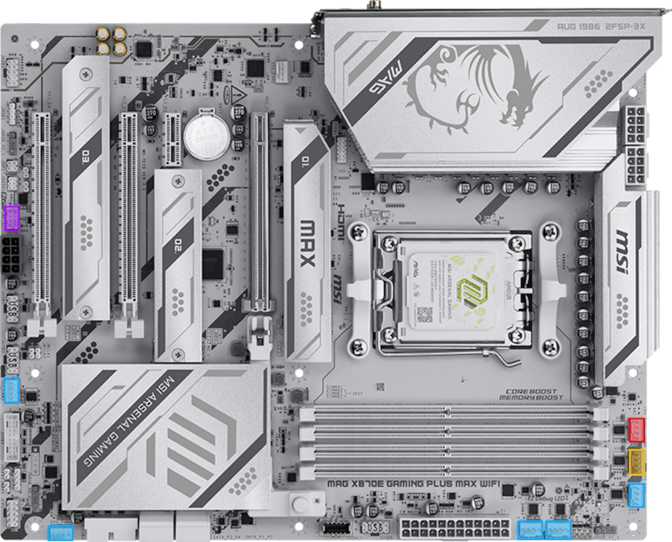
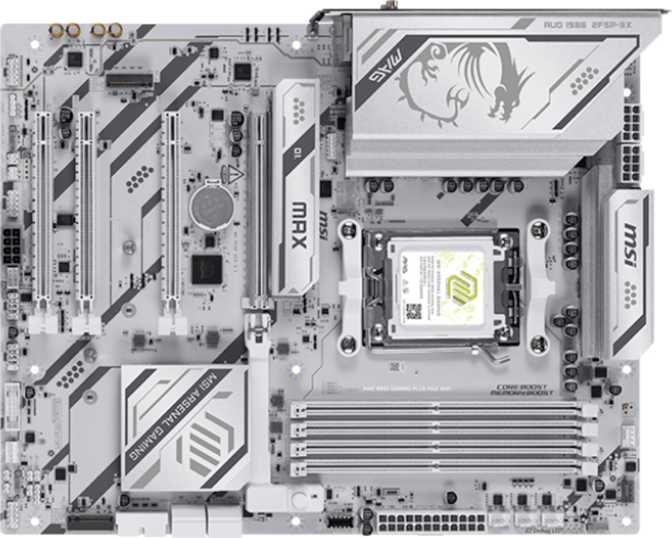
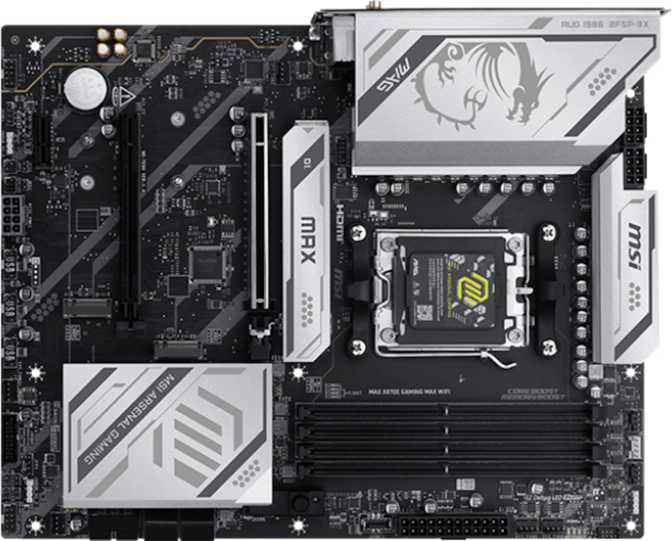
The MAG X870E Gaming Max follows standard ATX dimensions, fitting cleanly into any mid-tower or full-tower case designed for ATX layouts. There are no physical compatibility surprises — the footprint is conventional enough that case and cooling planning requires no special accommodation for unusual overhangs or non-standard mounting points.
RGB lighting spans the board and is controllable through MSI's software ecosystem. It complements a windowed build without demanding center stage, and builders who prefer a dark aesthetic can disable it entirely through software.
The physical layout reflects a board designed by someone who has actually built PCs. The 24-pin ATX power connector sits at the right edge, CPU power connectors are positioned at the top, and the M.2 slots are distributed to avoid GPU obstruction during installation. A dedicated Clear CMOS button — accessible without disassembling the build — reflects the kind of practical detail that earns points during a midnight troubleshooting session.
- Accessible Clear CMOS button — reachable without disassembly
- M.2 slots positioned to avoid GPU cable conflicts
- RGB fully software-controlled and completely disableable
- Standard ATX footprint — no case compatibility surprises
AM5 Platform: Why the Socket Matters
The AM5 socket is AMD's current-generation platform, and choosing it is a commitment to longevity. AMD has publicly committed to AM5 support through future processor generations, meaning a board purchased today should remain viable for CPU upgrades well into the future — a meaningful consideration when making a significant hardware investment.
The X870E chipset — the “E” designating the enhanced, top-tier variant — provides more PCIe lanes, higher-bandwidth USB natively from the chipset, and greater overclocking headroom compared to the standard X870 or the mid-range B850 and B650 boards below it. If you are pairing this board with a high-end Ryzen processor, the X870E chipset ensures that processor is not being artificially constrained by chipset-level bandwidth limitations.
Memory Performance: DDR5 Done Properly
The Baseline and the Ceiling
This board supports DDR5 exclusively — the right call at this tier. Four physical slots in a dual-channel configuration accept up to 256 GB total. That ceiling is more relevant to content creation workstations and large-scale simulation builds than pure gaming, but it future-proofs the platform for users whose needs evolve over a multi-year ownership period.
The native validated speed sits at 5,600 MHz — meaning out of the box, with compatible DDR5 memory, you get full-speed operation without touching the BIOS. No manual configuration, no ambiguity. The board is also flagged as easy to overclock, which in practice means XMP and EXPO profiles are supported via a single BIOS toggle.
Overclocking Memory to 8,200 MHz
The maximum overclocked memory speed of 8,200 MHz is a genuine future-proof ceiling. Most DDR5 kits sold today are validated between 6,000 and 7,200 MHz, with premium enthusiast modules reaching toward 7,600 MHz. A ceiling of 8,200 MHz means this board accommodates whatever the memory market produces at the extreme end without becoming the limiting factor.
For gaming, memory speed above roughly 6,000–6,400 MHz yields diminishing returns. For video rendering, 3D simulation, and RAM-intensive productivity workloads, higher-frequency, low-latency memory makes a measurable difference. The ceiling exists for those who need it — everyone else benefits from having headroom to grow.
Storage: Fast, Flexible, and Built for Expansion
Three M.2 slots form the primary storage backbone. The lead slot runs at PCIe 5.0 — the current performance frontier for consumer SSDs — delivering sequential read speeds that far exceed anything PCIe 4.0 can offer. Installing a cutting-edge NVMe drive here means the board will not be the bottleneck.
The remaining two M.2 slots support PCIe 4.0 drives, which remain the mainstream high-performance standard and represent excellent value. Three total slots means a dedicated OS drive, a game library drive, and a fast project scratch drive — all without a single SATA cable.
Four SATA 3 connectors support traditional 2.5-inch SSDs and spinning hard drives for bulk storage. For builders migrating drives from a previous build, these ports make the transition straightforward and immediate.
Four ports cover most builds comfortably. Users planning large spinning-disk arrays may find the count modest compared to workstation-tier boards, which is one of the genuine constraints of this design.
Full RAID support covers RAID 0, 1, 5, and 10 configurations across the storage array. RAID 0 stripes data across drives for peak throughput. RAID 1 mirrors for redundancy. RAID 5 and RAID 10 deliver blended speed-and-fault-tolerance configurations.
Primarily relevant for content creation workstations handling irreplaceable media files, NAS-style desktop builds, or power users who want hardware-level data redundancy without a dedicated external device.
PCIe Expansion: The GPU Slot and Beyond
The primary expansion slot runs PCIe 5.0 at full x16 bandwidth — the complete allocation that current and next-generation GPUs are designed to use. PCIe 5.0 x16 delivers twice the raw throughput of PCIe 4.0 x16, and while today’s graphics cards do not yet saturate PCIe 4.0, having PCIe 5.0 ensures that future graphics architectures will not be throttled at the slot level. Buying once and not revisiting this decision is the point.
Connectivity: Where This Board Distinguishes Itself
The rear I/O panel is the MAG X870E Gaming Max Wi-Fi’s clearest differentiator. The combination of Thunderbolt 4, USB 4 at 40 Gbps, and USB 3.2 Gen 2x2 alongside a full suite of standard high-speed USB-A ports makes this one of the most generously equipped rear panels at its price tier.
USB 4 and Thunderbolt 4: Not the Same Thing
A USB 4 port operating at 40 Gbps and a Thunderbolt 4 port both occupy the rear panel. They share the same physical USB-C form factor but serve meaningfully different purposes. USB 4 at 40 Gbps connects an external NVMe enclosure at speeds approaching internal storage — a transformative setup for videographers, photographers, and audio engineers working from external drives. Thunderbolt 4 adds certification-backed compatibility with docking stations, eGPU enclosures, and professional single-cable displays that USB 4 alone cannot address.
Full Rear USB Port Breakdown
| Port Type | Speed | Count | Best Use Case |
|---|---|---|---|
| USB 4 (USB-C) | 40 Gbps | 1 | Fastest external storage, high-speed hubs |
| Thunderbolt 4 (USB-C) | 40 Gbps + TB | 1 | TB docks, eGPUs, certified single-cable displays |
| USB 3.2 Gen 2x2 (USB-C) | 20 Gbps | 1 | Fast external SSDs, high-bandwidth hubs |
| USB 3.2 Gen 2 (USB-A) | 10 Gbps | 2 | External SSDs, fast peripherals |
| USB 3.2 Gen 1 (USB-A) | 5 Gbps | 2 | Keyboards, mice, USB hubs |
| USB 2.0 | 480 Mbps | 4 | Dongles, older peripherals, low-bandwidth devices |
Wireless and Wired Networking
Wi-Fi 7 (802.11be)
Operates simultaneously across the 2.4 GHz, 5 GHz, and 6 GHz bands through Multi-Link Operation — delivering lower latency, better handling of congested wireless environments, and peak speeds that can compete with wired connections on a compatible router. Fully backwards compatible with Wi-Fi 6E, 6, 5, and 4. Wherever your router stands today, this module connects at its maximum capability.
Bluetooth 5.4 & Wired LAN
Bluetooth 5.4 — the current specification revision — provides longer range, lower power draw for connected peripherals, and improved coexistence with Wi-Fi on shared frequency bands. The RJ45 Ethernet port handles wired networking for the lowest-latency, most consistent connection available — essential for competitive gaming and large file transfers where wireless variability is unacceptable.
Video Output
An HDMI 2.1 port on the rear I/O connects to the processor’s integrated graphics output — relevant for AMD Ryzen processors with a Radeon integrated GPU, for initial system setup without a discrete GPU installed, or as a secondary monitoring display. HDMI 2.1 supports 4K at up to 120Hz, covering essentially any display currently available.
There is no DisplayPort output on the rear I/O. For a board at this category — where a discrete GPU is assumed — this omission is largely inconsequential, since the GPU provides its own display outputs directly. Builders should not factor this in as a meaningful limitation for typical enthusiast builds.
Onboard Audio
Onboard audio handles 7.1 surround sound decoding through three physical jacks on the rear panel — covering stereo output, microphone input, and rear surround or line-in simultaneously. The audio circuit is physically isolated from the main board components, which reduces electrical interference pickup and is standard practice at this price tier.
Fan Control and Thermal Management
Eight fan headers is an unusually high count for an ATX board, and it matters in real builds. A well-ventilated mid-tower running a CPU cooler, three to six case fans, and a liquid cooling radiator with pump header can consume all eight — meaning every fan gets a dedicated, independently software-controlled connection. No splitters, no compromises.
MSI’s fan control software allows each header to be individually mapped to different thermal sensors. Front intake fans track CPU temperature. Rear exhaust fans respond to GPU load. Radiator fans follow coolant temperature. This granularity matters equally for builders optimizing a near-silent workstation and enthusiasts chasing precise thermal performance curves under sustained load.
Dual BIOS: Built-In Insurance
Two physical BIOS chips ship on this board. The primary handles normal operation. If an update fails, corruption occurs, or an experimental firmware setting renders the primary chip unbootable, the board automatically switches to the backup chip and recovers — without user intervention. Combined with the dedicated Clear CMOS button that resets settings to factory defaults in seconds, this board is designed for confident experimentation at any experience level.
Who This Board Is For
- You are building around a high-end AMD Ryzen processor and want a chipset that does not constrain it at the bandwidth level.
- You work with large files externally and need Thunderbolt 4 or USB 4 connectivity on a desktop platform — not just in a laptop.
- You are a content creator, video editor, or 3D artist who benefits from fast storage, high RAM capacity, and rapid USB throughput simultaneously.
- You want a wireless module that will remain competitive for the next several years — not one that was already behind at purchase.
- You plan to overclock your processor or memory and want headroom, flexibility, and safety features to experiment confidently.
- You are building a system intended to last five or more years and want platform upgrade flexibility as new Ryzen generations release.
- You are building a budget gaming PC — a B850 or standard X870 board covers most gaming needs for meaningfully less money, freeing budget for GPU or CPU.
- You do not need Thunderbolt 4, USB 4, or advanced overclocking and would prefer to direct that budget toward other build components.
- You need more than four SATA ports for a large spinning-disk array — this board is adequate but not generous for deep traditional storage configurations.
- You require S/PDIF optical audio output for a home theater receiver — you will need a USB DAC or PCIe sound card as an additional purchase.
Competitive Positioning
At this price and feature level, the MAG X870E Gaming Max Wi-Fi competes primarily with boards like the ASUS TUF Gaming X870E-Plus, the Gigabyte X870E Aorus Elite, and MSI’s own higher-tier MEG line. The Thunderbolt 4 inclusion is the single clearest differentiator — most competing boards at comparable pricing offer USB 4 without Thunderbolt 4 certification, or neither. For users who require TB4 compatibility, this alone can justify the board over alternatives.
| Feature | MSI MAG X870E Gaming Max | Typical X870E Competitor |
|---|---|---|
| Chipset | X870E | X870E |
| PCIe 5.0 x16 GPU Slot | ||
| USB 4 (40 Gbps) | Sometimes | |
| Thunderbolt 4 | Rare at this price | |
| Wi-Fi Version | Wi-Fi 7 | Wi-Fi 6E or 7 |
| M.2 Slots | 3 | 3–4 |
| Fan Headers | 8 | 6–8 |
| Dual BIOS | Varies |
The ASUS TUF Gaming X870E-Plus offers four M.2 slots versus three here — an advantage for storage-intensive builds. Gigabyte’s competing option sometimes edges ahead on VRM thermal performance under extreme sustained overclocking. Neither alternative at comparable pricing typically includes both Thunderbolt 4 and USB 4 simultaneously.
Honest Assessment: Strengths and Weaknesses
The MAG X870E Gaming Max Wi-Fi is an intelligently specified board. MSI has prioritized the features that most enthusiast builders actually use — generous USB bandwidth at the rear panel, future-proof wireless, solid memory overclocking headroom, and dual BIOS safety — without inflating the price by chasing metrics that matter only on specification sheets.
The Thunderbolt 4 port is a genuine differentiator and is well-implemented here. The Wi-Fi 7 module positions the board ahead of the current market ceiling rather than merely at it — a meaningful choice for a platform intended to remain relevant for years.
The weaknesses are real but narrow. The absence of S/PDIF digital audio output will frustrate users with legacy home theater audio setups, though a USB DAC addresses this without significant cost. The four SATA ports are functional but sparse for users building large hybrid storage arrays. A standard USB-C cable from a phone connected to the wrong rear port will link at USB 2.0 speeds — a navigation issue, not a hardware gap, but one worth knowing in advance.
- Thunderbolt 4 at this price tier
- USB 4 at 40 Gbps on the rear panel
- Wi-Fi 7 — ahead of today’s market ceiling
- 8,200 MHz DDR5 overclocking ceiling
- PCIe 5.0 x16 primary GPU slot
- Dual BIOS with automatic recovery
- 8 fan headers — no splitters needed
- PCIe 5.0 primary M.2 slot
- No S/PDIF optical audio output
- Only 4 SATA ports — sparse for large arrays
- No DisplayPort on rear I/O
Frequently Asked Questions
The Platform You Buy Once
The MSI MAG X870E Gaming Max Wi-Fi earns its price through genuine feature inclusion rather than marketing copy.
The combination of Thunderbolt 4, USB 4 at 40 Gbps, Wi-Fi 7, PCIe 5.0 x16, a PCIe 5.0 primary M.2 slot, and a DDR5 memory overclocking ceiling of 8,200 MHz makes this a genuinely future-proof platform for enthusiast builders who intend to own their build for the long term.
It is the right choice for high-end AMD builds where the builder wants a board that accommodates today’s fastest components and tomorrow’s upgrades without compromise. Content creators who need high-speed external connectivity, power users who value overclocking flexibility and BIOS safety, and builders planning a five-plus year platform lifespan will find it particularly well-matched.
Buyers whose priorities are purely gaming performance on a tighter budget will find better value stepping down to an X870 or B850 board. The MAG X870E Gaming Max Wi-Fi’s advanced features add real cost, and a dedicated gaming build at moderate settings does not fully utilize what this board offers. For everyone else in the enthusiast market: this is a board you buy once and do not think about again.