MSI MAG X870E Gaming Plus Max Wi-Fi: Full Review and Platform Analysis
MotherboardsMotherboards rarely generate excitement on their own. They sit behind the CPU, the GPU, and the RAM in every headline benchmark, yet they determine whether all those expensive components actually perform to their potential — or leave bandwidth on the table. The MSI MAG X870E Gaming Plus Max Wi-Fi sits in a genuinely interesting position: it carries AMD's top-tier enthusiast chipset in a form factor and at a price point aimed squarely at serious builders who don't want to pay flagship prices for features they'll never use.
The X870E designation carries real weight. AMD's X870E chipset — the "E" standing for Extreme — is the highest-tier platform available for Ryzen 9000 and 7000 series processors on the AM5 socket. Platform choice locks you in for years, making the right chipset selection an investment decision, not just a purchase.
At a Glance
Design and Build Quality: ATX Done Right
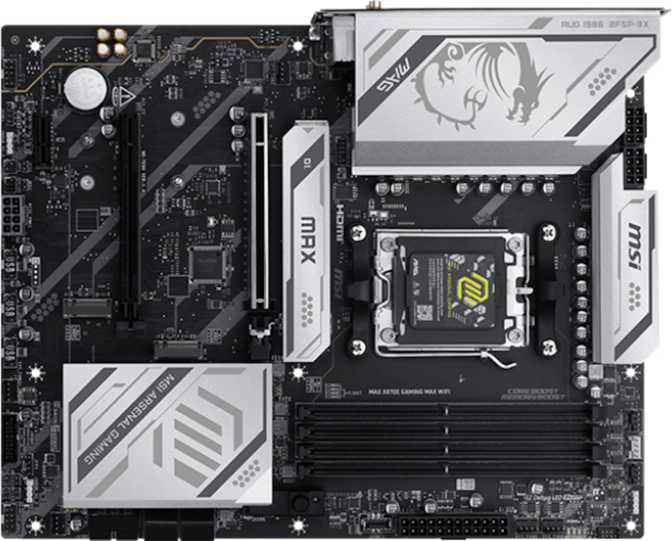
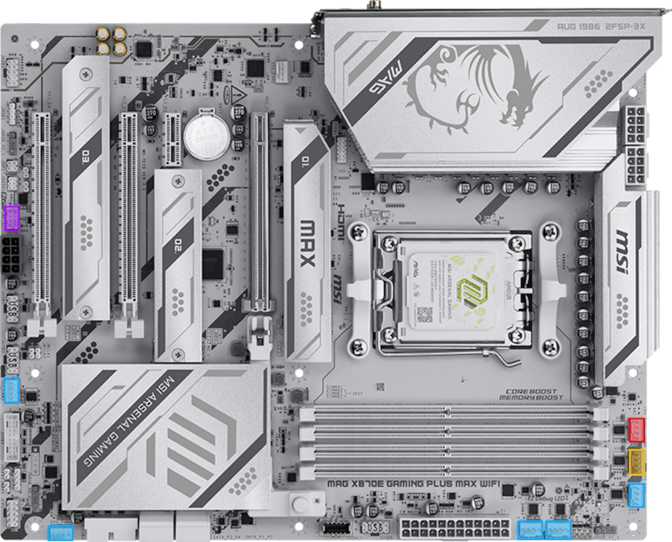
The MAG X870E Gaming Plus Max Wi-Fi follows the standard ATX footprint — 304.8 mm wide and 243.8 mm tall — which fits comfortably in any mid-tower or full-tower case designed for modern builds. There are no compatibility surprises for anyone buying a case from the last several years.
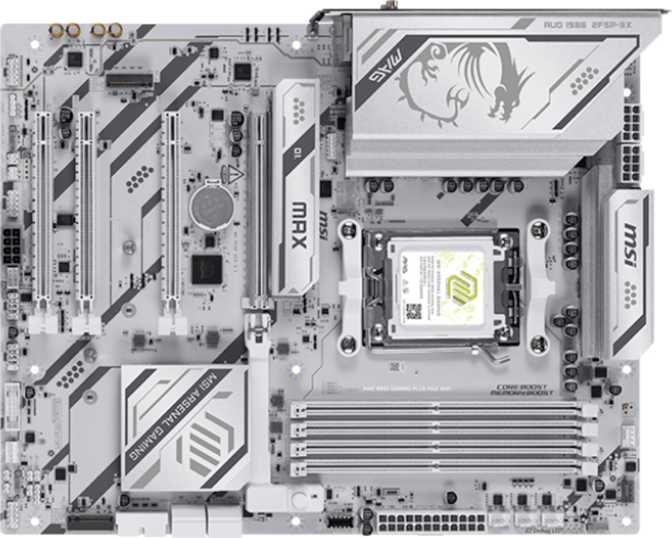
MSI's MAG line occupies a deliberate aesthetic position: visually polished without leaning into the garish excess that defines some gaming hardware. The board includes RGB lighting, giving builders the option to integrate it into a cohesive system theme. If you want the lights off entirely, MSI's software handles that without technical complexity.
Eight fan headers spread across the board mean there is no scenario where a builder with a serious cooling setup — multiple case fans, a CPU cooler with dual fans, and a radiator — runs short of headers. Most enthusiast configurations max out at five or six headers, so this headroom is genuine rather than theoretical.
Dual BIOS Protection
A dedicated clear CMOS button and dual BIOS system mean recovery from a failed overclocking session or firmware update never requires disassembling the build or hunting for a jumper with a screwdriver. The backup BIOS chip is silent insurance that becomes very visible exactly when you need it most.
Eight Fan Headers
Even the most aggressive cooling configurations — triple-fan radiators, multi-fan tower coolers, several intake and exhaust fans — can be wired directly without purchasing a separate fan hub or controller. That's a meaningful quality-of-life advantage during the build and when fine-tuning fan curves later.
CPU and Memory Performance
Processor Compatibility and Platform Longevity
The AM5 socket supports AMD's current and recent Ryzen processor generations. AMD has publicly committed to AM5 longevity, meaning a processor bought today and one bought two or three years from now can both use this same board. For anyone building a system they plan to hold for five or more years, that upgrade path is a meaningful factor in the total cost of ownership.
The X870E chipset unlocks the full feature set AMD has built into the AM5 ecosystem: PCIe 5.0 for both the primary GPU slot and, critically, for high-speed NVMe storage. This is where X870E separates from mid-range B650 and even standard X870 boards, which may limit PCIe 5.0 availability for storage devices.
DDR5 Memory: Headroom and Real-World Meaning
Four DDR5 slots across two channels support up to 256 GB of total memory. For gaming, content creation, software development, and moderate video editing, this ceiling is so far beyond practical requirements that it functions as a statement of headroom rather than a useful number. What matters day-to-day is XMP/EXPO profile support, which lets memory kits run at their advertised speeds without manual tuning.
For enthusiasts who want to go further, the platform supports manual overclocking to speeds approaching 8200 MHz — the current frontier of DDR5 overclocking. Whether such speeds translate to meaningful real-world gains depends on the workload, but the headroom is there for those who want to explore it.
ECC (Error-Correcting Code) memory — which detects and corrects single-bit errors automatically — is not supported on this board. If your workload involves financial data, server tasks, or any environment where silent data corruption is unacceptable, this platform is not designed for that use case. The MAG X870E is a consumer gaming and enthusiast product, and ECC is a workstation or server feature on the AM5 ecosystem.
Connectivity: A Genuine Strength
Connectivity is where this board makes its most compelling argument. The specifications here reflect real generational advancement — not marketing padding. The rear I/O panel covers both today's devices and tomorrow's peripherals in a way that's unusual at this market position.
Rear Panel Port Breakdown
| Port | Count | Speed | Best Used For |
|---|---|---|---|
| USB4 | 1 | 40 Gbps | External NVMe enclosures, high-resolution capture cards, high-bandwidth peripherals |
| Thunderbolt 4 | 1 | 40 Gbps | TB docks, daisy-chaining peripherals, external GPU enclosures, TB-certified displays |
| USB 3.2 Gen 2 (USB-A) | 2 | 10 Gbps | Fast external SSDs, current-generation peripherals |
| USB 3.2 Gen 1 (USB-A) | 2 | 5 Gbps | Keyboards, mice, webcams, standard peripherals |
| USB 2.0 | 4 | 480 Mbps | Legacy peripherals, headsets, low-bandwidth accessories |
| HDMI 2.1 | 1 | Display Output | iGPU display output, BIOS troubleshooting without a discrete GPU installed |
| 2.5GbE (RJ45) | 1 | 2.5 Gbps | Wired networking — five times faster than legacy gigabit connections |
USB-C and DisplayPort Note: There are no standard-speed USB-C ports on the rear panel. The only Type-C connectivity at the rear runs through the premium USB4 and Thunderbolt 4 ports. For users with basic USB-C accessories, those ports technically work but represent premium connectivity handling routine tasks. Front-panel USB-C is supported via an internal header. There is also no DisplayPort output — the HDMI 2.1 port is the sole video output on the rear panel.
Wireless Connectivity
Wi-Fi 7 (802.11be)
The Wi-Fi 7 adapter is backwards compatible with all previous Wi-Fi generations, so it works with any current router today. The meaningful upgrade activates when paired with a Wi-Fi 7 router: Multi-Link Operation across 2.4 GHz, 5 GHz, and 6 GHz simultaneously delivers reduced latency and improved reliability in congested wireless environments. Think of it as a built-in future upgrade that costs nothing to enable when your network infrastructure catches up.
Bluetooth 5.4
Bluetooth 5.4 is the current specification, offering higher data rates, improved connection stability, and better coexistence with Wi-Fi compared to older versions. One absence worth noting: aptX codec support for Bluetooth audio is not included. Most wireless headsets use proprietary codecs anyway, making this a minor point for the majority of users — but buyers who specifically rely on aptX should factor this in before purchasing.
Storage: Three M.2 Slots and Full RAID Support
Solid-State Storage Configuration
Three M.2 slots provide the primary storage infrastructure for modern builds. M.2 is the standard form factor for current NVMe SSDs — the drives that deliver dramatically faster read and write speeds compared to traditional SATA SSDs or mechanical hard drives. Three slots mean a builder can install a fast primary drive for the operating system and applications, a second for games or media libraries, and a third for backups or a secondary operating system.
The primary M.2 slot benefits from PCIe 5.0 bandwidth through the X870E chipset, meaning it supports the fastest NVMe drives on the market without creating a bottleneck. The remaining slots operate at PCIe 4.0 speeds — still extremely fast, and more than adequate for any current consumer NVMe SSD outside the latest PCIe 5.0 flagship products.
Four SATA 3 connectors extend storage to traditional 2.5-inch SSDs and 3.5-inch mechanical hard drives. A builder can combine fast NVMe drives for active workloads with high-capacity spinning drives for cold storage, archival, or media libraries — without spending on expansion cards.
RAID Configuration Support
Combines drives for maximum speed. Ideal for performance-critical scratch disks. No redundancy — a single drive failure means data loss across the entire array.
Mirrors two drives for complete redundancy. If one drive fails, the other contains an identical copy of all data. The simplest form of local data protection.
Stripes data across three or more drives with parity protection. Balances performance, capacity, and redundancy — a practical choice for creative professionals.
Combines mirroring and striping for both speed and redundancy. Requires four or more drives. The most resilient consumer RAID configuration available.
Expansion Slots and GPU Support
The primary expansion slot runs at PCIe 5.0 x16, making it the appropriate home for any current or near-future discrete graphics card. PCIe 5.0 doubles the bandwidth of PCIe 4.0. While no GPU available today fully saturates PCIe 4.0 x16 bandwidth in gaming, the headroom matters for compute workloads and future-proofing the platform over a multi-year build lifecycle.
No second x16 slot for multi-GPU: This is not an oversight — it's an accurate reflection of the current gaming landscape. Multi-GPU gaming configurations have been functionally obsolete for several years. The slot count here is exactly what modern single-GPU builds require, with no wasted real estate.
Audio and Internal Connectivity
Onboard Audio
Onboard audio supports 7.1 surround sound through three analog audio connectors on the rear panel. This covers stereo headphones, 2.1 speaker setups, and surround sound configurations for gaming and general use.
There is no S/PDIF optical output. For home theater integration where an AV receiver expects a digital optical input, this is a genuine limitation. Direct digital audio connection to such a receiver requires an external DAC or a receiver with analog inputs.
For users with serious audio requirements, a discrete sound card in one of the PCIe expansion slots remains an option. The onboard solution is competent for gaming headsets, casual listening, and voice communication — but it doesn't reach beyond that.
Internal Headers at a Glance
The internal connector layout determines how fully a builder can wire up their chassis. Here's what's available beyond the rear panel:
- USB 3.2 Gen 1 internal headers (front-panel USB-A) 4 ports
- USB-C internal header — Gen 2 at 10 Gbps (front-panel USB-C) 1 port
- USB 2.0 internal headers (front panel and RGB controllers) 6 ports
- Fan headers distributed across the board 8 total
- TPM connector for discrete Trusted Platform Module 1 port
Who This Board Is For — and Who Should Look Elsewhere
Strong Fit For
- Ryzen 9000/7000 series builders who want top-tier chipset features without paying for the absolute highest-end flagship boards with premium aesthetics and marginal additional capabilities.
- Gamers planning to hold their system for five or more years, who want to ensure the platform won't limit future CPU upgrades or block fast storage additions down the line.
- Content creators — video editors, 3D artists, streamers — who benefit from fast NVMe storage, USB4 and Thunderbolt 4 for external devices, and the memory capacity headroom this platform offers.
- Builders with high-speed external storage needs — external NVMe drives, Thunderbolt docks, or USB4-connected devices that are regular parts of their workflow.
- Anyone investing in Wi-Fi 7 infrastructure who wants the router and the PC to match wireless generations without needing to revisit the motherboard later.
Not the Right Fit For
- Budget-conscious builders who won't use PCIe 5.0 storage, USB4, or Thunderbolt 4. A B650 board serves those builds at significantly lower cost without meaningful day-to-day gaming differences.
- Workstation users requiring ECC memory for data integrity in professional or financial environments. This is a consumer gaming platform without ECC support.
- Builders needing multiple standard-speed USB-C rear ports. All rear Type-C connectivity runs through the USB4 and Thunderbolt 4 ports — there are no standard-speed USB-C options at the rear.
- Home theater PC builders who need S/PDIF optical audio for AV receiver connectivity, or who require DisplayPort on the rear panel for their display setup.
- Extreme overclocking purists pushing a flagship Ryzen processor to its absolute limits under sustained all-core load. MSI's MEG lineup offers more VRM headroom specifically for that use case.
How It Compares to Logical Alternatives
These comparisons reference chipset-tier alternatives rather than specific competing models, since individual boards vary significantly within each category. The goal is to show where the X870E platform premium is — and isn't — justified.
| Feature | MSI MAG X870E Gaming Plus Max Wi-Fi |
Comparable X870 (Non-E) Board |
Comparable B650E Board |
|---|---|---|---|
| PCIe 5.0 x16 (GPU) | Typically Yes | ||
| PCIe 5.0 M.2 Storage | Varies | Limited / None | |
| USB4 40 Gbps | Varies | Rare at this price | |
| Thunderbolt 4 | Rare | Very rare | |
| Wi-Fi Generation | Wi-Fi 7 | Often Wi-Fi 6E | Often Wi-Fi 6E |
| M.2 Slots | 3 | 2–3 | 2–3 |
| Fan Headers | 8 | 6–8 | 6 |
| Dual BIOS | Sometimes | Sometimes | |
| Memory OC Ceiling | ~8200 MHz | ~7600–8000 MHz | ~6000–7200 MHz |
Honest Assessment: Strengths and Limitations
Where It Excels
The MAG X870E Gaming Plus Max Wi-Fi gets the fundamentals right in ways that matter over a long build lifetime. The AM5 socket keeps CPU upgrade paths open. The three-year warranty provides meaningful coverage for a component that's difficult and expensive to replace. The dual BIOS implementation is a practical safety net that overclockers will appreciate immediately and casual users will appreciate exactly once — when they need it most.
The connectivity package — USB4, Thunderbolt 4, Wi-Fi 7, and 2.5GbE together on one board — is genuinely forward-looking. These aren't features added to pad a specification sheet; they're the connectivity standards that peripherals and infrastructure are actively moving toward. A system built on this board won't feel outdated in its port selection for a long time.
Three M.2 slots with a PCIe 5.0 primary slot, combined with four SATA ports and complete RAID support, means storage flexibility without compromise. Eight fan headers remove one of the most common frustrations in serious builds entirely.
Where It Falls Short
The audio implementation won't satisfy audiophiles. The absence of S/PDIF optical output is a meaningful omission for home theater configurations where an AV receiver is the central audio device. The onboard audio story is competent and nothing more — adequate for gaming headsets and casual use, not for anyone whose audio setup demands serious attention.
The rear panel's USB-C coverage is a genuine inconvenience for some users. Concentrating all Type-C connectivity in the premium high-speed ports means users with standard USB-C accessories either consume premium bandwidth for basic tasks or rely on front-panel headers — which assumes the case has a USB-C front port to connect to.
For extreme CPU overclocking specifically — pushing a flagship Ryzen processor to its absolute limits under sustained all-core load — the VRM configuration is competent but not the highest-grade available at this chipset tier. For gaming and content creation workloads this is a non-issue, but if extreme overclocking is the primary goal, a step up to a premium X870E board is worth considering.
Common Questions from Real Buyers
Answers to what buyers actually search for before making this purchase.
Final Verdict
The MSI MAG X870E Gaming Plus Max Wi-Fi occupies a compelling position in the X870E market. It delivers the full capability of AMD's top chipset — PCIe 5.0 storage bandwidth, high-ceiling memory performance, and a complete AM5 upgrade path — alongside connectivity that reflects where PC hardware is genuinely headed rather than where it's been.
The inclusion of USB4 at 40 Gbps, Thunderbolt 4, and Wi-Fi 7 on a mid-to-high range board rather than an ultra-premium flagship is the real story here. Builders who want those features have historically had to pay flagship prices or accept a chipset downgrade. This board changes that calculus meaningfully.
It's not a board for extreme overclocking purists or for workstation users with ECC requirements. It's a board for builders who want a capable, connected, long-lived AM5 platform that won't require an immediate upgrade when the next generation of fast storage, USB4 peripherals, and wireless infrastructure becomes mainstream. For that buyer, it makes a strong case.