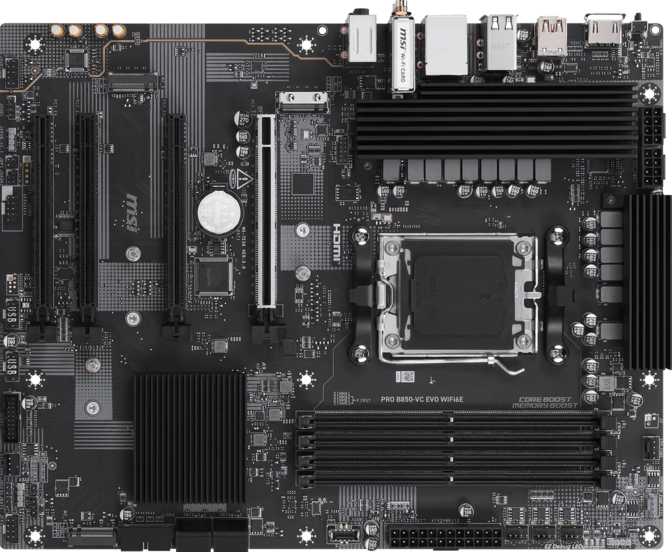
MSI Pro B850-VC Evo Wi-Fi 6E: A Full Review for AM5 Builders
MotherboardsThe AM5 platform has matured to a point where mid-range motherboards no longer force uncomfortable compromises. The MSI Pro B850-VC Evo Wi-Fi 6E sits in exactly that space — a full-size ATX board built on AMD's B850 chipset, targeting builders who want a future-ready foundation without paying flagship X870E prices. Whether you are putting together your first AMD Ryzen 7000 or 9000 series build, or upgrading from an older platform, this board earns a careful look. It is not a perfect fit for every builder, and knowing those limits matters before you commit.
Design, Build Quality, and Physical Experience
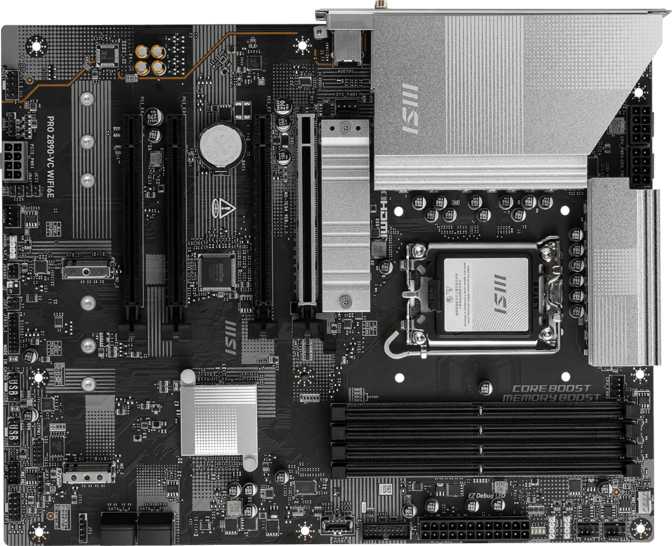
The MSI Pro B850-VC Evo Wi-Fi 6E follows the standard ATX footprint — 304.8mm wide and 243.8mm tall — meaning it fits comfortably in any ATX-compatible case, covering the vast majority of mid-tower and full-tower enclosures on the market. Building in a compact micro-ATX case? This board will not fit, so check your case specifications before purchasing.
The "Pro" branding signals MSI's intent clearly. This is not a board designed to look dramatic on camera. There is no RGB lighting anywhere on the PCB, which for productivity workstations, office builds, or cases where owners prefer a clean interior is a genuine advantage. If you want a light show inside your case, you will need to rely entirely on RGB fans and strips controlled through the board's headers — or choose a different board altogether.
Build quality on the Pro series reflects the professional market MSI targets with this line. Heatsink coverage over the VRM area and M.2 slots is expected at this tier, and the overall construction feels appropriately substantial. What the Pro series trades in visual flair, it delivers in layout sensibility and long-term reliability focus.
Platform and Chipset: Why B850 on AM5 Makes Sense
The AM5 socket is AMD's long-term platform investment. AMD has committed to AM5 support through multiple processor generations, which means a board you buy today should remain viable for at least one or two future CPU upgrades. That platform longevity is one of the most compelling arguments for building on AM5 at any price point — it shifts the conversation from "what does this board do now" to "how long will this investment last."
The B850 chipset occupies the upper tier of AMD's mainstream lineup — above B650, below the enthusiast-class X870 and X870E. For most builders, B850 is the sweet spot. It supports full PCIe 5.0 connectivity for the primary graphics card slot, unlocks memory overclocking without restriction, and includes native USB 4.0 support at the chipset level — though this particular board does not deploy USB 4 ports on the rear panel. That is a design choice, covered in detail in the Connectivity section.
The key upgrade B850 brings over B650 is that memory overclocking is fully supported and officially sanctioned — no workarounds, no ambiguity about compatibility.
Memory: DDR5 With Serious Headroom
This board carries four DIMM slots in a dual-channel configuration, supporting DDR5 exclusively. DDR4 is not compatible — this is a DDR5-only platform, worth confirming if you are migrating from an older build and hoping to reuse existing memory sticks.
Four slots give genuine flexibility. You can start with two sticks today — say, a 32GB kit — and add another matched pair later to reach 64GB without discarding anything. At maximum, all four slots accept up to 256GB, which is territory typically reserved for workstations running large virtual machine stacks, 8K video editing pipelines, or RAM-heavy databases.
Out-of-the-box rated speed tops out at 6400MHz — the standard target for most high-performance DDR5 kits. For enthusiasts who want more, the board supports overclocked operation up to 8800MHz, placing it alongside genuinely enthusiast-class alternatives. Reaching those speeds requires a compatible processor, careful memory kit selection, and BIOS tuning, but the ceiling is there. ECC memory is not supported, which rules out scientific computing and financial modeling where data integrity over long runs is non-negotiable — but this affects very few consumer or prosumer use cases.
Storage: Three M.2 Slots and a Practical SATA Setup
Three M.2 sockets cover the needs of most builds comfortably. The primary slot connects via PCIe 5.0 — the current high-speed NVMe standard enabling drives with sequential speeds that dwarf anything achievable on previous generations. For day-to-day use the perceptible difference between a Gen 4 and Gen 5 drive is modest, but for large file transfers, video production pipelines, or workloads that constantly move massive datasets, the headroom is meaningful. The secondary and tertiary slots operate on PCIe 4.0, which remains an excellent standard covering every high-end consumer NVMe drive not specifically labelled Gen 5.
| M.2 Slot | Interface | Best Use Case |
|---|---|---|
| Primary | PCIe 5.0 NVMe | Fastest Gen 5 SSDs, boot drive, demanding workloads |
| Secondary | PCIe 4.0 NVMe | High-end Gen 4 SSDs, game library, project storage |
| Tertiary | PCIe 4.0 NVMe | Secondary data drive, backups, overflow storage |
Four SATA 3 connectors handle traditional SSDs or spinning hard drives. Migrating from an older system with existing storage? These ports keep your options open without forcing replacements on day one. RAID 0 and RAID 1 are supported across SATA devices — giving you either the performance benefits of striping two drives together or the data redundancy of mirroring. RAID 5 and RAID 10 are not supported, keeping those configurations firmly in enterprise territory.
Graphics and Expansion: PCIe 5.0 Ready, Sensibly Equipped
The primary graphics card slot operates at PCIe 5.0 x16 — the full-bandwidth interface that next-generation GPUs are beginning to use. Current AMD and NVIDIA graphics cards are mostly still optimized for PCIe 4.0 x16, but run without any bottlenecking in a PCIe 5.0 slot. Any GPU you install today will perform identically to how it would on a Gen 4 board, while leaving bandwidth headroom for future cards.
Beyond the primary slot, there is one PCIe x4 slot and two PCIe x1 slots. The x4 slot handles add-in cards like high-speed capture cards, additional NVMe controllers, or 10GbE networking adapters. The x1 slots manage lighter peripherals — sound cards, low-profile network adapters, or USB expansion boards. There is no secondary x16-width slot, so dual-GPU configurations are off the table — a moot point for practically all builds today.
An HDMI 2.1 output sits on the rear I/O panel, but activates only with AMD processors that include integrated graphics — APU variants. Standard Ryzen desktop processors without integrated graphics will see no video signal from this port when paired with a dedicated GPU. There is no DisplayPort output on the rear panel.
| Expansion Slot | Count | Typical Use |
|---|---|---|
| PCIe 5.0 x16 | 1 | Primary graphics card — full bandwidth for any current GPU |
| PCIe x4 | 1 | Capture cards, NVMe controllers, 10GbE adapters |
| PCIe x1 | 2 | Sound cards, USB expansion, lightweight adapters |
Connectivity: Wi-Fi 6E, Wired Networking, and Full USB Breakdown
Wireless
Wi-Fi 6E is the headline wireless feature, and a meaningful one. Unlike standard Wi-Fi 6, which operates on the 2.4GHz and 5GHz bands, Wi-Fi 6E adds the 6GHz band — a less congested radio space with wider channel widths available. In practical terms, this means lower interference in dense environments like apartments or offices, and consistently faster throughput when your router also supports 6GHz. For anyone with a Wi-Fi 6E or Wi-Fi 7 router, the benefits are real. The board is also backward-compatible with Wi-Fi 6, 5, and Wi-Fi 4, so it connects to any modern router without issue.
Bluetooth 5.3 is included, bringing improved connection stability and modest efficiency gains over earlier 5.x versions — relevant for wireless peripherals, audio devices, and anything you pair wirelessly.
Wired Networking
One gigabit Ethernet port sits on the rear panel. For most home and small office environments, gigabit wired networking is more than sufficient. If you are on a multi-gigabit internet connection or operate within a 2.5GbE or 10GbE local network, however, this port becomes a clear limiting factor. An add-in card via the PCIe x4 slot can address that gap — but that is an additional cost and a slot consumed.
USB: Rear Panel
The rear I/O panel provides eight USB ports total, covering a range of speeds for different peripheral needs:
| Port Type | Quantity | Speed | Best For |
|---|---|---|---|
| USB 2.0 Type-A | 4 | 480 Mbps | Keyboard, mouse, hubs, USB dongles |
| USB 3.2 Gen 1 Type-A | 1 | 5 Gbps | External drives, general peripherals |
| USB 3.2 Gen 2 Type-A | 1 | 10 Gbps | Fast external SSDs, high-throughput devices |
| USB 3.2 Gen 2 Type-C | 2 | 10 Gbps | Modern peripherals, portable SSDs, smartphones |
Internal Headers and Front Panel Expansion
Inside the case, additional USB ports are available through onboard headers — what your front panel actually delivers depends on which headers the board provides:
| Header Type | Count | Speed |
|---|---|---|
| USB 3.2 Gen 1 (Type-A) | 4 | 5 Gbps |
| USB 3.2 Gen 2 (Type-C) | 1 | 10 Gbps |
| USB 2.0 | 4 | 480 Mbps |
The front-panel USB-C header runs at Gen 2 speeds (10 Gbps) — a step above boards that offer only Gen 1 for front-panel Type-C. Most modern mid-tower cases with a front USB-C port will benefit directly.
Fan Control, Audio, and BIOS
Fan Control and Thermal Management
Six fan headers are distributed across the board. For a typical build — CPU cooler, several case fans, and possibly a pump header for liquid cooling — that covers everything without splitter cables. Even enthusiast builds with moderate water cooling will likely find six headers sufficient. Each header is individually addressable through the BIOS, letting you configure custom speed curves tied to CPU or motherboard temperature sensors, or lock fans to a fixed RPM target.
Audio
The onboard audio supports 7.1 surround sound output with two analog connectors on the rear panel for standard 3.5mm headphones and microphone use. An S/PDIF optical output is also included for routing audio through an external DAC or surround sound receiver. For users with a dedicated sound card or USB audio interface, onboard audio is irrelevant. For everyone else — including the majority of gamers on headsets and casual listeners — the onboard codec handles daily use cleanly without audible interference.
BIOS and Overclocking
A physical CMOS reset mechanism saves time when an overclock or BIOS experiment goes wrong. Rather than opening the case to locate jumper pins, the button handles recovery directly — a small addition that matters disproportionately when you actually need it.
Who This Board Is For — and Who Should Look Elsewhere
An Excellent Match If You...
- Are building a new AMD Ryzen 7000 or 9000 series system and want a full-size ATX board with room to expand over time
- Want Wi-Fi 6E built directly into the board — no add-in card, no additional cost
- Are building a workstation or productivity machine where a clean, RGB-free interior matters
- Want to push DDR5 memory performance — the overclocking ceiling here is genuinely competitive
- Run multiple NVMe drives and need three M.2 slots without sacrificing your SATA ports
Consider Alternatives If You...
- Need Thunderbolt 4 or USB 4 on the rear panel — neither is present despite chipset-level support
- Require 2.5GbE or faster wired networking — the single gigabit port will hold you back
- Want a secondary full-bandwidth PCIe x16 slot for multi-GPU or high-bandwidth add-in configurations
- Are building in a micro-ATX or ITX case — this board is full ATX and will not physically fit
- Need dual BIOS failsafe protection for mission-critical systems or aggressive BIOS experimentation
Competitive Positioning
The MSI Pro B850-VC Evo Wi-Fi 6E competes primarily with the ASUS TUF Gaming B850-Plus Wi-Fi, Gigabyte B850 Aorus Elite, and ASRock B850 Pro RS Wi-Fi. Each covers the same chipset territory with similar feature sets — but with different trade-offs around aesthetics, I/O completeness, and failsafe features.
| Feature | MSI Pro B850-VC Evo Wi-Fi 6E | Typical B850 Competition |
|---|---|---|
| Form Factor | ATX | ATX |
| Wi-Fi 6E | Yes | Most include it |
| PCIe 5.0 x16 Slot | Yes | Yes |
| M.2 Slots | 3 | 2–4 (varies by model) |
| Rear USB-C (10 Gbps) | 2 ports | 1–2 ports |
| RGB on PCB | None | Usually present |
| Dual BIOS | No | Varies by brand |
| Fan Headers | 6 | 4–6 |
| Rear USB 4 / Thunderbolt 4 | No | Rarely at this price tier |
| Warranty | 3 Years | 2–3 Years |
Competing board features represent generalized ranges across typical B850 offerings. Consult individual manufacturer pages for exact model specifications.
Honest Assessment: Strengths and Limitations
The MSI Pro B850-VC Evo Wi-Fi 6E does most things right for a mainstream AM5 build. The combination of Wi-Fi 6E, PCIe 5.0, DDR5 with a high overclocking ceiling, and three M.2 slots covers the needs of a large proportion of people building a modern PC for the first time or upgrading from a previous-generation platform.
Where It Delivers
The platform longevity argument here is genuinely compelling. AM5 support through future Ryzen generations means this investment has a realistic lifespan well beyond the initial build — value that does not show up in a feature checklist but matters in practice.
Three M.2 slots are genuinely useful, not padding. The front-panel USB-C header running at full Gen 2 speeds is a step ahead of boards that throttle this connection. The physical CMOS reset is one of those small-but-significant quality-of-life features that only becomes obvious when you actually need it at 1am after a failed BIOS flash.
Three years of warranty coverage provides meaningful reassurance above the two-year standard at competing brands, and the clean professional aesthetic is a genuine differentiator for builders who prioritize a tidy interior over visual drama.
Where It Falls Short
The single gigabit Ethernet port is the most consequential omission. Multi-gigabit home networking is increasingly mainstream, and a 2.5GbE port — which costs very little to add at the component level — would have made this board significantly more future-proof on the wired side.
The absence of rear-panel USB 4 is a missed opportunity, particularly because the B850 chipset supports it natively. Competing boards at similar price points have begun deploying at least one USB 4 port, and the gap will become more noticeable as USB 4 peripherals reach everyday adoption.
The lack of a dual BIOS chip removes a safety net that offers real peace of mind during firmware updates. It is a rare failure mode, but on a board positioned for long-term use in a professional context, the omission stands out against the otherwise reliability-focused Pro branding.
Answers to Common Buyer Questions
Final Verdict
The MSI Pro B850-VC Evo Wi-Fi 6E is a well-executed B850 motherboard that delivers where it matters for most builders: modern wireless connectivity, a forward-compatible AM5 platform, capable DDR5 performance headroom, and a practical storage layout — all in a professional, no-frills package that will look at home in a serious workstation for years.
It is not the board for users who prioritize USB 4 rear ports, multi-gigabit wired networking, or dual BIOS failsafe protection. Those are specific, meaningful gaps depending on your use case. For the large majority building a capable AM5 workstation or gaming PC — especially those who want Wi-Fi 6E built in and plan to push their memory configuration over time — this board represents strong value at its price tier.
Buy with confidence if:
- You want Wi-Fi 6E and serious DDR5 overclocking in a professional ATX board
- You are building on AM5 for long-term platform continuity
- A clean, RGB-free interior suits your build or workspace aesthetic
Keep searching if:
- USB 4, Thunderbolt 4, or 2.5GbE wired networking are hard requirements
- You need dual BIOS failsafe for firmware safety or frequent BIOS testing
- Your case only accepts micro-ATX or smaller form factors