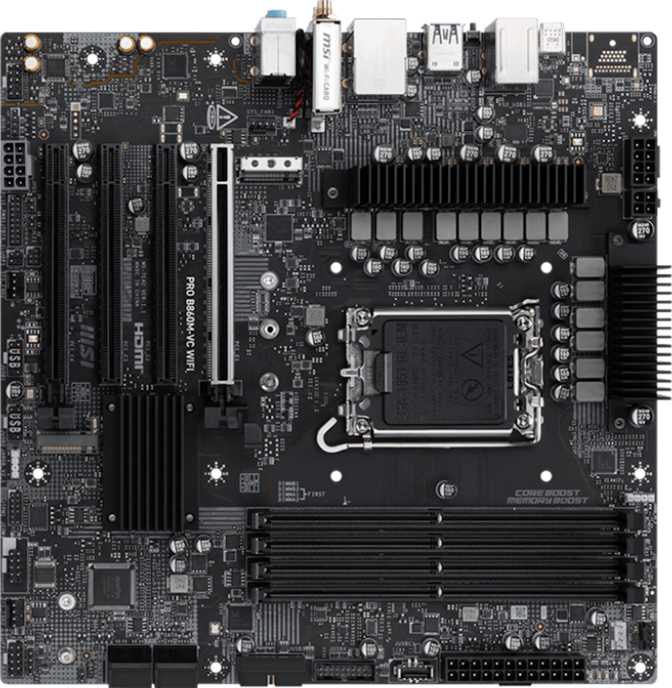
MSI Pro B860M-VC Wi-Fi Review: Compact Board, Premium Connectivity
MotherboardsThe MSI Pro B860M-VC Wi-Fi occupies a position that product category logic alone doesn’t fully capture. It is a mid-range chipset board with a compact footprint, yet it carries connectivity features that typically sit a price tier or two above — including the latest wireless standard, a Thunderbolt 4 port, and three M.2 storage slots in a chassis smaller than a sheet of paper. For the right builder, that combination is exactly what the market has been missing. For the wrong one, it will feel like paying for features left unused while missing basics they actually needed.
MSI’s Pro series has always leaned toward professional environments rather than gaming setups — clean operation, thoughtful reliability features, no decorative hardware. The B860M-VC Wi-Fi follows that lineage with conviction, and the result is a board with a clear, coherent identity that rewards buyers whose needs align with it.
Design and Build Quality
Micro-ATX Form Factor · No RGB · Professional Aesthetic · 244 × 244 mm
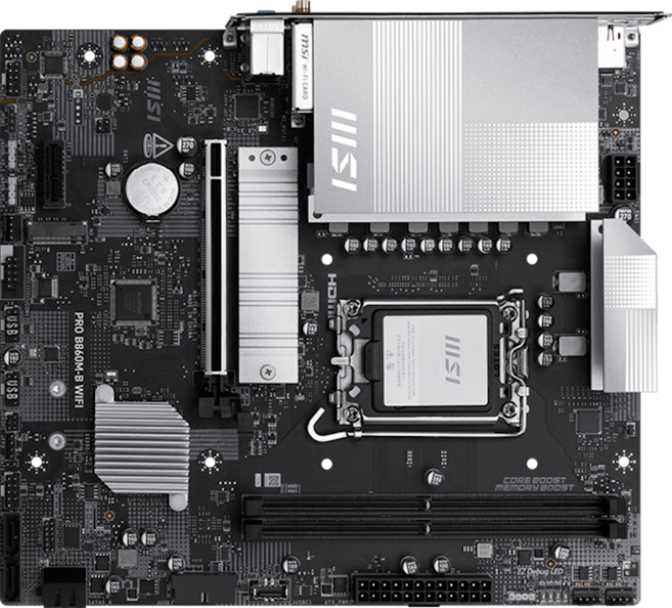
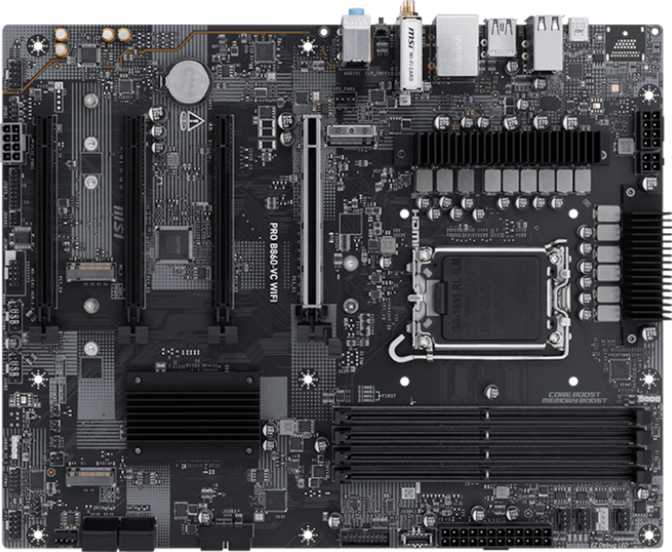
At 244 × 244 mm, this board occupies the standard Micro-ATX footprint — fitting comfortably in any mid-tower case while remaining compact enough for smaller dedicated enclosures. For builders assembling a workstation that needs to live on or under a desk rather than on a display shelf, this size hits the practical sweet spot: small enough to matter, large enough to carry real expansion capacity.
There is no RGB lighting anywhere on this board. Not a single addressable LED. The visual design is clean, matte, and entirely functional — the right answer for office environments, professional workstations, media center builds, and under-desk systems. Show-through windowed cases built around lighting choreography are not the audience here.
A physical CMOS reset mechanism allows BIOS settings to be cleared quickly without hunting for jumpers or removing the CMOS battery. For builders who push memory configurations or need rapid system recovery after a failed setting, this practical simplification matters more than it might initially seem.
Dual BIOS Protection
Two independent firmware chips rather than one. If a BIOS update corrupts the active chip — through a power outage mid-flash, a corrupted file, or a hardware fault — the board detects the failure and automatically falls back to the backup. The system boots normally rather than requiring physical repair or factory service.
3-Year Manufacturer Warranty
Three years of MSI coverage backs the Pro line positioning meaningfully. For a system expected to stay in service long-term — whether a business workstation, creative studio machine, or primary home system — this provides a real floor of confidence on the hardware investment.
Platform Foundation: B860 on Intel’s Current Socket
Intel LGA 1851 · B860 Chipset · DDR5 · 4-Slot Dual-Channel
What B860 Actually Delivers
The LGA 1851 socket is Intel’s current desktop platform, and B860 is the mainstream mid-tier chipset within it — positioned above bare-minimum entry boards and below the premium Z890 platform. For the vast majority of users, the practical distinction from higher chipsets is nearly invisible: B860 delivers the full rated performance of the installed processor, supports PCIe 5.0 on the primary GPU slot, and provides the complete I/O feature set covered throughout this review.
The one meaningful constraint is CPU overclocking. B860 does not allow manual adjustment of the processor’s clock multiplier. If your build specifically targets pushing an unlocked Intel K-series processor beyond its rated speeds through manual tuning, B860 is the wrong platform — that capability requires a Z890 board. For non-K processors, or K-series chips run at their rated specifications, B860 delivers full processor performance without compromise.
DDR5 Memory: Speed, Capacity, and Upgrade Architecture
Memory performance is a different matter entirely. B860 fully supports Intel’s XMP profile standard, allowing DDR5 kits to run at their advertised high speeds rather than the conservative JEDEC defaults those kits fall back to without profile activation. This board goes further — supporting memory configurations pushed well beyond standard XMP ceilings, with headroom that satisfies genuine DDR5 enthusiasts without requiring a premium chipset.
Four DDR5 slots run in dual-channel configuration. The practical advantage is incremental upgradeability: a build can start with two sticks in the recommended paired layout and expand later into the remaining two slots without replacing existing modules or discarding prior investment. The combined capacity ceiling reaches territory typically associated with professional workstation platforms, making this board genuinely relevant for video finishing, heavy virtualization, and large-scene 3D rendering workloads.
Memory at a Glance
- Standard
- DDR5
- Slots
- 4 (Dual-Channel)
- XMP Support
- Yes
- Extended OC
- Yes
- Upgrade Path
- 2 → 4 Sticks
- ECC Support
- None
ECC not supported. Error-correcting memory remains the province of HEDT and server-class platforms. If ECC is a hard requirement for your workflow, this board is not compatible.
Connectivity: The B860M-VC Wi-Fi’s Strongest Argument
Wi-Fi 7 · Bluetooth 5.4 · Thunderbolt 4 / USB4 40 Gbps · Multi-Speed USB Array
Wi-Fi 7 — Current-Generation Wireless Built In
The integrated wireless module supports Wi-Fi 7, the newest consumer wireless standard currently available. Wi-Fi 7 expands available channel bandwidth significantly and introduces multi-link operation — the ability for the radio to transmit and receive simultaneously across multiple frequency bands. On a compatible router, this yields higher throughput, lower latency, and more resilient connections in congested wireless environments.
The module is backward compatible with all earlier wireless standards, so no existing router environment is incompatible. The Wi-Fi 7 capability becomes valuable when the router is eventually upgraded — a buyer is not purchasing immediately unusable features, but protecting the build from a wireless ceiling in the future.
Bluetooth 5.4 is included, supporting current-generation wireless peripherals, headsets, audio devices, and smart home integrations at the latest Bluetooth standard.
Thunderbolt 4 — An Uncommon Advantage at This Tier
A Thunderbolt 4 port on a B860 Micro-ATX board is worth pausing on. Thunderbolt 4 provides 40 Gbps of bidirectional bandwidth through a single USB-C connector — the same physical port also functions as a USB4 40 Gbps connection. One connector, two compatibility paths, and the highest-bandwidth rear-panel port available at this board tier.
External Storage
Thunderbolt NVMe enclosures reach near-internal drive speeds over a single cable
Pro Interfaces
Audio interfaces and video capture hardware without consuming a PCIe slot
Device Chaining
Multiple Thunderbolt devices linked in sequence off a single rear-panel port
Thunderbolt Docks
One cable expands the rear I/O without any internal hardware changes
Rear Panel USB Layout
Beyond the Thunderbolt 4 / USB4 port, the rear I/O covers a practical range of USB speeds. A 10 Gbps USB-A port handles fast external drives and current-generation peripherals. Two 5 Gbps USB-A ports serve standard external connectivity. A dedicated 5 Gbps USB-C port adds Type-C compatibility without requiring Thunderbolt-class bandwidth. Two USB 2.0 ports cover keyboards, mice, and low-bandwidth accessories that gain nothing from higher-speed connections.
| Connection | Throughput | Connector | Count |
|---|---|---|---|
| USB4 / Thunderbolt 4 | 40 Gbps | USB-C | 1 |
| USB 3.2 Gen 2 | 10 Gbps | USB-A | 1 |
| USB 3.2 Gen 1 | 5 Gbps | USB-A | 2 |
| USB 3.2 Gen 1 | 5 Gbps | USB-C | 1 |
| USB 2.0 | 480 Mbps | USB-A | 2 |
| PS/2 | Legacy | PS/2 | 1 |
Wired Networking
A single RJ45 Ethernet port provides wired connectivity. Wired remains the most reliable path for sustained throughput and low-latency applications. Buyers who have invested in 2.5G networking infrastructure will note this board sits at the standard-speed tier for wired — some competing boards at similar price points have begun shipping with higher-speed wired adapters as a differentiator, and this board does not match that trend.
Internal Expansion Headers
- 4 × USB 3.2 Gen 1 headers for case front-panel USB-A (5 Gbps each)
- 1 × USB-C front-panel header running at 10 Gbps
- 4 × USB 2.0 headers for legacy front-panel connections
- 5 fan and pump headers for full system thermal management
- TPM connector for hardware security module support
Storage Architecture: Three M.2 Slots Is the Headline
3 × M.2 Sockets · 4 × SATA 3 · Full RAID Support
For a Micro-ATX board, three M.2 slots is an above-average allocation. Most boards at this form factor ship with two, which forces a choice between prioritizing internal NVMe slots or using SATA ports for overflow storage. Three slots removes that compromise entirely — a meaningful architecture advantage for builders who want a complete internal storage solution without tradeoffs.
The practical build configuration this enables: a fast boot and operating system drive in the first slot, a working storage drive for active projects in the second, and a third for archival or overflow capacity — all without touching the four SATA 3 connectors, which remain fully available for additional drives or traditional hard disks.
The four SATA 3 connectors handle traditional SSDs and hard drives as supplemental or archival storage. Combined with the three M.2 slots, the total internal storage potential covers demanding workstation configurations without any external expansion requirement.
Suggested Storage Layout
M.2 Slot 1
OS and Boot Drive
M.2 Slot 2
Active Working Storage
M.2 Slot 3
Archival or Overflow
4 × SATA 3 connectors remain fully available for additional drives
RAID Storage Support
RAID support across the SATA array is comprehensive. RAID 5 and RAID 10 support in particular is not universal at this chipset tier — finding both here is relevant for small office environments, creative studios, and home builds where storage reliability across multiple drives is a genuine operational need.
| RAID Level | What It Does | Best Use Case | Supported |
|---|---|---|---|
| RAID 0 | Stripe — combined capacity and speed across drives | Maximum throughput workloads | |
| RAID 1 | Mirror — full data redundancy | Data safety and protection | |
| RAID 5 | Distributed parity across three or more drives | Efficient redundancy with usable capacity | |
| RAID 10 | Mirrored stripe — speed and redundancy combined | Performance-critical workloads requiring redundancy |
Expansion Slots: The GPU Slot Is the Right Priority
1 × PCIe 5.0 x16 · 1 × PCIe 4.0 x16 · 2 × PCIe x1
The primary expansion slot runs at PCIe 5.0 — the current peak standard for discrete GPU connectivity. Today’s graphics cards do not yet fully saturate even PCIe 4.0 bandwidth in most real-world scenarios, but the PCIe 5.0 slot provides forward compatibility for GPU generations that will eventually push into that bandwidth range. Buying this board today avoids a slot-level bottleneck across the foreseeable hardware lifecycle.
| Slot | PCIe Generation | Physical Size | Primary Purpose |
|---|---|---|---|
| Slot 1 — Primary GPU | PCIe 5.0 | x16 | Discrete graphics card — full current-generation bandwidth |
| Slot 2 — Secondary | PCIe 4.0 | x16 physical | Capture cards, network adapters, full-length add-in cards |
| x1 Slot A | PCIe | x1 | Network adapters, USB expansion cards, audio cards |
| x1 Slot B | PCIe | x1 | Network adapters, USB expansion cards, audio cards |
The second full-length slot is physically x16 but operates through the chipset’s available lane allocation. It suits cards that need the physical housing but do not demand the full electrical bandwidth of the CPU-connected primary slot.
The Missing Video Output: A Hard Constraint to Understand Before Buying
No video outputs are present on the rear panel.
No HDMI. No DisplayPort. No DVI. Even when the installed CPU includes integrated graphics, this board has no pathway to route that signal to a monitor. A discrete GPU is not optional for any display-connected build — it is a hard hardware requirement with no workaround available.
This is not a fine-print caveat — it is a fundamental hardware limitation that affects compatibility in a binary way. Buyers need to account for it explicitly before committing to this board.
What this means in practice:
- A system cannot be fully assembled and display-tested before the discrete GPU arrives.
- Temporary GPU removal for diagnostics requires an alternative display source on a different machine.
- Builds intended to run displays using only integrated graphics are simply incompatible with this board.
If you need integrated graphics output…
This board is not compatible with that requirement. Look for a B860 or Z890 board that explicitly lists HDMI or DisplayPort on its rear I/O panel.
If you will always have a discrete GPU installed…
This constraint is a complete non-issue. The board operates normally, and the absence of integrated graphics output has no impact on any aspect of the build.
Onboard Audio
7.1 Surround Capable · 3 Rear Jacks · No S/PDIF Output
The onboard audio codec supports 7.1 surround sound output through three rear-panel jacks, covering stereo speakers, headsets, and multi-channel configurations through combined jack assignments. For everyday audio needs, gaming headsets, and standard desktop speaker setups, the onboard solution is fully adequate.
There is no digital audio output — no optical S/PDIF connection for external receivers, standalone DACs, or hi-fi integrations that specifically require it. Users with high-demand audio setups — studio monitoring chains, audiophile playback hardware, or professional recording interfaces — typically add a dedicated audio solution regardless of what the motherboard provides. For that audience, the onboard audio’s limits are largely academic. For everyone else, what’s here is sufficient.
Audio Specifications
- Channel Support
- 7.1 Surround
- Rear Jacks
- 3 Connectors
- S/PDIF Out
- None
- Best Suited For
- Everyday Use
Who This Board Is Built For — and Who Should Look Elsewhere
Knowing your use case before buying prevents expensive compatibility surprises.
- You are building a compact workstation or productivity system and prefer clean, professional hardware without gaming aesthetics
- You need Thunderbolt 4 for professional peripherals — external storage, audio interfaces, or a dock — without paying for a Z890 board to get it
- Wi-Fi 7 longevity matters and you want the current leading-edge standard built into the board
- Three M.2 slots in Micro-ATX solves a storage architecture problem that two-slot boards create for your workflow
- Dual BIOS reliability and a three-year warranty are meaningful for a long-term build or business environment
- The system will always have a discrete GPU installed — no exceptions
- You intend to manually overclock a K-series Intel processor — that requires a Z890 board and is not available on the B860 chipset
- You want any ability to connect a monitor through integrated graphics — there is no video output on this board under any configuration
- Your networking infrastructure runs at 2.5G speeds and wired throughput is a priority this board should match
- RGB lighting or gaming-oriented visual aesthetics are part of the build plan — there are no addressable LEDs anywhere on this board
- ECC memory is a firm requirement for your workload — error-correcting RAM is not supported on this platform
How It Sits Against the Alternatives
B860 Micro-ATX segment · Versus the Z890 tier above
Within the B860 Micro-ATX segment, most competing boards converge around two M.2 slots and Wi-Fi 6E as the wireless ceiling, with Thunderbolt 4 entirely absent. The B860M-VC Wi-Fi distinguishes itself through three specific differentiators: Wi-Fi 7 instead of 6E, a third M.2 slot, and a Thunderbolt 4 port. Each represents a capability step that is typically found only on Z890 boards or premium-tier alternatives at a higher cost.
Stepping up to Z890 gains CPU overclocking and typically broader PCIe lane allocation, but at a meaningful price premium for capabilities irrelevant to any build not using unlocked processors with manual clock tuning. Stepping down to entry-level chipsets trades away memory profile support and PCIe 5.0 primary lane access — both of which the B860M-VC Wi-Fi preserves.
| Feature | Typical B860 Competitor Entry Tier |
MSI Pro B860M-VC Wi-Fi This Board |
Typical Z890 Board Premium Tier |
|---|---|---|---|
| CPU Overclocking | |||
| Primary PCIe Slot | PCIe 5.0 | PCIe 5.0 | PCIe 5.0 |
| Wi-Fi Generation | Wi-Fi 6E | Wi-Fi 7 | Wi-Fi 7 |
| Thunderbolt 4 | Varies | ||
| M.2 Slot Count | 2 | 3 | 3–4 |
| Rear Video Output | Varies | ||
| Dual BIOS | Rarely Included | Varies | |
| RAID 5 & RAID 10 | Partial | ||
| Form Factor | mATX | mATX | ATX / mATX |
| RGB Lighting | Often Included | None | Often Included |
| Best Suited For | Budget Builds | Pro & Creator Builds | Enthusiast & OC Builds |
Competitor columns represent common patterns across the B860 mATX and Z890 segments rather than a single named product. Individual boards vary — always verify specific feature sets before purchasing any alternative.
Honest Strengths and Where It Falls Short
A balanced assessment without the marketing filter
The genuine strengths are specific and useful rather than broad and vague. Wi-Fi 7 is the right long-term investment for a board expected to stay in service across multiple router upgrade cycles — the capability is present and waiting, not paid for and stranded. Three M.2 slots in a Micro-ATX footprint is a concrete architecture advantage that only a minority of competitors at this form factor and tier can match, and its value compounds across the lifespan of the build.
Thunderbolt 4 is the clearest single reason to choose this board over a standard B860 alternative. Finding it without paying a Z890 premium is the strongest version of the board’s value argument — especially for content creators running professional audio interfaces, photographers with Thunderbolt card readers, or anyone building around an external fast-storage workflow.
Dual BIOS protection and a three-year warranty are not decorative additions — they change the long-term serviceability and risk profile of the build in real, measurable ways. The Pro designation is backed with substance here, not just applied to a consumer board as brand elevation.
The absence of any video output is the most significant constraint, and it is worth naming plainly because it is a binary incompatibility rather than a preference difference. A Pro-series board positioned at professional and prosumer workflows should be able to accommodate the scenario of running without a discrete GPU — even temporarily, even just for initial system validation. This board simply cannot. That is a real limitation that a percentage of buyers will discover after purchase if they do not check for it explicitly beforehand.
The wired Ethernet speed gap feels incongruous on a board that leads its tier on every other connectivity dimension. Boards including 2.5G wired adapters as standard are becoming more common across this price range, and the B860M-VC Wi-Fi does not match that trend despite surpassing competitors on wireless, Thunderbolt, and M.2 allocation.
The audio section is functional without being notable — acceptable for a board without audiophile ambitions, but not a reason to choose it. And the complete absence of RGB, while deliberate and appropriate for the target audience, closes the door on a segment of builders for whom lighting customization is part of the build brief rather than an aesthetic add-on.
Common Questions Before Buying
Answers to what real buyers search for before committing to this board
Final Verdict
MSI Pro B860M-VC Wi-Fi — Purchase Recommendation
Recommended For
- Compact workstations and productivity builds
- Content creation and creative-professional rigs
- Prosumer setups needing Thunderbolt 4
- Long-service builds prioritizing reliability
- Multi-drive storage configurations on mATX
Not Recommended If
- Manual CPU overclocking is the goal
- No discrete GPU is guaranteed in the build
- ECC memory is a hard requirement
- RGB lighting is a build priority
- 2.5G wired networking is needed
The MSI Pro B860M-VC Wi-Fi is a well-defined board that rewards buyers whose requirements align with what it prioritizes. It does not try to be everything — it chooses Wi-Fi 7, Thunderbolt 4, three M.2 slots, and long-term reliability features, then builds a compact professional board around those choices. The result is a Micro-ATX platform with feature density that genuinely stands above most B860 competitors without inflating the bill of materials with gaming aesthetics or overclocking infrastructure that its audience does not need.
The non-negotiable constraint is the lack of any video output. Buyers who will always have a discrete GPU installed can set that aside entirely. Buyers who have any scenario requiring display output without a dedicated GPU need to choose a different board — there is no workaround available, and this is the one area where the board’s professional positioning creates a practical gap rather than an advantage.
Verdict: Recommended
For a compact workstation, focused content creation rig, or a productivity-first system built to run reliably for years, the B860M-VC Wi-Fi earns a clear, confident recommendation. Know what it doesn’t do, confirm your discrete GPU plan, and this board delivers meaningful value at its tier.