MSI Pro B860M-P Wi-Fi 6E Motherboard: Full Review and Verdict
MotherboardsDesign and Build Quality
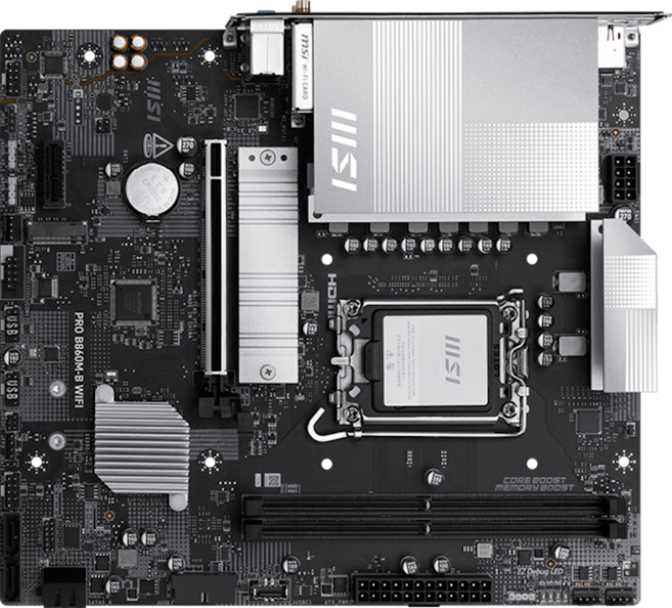
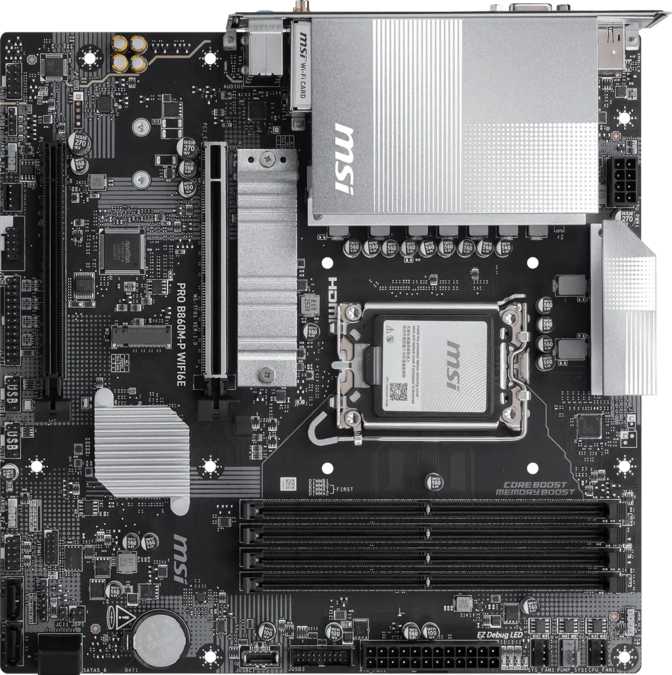
At 243.8 mm by 243.8 mm, this is a square Micro-ATX board — a format that fits comfortably in most mid-tower enclosures while also opening compatibility with smaller chassis. For builders who want a more contained system without committing to the compromises of a Mini-ITX build, Micro-ATX hits exactly the right balance of size and capability.
MSI's Pro branding carries a workman-like aesthetic, and the board delivers on it. RGB lighting adds enough visual character to look clean behind a glass side panel without appearing theatrical in an enclosed case. Heatsink coverage across the voltage regulation area is practical and correctly sized for B860-tier power delivery — functional without the oversized finned towers that pad cost at higher-end boards without adding meaningful cooling at this tier.
The layout is logical and installer-friendly. Four memory slots are arranged above the primary expansion slot, both M.2 connectors are reasonably accessible without full disassembly, and a dedicated clear-CMOS button on the board body is the kind of quality-of-life detail that is invisible until you desperately need it — typically late at night after a failed memory overclocking session.
- Form Factor
- Micro-ATX
- Dimensions
- 243.8 × 243.8 mm
- Socket
- LGA 1851
- Chipset
- Intel B860
- RGB Lighting
- Yes
- Dual BIOS
- No
- Clear CMOS
- Yes
Platform Context: The B860 Chipset Explained
To understand this board's value proposition, it helps to know where B860 sits in Intel's chipset lineup. It is the mid-range option for the current LGA 1851 platform — positioned below the enthusiast-grade Z890 while offering a meaningful step up from entry-level alternatives. For most mainstream desktop builds, B860 represents the sensible centre of the range.
- Memory speed tuning and XMP profile activation
- Manual memory timing and frequency adjustments
- Full support for current-generation Intel processors
- PCIe 5.0 bandwidth on the primary graphics slot
- Complete use of all standard non-K Intel CPUs
- CPU core multiplier overclocking
- Pushing K-series processors beyond their stock boost speeds
If your plan includes buying an unlocked K-series processor to overclock its core speeds, this board is the wrong choice — a Z890 board is required. If you are buying a standard non-K processor, nothing is lost: those CPUs cannot be core-overclocked regardless of which chipset you use. The board's overclocking designation refers specifically to memory tuning within what the B860 chipset permits.
Memory: DDR5 with Serious Headroom
The four memory slots support dual-channel DDR5 — the current generation standard that delivers higher bandwidth and lower per-bit power consumption compared to DDR4. Using matched pairs of modules in the board's recommended slot pairing maximizes memory controller throughput, delivering the bandwidth that modern processors need for intensive workloads.
Maximum capacity extends to 256 GB — effectively unlimited for any home or small business use case. Even demanding content creation, video editing, and virtualization setups rarely approach that ceiling, making capacity a non-limiting factor for virtually every buyer this board is designed for.
The standard rated frequency operates without any fuss. The board's genuine strength is its overclocking headroom: XMP profiles on high-performance DDR5 kits run as intended, and for users who enjoy manually tuning memory timings, the frequency ceiling is high enough that most consumer DDR5 kits will hit their physical limits before the board does. ECC memory — the error-correcting variant used in servers — is not supported, which is standard and expected at this chipset tier.
- Type
- DDR5
- Slots
- 4
- Channels
- Dual
- Max Capacity
- 256 GB
- Base Speed
- 6400 MHz
- OC Ceiling
- 8800 MHz
- ECC Support
- No
Storage: Enough for a Complete Build
M.2 NVMe Storage
Two M.2 slots accommodate the current standard for fast primary storage. For most builds, two slots is exactly right — one for an operating system and boot drive, one for a secondary fast storage volume or game library. The primary slot benefits from the board's PCIe 5.0 architecture, making it compatible with the fastest NVMe drives available today without any bandwidth limitation.
SATA and Bulk Storage
Four SATA 3 connectors handle traditional SSDs and high-capacity spinning hard drives — the kind used for media libraries, backups, and archival storage where cost per gigabyte matters more than raw speed. There are no legacy SATA 2 connectors and no mSATA port, which correctly reflects where the storage market stands today.
RAID Support
All four major RAID configurations are available. For most home users, a genuine backup strategy outperforms RAID for data protection — but for small workstations or home servers where RAID is the right tool, the complete option set is present.
| RAID Level | Purpose | Supported |
|---|---|---|
| RAID 0 | Performance striping | |
| RAID 1 | Mirrored redundancy | |
| RAID 5 | Parity with capacity efficiency | |
| RAID 10 | Speed and redundancy combined |
Graphics and Expansion Slots
The PCIe 5.0 Primary Slot
The primary expansion slot runs at PCIe 5.0 speeds — the current ceiling for consumer desktop motherboards. In practical terms, this means compatibility with any discrete graphics card on the market today, and sufficient generational headroom that future GPUs will slot in without the board becoming the limiting factor. PCIe is backward compatible, so older graphics cards work here too, operating at their native generation's speeds rather than the slot's maximum.
Secondary Slot and Add-In Cards
A second expansion slot running at x4 bandwidth accommodates capture cards, sound cards, PCIe-to-M.2 adapters, and other add-in hardware that does not demand x16 bandwidth. There are no x1 slots, but this is not a practical limitation: any card that fits the slot physically and requires x4 or less bandwidth will work correctly regardless of its physical connector size.
Display Outputs
These outputs are only active if your processor includes integrated graphics. Users with a discrete GPU route video through the GPU directly.
- HDMI 2.1High-res ready
- DisplayPortStandard
- VGALegacy
Wireless Connectivity: Wi-Fi 6E Is a Real Differentiator
The built-in wireless card supports Wi-Fi 6E — the current generation that adds access to the 6 GHz radio band alongside the established 2.4 GHz and 5 GHz options. The 6 GHz band is new enough that only Wi-Fi 6E and newer routers use it, which translates directly to dramatically less interference from neighboring devices and household appliances. In congested wireless environments — apartments, shared buildings, and densely populated areas — the difference between Wi-Fi 5 and Wi-Fi 6E on the 6 GHz band is consistently and meaningfully noticeable, not a marginal paper improvement.
Backward compatibility is complete. The card connects to older Wi-Fi 6, Wi-Fi 5, and Wi-Fi 4 routers without any configuration. If your router gets upgraded to a Wi-Fi 6E model at a later date, the PC is already fully prepared to take advantage of it.
Bluetooth 5.3 handles peripheral connections — wireless keyboards, mice, headphones, and controllers. Version 5.3 is the current standard, offering strong low-energy performance for modern accessories. A single gigabit ethernet port covers wired networking for users who run a cable, delivering throughput appropriate for the vast majority of home and small office internet connections.
- Wi-Fi Standard
- Wi-Fi 6E (802.11ax)
- Bands
- 2.4 / 5 / 6 GHz
- Legacy Support
- Wi-Fi 4, 5 compat.
- Bluetooth
- 5.3
- Ethernet
- Gigabit RJ45
USB and Rear I/O: Functional but Restrained
Rear Panel Ports
| Port Type | Count | Use Case |
|---|---|---|
| USB 3.2 Gen 1 (Type-A) | 3 | External drives, peripherals |
| USB 2.0 (Type-A) | 2 | Keyboards, mice, low-bandwidth |
| HDMI 2.1 | 1 | High-res display (iGPU required) |
| DisplayPort | 1 | Display output (iGPU required) |
| VGA | 1 | Legacy display compatibility |
| RJ45 Ethernet | 1 | Gigabit wired networking |
| 3.5mm Audio Jacks | 3 | Line-in, line-out, microphone |
Internal Headers and Connectors
- USB 3.2 Gen 1 headers (front panel)2
- USB 2.0 internal headers4
- Fan and pump headers4
- SATA 3 connectors4
- M.2 NVMe sockets2
- TPM module connectorIncluded
Four fan headers is a practical count for a Micro-ATX build. Most compact configurations run two to three case fans, leaving at least one header free for a CPU pump or additional cooling expansion as the build matures.
Onboard Audio
The onboard audio system handles 7.1 surround decoding and outputs through three physical 3.5mm jacks on the rear panel — the standard trio of line-in, line-out, and microphone. This covers headphones, stereo speakers, and standard headsets without any additional hardware purchase, which is the right call for a board at this tier.
There is no optical S/PDIF output. Users who connect a PC to an AV receiver or soundbar via optical cable will need to add a USB audio adapter or install a dedicated sound card in the secondary PCIe slot. For the majority of users on headphones or desktop speakers, the absence of optical output is entirely irrelevant to daily use.
Who Should Buy This Board?
Strong Fit
- Builders upgrading to Intel's current platform who want Wi-Fi 6E included without paying for a Z890 board
- Compact build enthusiasts who want Micro-ATX but refuse to sacrifice four memory slots for expandability
- Home office and productivity workstation builders using standard non-K Intel processors
- Users planning to run high-performance DDR5 XMP kits without CPU overclocking
- Builders who need reliable wireless built in, without buying and installing a separate expansion card
Not the Right Fit
- Enthusiasts who need CPU core multiplier overclocking — that requires a Z890 board with a K-series processor
- Users who depend on Thunderbolt for docks, external storage, or display daisy-chaining
- Builders who need multiple 10 Gbps+ USB ports on the rear panel for fast external devices
- BIOS experimenters who want dual-BIOS protection as a safety net for firmware modifications
- Professional workstation users who require ECC memory for data integrity in critical applications
Competitive Positioning
At the B860 Micro-ATX tier, this board competes primarily with options from ASUS, Gigabyte, and ASRock. The table below maps key differentiators against what typical competitors offer at a similar price point within the same chipset class.
| Feature | MSI Pro B860M-P Wi-Fi 6E | Typical B860 Competitors |
|---|---|---|
| Wi-Fi Standard | Wi-Fi 6E | Varies — often Wi-Fi 6 or 6E |
| Memory Slots | 4 DIMM | 2 or 4 depending on model |
| PCIe Primary Slot | PCIe 5.0 x16 | PCIe 5.0 x16 (platform standard) |
| M.2 Slots | 2 | 2 to 3 (varies) |
| SATA Ports | 4 | 4 to 6 (varies) |
| Dual BIOS | No | Sometimes included |
| USB 3.2 Gen 2 Rear | None | Sometimes 1 to 2 ports |
| Warranty | 3 Years | 3 Years (typical) |
The board holds its ground on wireless specification and memory slot count. Where some competitors differentiate is rear USB speed — a handful of B860 boards at similar prices include at least one 10 Gbps port. If high-speed rear USB is a priority in your workflow, targeted comparison shopping within the B860 tier is worthwhile before committing.
Honest Strengths and Real Weaknesses
What It Gets Right
Wi-Fi 6E built in eliminates the cost and slot consumption of a separate wireless card — and for most buyers, wireless is a necessity, not an optional extra. Four memory slots on a Micro-ATX board is a genuine advantage: many boards at this size cut this to two, limiting both maximum capacity and long-term upgrade paths. The PCIe 5.0 primary slot ensures forward compatibility with current and future graphics cards. And the three-year warranty signals manufacturer confidence in a product category where failures are expensive and time-consuming to diagnose.
Where It Falls Short
The rear USB speed ceiling is a genuine limitation on a platform that supports faster standards. The absence of even a single 10 Gbps port will become noticeable when connecting fast external SSDs over time. The single BIOS chip carries real risk for firmware experimenters — recovery from a failed flash requires manual intervention. Single gigabit ethernet is increasingly modest as 2.5 Gbps LAN becomes more common at this price point. The VGA port, while occasionally useful for legacy monitors, occupies rear panel space that a faster USB port would fill more usefully for most buyers.
Common Questions Before You Buy
Final Verdict
The MSI Pro B860M-P Wi-Fi 6E is a focused, capable board that delivers exactly what its target buyer needs — without padding the price with features that most users will never touch.
If your build priorities are current Intel platform access, Wi-Fi 6E built in, four memory slots in a compact footprint, and solid storage connectivity, this board checks every box without compromise. The three-year warranty adds genuine confidence. The caveats are real and worth repeating: the rear USB speed ceiling is a practical trade-off, the missing dual-BIOS carries risk for firmware experimenters, and Thunderbolt users need to look elsewhere entirely. For the builder who knows what they need — a dependable, modern-platform Micro-ATX board with excellent wireless built in — this board earns a clear recommendation.