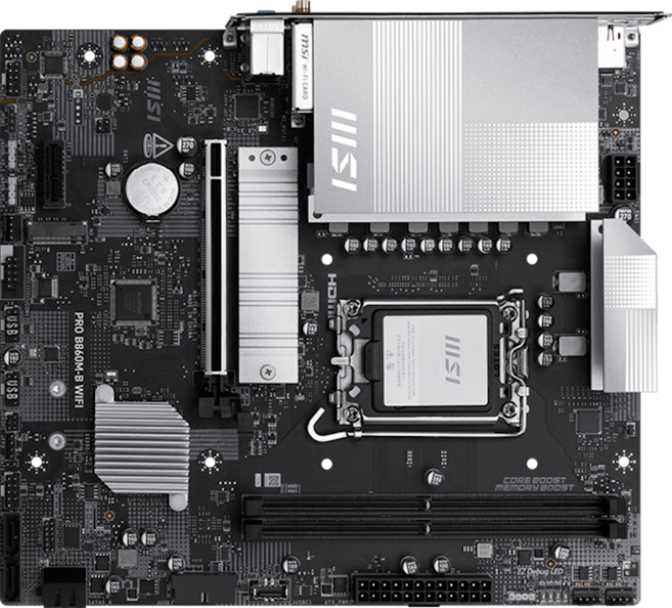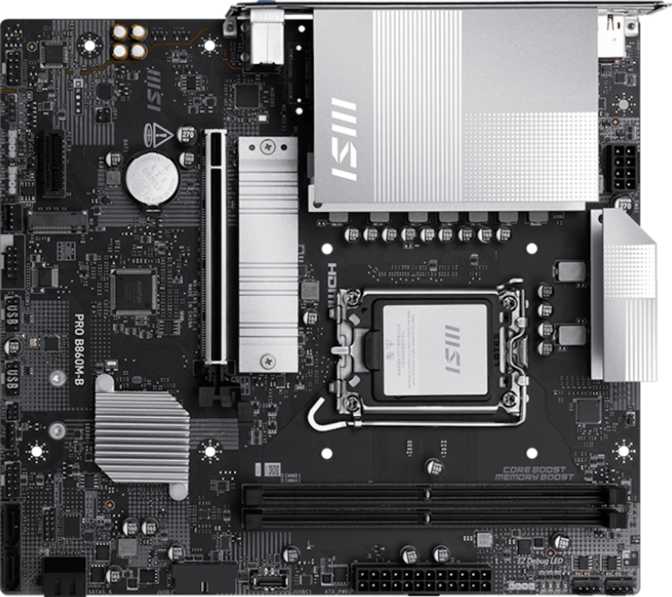
MSI Pro B860M-B Review: Compact B860 Platform Built for Reliability
MotherboardsAt a Glance
CPU Socket
LGA 1851
Chipset
Intel B860
Form Factor
Micro-ATX
Memory
DDR5 / 128 GB Max
Storage
2x M.2 + 4x SATA
Dual BIOS
Included
Wireless
None Built-In
Warranty
3 Years
The Micro-ATX segment is crowded with boards that promise business-class reliability at budget-friendly prices, then quietly cut corners where it hurts most. The MSI Pro B860M-B takes a different approach: a no-Wi-Fi, no-frills foundation built around Intel's B860 chipset and the LGA 1851 socket, targeting system builders who want a compact, stable platform for a modern Intel processor without paying for features they'll never use. Whether you're assembling a tight office workstation or a space-conscious home desktop, this board earns attention — but it demands an honest look at what you're gaining and what you're leaving behind.
Design and Build Quality
Compact Without Feeling Cheap
At 244 mm wide and 220 mm tall, the MSI Pro B860M-B fits the standard Micro-ATX footprint, meaning it slots into the vast majority of mid-tower and compact cases on the market without any compatibility gymnastics. The form factor is a practical choice: you get enough PCB real estate to support meaningful expansion without committing to the desk footprint of a full ATX board.
MSI's "Pro" line carries a functional aesthetic — this is not a showpiece board. The RGB lighting is present, which is a small surprise on a business-oriented product, but it's implemented conservatively enough that it won't look out of place in a professional setting. Builders who want a clean, understated system can typically disable the lighting through MSI's software ecosystem.
Dual BIOS: Why It Matters
Two separate BIOS chips mean a failed or corrupted firmware update cannot brick the board — the backup chip takes over automatically. For a small office build or a home system without an IT department nearby, this is quiet reassurance that the platform won't need emergency surgery after a routine update goes wrong. It's a feature most competing boards at this price tier skip entirely.
Platform and Performance
The B860 Chipset Explained
What LGA 1851 and B860 Mean
The LGA 1851 socket is Intel's current mainstream platform, designed for the latest-generation processors. Choosing this socket means buying into a platform with genuine longevity — not inheriting an aging ecosystem about to be retired.
The B860 chipset sits one tier below Intel's Z890. The practical difference comes down to one thing: CPU clock-speed tuning is locked. You cannot push the processor's core frequencies beyond Intel's factory specification. However, memory overclocking remains enabled — and that's where this board's memory controller genuinely shines. For productivity workloads, office applications, creative software, and gaming within normal parameters, B860 performs identically to Z890. The gap only materializes if you spend time in the BIOS tuning CPU voltages.
Memory Capability
Two DDR5 memory slots support up to 128 GB of total system memory — a ceiling more than sufficient for home users, content creators, and office workstations. Even demanding video editing projects rarely exceed 64 GB in practice.
Standard Speed
Aligns with high-performance retail DDR5 kits at mainstream prices
XMP Overclocked
Enabled via a single BIOS toggle — no manual tuning required
Two slots vs. four: The two-slot configuration means upgrading later requires replacing existing sticks rather than simply adding new ones. For most users installing a 16 GB or 32 GB kit today, this creates no immediate problem. Those planning aggressive upgrades years down the line should factor in the added replacement cost.
Storage
Two Fast Lanes and Four Dependable Bays
M.2 NVMe Slots
Two M.2 sockets accommodate current-generation NVMe solid-state drives. The primary slot connects through the processor's PCIe 5.0 lanes — supporting the fastest NVMe drives currently available, capable of transfer speeds that make even the quickest SATA SSDs look sluggish by comparison. Booting an operating system, loading large game files, or working with high-resolution video assets all benefit tangibly from this bandwidth.
The second M.2 slot provides additional high-speed storage without consuming any of the rear SATA ports, so your storage expansion doesn't come at the expense of traditional drive connectivity.
SATA Ports for Traditional Drives
Four SATA 3 connectors keep the door open for 2.5-inch SSDs and 3.5-inch hard drives. If you're migrating from an older system and bringing mechanical drives along for mass storage — or running a setup with multiple large drives — these four ports cover typical home and small office needs without requiring a supplemental controller card.
- PCIe 5.0 primary M.2 — fastest NVMe drives supported
- Second M.2 slot — no SATA port penalty
- 4x SATA 3 — supports HDD and SATA SSD migration
- No U.2, no mSATA, no SATA 2 legacy connectors
Expansion and Connectivity
Where Priorities Are Clearly Set
PCIe Expansion Slots
One PCIe 5.0 x16 slot handles the primary graphics card at full platform bandwidth. Any modern discrete GPU installs here without compromise — PCIe 5.0 is forward-compatible, so current cards that only require PCIe 4.0 bandwidth run perfectly, and the slot is ready for next-generation hardware when you upgrade.
A single PCIe x1 slot handles smaller expansion cards: a Wi-Fi adapter, sound card, or capture card. The absence of additional x16 slots means multi-GPU configurations aren't possible — but that market has effectively collapsed, and omitting those slots keeps cost and complexity down without real-world sacrifice for virtually any buyer.
No Wireless — A Deliberate Choice
There is no Wi-Fi and no Bluetooth. This is not an oversight — it's a cost and reliability decision common in workstation-class boards. Wired ethernet is more stable, lower-latency, and more predictable in dense network environments.
A PCIe Wi-Fi card or USB adapter fills the gap using the available expansion slot or USB port. That adds a small cost and one extra step, but it's a straightforward fix. Bluetooth peripherals require a separate USB Bluetooth adapter.
Rear I/O Port Breakdown
| Port | Count | Real-World Use |
|---|---|---|
| USB 2.0 Type-A | 4 ports | Keyboard, mouse, and low-bandwidth peripherals |
| USB 3.2 Gen 1 Type-A | 2 ports | External drives, up to 5 Gbps transfer |
| USB 3.2 Gen 2x2 Type-C | 1 port | Fast external SSDs and docks at 20 Gbps |
| HDMI 2.1 | 1 port | 4K@120Hz or 8K display output (requires iGPU) |
| DisplayPort | 1 port | Second display output alongside HDMI |
| RJ45 Ethernet | 1 port | Sole network interface — wired only |
Internal Headers
- 4x USB 2.0 headers — routes front-panel USB-A ports on your case
- 2x USB 3.2 Gen 1 headers — fast-transfer front-panel ports
- 1x USB-C Gen 2 header — front-panel USB-C on compatible modern cases
- 3x fan headers — CPU cooler and chassis fans; sufficient for a compact build
- TPM header — enterprise security compliance and Windows 11 requirements
- 3 fan headers total — limits elaborately ventilated setups
Audio
Functional, Not Audiophile
The onboard audio delivers 7.1 surround sound output across three 3.5 mm analog jacks on the rear panel. For gaming headsets, stereo speakers, and standard headphones, this is entirely adequate. The absence of a digital optical (S/PDIF) output is a limitation only if your audio setup specifically requires it — most modern speakers and headphones connect via analog or USB rather than optical.
Dedicated audiophiles or home theater builders routing audio through an AV receiver via optical will want to add a discrete sound card in the PCIe x1 slot. That's a simple, well-supported upgrade path — but it's worth accounting for in your budget if optical audio is non-negotiable.
Who This Board Is For
And Who Should Look Elsewhere
Ideal Buyers
Home Desktop Builders on a Budget
Delivers the full capability of Intel's current platform at a price that reflects the stripped-down feature set. Covers every scenario if you'll connect via ethernet.
Small Office and Business Workstation Builders
Dual BIOS, TPM header, three-year warranty, and absence of flashy consumer features make this credible for professional environments where stability matters more than aesthetics.
Compact Build Enthusiasts
Micro-ATX opens up case options that full ATX boards cannot fit — with no compromise on the specifications that matter for performance.
Users Migrating from Older Systems
Four SATA ports accommodate existing hard drives and SATA SSDs while the M.2 slots prepare the system for fast NVMe storage going forward.
Look Elsewhere If You Need
Wireless Connectivity Without Workarounds
No Wi-Fi and no Bluetooth. Boards at similar price points with integrated Wi-Fi exist and are worth comparing if your system isn't near a router.
CPU Overclocking Headroom
B860 locks CPU multiplier tuning. If extracting every MHz from your processor is the goal, a Z890 board is the correct platform — at a higher price.
Maximum Memory Upgrade Flexibility
Two DDR5 slots mean future upgrades require replacing existing sticks. Four-slot alternatives give more flexibility for incremental expansion.
Optical Audio Output
The missing S/PDIF port is a genuine gap for AV receiver integration. A discrete sound card in the PCIe x1 slot solves it — but adds cost and a component.
Competitive Positioning
How It Compares to Logical Alternatives
| Feature | MSI Pro B860M-B | Typical B860 Competitor | Typical Z890 Board |
|---|---|---|---|
| CPU Overclocking | No | No | Yes |
| Memory Overclocking | Yes — 9066 MHz | Yes | Yes |
| Integrated Wi-Fi | No | Often Included | Often Included |
| Dual BIOS | Yes | Rare at This Tier | Common |
| PCIe 5.0 x16 | Yes | Yes | Yes |
| M.2 Slots | 2 | 2 – 3 | 3 – 4 |
| Memory Slots | 2 | 2 – 4 | 4 |
| Warranty | 3 Years | 1 – 3 Years | 3 Years |
| Form Factor | Micro-ATX | Varies | Usually ATX |
The B860M-B's dual BIOS at this price tier is a genuine differentiator. The three-year warranty also exceeds what some competitors offer. The two-slot memory configuration and absent wireless are where competing boards sometimes pull ahead.
Strengths and Honest Weaknesses
What You're Really Getting
The MSI Pro B860M-B is a well-considered board for a specific type of builder, but its appeal is narrow enough that its weaknesses matter as much as its strengths. On the positive side, the dual BIOS adds a safety net that many competing boards at this tier lack. The PCIe 5.0 primary slot keeps the graphics card connection fully current and future-tolerant. Memory support reaches impressive ceiling speeds through XMP, even if CPU clock adjustment is off the table.
The rear port selection is adequate rather than generous — two USB-A 3.2 Gen 1 ports are workable, but builders who regularly connect multiple fast external drives simultaneously may find themselves reaching for a hub. The single USB-C Gen 2x2 port at 20 Gbps partially compensates with genuinely modern bandwidth.
Strengths
Dual BIOS as standard
Firmware failure protection most competing boards don't include at this price
PCIe 5.0 x16 primary slot
Fully current and forward-compatible for any GPU generation
High-ceiling memory performance
XMP support up to 9066 MHz — ahead of most DDR5 kits available at accessible prices
Three-year warranty
Exceeds what many competitors offer at comparable price points
USB-C Gen 2x2 at 20 Gbps
Modern, genuinely fast rear port for docking stations and fast external storage
Weaknesses
No wireless connectivity
Wi-Fi and Bluetooth require a PCIe card or USB adapter — adds cost and a component
Only two DDR5 slots
Future upgrades mean replacing existing sticks — less flexibility than four-slot alternatives
CPU overclocking locked
B860 blocks multiplier tuning — Z890 required for full processor frequency control
No optical audio output
S/PDIF omission affects AV receiver integration in home theater setups
Limited fan headers
Three total headers constrain elaborate cooling configurations
Common Buyer Questions
Answered Before You Purchase
Final Verdict
MSI Pro B860M-B — Our Recommendation
The MSI Pro B860M-B is a focused, honest board that delivers exactly what its design targets: a stable, compact Intel platform for builders who don't need wireless and aren't chasing CPU overclocking records.
The dual BIOS, PCIe 5.0 readiness, and three-year warranty add real value that competitors at similar prices don't always match. Its limitations are genuine — two memory slots and no wireless connectivity are real constraints, not minor footnotes. Buyers need to evaluate those against their specific setup before committing.
For a compact wired workstation, a business desktop, or a home build where ethernet is readily available and the budget doesn't justify a Z890 board, the MSI Pro B860M-B is a sensible, well-constructed choice that won't embarrass you months after building. For anyone who needs wireless, plans extensive memory upgrades, or wants CPU tuning headroom, a different board serves better — and there's no shame in that. Knowing what a product is for is precisely how you avoid a regrettable purchase.
Reliability
Dual BIOS + 3yr Warranty
GPU Slot
PCIe 5.0 x16
Memory OC
Up to 9066 MHz
Wireless
Add-on Required