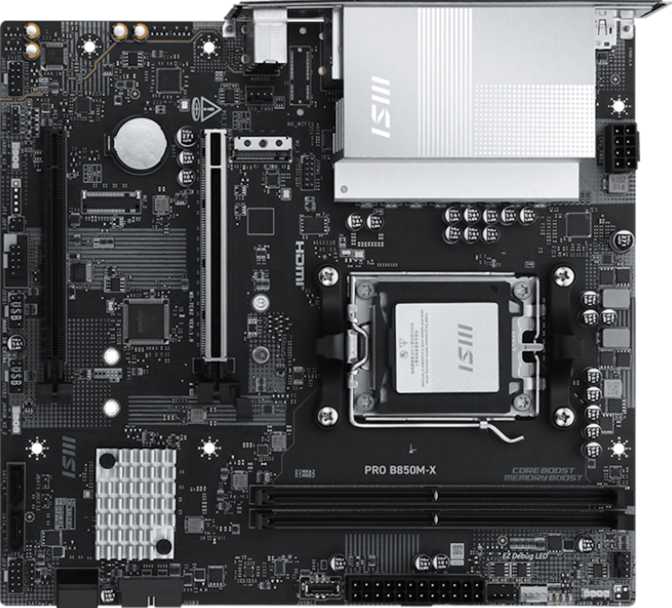
MSI Pro B850M-X Review: A Focused AM5 Micro-ATX Board
MotherboardsCompact builds are having a moment — and not just for aesthetic reasons. More builders are discovering that a Micro-ATX motherboard paired with a capable AMD platform can deliver nearly everything a full-size board offers, at a smaller footprint and a lower price. The MSI Pro B850M-X makes a clear case for that philosophy. Built around AMD's B850 chipset and the current-generation AM5 socket, it targets system builders who want genuine performance headroom without paying for features they'll never use.
This is not a board for everyone. It makes deliberate trade-offs, and understanding those trade-offs before you buy is the difference between a satisfying build and a frustrating one. This review breaks down exactly what the Pro B850M-X delivers, where it draws the line, and who should — or shouldn't — put it at the center of their next PC.
Design, Build Quality, and Physical Experience
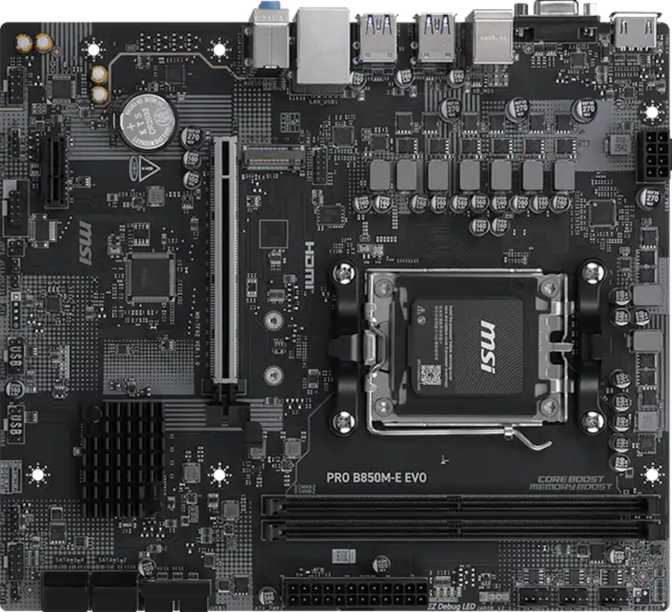
At 226 × 243.8 mm, the Pro B850M-X follows the standard Micro-ATX footprint, which means it will fit comfortably in the vast majority of ATX mid-towers and all mATX-compatible cases. Moving down from a full ATX board doesn't require a specialty enclosure — a refreshing reality for first-time compact builders worried about compatibility.
The board's aesthetic sits squarely in the "professional workstation" camp rather than the "RGB gamer shrine" category — though RGB lighting is present for those who want it. The accent lighting is understated rather than theatrical, which suits the "Pro" branding. Builders who prefer a clean, neutral look will find this easy to work with; those expecting a full light show may want to temper expectations.
Build quality matches what MSI's Pro line consistently delivers at this tier: solid PCB layering, reinforced primary expansion slot, and component placement that doesn't feel cramped despite the reduced board area. The single M.2 slot and four SATA ports are positioned to minimize cable clutter, and the four fan headers are reasonably distributed across the board for effective airflow management without forcing awkward cable routing.
Platform and Chipset: What B850 Actually Means for Your Build
The AM5 Foundation
The AM5 socket is AMD's current-generation platform, designed to support modern Ryzen processors. Choosing AM5 now means you're building on a foundation with real longevity — AMD has committed to platform compatibility across multiple processor generations, so the board you install today has a credible upgrade path as faster CPUs become available.
B850 in Context
AMD's chipset lineup for AM5 runs from the budget-oriented B650 up through the enthusiast-class X870E. B850 sits as a meaningful step above B650 — it delivers improved I/O flexibility and full native PCIe 5.0 support for the primary expansion slot.
What B850 doesn't offer compared to X670 or X870 is multi-GPU infrastructure, extensive PCIe lane counts, or the premium VRM designs targeted at extreme overclocking. For the vast majority of desktop users — gamers, content creators, general productivity builders — B850 is the sweet spot where capability and cost meet sensibly.
Memory: DDR5 With Genuine Overclocking Range
Two Slots, Real Capacity
Two DDR5 slots wired in dual-channel configuration is a calculated trade-off common on Micro-ATX boards — it keeps the PCB smaller and the price lower, but it means you're installing your full memory kit at once rather than being able to expand incrementally. Realistically, most builders will install 32 GB (2 × 16 GB) or 64 GB (2 × 32 GB) and never feel the constraint.
Speed and Overclocking
At stock settings, the board supports DDR5 running at speeds representing the current mainstream sweet spot for AMD's AM5 platform — fast enough to fully feed the CPU's memory controller without waste. Builders using standard off-the-shelf DDR5 kits will find out-of-the-box performance strong.
With XMP/EXPO profiles or manual tuning, the board can push DDR5 to 8200 MHz — a figure well above what most consumer memory kits even advertise. This isn't a guarantee that your specific RAM will hit that number (memory overclocking headroom depends heavily on the individual kit and the CPU's integrated memory controller), but it signals that the board's trace routing and power delivery to the memory slots are engineered for serious enthusiasts.
Storage: Capable Within Limits
The M.2 Situation
The Pro B850M-X includes a single M.2 slot. For most users — including those building gaming rigs or productivity workstations — one fast NVMe drive covers everything. Your operating system, applications, and active game library live here with no meaningful performance compromise.
Where this becomes a genuine limitation is for builders who want multiple NVMe drives: a separate OS drive and a dedicated scratch disk for video editing, or a primary drive plus a large game storage drive. With only one M.2 slot, a second NVMe drive isn't an option without a PCIe adapter card, which then consumes the secondary expansion slot. Plan your storage strategy before committing.
SATA for Legacy and Large Drives
Four SATA 3 ports provide connectivity for traditional 2.5" SSDs and 3.5" hard drives — sufficient for most use cases: a primary NVMe drive for speed-sensitive tasks, plus SATA drives for bulk storage. Builders transitioning from older systems who are bringing existing hard drives will have room to accommodate them.
RAID Support
| RAID Mode | Status | What It Provides |
|---|---|---|
| RAID 0 | Supported | Stripes data across drives for combined speed |
| RAID 1 | Supported | Mirrors data for redundancy — protects against single drive failure |
| RAID 10 | Supported | Combines striping and mirroring — speed plus resilience |
| RAID 5 | Not Supported | Distributed parity across three or more drives — not available on this board |
Expansion and GPU: PCIe 5.0 Is the Real Story
The primary expansion slot operates at PCIe 5.0 x16 — the fastest current-generation interface for graphics cards. This means the board will not bottleneck any GPU available today, and it positions the system well for next-generation graphics cards that will increasingly demand PCIe 5.0 bandwidth.
A secondary PCIe x4 slot rounds out the expansion options. This slot can accommodate a PCIe NVMe adapter, a capture card, a 10 GbE networking card, or similar add-in devices. Between the primary GPU slot and this secondary slot, most builders have everything they need.
Connectivity: Wired Strong, Wireless Absent
Rear I/O Port Breakdown
| Port Type | Count | Notes |
|---|---|---|
| USB 3.2 Gen 1 Type-A | 3 | ~625 MB/s throughput each; covers most peripherals and external drives |
| USB 3.2 Gen 1 Type-C | 1 | Modern connector form factor at the same 5 Gbps speed as the Type-A ports |
| USB 2.0 | 2 | Keyboards, mice, wireless receivers, and other low-bandwidth peripherals |
| HDMI 2.1 | 1 | Up to 4K 120Hz or 8K 30Hz — active only with a CPU that includes integrated graphics |
| DisplayPort | 1 | Modern display output — active only with a CPU that includes integrated graphics |
| Gigabit Ethernet (RJ45) | 1 | Stable, low-latency wired networking for gaming and streaming |
| 3.5mm Audio Jacks | 3 | Supports 7.1 surround sound via software channel reassignment |
Internal Headers: More Expansion Available
The real USB flexibility sits inside the case. Internal headers allow your PC case's front panel to provide additional USB 3.2 Gen 1 Type-A ports, a front-panel USB-C connector, and additional USB 2.0 ports. In practice, the combined rear and front-panel USB count satisfies most users even in demanding setups. Those regularly connecting multiple external drives, VR headsets, and streaming peripherals simultaneously may find themselves rotating devices.
The Wireless Gap
For desktop setups with a wired ethernet connection nearby, this is a non-issue — the single Gigabit Ethernet port provides stable, low-latency networking that outperforms wireless in every measurable way for gaming and streaming. For builds in rooms without a cable run, or for users who rely on Bluetooth peripherals such as wireless keyboards, headsets, or controllers, budget for a PCIe Wi-Fi card or USB adapter accordingly. Note that a PCIe card will consume the secondary expansion slot.
Audio: 7.1 Surround on a Budget Board
The integrated audio solution supports 7.1 surround sound output through a three-jack arrangement on the rear panel — center/LFO plus surround channels are achieved by reassigning the physical connectors in software, a standard approach on consumer boards. For stereo listening and standard gaming headsets, the audio quality is adequate and comparable to integrated audio on competing boards at this price point.
Overclocking and BIOS Features
Accessible but Not Extreme
The Pro B850M-X is overclocking-friendly through EXPO/XMP memory profile support and the generous DDR5 headroom. CPU overclocking is supported and handles moderate tuning without requiring deep BIOS expertise. What it doesn't offer is the premium VRM hardware for sustained, extreme CPU loads — casual overclocking and memory tuning are its wheelhouse, not competitive benchmarking at absolute limits.
BIOS Reset Made Easy
A dedicated Clear CMOS button simplifies recovery if a BIOS setting causes boot failure. For overclockers who push settings aggressively, or builders experimenting with memory profiles, this button is a practical convenience that eliminates the need to locate and short jumper pins inside the case.
No Dual BIOS
Unlike some competing boards that carry a backup BIOS chip, the Pro B850M-X uses a single BIOS chip. In normal use this is irrelevant — but a failed firmware update without a backup chip can leave the board unbootable and require professional reflashing. Stick to stable BIOS releases and update only when there's a specific reason to do so.
Who Should Buy the MSI Pro B850M-X
This Board Is a Strong Fit For
- Compact desktop builders who want AM5 performance in a smaller footprint without giving up the PCIe 5.0 slot for a future GPU upgrade
- Budget-conscious gamers building around a discrete GPU who connect via ethernet and don't need wireless
- First-time PC builders who want an accessible BIOS, straightforward overclocking, and a three-year warranty safety net
- Upgraders from AM4 who want to move to DDR5 and a modern platform without paying for flagship chipset pricing
- Single-NVMe users who pair fast primary storage with SATA drives for bulk capacity
This Board Is Not the Right Choice For
- Wireless-dependent setups — the absence of Wi-Fi and Bluetooth is non-negotiable; a separate adapter is required and may consume the secondary PCIe slot
- Multi-NVMe builders — a single M.2 slot limits NVMe options to one drive without a PCIe adapter card
- Integrated-graphics users — no discrete GPU means no display output for most current Ryzen desktop processors
- Home theater builders needing S/PDIF optical audio passthrough — this output is absent on the Pro B850M-X
- Extreme overclockers running high-core-count CPUs at sustained loads will quickly find the VRM to be the board's practical ceiling
How It Compares: Competitive Positioning
The B850 mATX market has credible alternatives from ASUS, Gigabyte, and ASRock. The Pro B850M-X's most notable gaps versus similarly-priced competition are the absence of USB 3.2 Gen 2 rear ports and the single M.2 slot. Boards with two M.2 slots at comparable pricing exist and are worth checking if storage expansion matters — though those boards sometimes sacrifice the PCIe 5.0 primary slot or include fewer SATA ports. There is no obvious winner without knowing your specific priorities.
| Feature | MSI Pro B850M-X | Typical B850 mATX Competition |
|---|---|---|
| PCIe 5.0 x16 GPU Slot | Yes | Yes (most) |
| DDR5 Memory Slots | 2 | 2–4 |
| M.2 NVMe Slots | 1 | 1–2 |
| Integrated Wi-Fi | No | Varies — some yes, some no |
| Bluetooth | No | Varies |
| Dual BIOS | No | Varies |
| USB 3.2 Gen 2 Rear Ports | 0 | Often 1–2 |
| Rear USB-C Speed | Gen 1 (5 Gbps) | Often Gen 2 (10 Gbps) |
| Warranty Period | 3 Years | Typically 3 Years |
Honest Assessment: Strengths and Weaknesses
Where It Earns Genuine Respect
- The DDR5 overclocking headroom is more impressive than you'd expect at this price tier — boards at this level routinely cap at much lower memory ceilings.
- PCIe 5.0 for the GPU slot ensures this board won't be the bottleneck holding back a high-end graphics card now or in the near future.
- The three-year warranty is standard for MSI's Pro line and provides reasonable peace of mind for long-term system owners.
- BIOS usability — including the clear CMOS button and the generally accessible MSI Click BIOS interface — makes the board approachable for newer builders without sacrificing tuning options for experienced ones.
Real Weaknesses to Consider
- The complete absence of wireless connectivity is a meaningful compromise — you either need a wired ethernet run or an additional purchase to add it.
- One M.2 slot is a genuine restriction for storage-heavy workflows where multiple NVMe drives would otherwise be the natural choice.
- The USB rear panel lags behind competing boards that offer Gen 2 speeds on at least one rear port — for external drive users who notice transfer speeds, this matters.
- The single BIOS chip is a minor but real risk during firmware updates — a failed flash without a backup requires professional intervention to resolve.
Frequently Asked Questions
Final Verdict
The MSI Pro B850M-X is a focused, no-nonsense Micro-ATX board that does its core job well.
It brings AMD's current-generation AM5 platform into a compact package without compromising on the features that matter most for GPU-centric builds: a full-bandwidth PCIe 5.0 slot, serious DDR5 memory headroom, and a chipset with room to grow as better processors arrive.
The trade-offs are clear-eyed and should be treated as firm requirements rather than minor footnotes: you need a wired ethernet connection or a budget for a wireless adapter, you need a discrete GPU from day one, and you should plan your storage needs around a single M.2 slot and four SATA ports. These aren't flaws — they're the choices that define exactly who this board is for.
For the builder who fits that profile — compact case, wired connection, discrete GPU, one fast NVMe drive, and a preference for getting the most out of DDR5 without paying X670 prices — the Pro B850M-X is a confident recommendation. It's an honest board at an honest price, and that's worth more than a feature list padded with things you'd never actually use.