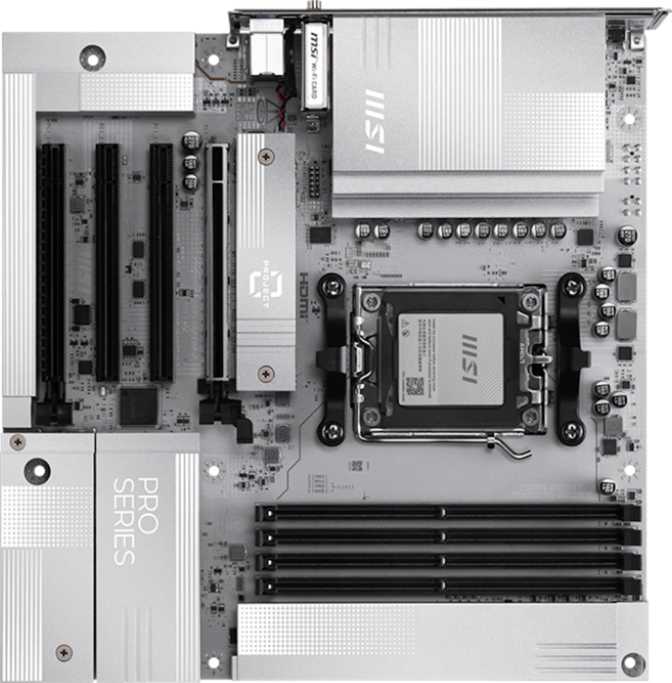
MSI Pro B850M-A Wi-Fi PZ Review: Smart Value on the AM5 Platform
MotherboardsOverall Rating
Mid-range AM5 board with flagship-tier wireless and strong DDR5 headroom
Category Ratings
Key Specifications
- Socket
- AM5
- Chipset
- AMD B850
- Form Factor
- Micro-ATX (243.8 mm²)
- Memory
- DDR5 — 4 Slots, 256 GB
- Primary Slot
- PCIe 5.0 x16
- M.2 NVMe
- 2 Slots
- Wireless
- Wi-Fi 7 + BT 5.4
- Video Out
- HDMI 2.1 + DisplayPort
- Audio
- 7.1-Channel
- Warranty
- 3 Years
The Micro-ATX segment is where most real-world PC builds actually happen — not the flagship tower with a tempered glass window, and not the ultra-compact mini-ITX squeeze, but the sensible, space-conscious build that still wants room to grow. The MSI Pro B850M-A Wi-Fi PZ lands squarely in this space, pairing AMD's current-generation AM5 platform with a feature set that punches noticeably above what its price tier typically delivers.
The inclusion of Wi-Fi 7, a PCIe 5.0 primary slot, and overclocking headroom on a B-series board is not a given — and that combination is the central story here. This is a board aimed at builders who want a modern, long-lasting foundation without committing to a premium X870E price tag. Whether that trade-off makes sense for you depends on specifics this review covers in full.
Design and Build Quality
Form Factor and Physical Footprint
At 243.8 mm × 243.8 mm, this is a true square Micro-ATX board — fitting standard mATX cases without the awkward proportions some compact boards produce. The square layout gives MSI's engineers more routing flexibility than the tightest mATX footprints, and it shows: the rear I/O panel feels generous rather than cramped, and internal headers are positioned toward board edges where they're easier to reach during cable management.
The Pro series aesthetic leans professional over flashy, but addressable RGB lighting is present — subtle enough for a clean build, visible enough to participate in a themed system if that's a priority.
BIOS and Usability Features
MSI includes a Clear CMOS button accessible without opening the case — a quality-of-life feature that removes one of the more frustrating friction points when pushing memory overclocks or recovering from a failed BIOS update. Easy overclock support means the BIOS guides users through performance tuning without requiring deep technical knowledge.
No Dual BIOS on This Board
Unlike some higher-end MSI models, this board carries a single BIOS chip. The Clear CMOS button provides a recovery path, but there is no automatic BIOS failover. Keep this in mind before aggressive firmware experimentation.
Platform and Chipset: What B850 Actually Means
The AM5 Foundation
The AM5 socket positions this board at the current frontier of AMD's consumer desktop platform, supporting Ryzen 7000 series and newer processors. AMD has publicly committed to continued AM5 support across multiple future CPU generations — a significant consideration if you plan to upgrade your processor without replacing the motherboard.
The B850 chipset occupies AMD's mid-tier for the AM5 generation. It sits above the entry-level B650 in connectivity bandwidth and overclocking permissions, and below the flagship X870E. The trade-off is straightforward: B850 accepts a reduction in total PCIe lane allocation and certain high-speed USB guarantees in exchange for a substantially lower price floor — while retaining full CPU and memory overclocking, which B650 boards could not universally unlock.
Overclocking Capabilities
With an unlocked AMD Ryzen processor, this board permits CPU clock adjustments beyond factory settings through the BIOS. Memory overclocking is supported via EXPO profile activation and manual tuning — exactly the headroom that enthusiast builders with high-frequency DDR5 kits will want to access, and an advantage B850 holds cleanly over its B650 predecessor.
B850: Where It Sits
- Advantage Over B650Full CPU and memory overclocking unlocked; broader PCIe bandwidth allocation
- PCIe 5.0 Primary SlotDouble the bandwidth of PCIe 4.0 — current GPUs don't saturate it, but next-generation hardware will benefit immediately
- Behind X870EFewer total PCIe lanes, no guaranteed dual BIOS, more limited USB 4 chipset support
- Platform LongevityAM5 is confirmed for multiple future Ryzen CPU generations — this socket has a long life ahead
Memory Support: DDR5 With Serious Headroom
Four physical memory slots in dual-channel configuration represent one of this board's most practical advantages over mini-ITX alternatives, typically limited to two slots. Four slots let you start with a modest kit and add more later, or populate all four for maximum capacity immediately.
The maximum supported capacity of 256 GB — using high-density DDR5 modules — is far beyond what most desktop users will install, but it signals platform maturity. More practically, 64 GB configurations using four 16 GB sticks are entirely within reach for creative professionals handling large video editing, 3D rendering, or virtualization workloads.
Memory speed has a measurable effect on AMD's current architecture — both gaming frame rates (particularly minimums) and application performance in memory-sensitive workloads. Starting from a solid native DDR5 frequency and pushing higher via EXPO profiles or manual tuning is exactly where B850's unlocked overclocking becomes concretely useful day-to-day.
Memory Specifications
| Slots | 4 (Dual-Channel) |
| Type | DDR5 Only |
| Max Capacity | 256 GB |
| Native Speed | Up to 5600 MHz |
| Overclocked Speed | Up to 8200 MHz |
| ECC Support | No |
ECC memory is a workstation and server feature. Its absence is expected at this platform tier and is not a concern for mainstream desktop use.
Storage Options: Fast Where It Counts
M.2 NVMe Slots
Two M.2 sockets handle primary fast storage. The first runs on PCIe 5.0 bandwidth — supporting current ultra-fast NVMe drives and forward-compatible with next-generation SSDs as they reach mainstream pricing. The second operates at PCIe 4.0 speeds — still fast by any practical measure, and a natural home for a secondary drive, backup volume, or scratch disk.
Two M.2 slots is lean for storage-heavy builds. Users planning three or more NVMe drives should budget for a PCIe expansion card or plan to supplement with SATA-connected storage.
SATA Ports and RAID
Four SATA 3 ports cover traditional SSDs, HDDs, and hybrid storage configurations alongside an NVMe boot drive. RAID support covers the most practical configurations:
- RAID 0 — Striping for maximum combined throughput
- RAID 1 — Mirroring for data redundancy
- RAID 10 — Combined striping and mirroring
- RAID 5 — Not supported at B850 chipset level
Connectivity: Where This Board Stands Out
Wireless Networking
The wireless module supports Wi-Fi 7 — the current leading-edge wireless standard — along with full backward compatibility across Wi-Fi 6E, 6, 5, and 4. Wi-Fi 7 (802.11be) introduces multi-link operation, enabling simultaneous transmission across multiple frequency bands. In supported environments this translates to lower latency and higher sustained throughput, particularly in congested networks. The full benefit requires a Wi-Fi 7 router, but the board will not be a wireless bottleneck as that infrastructure becomes mainstream.
Bluetooth 5.4 accompanies the wireless module, offering improved range, lower power consumption, and better coexistence with Wi-Fi compared to earlier versions — relevant for wireless peripherals, audio devices, and game controllers.
Wired Network and Video Output
A 2.5 Gigabit Ethernet port handles wired connectivity — more than sufficient for most home and office environments. Only users with 10 GbE NAS equipment or specific high-bandwidth infrastructure will find a ceiling here.
HDMI 2.1 and DisplayPort outputs on the rear panel serve AMD processors with integrated graphics. HDMI 2.1 supports 4K at 144Hz and 8K output — a genuinely future-proof specification. These outputs are inactive with CPU-only processors that carry no integrated graphics; a discrete GPU is required in those configurations.
Rear Panel USB — A Strong Showing for mATX
3
USB-A Gen 2
10 Gbps per port
3
USB-A Gen 1
5 Gbps per port
2
USB-C Gen 2
10 Gbps per port
Eight rear USB ports with no USB 2.0 in the lineup is a deliberate and meaningful choice. The two USB-C ports at full 10 Gbps each serve modern peripherals well: high-speed external SSDs, USB-C hubs, current-generation smartphones, and docking accessories all benefit. Having two at full Gen 2 bandwidth exceeds what most competing boards at this tier offer.
USB 4 (40 Gbps), Thunderbolt 3 and 4, and USB 3.2 Gen 2×2 are absent. These are B850 chipset-level constraints, not specific to this MSI board. Users requiring Thunderbolt for professional audio interfaces or high-bandwidth docking should consider Intel-platform options or higher-end AMD boards.
Internal Headers for Case Expansion
1
Front-panel USB-C
Gen 2 header
2
USB 3.2 Gen 1
internal headers
4
USB 2.0
internal headers
5
Fan headers for
thermal control
Expansion Slots: GPU-Ready and Future-Proof
One PCIe 5.0 x16 slot handles the primary graphics card or high-bandwidth expansion card. Current discrete GPUs do not saturate even PCIe 4.0 bandwidth in most gaming scenarios, but the PCIe 5.0 headroom ensures this board will not become a platform bottleneck as GPU generations advance. PCIe is fully backward compatible — any current GPU installs and functions correctly at its native generation's speed.
Two PCIe x1 slots serve capture cards, additional USB controllers, network adapters, and similar low-bandwidth add-in cards. One PCIe x4 slot provides a home for RAID controllers, NVMe expansion cards, or other mid-bandwidth accessories.
There is no second x16 physical slot — multi-GPU configurations are not supported. For the overwhelming majority of desktop builders today, this is not a meaningful limitation.
Expansion Slot Summary
- PCIe 5.0 x161
- PCIe x41
- PCIe x12
- M.2 — PCIe 5.0 NVMe1
- M.2 — PCIe 4.0 NVMe1
- SATA 3 Ports4
Onboard Audio and Thermal Management
Onboard Audio
A 7.1-channel audio codec handles onboard sound, with three rear-panel audio jacks covering stereo, microphone, and surround configurations. There is no S/PDIF optical output — users with AV receivers or digital audio equipment relying on optical connections will need a USB audio interface as an alternative.
For gaming, music, and general video, the onboard audio on current MSI Pro boards is competent enough that most users won't feel compelled to add a discrete sound card. Audiophiles and studio users typically bring external audio solutions regardless of motherboard choice.
Thermal Control
Five fan headers distributed across the board provide meaningful thermal management — above average for a Micro-ATX platform. Five headers is enough to run a multi-fan CPU cooler, case intake and exhaust fans, and a dedicated radiator pump simultaneously without a separate fan hub.
Each header is individually configurable through MSI's BIOS, allowing different temperature curves and speed targets per zone. This level of granularity is typically reserved for higher-tier boards and represents a practical quality-of-life inclusion at this price point.
Who Should Buy the MSI Pro B850M-A Wi-Fi PZ
This board fits some build profiles exceptionally well — and others it genuinely does not serve. Here is an honest breakdown.
This Board Is Right For You If...
- You are building a compact or mid-size desktop and want Wi-Fi 7 without paying for a flagship chipset
- You are a gamer pairing a current or upcoming Ryzen processor with a mid-to-high-end GPU — the PCIe 5.0 slot and strong memory support ensure no platform bottlenecks
- You are a creative professional needing 32–128 GB of RAM and fast primary NVMe storage without workstation-class pricing
- You want an AM5 platform with confirmed long CPU upgrade compatibility across future Ryzen generations
- You are moving away from wired networking or dealing with poor Ethernet routing in your space
Look Elsewhere If...
- You need three or more M.2 NVMe drives without purchasing additional expansion cards
- You require Thunderbolt connectivity for professional audio interfaces, high-bandwidth docking, or video capture equipment
- You are building a data-critical workstation that requires ECC memory for hardware-level error correction
- Your storage strategy depends on a RAID 5 configuration — not supported at B850 chipset level
- You are planning extreme competitive overclocking and want a dual BIOS safety net — that requires an X870E board
Competitive Positioning
How the MSI Pro B850M-A Wi-Fi PZ compares to the two most common alternatives a buyer at this decision point would also consider.
| Feature | MSI Pro B850M-A Wi-Fi PZ | Typical B650 mATX | Typical X870E mATX |
|---|---|---|---|
| Chipset Tier | B850 (mid) | B650 (entry-mid) | X870E (flagship) |
| CPU Overclocking | Yes | Limited | Yes |
| Memory OC Ceiling | Very High (8200+ MHz) | Moderate | Very High |
| Primary PCIe Slot | PCIe 5.0 x16 | PCIe 4.0 / 5.0 (varies) | PCIe 5.0 x16 |
| Wi-Fi Generation | Wi-Fi 7 | Wi-Fi 6 (typically) | Wi-Fi 7 |
| Rear USB-C Count | 2× Gen 2 (10 Gbps) | 0–1 (varies) | 2–3 (varies) |
| Dual BIOS | No | Rare at this price | Often Yes |
| Price Tier | Mid | Entry-Mid | Premium |
Honest Assessment: Strengths and Weaknesses
Where It Excels
Wi-Fi 7 — Genuine Forward Value, Not a Marketing Line
The Wi-Fi 7 module is a specification that typically appears on more expensive boards and represents real forward compatibility as wireless infrastructure develops. Combined with Bluetooth 5.4, the wireless story here beats most direct competition at the same price tier.
Rear USB Panel Done Right
Eight ports, none USB 2.0, with two USB-C at full 10 Gbps each — this is a rear I/O that doesn't force compromises on modern peripheral setups. It's a better-than-expected lineup for a mid-tier board.
Memory Support Built for Longevity
Four DDR5 slots, a very high overclocking ceiling, and a 256 GB maximum capacity position this board well against the future. Many competing boards at similar price points offer only two slots or tighter frequency limits.
Where It Falls Short
Only Two M.2 Slots
For storage-heavy workloads, two M.2 slots will feel limiting. This is a form-factor trade-off at mATX, not a misstep — but buyers planning three or more NVMe drives should budget for a PCIe expansion card or supplement with SATA-connected drives.
No Dual BIOS Safety Net
BIOS recovery depends on the Clear CMOS button and a single chip rather than automatic failover. Expected at B850, but worth noting clearly for anyone planning aggressive firmware experimentation.
No USB 4 or Thunderbolt
The most significant port-level limitation reflects B850 chipset boundaries — not an MSI design choice specifically. Users who need high-bandwidth docking or Thunderbolt accessories should plan accordingly before purchasing.
Frequently Asked Questions
Final Verdict
The MSI Pro B850M-A Wi-Fi PZ makes a compelling case in a genuinely competitive segment. Its combination of Wi-Fi 7, PCIe 5.0, strong DDR5 overclocking support, and an unusually complete rear USB panel makes it a better-than-expected platform for the price it occupies.
The trade-offs are real but largely predictable: two M.2 slots instead of three, no dual BIOS, no USB 4 or Thunderbolt. These are the natural boundaries of the B850 chipset in a compact form factor — not evidence of corner-cutting on MSI's part.
For the target buyer — someone building a compact, modern AMD Ryzen system they intend to keep for years — this board delivers genuine value. The platform longevity is strong, the wireless specification is ahead of the category, and the memory and storage foundation is capable for current and near-future workloads alike.
Recommended
Buy it if: You want Wi-Fi 7, PCIe 5.0, and serious DDR5 support without paying flagship prices
Skip it if: You need more than two M.2 slots, Thunderbolt connectivity, or a dual BIOS failover