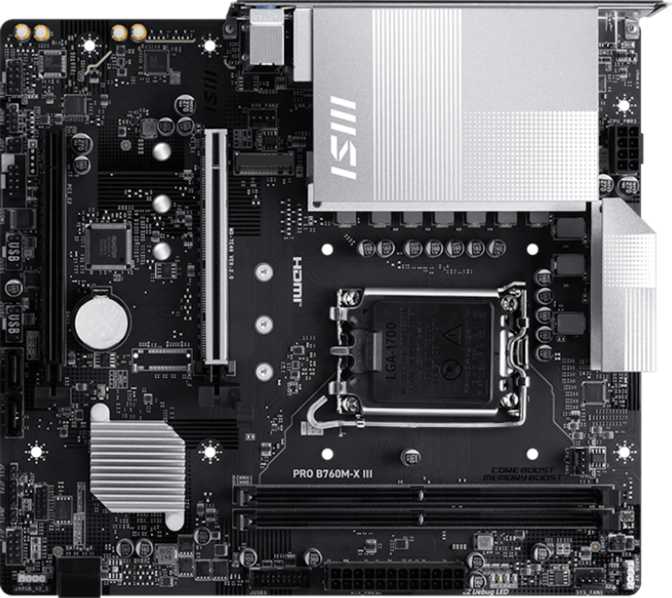
MSI Pro B760M-X III Review: An Honest Look at This B760 Board
MotherboardsKey Specifications at a Glance
Budget Micro-ATX motherboards are easy to dismiss. They are the unglamorous foundation of practical builds — the part most people stop thinking about the moment the PC posts. But a bad choice here creates cascading regrets: a storage bottleneck you cannot expand around, a USB situation that does not fit your desk, or a connectivity gap that forces you to buy a separate Wi-Fi card you did not budget for.
The MSI Pro B760M-X III sits in the honest middle of the Intel platform stack — not a stripped-down entry board, not a feature-stuffed enthusiast option. It pairs Intel's B760 chipset with the LGA 1700 socket, supporting 12th, 13th, and 14th generation Intel processors. For builders who want a dependable, no-nonsense foundation for a mainstream or light workstation build, this board deserves a closer look — with eyes open to what it deliberately leaves out.
Design and Build Quality
Form factor, physical layout, and what the "Pro" branding actually signals
Form Factor and Physical Footprint
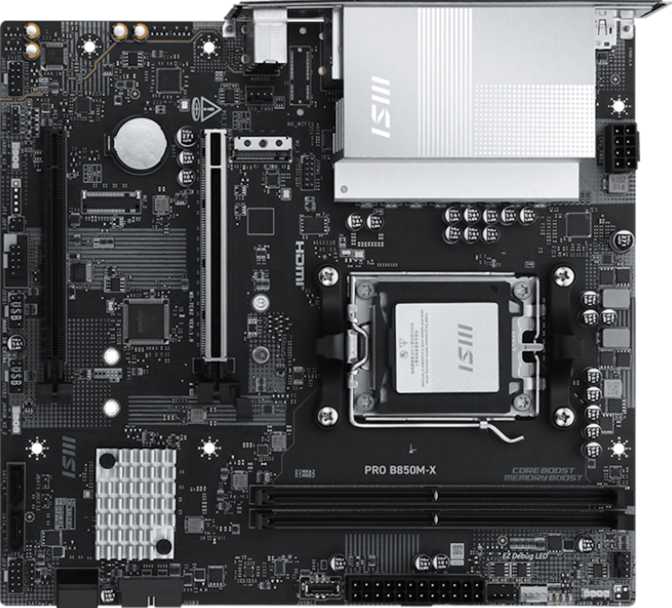
At roughly 244 mm wide by 220 mm tall, the Pro B760M-X III occupies the Micro-ATX footprint — smaller than a standard ATX board but meaningfully larger than Mini-ITX. This is the sweet spot for compact-but-capable builds: it fits comfortably in most mid-tower and compact mid-tower cases, and the reduced PCB real estate encourages a cleaner layout compared to cramped Mini-ITX designs.
MSI's "Pro" branding signals a business and productivity focus rather than a gaming-first approach. The board includes RGB lighting as a nod to the consumer market, but the overall aesthetic is restrained — not a board covered in addressable LED strips and aggressive heatsinks. It is clean, professional, and visually quiet enough to disappear inside a case.
Build Quality Signals
The three-year warranty MSI provides is a meaningful differentiator. Value boards often ship with one-year coverage; three years aligns this product with mid-range and productivity-class hardware. Motherboard failures tend to be either early, from manufacturing defects, or late, from capacitor aging — and three years covers the period where a build sees its heaviest use.
There is no hardware fallback if a BIOS update fails, and clearing the CMOS requires a jumper or dedicated button rather than a tool-free mechanism. Recovery from a failed firmware flash is more involved here than on boards with a secondary BIOS chip. Update firmware carefully using MSI's official utility with a stable power source.
The B760 Chipset: What It Delivers and Where It Stops
Performance ceiling, platform context, and the upgrade horizon for LGA 1700
Intel's B760 sits in the mainstream platform position — above the feature-stripped H610 and below the Z790, which permits full CPU overclocking. For the vast majority of desktop builders, B760 is the correct answer.
In practice, the processor runs at Intel's factory-rated specifications. Core i5, i7, and i9 chips perform exactly as Intel intends. The performance difference between stock clocks on B760 and manual overclocking on Z790 is real but narrow for typical workloads — gaming, content creation, and productivity tasks are largely unaffected by that ceiling.
What B760 preserves is access to fast PCIe lanes, modern DDR5 memory speeds, and flexible storage options — all of which this board puts to meaningful use.
The LGA 1700 Upgrade Ceiling
The LGA 1700 socket generation is complete. Intel has moved to a new platform for their 15th generation processors. You can upgrade between 12th, 13th, and 14th generation chips without changing the board — but that is the extent of the path. For a 3–5 year build lifespan, this is rarely a concern. For buyers who want maximum long-term upgrade headroom, it is worth acknowledging before purchase.
| Chipset | CPU OC | XMP RAM | PCIe 5.0 |
|---|---|---|---|
| Z790 | Yes | Yes | Yes |
| B760 This Board | No | Yes | Yes |
| H610 | No | No | No |
Memory: DDR5 Only — Capabilities and Constraints
What the platform commitment means for your build, your budget, and your upgrade path
The DDR5 Commitment
This board accepts DDR5 exclusively. DDR4 modules have a different physical notch position — preventing incorrect installation by design. DDR5 prices have stabilized considerably since the platform launched, reducing the cost premium for mainstream capacities. If you are upgrading from a DDR4 system, new memory modules are required.
Only two physical slots are available. For gaming and home office use, 16–32 GB of DDR5 in dual channel covers virtually every scenario. The constraint matters if you anticipate needing more than 64 GB total — which requires two high-capacity modules at a premium price. Memory-heavy professional tasks such as large video timelines or virtualization are where this limit becomes genuinely relevant.
Always install modules in both slots to activate dual-channel mode, where the sticks work in parallel for combined bandwidth. A single stick in one slot runs in single-channel mode, which measurably reduces bandwidth in demanding applications.
Speed: Native Rates vs. XMP Profiles
At stock settings, memory operates at the speed Intel officially certifies for this platform. Through XMP (Extreme Memory Profile), the board supports compatible kits running at significantly higher frequencies. Since B760 does not allow CPU overclocking, XMP is the primary performance tuning lever available here.
Whether higher XMP speeds produce real-world improvements depends on the workload. Content creation and simulation see meaningful gains from faster memory bandwidth. Gaming tends to plateau at moderate speeds with diminishing returns beyond a certain threshold.
Memory Speed Benefit by Workload
Storage: One M.2 Slot and Four SATA Ports
The storage layout, its practical implications, and the RAID inclusion that distinguishes this board
The Single M.2 Socket
There is exactly one M.2 slot on this board. M.2 is the connector format used by modern NVMe solid-state drives — the type that boots operating systems in seconds and loads applications almost instantly. For a primary build, one M.2 slot is sufficient: install a fast NVMe drive there and the system has the storage performance that defines the modern desktop experience.
The constraint surfaces when you need a second fast drive — for a game library, a video scratch disk, or a secondary OS volume. At that point, you are working with SATA ports, which are slower on sequential reads and writes than NVMe.
There is no workaround for the absence of a second NVMe socket. If your workflow genuinely requires two high-speed NVMe drives — large video editing pipelines, dual-OS power user setups — this is an architectural limitation. Consider boards with two M.2 sockets if that is a non-negotiable requirement.
SATA Storage and RAID
Four SATA 3 ports provide meaningful expansion for 2.5-inch SSDs and 3.5-inch hard drives. SATA SSDs are slower than NVMe on sequential transfers but remain cost-effective for bulk storage, game libraries, and backup volumes. A build pairing one NVMe boot drive with SATA data drives is a completely practical and common configuration.
Full RAID support across configurations 0, 1, 5, and 10 is the feature that most clearly distinguishes this board from similarly priced competitors. Most budget boards offer RAID 0 and 1 at best. RAID 5 and 10 here serve small office and light NAS deployments where redundancy combined with performance actually matters.
| RAID Type | Primary Use | Available |
|---|---|---|
| RAID 0 | Maximum sequential throughput | Yes |
| RAID 1 | Drive mirroring and redundancy | Yes |
| RAID 5 | Distributed parity across drives | Yes |
| RAID 10 | Mirror and stripe combined | Yes |
Rear I/O Connectivity: An Honest Assessment
What is on the back panel, what performs well, and what is simply absent
What the Rear Panel Provides
Four USB-A ports operating at 5 Gbps handle fast external drives, modern peripherals, and accessories. Four additional USB-A ports at the older 480 Mbps standard cover keyboards, mice, webcams, and other low-bandwidth devices. Eight rear USB-A ports total is generous at this price tier.
A single gigabit ethernet port handles wired networking reliably. Gigabit is sufficient for home and office networks, handles 4K streaming without congestion, and provides consistent low-latency connectivity for online gaming — without the variation that Wi-Fi can introduce.
For display output, HDMI 2.1 and one DisplayPort support monitors when a processor with Intel integrated graphics is installed. HDMI 2.1 handles 4K at high refresh rates and is correctly current-generation — not an older revision carrying a modern label.
| Port Type | Count | Speed / Standard |
|---|---|---|
| USB-A (3.2 Gen 1) | 4 | 5 Gbps per port |
| USB-A (2.0) | 4 | 480 Mbps per port |
| HDMI Output | 1 | HDMI 2.1 |
| DisplayPort Output | 1 | Standard DisplayPort |
| RJ45 Ethernet | 1 | Gigabit (1000 Mbps) |
| USB-C (Rear) | 0 | Not present |
| Wi-Fi | — | Not included |
| Bluetooth | — | Not included |
Critical Absences
These are not minor omissions — they are the most important features to evaluate before purchasing. Wireless connectivity is completely absent. If your build location requires wireless, a separate PCIe Wi-Fi card or USB adapter adds cost and planning. There is also no USB-C port anywhere on the rear panel — a real inconvenience as USB-C becomes standard across monitors, external drives, and accessories.
Adding Wi-Fi After Purchase
The secondary PCIe slot accepts a standard Wi-Fi card. Most Wi-Fi 6 cards include Bluetooth, resolving both absences in one purchase at typically $20–$40. A USB Wi-Fi adapter is a simpler alternative requiring no internal installation.
Onboard Audio
The integrated audio supports 7.1 channel output through three analog rear jacks — covering headphones, speakers, and surround configurations. There is no optical (S/PDIF) digital output, which limits compatibility with receivers that rely on optical cable. For headphones, gaming headsets, and standard speaker setups, the onboard solution is functional. Audiophiles and users with optical-dependent receivers will want an external USB DAC or discrete audio card.
Internal Connectors, PCIe Expansion, and Cooling
Front panel headers, GPU slot capability, and thermal management capacity
Front Panel Headers
Two internal USB 3.2 Gen 1 headers allow cases with front-panel USB 3.0 ports to provide 5 Gbps access from the front of the chassis. Four additional USB 2.0 internal headers support older front-panel connectors and internal USB devices such as card readers.
Cases with a front-panel USB-C port cannot use that port here — an absence that compounds the rear panel's USB-C gap. There is no USB-C connectivity anywhere on this board in any form.
PCIe Expansion
The primary slot runs at PCIe 5.0 x16 — the current top-tier standard for discrete GPUs. Any modern graphics card from NVIDIA or AMD operates at full bandwidth here. The bandwidth available exceeds what any current consumer GPU requires, leaving headroom for future hardware.
A second PCIe 4.0 x16 physical slot is present for add-in cards such as Wi-Fi adapters, capture cards, or audio cards. On the B760 chipset, this slot typically runs at one lane of electrical bandwidth despite its full-length physical form — suitable for accessories but not a second full-performance graphics card.
Cooling and Other Headers
Three fan headers support a CPU cooler and up to two chassis fans without additional hardware. For builds with more than two case fans, a simple fan hub or splitter resolves the limitation at minimal extra cost — it is a manageable constraint rather than a fundamental design flaw.
A TPM (Trusted Platform Module) connector supports discrete TPM module installation — relevant primarily in enterprise compliance deployments. Most modern Intel systems satisfy Windows 11's TPM requirement through the processor's firmware-level implementation, making the physical connector a niche-use feature.
Who Should Buy the MSI Pro B760M-X III
Match your build requirements against what this board provides — and where it ends
This Board Is Right for You If...
- You are building a compact desktop in a Micro-ATX or standard mid-tower case and want a reliable foundation without paying for features you will not use.
- Your build location has wired ethernet — a home office desk, gaming setup with a cable run, or a small business workstation.
- You plan one primary NVMe boot drive and SATA drives for additional storage — games, media, or backup volumes.
- You intend to pair the board with a discrete GPU for gaming, creative work, or 3D tasks.
- You are building a small office machine where local RAID redundancy adds real value for data protection.
- Budget discipline matters and leaving more for the CPU, GPU, and RAM is a deliberate strategy rather than an oversight.
Look Elsewhere If...
- Wireless connectivity is non-negotiable — Wi-Fi and Bluetooth are completely absent and require separate hardware to add.
- Your case has a front USB-C port you plan to use — there is no USB-C header on this board in any form.
- Your workflow requires two fast NVMe drives — for large video editing pipelines, dual-OS setups, or high-speed scratch storage alongside a boot drive.
- You are planning a multi-fan cooling configuration — three headers will require a hub or splitter to manage additional fans without compromise.
- You want dual BIOS protection — a failed firmware update on this board requires more involved technical recovery with no hardware fallback.
- You anticipate needing more than 64 GB of RAM — the two-slot limitation means higher capacities require expensive large-format DDR5 modules.
Competitive Positioning
How the B760M-X III compares to logical alternatives at a similar market tier
Boards at similar prices that include Wi-Fi typically achieve it by trimming elsewhere — reducing M.2 slots, using lower-spec audio, or cutting RAID support. The B760M-X III's comprehensive RAID support across all four configurations is unusual at a budget price point. Stepping up to a Z790 board adds CPU overclocking and more M.2 slots but costs significantly more. H610 boards below it sacrifice features aggressively — minimal RAID, fewer SATA ports, and often no PCIe 5.0 GPU slot.
| Feature | MSI Pro B760M-X III This | B760M with Wi-Fi | Entry H610M |
|---|---|---|---|
| PCIe 5.0 GPU Slot | Yes | Varies | Usually No |
| Wi-Fi & Bluetooth | No | Yes | No |
| M.2 Slots | 1 | 1–2 | 1 |
| DDR5 Support | Yes | Yes | Varies |
| RAID Support | Full (0,1,5,10) | Partial | Minimal |
| RAM Slots | 2 | 2–4 | 2 |
| USB-C (Rear) | No | Varies | No |
| Warranty Period | 3 Years | 3 Years | 1–3 Years |
Honest Assessment: Strengths and Weaknesses
A balanced evaluation with no marketing polish and no omissions
The PCIe 5.0 x16 primary slot is a genuine differentiator at this price tier. Not every budget B760 board includes it, and its presence ensures the GPU slot does not become a bottleneck for current or near-future discrete graphics cards.
Full DDR5 support with high XMP profile ceilings means the memory subsystem can reach speeds that bandwidth-sensitive workloads benefit from. Dual-channel operation adds to the overall picture, and the ceiling here is not something typical buyers would reach in practice.
Comprehensive RAID support across all four major configurations most clearly distinguishes this board from competitors at its price. Most budget boards offer RAID 0 and 1 at best. RAID 5 and 10 here serve small office and NAS-adjacent deployments in a way that few budget boards can match.
Eight rear USB-A ports — four at 5 Gbps and four at 480 Mbps — covers typical desktop peripherals and external storage without running short. Many boards at this tier offer fewer total rear ports.
HDMI 2.1 on the video output is correctly current-generation. Some budget boards use older HDMI revisions on their display connections; HDMI 2.1 here is the right choice for pairing with any modern monitor using integrated graphics.
The absence of Wi-Fi and Bluetooth is the most significant limitation for the broadest group of users. This is not a spec gap that can be mentally noted and moved past — it requires either accepting a wired-only setup or adding separate hardware after purchase, with the cost and effort that entails.
A single M.2 slot is an architectural ceiling. For a primary build it is sufficient; for users who will likely want a second fast NVMe drive within a few years, this is worth weighing before committing to the platform.
The complete absence of USB-C — neither on the rear panel nor as a front-panel internal header — reflects a design behind the current standard. USB-C is expanding across monitors, drives, and cases, and zero connectivity in that format adds real friction for users already embedded in that ecosystem.
Three fan headers are workable for simple builds but create overhead for anything more ambitious. A fan hub resolves the problem but is an additional item to budget and physically install.
No dual BIOS does not affect daily operation but removes a safety net that experienced builders value. BIOS updates carry a small but real failure risk, and having no hardware fallback makes recovery more technically demanding on this board than on alternatives with physical BIOS protection.
Common Buyer Questions
Answers to what real buyers search for before making a purchase decision
Final Verdict
A clear purchase recommendation with no equivocation
The MSI Pro B760M-X III makes a clear case for itself through genuine feature density at its price point. PCIe 5.0 x16 GPU support, full DDR5 compatibility with high XMP ceilings, comprehensive RAID functionality across all four major configurations, and eight rear USB-A ports are not universal on budget Micro-ATX boards. The three-year warranty adds purchase confidence that entry-tier products do not always provide.
Buy It If
You are building a wired desktop with a single NVMe drive, want a stable Micro-ATX foundation, and are comfortable with the connectivity trade-offs. That decision leaves meaningful budget for the components that actually drive daily performance: the processor, graphics card, and memory.
Look Elsewhere If
Wireless connectivity is non-negotiable, your case has a front USB-C port, or you are already planning two NVMe drives. In those cases, spending more upfront for a board that covers those needs from the start is the smarter long-term decision.
For the right builder with the right priorities, this board does exactly what it promises without pretending to be something it is not. That is a virtue in a product category full of misleading feature padding. Honest value, honestly delivered.