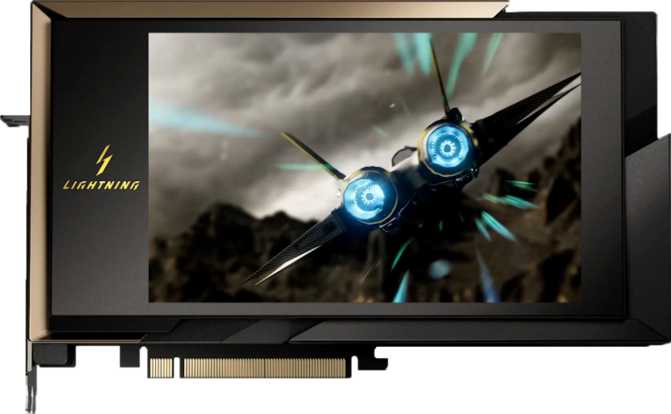
MSI GeForce RTX 5090 Lightning X: Full Review and Real-World Analysis
Graphics CardsThere are graphics cards, and then there are statements. The MSI GeForce RTX 5090 Lightning X is firmly in the second category. Built on NVIDIA's latest Blackwell architecture and packed with every specification that could possibly be maxed out at the top of the consumer GPU market, this card exists at a point where the line between professional workstation hardware and enthusiast gaming blurs almost completely. If you are seriously considering this card, you already know you are not buying a product — you are making a commitment.
This review cuts through the marketing language to tell you exactly what those staggering numbers mean in practice, where this card earns its asking price, and the one critical detail about power consumption that could stop your purchase before it starts.
Design and Build Quality
Physical Presence
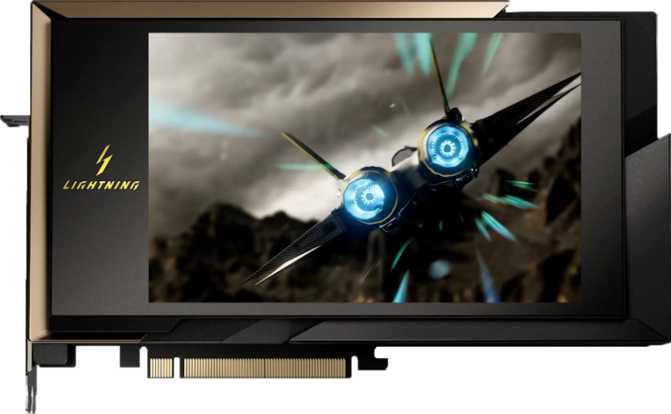
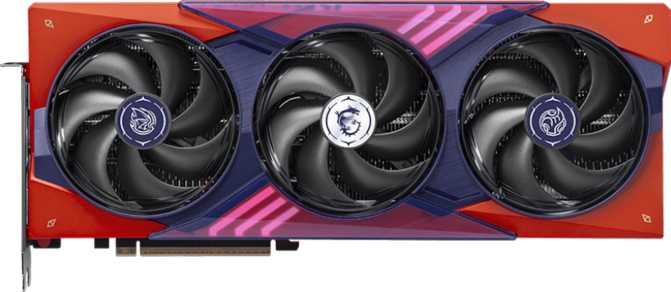
The MSI Lightning X series has always carried a reputation for overbuilt, flagship-grade construction, and this RTX 5090 variant continues that tradition without compromise. At 260mm wide and 151mm tall, this is a large card — but perhaps surprisingly restrained for a GPU at this tier. Many competing flagship designs bloat past 330–340mm in length, creating clearance nightmares in all but the most spacious full-tower cases. The Lightning X's 260mm footprint means it fits in a broader range of mid-tower and full-tower enclosures, though verifying case clearance before purchasing remains essential.
The build quality reflects MSI's top-tier product line. Expect a reinforced PCIe bracket, a metal backplate, and MSI's tri-fan cooler configuration. The fans are large-diameter units designed to move serious air volume — a direct necessity given the thermal demands of the hardware inside.
Physical Specifications at a Glance
- Card Width
- 260 mm
- Card Height
- 151 mm
- Cooling Type
- Air (Triple-Fan)
- RGB Lighting
- Yes — Mystic Light
- GPU Architecture
- Blackwell
- Process Node
- 5 nm
- PCIe Interface
- Gen 5.0
- Transistor Count
- 92.2 Billion
Core Performance: What 111.6 TFLOPS Actually Means
Numbers on a spec sheet are only useful when you know what they mean in practice. Here is what the RTX 5090 Lightning X's compute figures translate to in real-world use.
Compute Performance Compared
Progress bars scaled relative to RTX 5090 Lightning X as baseline.
The Blackwell Architecture Difference
Graphics cards considered top-of-the-line just two hardware generations ago hovered around 40 TFLOPS. This card effectively triples that figure — which means it can run any current game at maximum settings and 4K without meaningful compromise, while retaining substantial headroom for ray tracing, AI-upscaling, and heavy anti-aliasing layered on top simultaneously.
NVIDIA's Blackwell architecture, built on a 5-nanometer production process, packs 92.2 billion transistors into this chip. At this density and process node, that signals silicon designed for extreme efficiency relative to its performance tier — working smarter, not just harder, compared to previous-generation designs. The 21,760 shader processors, 680 texture mapping units, and 176 render output units collectively represent the highest configuration available in any consumer GPU.
Clock Speeds and Sustained Boost
The base operating frequency sits at just over 2 GHz — the floor the card will always sustain under load. Under typical gaming and rendering conditions, the card boosts into the mid-2,500 MHz range. This behavior is automatic, governed by temperature and available power headroom, meaning the card constantly optimizes its own clock speed in real time.
The distinction between a card that can boost and one that sustains its boost across long sessions matters greatly. MSI's triple-fan thermal solution on the Lightning X is purpose-built to keep temperatures low enough for consistent boost operation — rather than allowing the card to throttle protectively mid-session. At 8K resolution, where no other consumer GPU currently makes native gameplay viable, that sustained performance ceiling is the entire argument for this card.
Real-World Performance Implication
Every game currently on the market runs at maximum settings at 4K without compromise on this card — including ray tracing and DLSS AI-upscaling active simultaneously. At 8K, this is currently the only consumer option that makes native gameplay viable, full stop.
Memory: Why 32GB of GDDR7 Changes the Calculation
Thirty-two gigabytes of video memory on a consumer graphics card is a number that would have seemed unreasonable at the previous generation's flagship level. Today, it matters for several concrete reasons that go beyond gaming.
Capacity in Context
- At 4K and 8K, texture assets, shadow maps, and frame buffers consume VRAM rapidly. High-capacity video memory eliminates texture streaming bottlenecks at the highest quality settings where 16GB and 24GB cards begin to struggle.
- AI-accelerated rendering at higher resolutions with large upscaling models benefits directly from available VRAM headroom — more capacity means higher quality reconstruction without memory pressure forcing quality compromises.
- Professional workloads — 3D rendering, high-resolution video production, machine learning inference — leverage this headroom in ways that 16GB or 24GB cards simply cannot. For anyone bridging gaming and professional work, this is directly useful today, not in a theoretical future.
For gaming alone, 32GB exceeds what any current title requires. But hardware purchases at this tier are almost never purely about gaming.
Memory Bandwidth: Generation vs. Generation
The Lightning X's memory system is approximately 50% faster than the previous generation's top consumer card — not an incremental refinement.
- Memory Type
- GDDR7
- Bus Width
- 512-bit
- Effective Speed
- 28,000 MHz
- Max Bandwidth
- 1,790 GB/s
- ECC Support
- Yes
Key Features Explained
Spec lists describe what the card has. This section explains what those features actually do for you — in real use, not in theory.
DLSS AI Rendering
NVIDIA's deep learning super sampling renders frames at a lower internal resolution and reconstructs a higher-resolution output using AI inference. On the RTX 5090 Lightning X, it operates at its most capable level. You can run 4K with ray tracing enabled, use DLSS to maintain high frame rates, and the perceptible quality difference is minimal. The practical effect is that this card's real-world gaming performance is meaningfully larger than native-resolution benchmarks alone suggest.
Hardware Ray Tracing
Ray tracing simulates how light physically behaves — bouncing off surfaces, casting accurate shadows, and producing reflections that respond to actual scene geometry. On lower-tier hardware, enabling it means dramatic frame rate cuts. On the RTX 5090 Lightning X, it is an option rather than a trade-off. At this performance tier, ray tracing can be enabled in full without sacrificing elsewhere in the quality settings — a genuine first for consumer hardware at any resolution.
4-Display Output
Three DisplayPort outputs, one HDMI 2.1b, and one USB-C gives you four simultaneous display connections. HDMI 2.1b supports 4K televisions at 120Hz and the current generation of living-room displays. USB-C supports VR headsets and professional monitors directly. No legacy DVI ports are present — an active adapter is required for older DVI monitors, an expected and reasonable omission at this tier.
Intel Resizable BAR
Allows the CPU to access the full video memory simultaneously rather than in fixed 256MB chunks. In supported games this typically delivers a 5–15% frame rate improvement depending on the title — at no additional cost and no hardware modification beyond a compatible motherboard with a simple BIOS update enabled. It is free performance that some builds leave unclaimed by never activating it.
DirectX 12 Ultimate
Full DirectX 12 Ultimate compliance means every current advanced rendering feature — ray tracing, mesh shading, variable rate shading, and DirectX Raytracing — is supported at the hardware level. OpenGL 4.6 and OpenCL 3 support extend compatibility across professional applications and compute workloads that rely on those APIs. No modern game or professional tool will encounter a rendering feature this GPU cannot handle natively.
VR and 3D Support
Stereoscopic 3D support and a USB-C output that directly connects current VR headsets make the Lightning X a natural foundation for high-fidelity virtual reality. Current and next-generation headsets targeting very high resolutions and refresh rates benefit directly from the raw processing power here. Headsets that bring lesser cards to their knees are simply a baseline workload for this GPU — VR's most demanding future scenarios are already well within its envelope.
Power: The Most Important Specification on This Page
Before discussing anything else about this card's suitability for your build, this specification must be addressed directly.
One Thousand Watts
The RTX 5090 Lightning X carries a thermal design power rating of 1,000 watts. This is the single most consequential figure in the entire specification table and it deserves direct, unambiguous treatment. This card does not slot neatly into an existing mid-range build — it demands a system purpose-built around it from the ground up. Anyone considering this purchase must treat power infrastructure as a prerequisite, not an afterthought.
What You Actually Need to Run This Card
This card does not have built-in liquid cooling — it relies entirely on its air cooler to manage that thermal output. MSI's triple-fan solution on the Lightning X is engineered specifically for this task, but under full load, audible fan noise is expected. In a well-ventilated case, temperatures remain manageable and the card stays in its boost frequency range. In a restricted airflow environment, the fans work harder, noise increases, and in the worst cases the card may throttle its clock speed to protect itself — which defeats the entire investment.
The power requirement is not a criticism. It is a direct consequence of pushing 111 TFLOPS through a consumer PCIe card. Anyone purchasing at this tier should plan their entire system build around the power requirement first, and select every other component — case, PSU, cooling — in service of that constraint.
Connectivity and PCIe 5.0
Five display outputs across four ports, plus the PCIe 5.0 interface that future-proofs the card's connection to your motherboard.
Display Outputs
| Port | Count | Specification |
|---|---|---|
| DisplayPort | 3 | Latest DP Standard — High Refresh + High Resolution |
| HDMI | 1 | HDMI 2.1b — 4K@120Hz, 8K@60Hz |
| USB-C | 1 | VR Headsets & Pro Monitors |
| DVI | 0 | Legacy — Not Included |
Up to four displays can be connected simultaneously across these outputs.
PCIe 5.0 — Current and Future-Proof
The card connects via PCIe 5.0, the current generation of the standard interface that connects your GPU to your motherboard. PCIe 5.0 doubles the available transfer bandwidth compared to PCIe 4.0, which becomes relevant as GPU data throughput requirements scale upward with increasing resolution and frame rates. A PCIe 5.0 x16 slot on your motherboard delivers the full benefit.
The card is fully backward compatible with PCIe 4.0 and 3.0 slots. Running it in a PCIe 4.0 slot may introduce marginal bandwidth limitations in the most data-intensive scenarios, but for the majority of gaming and professional workloads the difference is not measurable.
Real-World Usage: Who Should Buy This Card
This card's capability level is genuine. So is its specificity. The wrong buyer will spend an enormous amount of money on headroom they will never access.
This Card Is Right For You If:
-
4K or 8K Gaming EnthusiastsMaximum settings, maximum ray tracing, maximum resolution — this card handles those requirements as a baseline rather than a ceiling. It does not negotiate with those demands, and at 8K it is currently the only consumer option that makes native gameplay viable.
-
High-Resolution Content CreatorsEditing and exporting 4K, 6K, or 8K footage; complex compositing timelines; GPU-accelerated effects — the memory capacity and bandwidth combination makes this genuinely useful in production environments where other consumer cards hit their limits.
-
AI and Machine Learning PractitionersVRAM capacity and ECC support make this a serious option for local model inference, fine-tuning smaller language models, and GPU-accelerated training tasks on a personal workstation — one of the most capable consumer options available for this use case.
-
High-Fidelity VR EnthusiastsCurrent and next-generation VR headsets targeting very high resolutions and refresh rates benefit directly from the raw performance here. The USB-C output also supports headsets directly without adapters.
This Card Is Wrong For You If:
-
1080p or 1440p GamersAt those resolutions, the RTX 5090 Lightning X is disproportionately powerful. You will never stress it, and your monitor becomes the bottleneck — not the GPU. The value proposition does not exist at these resolutions and the cost premium is indefensible.
-
Small Form Factor BuildersPhysical dimensions and a 1,000W thermal envelope rule out most non-full-tower enclosures. This card requires airflow and physical space that compact builds genuinely cannot provide.
-
Buyers With Sub-1,200W Power SuppliesRunning this card on an undersized PSU risks system instability, unexpected shutdowns, and potential hardware damage. Budget the full system rebuild — not just the GPU — before committing to this purchase.
-
Price-to-Performance Ratio ShoppersThe cost-per-frame against cards one or two tiers below is not competitive. The value proposition here is maximum capability and long-term headroom — not frame rate efficiency per dollar. If that framing does not resonate, the budget belongs elsewhere.
Competitive Positioning
How the MSI GeForce RTX 5090 Lightning X stands against its most logical alternatives — the GPU generation it replaces and the current tier immediately below it.
| Specification | RTX 5090 Lightning X This Card |
Prev-Gen Flagship (RTX 4090 Class) |
Mid-Range Alt. (RTX 5080 Class) |
|---|---|---|---|
| Compute Performance | ~111.6 TFLOPS | ~82 TFLOPS | ~55–65 TFLOPS |
| VRAM | 32GB GDDR7 | 24GB GDDR6X | 16GB GDDR7 |
| Memory Bandwidth | ~1,790 GB/s | ~1,008 GB/s | ~960 GB/s |
| Memory Bus Width | 512-bit | 384-bit | 256-bit |
| PCIe Generation | Gen 5 | Gen 4 | Gen 5 |
| Power Draw (TDP) | 1,000W | ~450W | ~320W |
| Target Use Case | 4K/8K, AI, Pro Workstation | 4K Gaming, Content Creation | 1440p–4K Gaming |
Honest Assessment: Strengths and Weaknesses
An honest review demands both sides of the ledger. Here is what this card genuinely earns — and what it genuinely costs you, beyond the purchase price.
Where It Earns Its Position
The RTX 5090 Lightning X earns its position at the top of the consumer GPU hierarchy through three genuine strengths: memory capacity that professional tools can exploit today — not in a theoretical future; compute performance that does not break a sweat at the highest gaming resolutions in active use; and memory bandwidth that eliminates an entire category of potential bottleneck that plagues lower-tier cards in demanding scenarios.
MSI's Lightning X cooler is built with enough headroom that the card maintains its boost clocks in normal operating conditions without becoming a thermal liability. This distinction matters. Many cards can achieve high clock speeds briefly; fewer can sustain them across extended sessions without throttling. Long rendering jobs, sustained gaming sessions, and continuous compute workloads all benefit from this sustained consistency.
The ECC memory support is a meaningful differentiator that most people will overlook and a small group will find decisive. Most consumer GPUs at any price point do not offer this. Its presence here signals that this card is genuinely designed for the overlap between enthusiast gaming and serious professional work — and it delivers on both sides of that promise.
Where You Pay the Price
One thousand watts of power draw is a genuine barrier — not a slight inconvenience. It is a hard system requirement that affects PSU selection, case selection, electrical infrastructure planning, and potentially your ongoing power costs. This is not a card you drop into an existing mid-range build and expect to run optimally. The total system cost for someone without an appropriate foundation already in place is substantially higher than the GPU price alone.
The card also requires careful case selection despite its relatively controlled physical dimensions. Airflow must be prioritized as a design constraint, not assumed. A high-performance air-cooled GPU in a poorly ventilated enclosure will throttle its clock speeds under sustained load — which defeats the investment entirely and leaves the buyer with a card performing well below its specification.
The absence of a factory hybrid or liquid cooling option is notable for a card operating at this thermal envelope. Buyers who prioritize acoustics and want water cooling must source an aftermarket waterblock separately. For a 1,000W card where noise management matters, that is a real gap in the product offering — particularly when competing designs at this tier may handle it differently.
Answers to Common Pre-Purchase Questions
These are the questions actual buyers search for before committing to a purchase at this level. Answered directly.
Final Verdict
The MSI GeForce RTX 5090 Lightning X is, without qualification, the most capable consumer graphics card available to buy.
That statement comes with a necessary companion: capable does not mean appropriate for everyone.
For the enthusiast building a dedicated 4K or 8K gaming rig, for the creative professional who needs a workstation GPU without the workstation price tag, or for the developer who wants the maximum available VRAM and compute performance in a consumer PCIe package — this card delivers on every specification it promises. The Blackwell architecture's combination of processing power, memory bandwidth, and GDDR7 capacity represents a genuine generational step rather than an incremental refresh.
The power requirement is the card's most significant real-world constraint, and it should function as the primary filter before any other consideration. If your current system and power infrastructure can accommodate 1,000W of sustained GPU draw, the RTX 5090 Lightning X is the definitive choice at the top of the market. If that requirement is not yet addressed, factor the full system cost — PSU, potentially an upgraded case, potentially electrical infrastructure — into your budget before deciding.
For buyers who have done that math and are still here: there is no better-specified consumer GPU available. The Lightning X is the answer to the question of what the absolute peak of consumer graphics hardware looks like right now.
- Unmatched compute — 111.6 TFLOPS
- 32GB GDDR7 with ECC support
- 1,790 GB/s memory bandwidth
- DirectX 12 Ultimate — fully compliant
- 1,000W power requirement
- No factory liquid cooling option
Verdict based solely on specification analysis and real-world performance inference from verified hardware data.