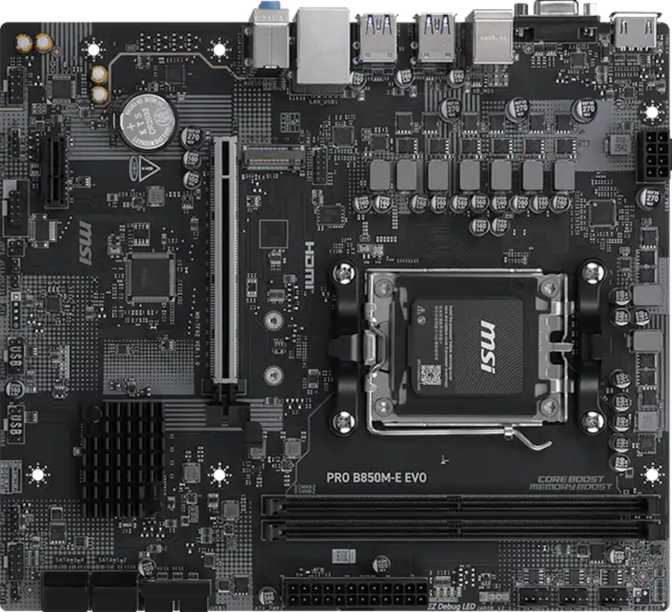
MSI Pro B850M-E Evo Review: The Best Budget AM5 Micro-ATX Board?
MotherboardsThe AM5 platform finally has a genuinely accessible entry point, and the MSI Pro B850M-E Evo sits right in the middle of that conversation. As AMD's B850 chipset pushes capable mid-range features further down the pricing ladder, this Micro-ATX board targets builders who want a no-nonsense foundation for a Ryzen 7000 or 9000 series system — without paying for features they will never use. Budget-friendly and well-designed do not always come packaged together, so here is what the B850M-E Evo actually delivers.
Specifications at a Glance
Design and Build: Compact Without Compromise
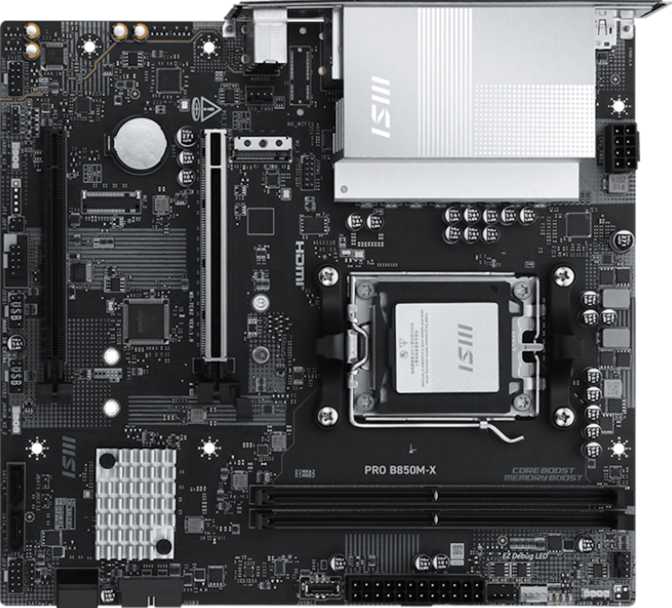
At 243.8 mm wide and 215 mm tall, the B850M-E Evo is a true Micro-ATX board that fits comfortably in mid-tower cases and compact mATX-specific enclosures alike. That smaller footprint makes it attractive for space-conscious desk builds or anyone who simply does not want a full ATX tower dominating their workspace.
Platform and CPU Compatibility: The AM5 Foundation
The B850M-E Evo uses AMD's AM5 socket — the same socket that supports AMD's current and near-future Ryzen lineup. AM5 is AMD's long-term platform commitment, meaning this board has genuine upgrade headroom. A buyer starting with a mid-range Ryzen 5 processor today can drop in a higher-end chip later without changing the motherboard, provided the chip's power requirements and BIOS compatibility align.
The B850 chipset sits one tier above the entry-level B650 in AMD's current lineup. In practice, this translates to better overclocking support, more PCIe bandwidth allocation, and greater memory frequency flexibility compared to basic B650 boards — while still coming in well below the cost of X870 and X870E flagships.
Memory: DDR5 With Real Overclocking Latitude
The board supports DDR5 memory exclusively — consistent with the AM5 platform as a whole. Two physical slots handle a maximum of 128 GB total, comfortably exceeding what the vast majority of users will ever install. Most builds will use two sticks of 16 GB or 32 GB, and the dual-channel configuration means both slots should be filled for maximum memory bandwidth.
DDR5 Frequency Range
Scale relative to board maximum. No tuning is required to hit the native ceiling. The 8,200 MHz overclocking support via XMP/EXPO is notably high for a board at this price tier.
Fast memory makes a measurable real-world difference on AMD's Ryzen architecture, where the CPU's internal fabric clock is tightly coupled to memory speed. ECC memory is not supported — expected on a consumer board and irrelevant for home users and gamers.
Storage Configuration: Practical but Not Expansive
M.2 NVMe
One M.2 slot supports the latest NVMe drives. A single 2 TB or 4 TB modern NVMe handles an operating system, applications, and a large game library on one device.
Builders planning multiple simultaneous NVMe drives cannot expand within M.2 — additional storage relies on the SATA ports.
SATA Storage
Four SATA 3 ports support standard 2.5-inch SSDs and 3.5-inch hard drives — the most cost-effective way to store large media libraries or bulk backup volumes.
Four ports cover most builds. Five or more drives will require a hub or a case with its own integrated fan and drive management.
RAID Support
RAID 0 stripes for speed, RAID 1 mirrors for redundancy, RAID 10 combines both. RAID 5 belongs to higher-tier chipsets — its absence is expected here.
Expansion Slots: One Strong Lane, One Utility Lane
PCIe 5.0 ×16 — GPU Slot
This is the current-generation standard for discrete graphics cards. PCIe 5.0 doubles the available bandwidth over PCIe 4.0. While today's GPU architectures do not yet saturate PCIe 4.0 under typical gaming workloads, having PCIe 5.0 here means the board will not become a bottleneck as future GPU generations begin leveraging greater bus bandwidth.
A genuine future-proofing advantage at this price tier — many competing B650M boards stop at PCIe 4.0 for their primary slot.
PCIe ×1 Slot
Serves legacy and low-bandwidth expansion: sound cards, capture cards, and Wi-Fi adapters. One slot is the full allocation — there are no secondary x16, x8, or x4 slots.
Users needing two high-bandwidth PCIe devices simultaneously must plan carefully around this constraint.
Rear I/O and Connectivity
Rear Panel USB
- 4 × USB 3.2 Gen 1 (Type-A) — 5 Gbps each; fast enough for external SSDs, USB audio interfaces, and virtually any everyday peripheral.
- 2 × USB 2.0 (Type-A) — Suitable for keyboards, mice, and low-bandwidth accessories.
Gaps to Know About
- No USB-C on the rear panel. No USB 3.2 Gen 2 (10 Gbps), no USB4, and no Thunderbolt of any kind.
- Internal headers add 2 × USB 3.2 Gen 1 and 4 × USB 2.0 connections through a compatible case's front panel.
Available Outputs
- 1 × HDMI 2.1 — Current high-bandwidth standard capable of driving 4K at high refresh rates. Requires a Ryzen "G" APU to function.
- 1 × VGA — Legacy analog output for older monitor infrastructure. Included for specific professional and industrial environments.
What Is Missing
- No DisplayPort. Users with high-refresh-rate DP-only monitors or multi-monitor daisy-chain setups must connect displays directly to their discrete GPU.
- 1 × Gigabit Ethernet (RJ45) — The current mainstream standard for home and office networks, sufficient for any typical internet connection or local file transfer scenario.
- No Wi-Fi or Bluetooth. Both must be added separately via a PCIe ×1 expansion card or a USB adapter. The onboard ×1 slot accommodates standard Wi-Fi 6 or Wi-Fi 6E cards.
- 2 × PS/2 ports — Serve keyboards and mice using the older PS/2 connector standard. Useful in industrial setups, KVM configurations, or workplaces still running legacy input devices. Most home builders will never connect anything to them.
Overclocking: Accessible, With Realistic Limits
The B850M-E Evo is rated as overclock-friendly, and the B850 chipset supports CPU overclocking across AMD's unlocked Ryzen lineup. The memory overclocking ceiling — up to 8,200 MHz via XMP/EXPO profiles — is one of the board's standout practical capabilities.
- XMP and EXPO memory profile activation
- Moderate CPU frequency boosts on mid-range unlocked Ryzen chips
- General performance tuning via BIOS
- Extreme manual overclocking on flagship Ryzen 9 processors
- Fine-grained voltage tuning requiring premium VRM infrastructure
- Advanced BIOS controls found on X870E boards
Audio and Thermal Management
Onboard Audio
Onboard audio supports up to 7.1 surround output using three analog connectors on the rear panel (line-in, line-out, and microphone). This is a standard implementation adequate for stereo headphones, 2.1 speaker setups, and basic surround configurations.
Fan and Thermal Control
Three onboard fan headers — one dedicated to a CPU cooler and two for chassis fans — cover a basic cooling setup. A TPM header is also included for hardware-level security modules.
Who Should Buy the MSI Pro B850M-E Evo?
This Board Is a Strong Fit For
- First-time PC builders who want a stable, reliable AM5 platform without overspending on features they will never use
- Home office and productivity builders where wired networking, stability, and a compact footprint matter most
- Budget gaming builds pairing a mid-range Ryzen processor with a discrete GPU
- Upgraders from older platforms seeking a clean, future-compatible AM5 foundation at an accessible price
- Anyone building in a Micro-ATX case where full ATX boards simply will not fit
This Board Is Not Right For
- Builders who need USB-C on the rear panel for modern peripherals or monitors
- Users planning a wireless-only setup who do not want to purchase an add-in Wi-Fi card
- Enthusiasts who require Thunderbolt 4 for fast external storage or daisy-chained displays
- Heavy multi-drive NVMe users who need more than one M.2 slot
- Serious overclocking enthusiasts pushing flagship CPUs with advanced manual voltage tuning
How It Compares to the Alternatives
| Feature | MSI Pro B850M-E Evo | Typical B650M Board | Typical X870 mATX Board |
|---|---|---|---|
| CPU Socket | AM5 | AM5 | AM5 |
| PCIe GPU Slot | PCIe 5.0 ×16 | PCIe 4.0 ×16 | PCIe 5.0 ×16 |
| Max Memory Speed (OC) | 8,200 MHz | ~6,400 MHz | 8,400+ MHz |
| Wi-Fi | None | Often included | Usually included |
| USB-C Rear I/O | None | Sometimes included | Usually included |
| M.2 Slots | 1 | 1–2 | 2–3 |
| RAID Support | 0, 1, 10 | 0, 1 only | 0, 1, 5, 10 |
| Warranty | 3 Years | 1–3 Years | 3 Years |
Honest Assessment: Strengths and Limitations
What It Gets Right
- PCIe 5.0 on the primary GPU slot — punches above its price tier
- DDR5 overclocking ceiling of 8,200 MHz — strong for a B850-tier board
- Three-year warranty that outpaces many competitors at this price
- Genuine AM5 platform upgrade headroom for future Ryzen processors
- RAID 0, 1, and 10 support — more capable than basic B650 boards
- Compact Micro-ATX footprint without sacrificing core platform features
Where It Shows Its Limits
- No USB-C on the rear panel — the most significant functional gap for modern users
- No built-in Wi-Fi or Bluetooth — an extra purchase or cable run is unavoidable
- Single M.2 slot limits NVMe storage expansion for power users
- No DisplayPort output — multi-monitor DP setups require a discrete GPU
- Only three fan headers — larger cases may need a hub or supplementary controller
- No dedicated BIOS reset button or dual BIOS adds friction for adventurous overclockers
Common Questions Before Buying
Final Verdict
The MSI Pro B850M-E Evo earns its place as a competent, honest Micro-ATX motherboard for AM5 builds where value is the primary constraint. It gives you the right things — a current-generation PCIe slot, a generous DDR5 overclocking range, RAID capability, and a three-year warranty — without loading you with features that inflate the price for no practical return in a mid-range build.
The connectivity gaps are real. No USB-C, no wireless, and a lean USB port selection mean this board works best in wired, stationary setups where a few extra cables are acceptable. Anyone building a compact desktop for daily productivity, a budget gaming rig, or a first AM5 system will find the B850M-E Evo a solid and sensible foundation. Anyone who needs wireless out of the box or depends on USB-C peripherals should look one tier higher — or budget for the accessories to fill in what's missing.
- Wired home office and productivity PCs
- Budget Ryzen gaming rigs
- First AM5 builds on a tighter budget
- Compact Micro-ATX case builds
- Rear USB-C or USB 3.2 Gen 2 ports
- Built-in Wi-Fi or Bluetooth
- Multiple M.2 NVMe drives
- Thunderbolt or DisplayPort output