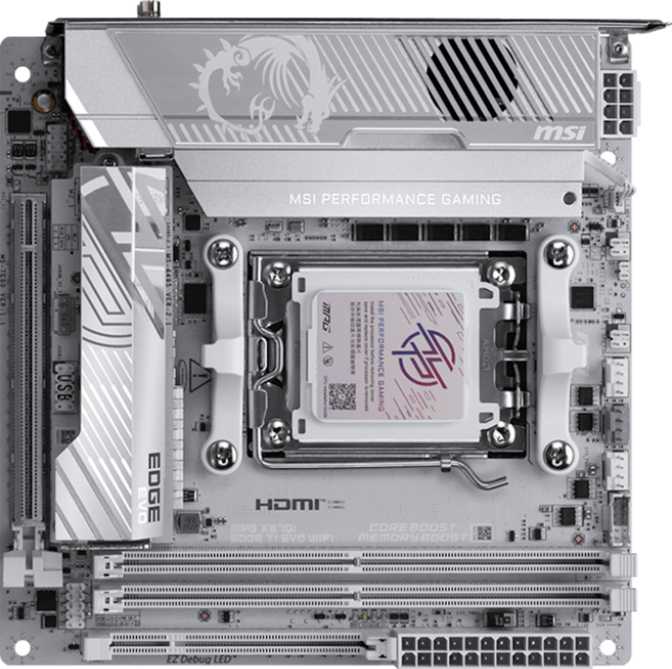
MSI MPG X870I Edge TI Evo Wi-Fi Review: The Best Mini-ITX AM5 Board?
MotherboardsBuilding a small form factor PC used to mean accepting compromise — less connectivity, weaker overclocking support, and feature sets that felt like stripped-down leftovers from larger boards. The MSI MPG X870I Edge TI Evo Wi-Fi is a direct challenge to that assumption. Packed into a 170 × 170mm footprint — roughly the area of a large paperback book — this board targets AMD Ryzen builders who want a genuinely premium experience without sacrificing desk space. Whether that ambition translates to real-world value is exactly what this review addresses.
Key Highlights
The essential features at a glance before the full breakdown.
Full Specifications
| Specification | Detail |
|---|---|
| Form Factor | Mini-ITX — 170 × 170 mm |
| CPU Socket | AM5 (LGA design) |
| Chipset | AMD X870 |
| Memory Slots | 2× DDR5 — up to 128GB, Dual-Channel, ECC Supported |
| Memory Speed | Up to 5600 MHz (JEDEC) / Up to 10000 MHz (OC via XMP/EXPO) |
| PCIe Slot | 1× PCIe 5.0 x16 |
| M.2 Sockets | 3× M.2 |
| SATA | 2× SATA 3 |
| RAID Support | RAID 0 / RAID 1 / RAID 5 |
| Rear USB | 2× USB 4 (40Gbps), 2× Thunderbolt 4, 5× USB 3.2 Gen 2 Type-A, 1× USB 3.2 Gen 2 Type-C |
| Internal Headers | 2× USB 3.2 Gen 1, 1× USB 3.2 Gen 2×2 (20Gbps), 2× USB 2.0 |
| Display Output | 1× HDMI 2.1 (iGPU only) |
| Wi-Fi | Wi-Fi 7 (802.11be) — backward compatible with Wi-Fi 6E/6/5/4 |
| Bluetooth | Bluetooth 5.4 |
| Ethernet | 1× RJ45 |
| Audio | 120dB SNR, 7.1-channel, S/PDIF optical out, 2× rear audio jacks |
| Fan Headers | 3× (PWM control) |
| BIOS | Dual BIOS, Clear CMOS, EXPO/XMP, Easy Overclocking |
| RGB Lighting | Yes — Mystic Light compatible |
| Warranty | 3 years |
Design and Build Quality
Form Factor Context
Mini-ITX boards are the smallest mainstream motherboard standard, and fitting an X870 chipset onto one is no trivial engineering task. The X870 platform from AMD sits at the top of the consumer AM5 stack — it typically lives on much larger boards with room to breathe. MSI's decision to pair that flagship chipset with a Mini-ITX layout says something important about who this board is for: it is not a compromise purchase. It is an intentional, high-performance compact build.
The board measures exactly 170mm on each side — the full Mini-ITX allocation used to its limit. Every millimeter of PCB real estate is put to work. There are no empty zones that suggest features were planned and then removed.
Aesthetics and RGB
Onboard RGB lighting integrates with MSI's Mystic Light software. On a compact build where the motherboard is often more visible through a windowed panel, it contributes meaningfully to the visual result. Those who prefer a cleaner look can disable it entirely through the BIOS or software — no impact on performance either way.
Platform and Processor Compatibility
The AM5 Socket and What It Means
This board uses AMD's AM5 socket — the current-generation platform supporting Ryzen 7000 and 9000 series processors. AM5 uses a land grid array (LGA) design, meaning the pins are on the motherboard socket rather than the CPU itself, which is a change from older AMD platforms. In practical terms: the socket handles repeated CPU swaps well, and AMD has committed to AM5 support through future processor generations, which speaks to the platform's longevity.
Why the X870 Chipset Matters
The X870 chipset is AMD's top-tier consumer offering. Compared to the B-series chipsets found on budget and mid-range boards, X870 enables full overclocking support, additional PCIe lanes, and enhanced connectivity options. If you are building with an overclockable Ryzen processor — anything in the X or XT lineup — pairing it with an X870 board ensures no performance is left behind due to chipset limitations.
Memory: DDR5 with Serious Headroom
Capacity and Configuration
Two DDR5 slots support up to 128GB total — a ceiling well beyond any consumer workload outside enterprise-class servers. Two slots is standard for Mini-ITX due to physical size constraints, and it means buying in matched pairs. Both slots operate in dual-channel mode, which nearly doubles the memory bandwidth available to the processor versus a single-stick setup, with measurable gains in gaming frame rates and creative workload throughput.
Speed and Overclocking Ceiling
At standard JEDEC specs, the board runs memory up to 5600MHz — already faster than the peak of the previous DDR4 generation. The overclocking ceiling reaches 10000MHz via XMP and manual tuning, an extraordinary figure for a consumer platform. AMD EXPO support means compatible memory kits can activate their rated high-speed profiles with a single BIOS toggle.
ECC (Error-Correcting Code) memory is supported — an unusual inclusion on any consumer board. ECC RAM detects and corrects single-bit memory errors in real time, which is critical for workstations handling financial data, scientific computation, or any environment where silent data corruption is unacceptable. Most boards at this price tier strip this feature out entirely.
Expansion and Storage
The PCIe 5.0 x16 Slot
A single full-length PCIe slot runs at PCIe 5.0 x16 — the highest generation currently available on consumer platforms, and double the bandwidth of PCIe 4.0. This slot will not throttle any current or near-future graphics card. Because this is Mini-ITX, one slot is all you get: your GPU occupies it. Secondary graphics cards or PCIe capture cards are not an option, but that is a universal ITX constraint and not specific to this board.
M.2 Storage: Three Slots on a Mini Board
Three M.2 slots is genuinely impressive at this size. M.2 is the standard format for high-speed NVMe SSDs — the drives that load operating systems in seconds and move large files at multiple gigabytes per second. Three slots directly resolves one of the most common Mini-ITX builder complaints.
Your fastest NVMe SSD here — operating system and primary applications, kept fast and clean.
Games or a video editing scratch disk — keeps your OS volume uncongested under heavy workloads.
Additional bulk fast storage or a dedicated backup — rare flexibility for any Mini-ITX platform.
SATA and RAID
Two SATA ports accommodate traditional 2.5-inch SSDs or mechanical hard drives — standard allocation for a compact chassis. RAID configurations are available across SATA and NVMe storage: RAID 0 (striping for speed), RAID 1 (mirroring for redundancy), and RAID 5 (distributed parity with fault tolerance). For workstation builders who need maximum throughput or built-in data protection, this support is present and ready to use.
Connectivity: Where This Board Distinguishes Itself
The rear I/O panel is exceptional for any board size and remarkable for one this small. Notably, there is no USB 2.0 on the rear panel — a deliberate choice that means every rear USB port runs at 10 Gbps minimum.
USB Port Breakdown
| Port Type | Count | Maximum Speed |
|---|---|---|
| USB 4 — Type-C | 2 | 40 Gbps |
| Thunderbolt 4 — Type-C | 2 | 40 Gbps |
| USB 3.2 Gen 2 — Type-A | 5 | 10 Gbps |
| USB 3.2 Gen 2 — Type-C | 1 | 10 Gbps |
| USB 2.0 (rear) | 0 | — |
USB 4 and Thunderbolt 4 Explained
The two USB 4 ports at 40 Gbps support external GPUs, high-speed external SSD arrays, and multi-display daisy-chaining from a single cable. The two Thunderbolt 4 ports deliver identical bandwidth with the added guarantee of Intel's Thunderbolt certification — relevant if you use professional audio interfaces, docking stations, or peripherals that specifically list Thunderbolt as a requirement. For front panel expansion, internal headers provide additional USB 3.2 Gen 1, USB 2.0, and one USB 3.2 Gen 2×2 header capable of 20 Gbps for a front panel USB-C port.
Wi-Fi 7
Operates across 2.4GHz, 5GHz, and 6GHz bands simultaneously via multi-link operation (MLO), lowering latency and increasing aggregate throughput. Backward compatible with all earlier Wi-Fi standards — connects automatically at the highest speed your router supports.
Wired Ethernet
One RJ45 port provides wired connectivity. At the X870 platform tier, multi-gigabit ethernet is the expected standard — 2.5 times the throughput of conventional gigabit, matching the output of most modern home routers and NAS devices.
Display Output
One HDMI 2.1 rear port serves processors with integrated graphics. Ryzen CPUs without an iGPU require a discrete GPU for display output. No DisplayPort is present on the rear panel; the Thunderbolt 4 ports carry video to compatible monitors or docking stations.
Audio
The onboard audio codec achieves a signal-to-noise ratio of 120dB — a measure of how clearly it reproduces sound against background electronic noise. Most people cannot distinguish between a high-quality external DAC and onboard audio above 110dB. At 120dB, this board's audio output is cleaner than the vast majority of listeners will ever perceive a difference from. For competitive gaming, music listening, and semi-professional production monitoring, the onboard solution is a credible choice.
7.1 surround channel support accommodates multi-speaker setups, and S/PDIF optical output passes audio digitally to an external receiver or DAC — relevant for home theater integration. Two rear audio jacks keep the panel clean, though users who frequently alternate between headphones and speakers may prefer the front panel headset connection their case provides.
Overclocking and BIOS
The board provides full access to CPU multiplier and voltage controls alongside the exceptional memory tuning covered earlier. AMD EXPO support means compatible DDR5 kits activate their rated high-speed profiles with a single BIOS toggle — no manual tuning required to unlock out-of-box performance. For those who want to push further, the tools are all present.
Dual BIOS
Two separate BIOS chips are installed on the board. If a firmware update fails — a real risk when flashing aggressively — the board switches to the backup chip and recovers without any additional hardware or intervention. For enthusiasts who stay current on BIOS versions, this is genuine peace of mind that cannot be overstated.
Clear CMOS
Resetting the BIOS to factory defaults is a straightforward process — critical when an overclock pushes too far and the system refuses to post. On many boards this requires opening the case and locating a small jumper with a flashlight. On the X870I Edge TI Evo, the process is direct and accessible by design.
Fan and Thermal Management
Three fan headers are available on the board. For a full-sized ATX system, three would be a constraint; for a Mini-ITX build, it is standard — most compact cases accommodate one CPU cooler and two case fans at most. All headers support PWM control, enabling fan speed curves to be configured in the BIOS against multiple temperature sensor inputs.
Builders who run high-static-pressure cooling setups — multiple intake and exhaust fans in a dense ITX enclosure — will need a fan hub connected to a single header. This is a minor constraint, but it is worth confirming your case and cooling selection before assuming three headers will be sufficient.
Who Should Buy the MSI MPG X870I Edge TI Evo Wi-Fi
- Compact Workstation BuildersNeed ECC memory, fast Thunderbolt 4 connectivity, and a flagship chipset all in a space-constrained setup.
- Enthusiast GamersBuilding Mini-ITX systems who refuse to compromise on CPU overclocking, memory tuning, or connectivity options.
- Creative ProfessionalsVideo editors, 3D artists, and audio producers who need three M.2 slots and fast external connectivity without a large tower.
- Home Lab and Power UsersRAID support, USB 4, and Thunderbolt 4 for docking stations and high-speed external storage make this a capable hub.
- Budget-Conscious BuildersThe X870I Edge TI Evo sits at the premium end of the market. A B650I board delivers similar everyday performance at a significantly lower cost.
- Simple Gaming or Productivity BuildsIf Thunderbolt 4 and USB 4 will never be used, you are paying for features that sit permanently idle.
- Users Needing Four Memory SlotsTwo slots is a universal Mini-ITX constraint. Quad-channel or four-DIMM configurations require an ATX or mATX form factor.
- Multi-GPU or Secondary PCIe BuildsOne PCIe slot means one card — always. Capture cards, PCIe accessories, or secondary GPUs cannot coexist alongside a discrete GPU here.
How It Compares to Alternatives
Previous-generation X670E Mini-ITX boards and the more affordable B650I options are the most logical alternatives. Here is how the X870I Edge TI Evo stacks up across the metrics that matter most for compact high-performance builds.
| Feature | MSI MPG X870I Edge TI Evo Wi-Fi | Typical X670E Mini-ITX | Typical B650I Mini-ITX |
|---|---|---|---|
| Chipset Tier | X870 — Current Top | X670E — Prev. Gen Top | B650 — Mid-Range |
| GPU Slot Generation | PCIe 5.0 | PCIe 5.0 | PCIe 4.0 |
| USB 4 / Thunderbolt 4 | 2+2 ports at 40 Gbps | Varies by model | Rarely included |
| Wi-Fi Generation | Wi-Fi 7 | Wi-Fi 6E | Wi-Fi 6 |
| M.2 Slots | 3 | 2–3 | 2 |
| Memory OC Ceiling | ~10000 MHz | ~6600 MHz typical | ~6400 MHz typical |
| ECC Memory Support | Sometimes | Rarely | |
| Price Positioning | Premium | Mid-to-High | Mid-Range |
Strengths and Weaknesses: An Honest Assessment
What It Gets Right
The X870I Edge TI Evo's most compelling quality is that it refuses to treat small form factor as a justification for cutting the features that matter most. The Thunderbolt 4 and USB 4 combination on a Mini-ITX board is rare. Three M.2 slots solve a real problem compact builders face. The memory overclocking ceiling is effectively uncapped for current DDR5 kits, and ECC support elevates this from a gaming board into genuine workstation territory.
The dual BIOS and accessible CMOS reset together create a safety net that enthusiasts will genuinely appreciate over the life of the board. A three-year warranty on a premium flagship product signals manufacturer confidence — and represents real value on a board that is likely to remain in service for years.
Where It Falls Short
Three fan headers is standard for Mini-ITX but not generous. Dense cooling setups will require a fan hub, adding minor cost and cable management complexity.
No rear USB 2.0 is an admirable choice in principle, but older peripherals with legacy power requirements may require a hub or an adapter to function correctly.
No rear DisplayPort — iGPU users with DisplayPort monitors must use HDMI 2.1 or route video through one of the Thunderbolt 4 ports instead.
The price is real. Premium features carry a premium cost, and buyers who will not use Thunderbolt 4 or USB 4 have no practical reason to spend for them.
Common Pre-Purchase Questions
Answers to what buyers actually search for before deciding.
Final Verdict
The MSI MPG X870I Edge TI Evo Wi-Fi makes the strongest case currently available for building a no-compromise AMD system in a Mini-ITX chassis. It does not ask you to sacrifice overclocking, Thunderbolt connectivity, fast wireless, ample NVMe storage, or premium audio to achieve a small footprint. That is a genuinely difficult engineering goal — and this board meets it.
The purchase decision ultimately comes down to whether your build will actually use what it offers. If you are constructing a compact workstation, a high-performance LAN party build, or a living room PC that operates at full desktop weight — this board justifies every dollar. If your workload is straightforward and Thunderbolt 4 will never be touched, a B650I at a significantly lower price will deliver identical day-to-day results.