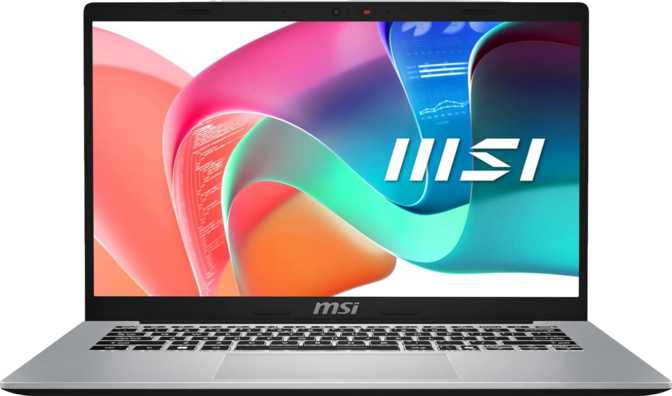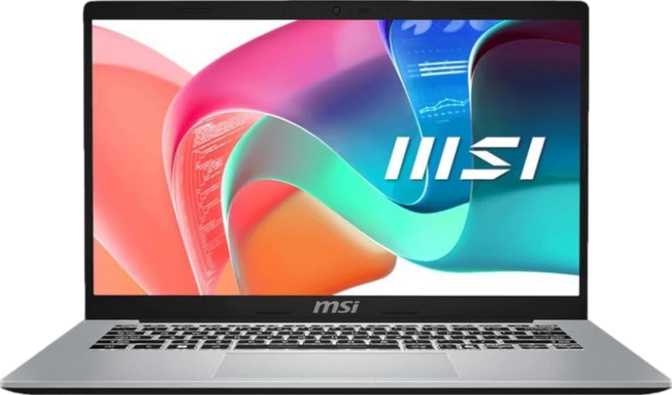
MSI Modern 14 F13M Review: Practical Productivity Laptop Tested
LaptopsAt a Glance
Six specifications that define the MSI Modern 14 F13M before you read further
Who Should Be Reading This Review
The MSI Modern 14 F13M sits at an interesting crossroads in the laptop market — light enough to carry daily, capable enough for real work, and priced to appeal to anyone who resents paying a premium for a brand logo. But "capable enough" is doing a lot of heavy lifting in that sentence, and this review defines exactly what that means in practice.
If you work primarily in browsers, documents, spreadsheets, and communication apps, the picture here is genuinely appealing. If you're eyeing this machine hoping it moonlights as a gaming rig or a video editing workstation, you need to keep reading before committing.
4 / 5 — Recommended
A capable, portable productivity machine with upgradeable RAM and strong wireless. Battery life and absent biometrics are the main caveats.
Design and Build: Slim, Light, and Sensible
Physical experience, materials, and everyday carry
Physical Presence
At 1.5 kilograms and just 19 millimeters thin, this machine earns its place in the all-day carry category without argument. Its weight is roughly equivalent to three stacked paperback novels — light enough to forget in a bag on the commute, thin enough to slide into most sleeves without fuss.
The footprint — 323mm wide by 217mm deep — keeps things compact without feeling cramped. The chassis occupies just 1.33 liters of total volume: a respectable achievement for a 14-inch machine with active cooling onboard.
Cooling and Acoustics
This is not a fanless design. An internal fan manages thermals under load, which means you will hear it during demanding tasks. The upside: active cooling allows the processor to run at full speed in scenarios that would throttle a passively cooled machine into sluggishness.
MSI has generally tuned its Modern series for quiet office operation. This is not a machine that sounds like a jet engine — but library users and open-plan office workers should know the fan responds visibly to demand.
Keyboard and Build
A backlit keyboard is included — evening meetings, dim conference rooms, and late work sessions all benefit from keys you can actually see. Backlighting signals that MSI treated this as a complete daily-driver package rather than a stripped-back budget device.
The Display: Workable, Not Wow
A solid IPS panel that does its job — with one meaningful limitation
Panel Quality and Viewing Experience
The 14-inch IPS panel delivers 1920 × 1080 resolution — approximately 157 pixels per inch. At normal viewing distances, text is crisp and icons are clean. This is a comfortable resolution for a 14-inch screen: not so high that UI scaling becomes a headache, not so low that individual pixels become visible.
IPS technology means consistent color accuracy and stable viewing angles. Look at the screen from the side during a presentation or over someone's shoulder, and the image holds up without washing out. This is the right panel type for a productivity machine that gets shared and shown around.
The display refreshes at 60Hz — standard for a work-focused laptop. Scrolling through documents, browsing the web, and working in spreadsheets all feel natural at this rate. Users expecting the buttery-smooth motion common in gaming-adjacent machines will not find it here.
Multi-Monitor Support: This machine supports up to four simultaneous external displays — a generous ceiling that far exceeds what most professionals will ever need, and a genuine advantage for desk-bound power users.
- Size14 inches
- Resolution1920 × 1080 (FHD)
- Pixel Density157 PPI
- Panel TypeIPS, LED-backlit
- Refresh Rate60 Hz
- Touch ScreenNo
- Anti-Glare CoatingNo
- Max External DisplaysUp to 4
Performance: The Heart of the Matter
Processor architecture, real-world benchmarks, memory, and storage
Processor Architecture Explained
The processor inside the MSI Modern 14 F13M uses a hybrid core architecture that divides its cores into two distinct groups. Two high-performance cores tackle the most demanding tasks — complex calculations, heavy applications, anything needing maximum single-thread speed — while eight efficiency cores handle background processes, lighter workloads, and parallelizable tasks simultaneously.
This design allows the processor to deliver strong peak performance while conserving power during lighter activity. The efficiency cores handle real work — they're optimized for throughput over raw speed, not relegated to housekeeping duties.
Under peak demand the processor boosts to 5GHz — a meaningful ceiling for a 15-watt chip. The 10-nanometer manufacturing process achieves a balance of efficiency and performance well-suited to a thin machine that regularly runs on battery.
Memory Configuration
The 16GB of DDR4 memory is the right amount for this class of machine. It allows comfortable multitasking — dozens of browser tabs, multiple Office applications, a video call in the background, a music stream — without the system ever feeling strained under normal use.
Two physical memory slots make this machine genuinely upgradeable to a maximum of 64GB. A user who buys with 16GB today and later runs demanding data analysis tools or virtual machines has a clear upgrade path without replacing the entire computer.
Storage
The NVMe SSD runs on PCIe Gen 4 — the current performance standard for laptop storage. Application launches feel instant, large file operations complete in seconds, and the system wakes from sleep nearly immediately. 512GB suits most users who manage files sensibly and use cloud storage for archives.
Benchmark Scores in Context
Raw scores shown with performance bars scaled relative to the productivity laptop category. Higher bars indicate stronger performance within this market segment.
Geekbench 6 — Single Core
Strong single-thread speed — fast app launches and a responsive UI across all everyday workloads.
Geekbench 6 — Multi Core
Capable multi-core throughput for multitasking and parallel workloads within the productivity segment.
PassMark CPU — Overall
Comfortably mid-tier for productivity laptops — exceeds what office and document work will ever demand.
PassMark CPU — Single Core
Competitive single-core speed — clicks, typing, and app switching all feel genuinely quick.
Graphics: Integrated and Honest About It
Intel Iris Xe — what it can do, and where the ceiling is
The Intel Iris Xe integrated GPU, configured with 96 execution units, is Intel's most capable integrated graphics solution. This represents a meaningful step beyond the basic integrated graphics found in entry-level machines — though it remains integrated hardware sharing system memory rather than a dedicated chip with its own resources.
In practice, Iris Xe handles everything that office work and content consumption demand: multiple 4K monitors, smooth video playback, light photo editing, and basic creative tasks. It supports DirectX 12 and OpenCL 3, enabling compatibility and some acceleration in supported creative applications.
Under load, the GPU reaches 1,300MHz with 768 shader units and 48 texture mapping units available. These figures translate to genuine usability for casual Adobe Photoshop sessions, basic video trimming, and similar light creative work — not a ceiling, but a clearly defined one.
- Multi-monitor setups (up to 4 displays)
- 4K video playback
- Light photo editing (Lightroom, basic Photoshop)
- Basic video trimming and timeline work
- Modern AAA gaming at playable frame rates
- 3D rendering or animation (Blender, Cinema 4D)
- GPU-accelerated machine learning workloads
- Ray tracing (not supported on this hardware)
Connectivity: Surprisingly Complete
Ports, wireless, and everything in between
Port Selection
The port layout covers the essential bases in better quantity than many slim competitors. Three full-size USB-A ports in a machine this thin shows that MSI prioritized real-world usability over minimalism.
- Three USB-A ports (Gen 1)
Works with virtually every peripheral ever made. Having three avoids the hub-carrying frustration that plagues competitors with just one or two full-size USB ports. - One USB-C port (Gen 2, 10 Gbps)
For fast external drives, display adapters, and charging. Note: this is not Thunderbolt. Users relying on Thunderbolt docks should verify compatibility carefully before purchasing. - HDMI output
For connecting monitors, projectors, or TVs. Universally compatible — no adapter needed for the vast majority of display setups. - MicroSD card slot
A meaningful inclusion for photographers, videographers, and anyone regularly pulling media from cameras. Many thin laptops have quietly dropped this. - 3.5mm audio jack
Wired headphones and headsets work without dongles or adapters — a small convenience that some thin laptops have silently removed.
What's Absent
- No RJ45 ethernet port
Wired network connectivity requires a USB adapter — a common omission on slim machines but worth planning for in IT environments where wired connections are required. - No Thunderbolt 3 or 4
Users dependent on Thunderbolt docks or high-bandwidth Thunderbolt peripherals should confirm compatibility before purchasing. Standard USB-C peripherals are fully supported. - No DisplayPort output
Display connectivity runs through HDMI or USB-C. Adapters may be required for certain professional monitor setups that rely on native DisplayPort.
Wi-Fi 6E extends into the 6GHz radio band, which carries dramatically less congestion than the crowded 2.4GHz and 5GHz bands in dense environments — apartments, coworking spaces, conference venues. For users with a Wi-Fi 6E router, the improvement in speed and consistency is tangible and real.
Fully backward-compatible with Wi-Fi 6, 5, and 4 networks. Bluetooth 5.3 covers modern wireless peripherals with low latency and reliable connections.
Battery Life: Realistic Expectations
Understanding what 46.8 Wh means across your actual working day
The 46.8 watt-hour battery is a modest capacity by current standards. A 15-watt processor and a 1080p IPS panel are not power-hungry components, but the relatively small cell means the relationship between workload and runtime is direct and unforgiving.
Under light-to-moderate use — document editing, web browsing, occasional video calls at moderate screen brightness — most users can expect a full workday from a single charge under favorable conditions. Push into video playback, sustained CPU tasks, or high screen brightness, and that window shortens meaningfully.
For comparison, many competing 14-inch productivity laptops ship with batteries in the 50–72 watt-hour range. The MSI Modern 14 F13M sits at the lower end of that scale — not a dealbreaker for a machine that spends most of its life near an outlet, but a meaningful consideration for users who need consistent all-day unplugged performance.
Below-average capacity for the 14-inch productivity segment
Camera and Audio: Fit for Purpose
Webcam quality, microphone, and speaker performance
Webcam
The front camera captures 720p video at 30 frames per second. This is entry-level by current standards — 1080p webcams have become the norm for laptops targeting professionals. The output is serviceable for internal meetings and calls where maximum video quality isn't a priority.
There is no Windows Hello facial recognition and no fingerprint scanner on this machine. Quick biometric login — the kind that unlocks instantly as you sit down — is not available. Password entry every time the screen locks is the reality here.
Audio
Stereo speakers and a single internal microphone represent the audio setup. The speakers handle meeting audio, media consumption, and background music adequately for a machine this size — they're not audiophile hardware, but they're serviceable for the use cases a productivity laptop encounters.
For important calls or any scenario where microphone quality matters, a dedicated headset or external microphone is the better choice. A single built-in microphone rarely delivers satisfying clarity in reverberant rooms or noisy environments — and no amount of software processing fully compensates for that physical limitation.
Who This Laptop Is For — and Who It Isn't
The clearest guide to whether this machine belongs on your shortlist
The MSI Modern 14 F13M makes a genuinely strong case for the professional whose workday lives in productivity software — office suites, project management tools, communication platforms, browser-based applications, light data analysis, and cloud-connected workflows.
- Office workers: Word, Excel, PowerPoint, Outlook, Teams
- Students in most fields — research, writing, data analysis, coding
- Remote workers who move between home, office, and client sites
- Anyone who wants upgradeable RAM without paying flagship prices
- Users who need three USB-A ports without carrying a hub everywhere
Several use cases are genuinely beyond what this machine is designed to handle. Buying it for these purposes will produce frustration rather than productivity.
- Gamers: No dedicated GPU, integrated graphics only, 60Hz display
- Video editors: Slow exports, limited GPU acceleration for effects
- 3D modelers: No dedicated GPU compute available at any level
- All-day road warriors: Below-average battery for sustained off-outlet use
- Biometric login users: No fingerprint reader, no facial recognition
How It Compares to the Alternatives
MSI Modern 14 F13M against typical budget and mid-range 14-inch productivity competitors
| Feature | MSI Modern 14 F13M | Budget 14" Competitor | Mid-Range 14" Competitor |
|---|---|---|---|
| CPU Architecture | Hybrid (P+E cores) | Often single-type cores | Hybrid in most models |
| RAM (Standard) | 16 GB DDR4 | 8 GB in many models | 16 GB typical |
| RAM Upgradability | Yes, up to 64 GB | Often soldered | Varies — many soldered |
| Storage | 512 GB PCIe 4 NVMe | Often PCIe 3 or eMMC | 512 GB–1 TB PCIe 4 |
| Wireless Standard | Wi-Fi 6E | Often Wi-Fi 5 or 6 | Wi-Fi 6 or 6E |
| USB-A Ports | 3 ports | 1–2 typical | 2 common |
| Thunderbolt | No | Rarely | Sometimes at higher price |
| Display Refresh Rate | 60 Hz | 60 Hz | 60–120 Hz (model-dependent) |
| Biometric Login | None | Fingerprint on some models | Fingerprint reader common |
| Battery Capacity | 46.8 Wh | 38–50 Wh (varies) | 50–72 Wh typical |
Honest Assessment
Where the MSI Modern 14 F13M earns praise — and where it falls short
The performance-to-portability balance is well-judged. A processor that scores above 14,000 on PassMark and north of 2,400 on Geekbench 6 single-core is a genuinely capable engine for the work this machine is positioned to do. Pair that with fast NVMe storage, 16GB of memory, and Wi-Fi 6E, and the daily-driver experience is smooth and responsive throughout.
The port selection deserves specific praise. Three USB-A ports in a machine this thin demonstrates that MSI prioritized real-world usability over minimalism. Competitors that ship with a single USB-C and a single USB-A force most users to carry a hub — an extra expense and friction the Modern 14 avoids by default.
The upgradeable RAM is a long-term value argument. Soldered memory means accepting whatever configuration you start with for the machine's entire life. Two physical slots and a 64GB ceiling mean this laptop can remain relevant as software demands grow over time.
The battery is the most honest criticism. A smaller-than-average capacity in a machine positioned for productivity means that travel-heavy users and full days away from outlets will create real range anxiety. This is not a confident transcontinental flight companion in unplugged scenarios.
The webcam disappoints for a machine targeting professionals. In an era when remote work has made video calls a core job function, shipping a 720p camera feels like an unnecessary concession. If your video presence matters professionally, budget for an external camera from day one.
The absence of any biometric login — no fingerprint reader, no facial recognition — is a genuine usability gap. Password entry every time the screen locks slows the daily rhythm in ways easy to underestimate until you've experienced a machine with instant biometric unlock.
Questions Buyers Actually Ask
Direct answers to the most common pre-purchase questions
Final Verdict
The bottom line on the MSI Modern 14 F13M
The MSI Modern 14 F13M is a well-constructed productivity laptop that makes sensible decisions where they matter most. The processor delivers genuine performance for office workloads, the storage is fast and accessible, the memory is upgradeable, and the wireless connectivity is current-generation. Three USB-A ports and a microSD slot make it unusually well-connected for a machine this size.
The compromises — a modest battery, an aging webcam, no biometric login, and integrated-only graphics — are real and should not be dismissed. They define the machine's boundaries clearly, and honest buyers should weigh them against their specific needs.
Buy this if you:
- Need a light, capable productivity daily driver
- Value physical port availability over sleekness
- Want upgradeable memory for long-term value
Look elsewhere if you:
- Require all-day battery without access to an outlet
- Depend on biometric login for daily speed
- Perform GPU-intensive work of any kind
For the professional living in productivity software, this is a straightforward recommendation.