MSI MEG X870E Unify-X Max: Full Review of AMD's Premium AM5 Flagship
MotherboardsThe high-end motherboard market is full of products that carry premium price tags and enthusiast branding while quietly compromising on the things that actually matter to serious builders. The MSI MEG X870E Unify-X Max is not one of those products. Built on AMD's most capable consumer platform and designed without apparent concession to budget constraints, this board targets the small but serious segment of builders who want an AM5 foundation they will not need to second-guess for years. Whether you are planning a professional workstation, a content creation powerhouse, or an uncompromising gaming rig, what this board offers — and what it deliberately omits — tells a clear story about who it was engineered for.
Key Specifications at a Glance
Platform
AM5 Socket · X870E
ATX Form Factor
Memory
DDR5 · 2 Slots · 128 GB
OC Up to 10,600 MHz
Storage
5× M.2 · 2× SATA 3
RAID 0, 1, 5 & 10
Connectivity
8× USB-A · 2× USB4
2× Thunderbolt 4 · Up to 40 Gbps
Wireless
Wi-Fi 7 · Bluetooth 5.4
802.11be · Full Backward Compat.
Reliability
Dual BIOS · 3-Year Warranty
Clear CMOS · RGB Lighting
Design and Build Quality
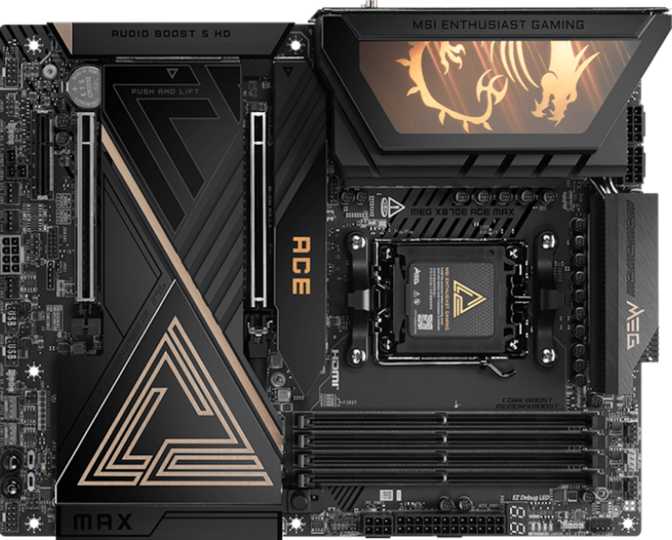
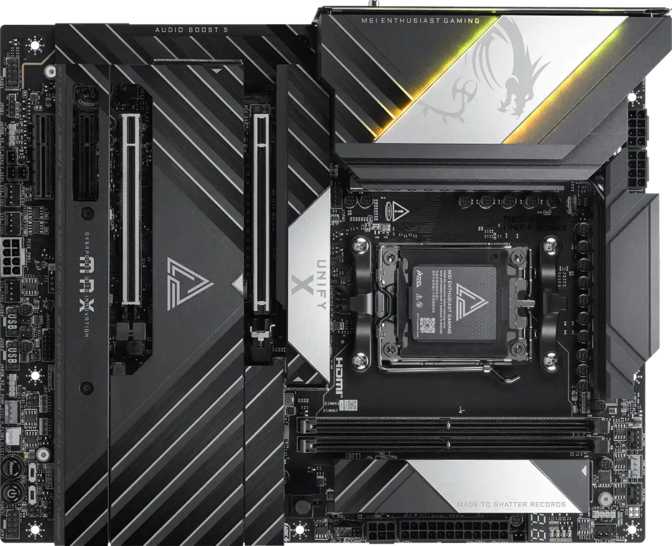
MSI's MEG line has long represented the company's top-tier offerings, and the Unify-X Max carries that identity with a visual language that prioritizes restraint over spectacle. The board ships in a predominantly dark colorway — part of the Unify series' signature look — which suits builders who want a high-performance aesthetic without garish excess.
RGB lighting is present but considered. Unlike some Unify variants that strip lighting entirely, the Unify-X Max retains addressable RGB so builders who want lighting control keep that option — but the implementation favors subtlety. If you want complete darkness, the lighting can be disabled through MSI's software or BIOS entirely.
Build quality at this tier reflects the engineering investment. The VRM configuration, PCB layer count, and reinforced slot design speak to structural durability under sustained workloads and aggressive overclocking — areas where cheaper boards start cutting corners quietly.
Physical Specifications
- Form Factor
- ATX
- Width
- 304.8 mm
- Height
- 243.8 mm
- CPU Sockets
- 1 × AM5
Build Highlights
- Dark Unify colorway — clean, professional aesthetic with no garish excess
- Addressable RGB — present but fully controllable or disableable
- Reinforced PCIe x16 slot — structural protection against GPU sag
- Standard ATX mounting — fits most mid-tower and full-tower cases
Platform Foundation: X870E and AM5
The Socket and Chipset
The board is built on AMD's AM5 socket using the X870E chipset — the highest tier in AMD's current consumer lineup. AM5 supports Ryzen 7000 and Ryzen 9000 series processors, and AMD has committed to platform continuity with future generations expected to remain compatible. Buying into AM5 today means buying into a platform with meaningful upgrade runway, not a dead end.
The X870E chipset adds chipset-level PCIe 5.0 across both the primary graphics slot and M.2 storage, higher USB bandwidth allocation, and enhanced overclocking capabilities compared to lower-tier X870 or B850 chipsets. For builders who want maximum lane availability and connectivity headroom, X870E is the correct foundation.
Memory Configuration
Two DDR5 slots with dual-channel support accept up to 128 GB. The two-slot layout is a deliberate engineering choice — it reduces signal interference on the memory trace, enabling more stable operation at extreme speeds. The overclocking ceiling reaches 10,600 MHz, far beyond what four-slot boards typically achieve reliably.
The native JEDEC-rated ceiling is around 5,600 MHz, but with EXPO or XMP profiles, speeds well past 8,000 MHz are accessible. For latency-sensitive work — 3D rendering, simulation, high-framerate gaming — that bandwidth advantage translates into measurable real-world differences.
With only two DIMM slots, your memory configuration is fixed at purchase. If you start with 32 GB and later need 64 GB, you replace both sticks — not supplement them. Plan your full memory requirement before committing to this board. The trade-off is access to the platform's highest overclocking ceiling, which four-slot boards structurally cannot match.
Storage: Built for the NVMe Generation
M.2 Slots
Five M.2 slots enable a fully NVMe-based storage build — no cables, maximum transfer speeds, and enough slots for a dedicated boot drive, application drive, scratch storage, and additional overflow, all running simultaneously without compromise.
SATA 3 Ports
Two SATA 3 connectors accommodate legacy hard drives or SATA-based SSDs. Adequate for hybrid configurations, but builders planning large SATA arrays should note this as a deliberate design signal: SATA is the secondary option here by intention.
Full RAID
RAID 0, 1, 5, and 10 are all supported, enabling everything from maximum throughput configurations to fault-tolerant data redundancy. Relevant for prosumer workstations and NAS-adjacent builds where data integrity has tangible value.
RAID Configuration Reference
| RAID Mode | What It Does | Min. Drives | Supported |
|---|---|---|---|
| RAID 0 | Striping — maximum read/write throughput, no redundancy | 2 | |
| RAID 1 | Mirroring — full data redundancy, no throughput gain | 2 | |
| RAID 5 | Parity striping — storage efficiency balanced with fault tolerance | 3 | |
| RAID 10 | Stripe of mirrors — speed and redundancy combined | 4 |
Connectivity: A Rear I/O That Sets a New Reference Point
The rear I/O panel is where a board's connectivity philosophy becomes concrete. The Unify-X Max makes a clear statement.
USB Port Allocation
Transfers a 100 GB file in roughly 80 seconds per port
Supports external GPU enclosures and multi-device hubs without bottlenecking
Daisy-chaining, TB docks, and Thunderbolt displays — native, on AMD
Standard high-speed Type-C for everyday peripherals
Wired Networking
One RJ45 Ethernet port handles wired connectivity. At this price tier, 2.5 Gigabit Ethernet is the expected baseline — faster than most residential internet connections can saturate, and more than adequate for NAS access and local file transfers at full speed.
Wireless
Wi-Fi 7 (802.11be) with full backward compatibility covering Wi-Fi 4 through 6E. Wi-Fi 7 delivers multi-gigabit wireless throughput and significantly improved performance in congested wireless environments.
Bluetooth 5.4 handles short-range peripherals with current-generation energy efficiency and reduced interference.
Display Output
One HDMI 2.1 port connects through AMD's integrated graphics pathway — useful for diagnostics or for Ryzen "G" processors with built-in video output.
No DisplayPort output is provided. Standard non-G Ryzen processors require a discrete GPU for any display output.
Expansion Slots and Onboard Audio
PCIe Expansion
One PCIe 5.0 x16 slot handles the primary graphics card. PCIe 5.0 doubles the bandwidth of PCIe 4.0, providing a ceiling that current GPUs cannot yet saturate — but future-proofing the build for next-generation cards that will approach those limits. The reinforced slot protects against sag from heavier GPU coolers.
Two PCIe x4 slots and one PCIe x8 slot offer meaningful room for add-in cards beyond the GPU — NVMe expansion, capture cards, high-speed networking, or specialized hardware. The absence of PCIe x1 slots reflects the board's emphasis on high-bandwidth expansion over sheer slot count.
| Slot Type | Count | Primary Use |
|---|---|---|
| PCIe 5.0 x16 | 1 | Primary GPU — future-proof bandwidth ceiling |
| PCIe x8 | 1 | Secondary card, capture card, or high-speed NIC |
| PCIe x4 | 2 | NVMe expanders, audio cards, or networking |
Onboard Audio
The audio section achieves a 120 dB signal-to-noise ratio — a figure describing how cleanly audio is rendered relative to background noise. Most motherboard audio sits in the 100–110 dB range. At 120 dB, this solution is clean enough that most users with high-impedance headphones or quality speakers will not feel compelled to add a dedicated sound card.
-
7.1 SurroundFull multichannel audio output
-
S/PDIF OutOptical output for external DACs and AV receivers
-
120 dB SNRAudiophile-grade signal clarity
-
2 Rear ConnectorsPhysical audio jacks on the rear panel
Overclocking, BIOS Protection, and Thermal Control
Overclocking Capability
MSI's MEG line is consistently associated with premium VRM configurations designed to handle the sustained power demands of high-core-count AMD processors running above stock specifications. This is not a board that apologizes for the demands of serious overclocking.
Memory overclocking headroom reaching 10,600 MHz positions the Unify-X Max at the upper boundary of what the AM5 platform can currently achieve — a ceiling made possible only by the two-slot DDR5 layout, which reduces signal interference in ways a four-slot trace cannot.
BIOS Features and Cooling Control
Two independent BIOS copies stored on-board. If the primary is corrupted during a failed update or power interruption, the secondary activates automatically — a necessary safeguard for aggressive firmware experimentation or extreme memory tuning sessions.
Accessible reset mechanism to restore BIOS defaults after a failed memory overclock, without opening the case or locating a jumper — critical when working at the edge of memory stability.
Comprehensive thermal control across large multi-radiator liquid cooling setups or complex air-cooling configurations. Each header is individually addressable with custom fan curves tied to specific temperature sensors.
Who Should Buy the MSI MEG X870E Unify-X Max?
Honest self-assessment is critical at this price point. Here is exactly who this board was engineered for — and who it was not.
This Board Is For You If...
-
You are building a professional workstationCPU-intensive work in 3D rendering, video editing, or software compilation benefits directly from maximum DDR5 bandwidth, PCIe 5.0 storage, and Thunderbolt 4 peripheral connectivity.
-
You want to push DDR5 memory to its limitsThe two-slot layout, robust VRM, and dual BIOS safety net create an environment purpose-built for extreme memory tuning, with a ceiling that competing four-slot boards cannot structurally reach.
-
You use Thunderbolt-based peripherals on AMDTwo dedicated Thunderbolt 4 ports on an AM5 board fills a gap that has historically pushed Thunderbolt-dependent professionals toward Intel systems.
-
You are investing in a long-term AM5 platformWith AMD's commitment to AM5 longevity, this board should remain relevant through multiple CPU upgrade cycles without requiring a platform change.
This Board Is Not Right If...
-
Your budget demands value efficiencyCapable X870 boards exist at significantly lower prices for builders who don't need Thunderbolt 4, extreme memory overclocking, or the full USB4 port allocation.
-
You need four DIMM slotsThe two-slot design locks your memory configuration at purchase. Builders who want to add memory incrementally over time will find this restrictive, regardless of the board's other strengths.
-
You run a large SATA storage arrayTwo SATA connectors serve most builders adequately, but anyone planning a six-drive SATA array needs a board with more traditional storage connectivity.
-
Thunderbolt is not part of your workflowIf you will never use Thunderbolt 4, you are paying for a premium feature that will never provide return on investment. Competing X870E boards deliver more value for that specific case.
Competitive Positioning
At the top of the AM5 market, the Unify-X Max competes with flagship offerings from ASUS, Gigabyte, and ASRock. These are the differentiators that matter.
| Feature | MSI MEG X870E Unify-X Max |
Typical Competing Flagship |
|---|---|---|
| Memory Slots | 2 — peak OC headroom | 4 — more flexibility |
| Thunderbolt 4 | 2 Ports | Varies (0–2) |
| USB4 at 40 Gbps | 2 Ports | Varies |
| Rear USB-A at 10 Gbps | 8 Ports | Typically 4–6 |
| M.2 Slots | 5 Slots | Typically 4–5 |
| PCIe 5.0 x16 | 1 Slot | 1 Slot |
| SATA Connectors | 2 Only | Typically 4–6 |
| Wi-Fi Generation | Wi-Fi 7 | Wi-Fi 6E to 7 |
Builders who prioritize four-slot memory flexibility will find competing ASUS ROG Crosshair or Gigabyte Aorus Extreme boards more accommodating. The Unify-X Max's differentiators are Thunderbolt 4 on AMD, rear USB density, and DDR5 overclocking ceiling.
Honest Assessment: Strengths and Limitations
Genuine Strengths
The dual-slot DDR5 layout is a genuine engineering choice that produces real-world memory performance advantages. The structural advantage over four-slot boards is measurable at the overclocking ceiling this board targets — not a marketing decision, but a physics-based trade-off that pays dividends for enthusiast tuners.
Thunderbolt 4 on an AMD platform fills a gap that has historically pushed Thunderbolt-dependent professionals toward Intel systems. Having two dedicated ports on an X870E board is genuinely uncommon and addresses a real workflow requirement.
The rear I/O — eight USB-A ports at 10 Gbps, two USB4 connections at 40 Gbps, and two Thunderbolt 4 ports — is among the most capable rear panels on any AM5 board. Running out of high-speed ports is functionally impossible in any realistic use case.
Real Limitations
Two memory slots means your configuration is locked at purchase. If you fill both slots with 64 GB today and need 128 GB next year, you are replacing both sticks — not adding to what you have. Plan your memory requirements in full before committing to this board.
Only two SATA connectors is a meaningful constraint for builders with existing drive collections or plans for traditional storage expansion. The board does not pretend SATA does not exist, but makes clear that traditional storage is a legacy consideration, not a design priority.
This board demands honest self-assessment. If Thunderbolt 4, extreme DDR5 overclocking, and the full USB4 allocation are not part of your actual workflow, you are paying for spec sheet credentials your real-world usage will never redeem.
Questions Real Buyers Ask
The most common pre-purchase questions about the MSI MEG X870E Unify-X Max, answered directly.
Final Verdict
The MSI MEG X870E Unify-X Max earns its flagship designation without ambiguity. It is engineered for builders who have thought carefully about what they need from an AM5 platform and arrived at an honest list that includes maximum memory bandwidth, Thunderbolt 4 in an AMD ecosystem, PCIe 5.0 storage, and long-term platform investment. For that specific builder, this board is not an indulgence — it is the correct tool.
For everyone else, the question is whether the premium features justify the cost in your specific context. If Thunderbolt 4 is not part of your workflow, if extreme DDR5 overclocking is not a goal, and if you are not filling five M.2 slots, capable X870E alternatives exist at lower cost. But if your build requirements align with what this board actually delivers, you will not find yourself wishing for more.