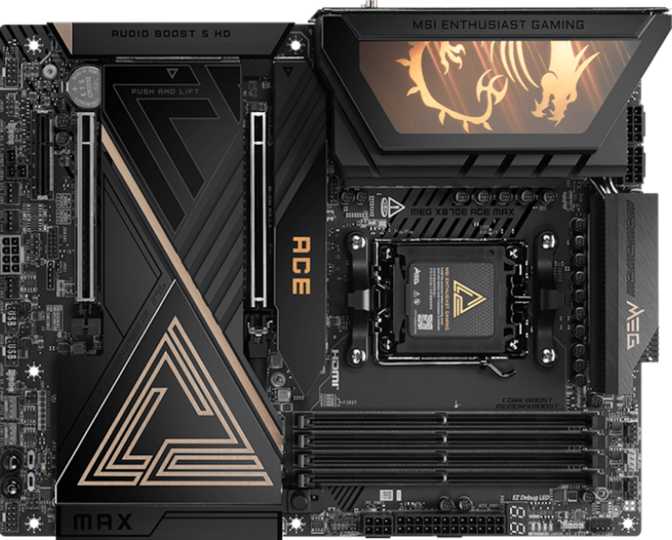
MSI MEG X870E Ace Max: A Full Review of AMD's Top AM5 Board
MotherboardsThe X870E chipset sits at the top of AMD's current platform hierarchy, and the MSI MEG X870E Ace Max earns its position there without compromise. This is not a board for the builder who wants the minimum entry point into a fast platform — it is built for the builder who plans to stay on this platform for years, upgrading GPUs and adding storage without the board ever becoming the limiting factor. Whether that commitment reflects your actual use case is the only question worth answering before you spend this much.
Platform At a Glance
Eight defining specifications of the MEG X870E Ace Max
Design and Build: ATX Done With Intent
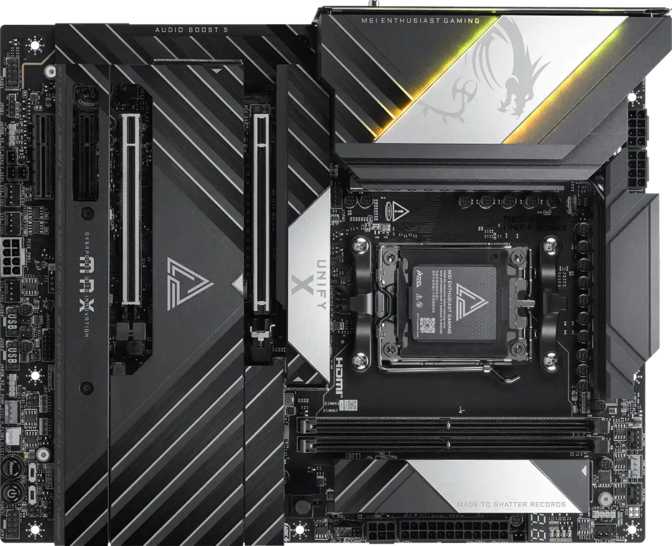
The MEG X870E Ace Max follows the standard ATX form factor — 304.8 mm wide by 243.8 mm tall — which fits virtually every full-tower and mid-tower case on the market. For builders, this is the responsible choice: maximum case compatibility, no awkward bracket positioning, and no slot-layout compromises driven by a smaller footprint.
MSI's MEG branding sits at the top of their consumer lineup, above the MAG and MPG tiers. The physical experience reflects this position. RGB lighting is integrated across the board in a way that reads as intentional rather than excessive — and whether it runs at all is entirely software-configurable.
Two design choices stand out as genuinely practical rather than merely impressive on a feature list. The dual BIOS system places two separate firmware chips on the board: if a BIOS update fails mid-process — through a power cut, corrupt file, or interrupted flash — the board recovers automatically from its backup chip without intervention. The dedicated clear CMOS mechanism lets you reset firmware to factory defaults without opening the case. Both features are most valuable during heavy overclocking sessions, where firmware instability is a real-world risk rather than a theoretical one.
Platform and Processor Compatibility
The MEG X870E Ace Max is built for AMD's AM5 socket, housing Ryzen 7000 and Ryzen 9000 series processors. The X870E chipset — the "E" standing for Extreme — is AMD's highest-tier designation for this socket generation, offering more PCIe lanes, more USB bandwidth allocation, and greater overclocking flexibility than the standard X870 or the mid-range B650E below it.
That distinction has real-world consequences. The chipset determines how many devices the board can communicate with at full speed simultaneously. On a lesser chipset, running a fast NVMe drive, a USB 4 peripheral, and a high-bandwidth GPU at once can create lane contention — one device throttling another. The X870E's expanded lane architecture is engineered to eliminate that scenario in typical power-user configurations.
This board provides no integrated graphics support. A dedicated GPU is mandatory for any display output. If you install a Ryzen processor without an integrated graphics unit, you will see no video signal without a discrete graphics card installed. Plan your build accordingly.
Overclocking Capability
The MEG X870E Ace Max is built explicitly for overclocking at every level — CPU frequency, memory speed, and bus timings. MSI's implementation on this board targets extreme memory overclockers specifically, with board trace routing and power delivery infrastructure engineered to maintain stability at speeds that most competing boards cannot reach cleanly. The full implications of this are detailed in the memory section below.
Memory: The Most Aggressive DDR5 Support Available
Four DDR5 slots across a dual-channel configuration support up to 256 GB total. For most users the practical ceiling is far below that figure, but the headroom is meaningful for content creators, simulation engineers, and anyone running memory-intensive professional workloads where available RAM defines throughput.
At stock settings, the platform supports DDR5 running at AMD's official specification for Ryzen on AM5. Where the MEG X870E Ace Max separates itself from the field is in overclocked memory territory. The board is validated to push selected DDR5 kits to 9000 MHz — a ceiling that sat firmly in the exotic category until recently and still requires serious hardware selection and tuning to achieve.
DDR5 Speed Context — Where This Board Sits
All values shown relative to the board's 9000 MHz validated overclocking ceiling
Reaching 9000 MHz in practice requires carefully selected high-grade DDR5 kits — typically Samsung or Hynix die variants — alongside precise voltage and timing adjustments and often dedicated cooling on the memory modules themselves. This figure is the validated ceiling for extreme overclockers, not an out-of-box XMP profile value.
Note: ECC (Error-Correcting Code) memory is not supported on this platform. If your workflow demands ECC for data integrity — scientific computing, financial systems, medical imaging — this board and the AM5 platform are not appropriate choices.
Storage: Five M.2 Slots and Comprehensive RAID Support
Five M.2 sockets onboard represent more than most users will ever fill — but exactly the right number for a builder who refuses to think about running out of slots. M.2 is the interface used by modern NVMe SSDs, which are significantly faster than traditional SATA drives in both sequential and random access. With five available, you can run a primary OS drive, a dedicated game library, a scratch disk for video editing, a long-term backup NVMe, and still have a spare slot for future expansion without touching an adapter card.
Four SATA 3 connectors serve existing SATA SSDs and traditional spinning hard drives. This makes migrating storage from a previous system straightforward — older drives slide in without adapters or converters.
Full RAID support across all four standard configurations gives NAS builders, video editors, and power users the flexibility to configure their storage subsystem exactly as their workflow demands — from pure performance striping to full mirror redundancy.
| RAID 0Striping for maximum drive performance |
| RAID 1Mirroring for complete data redundancy |
| RAID 5Balanced performance and redundancy (3+ drives) |
| RAID 10Combined mirroring and striping — highest reliability |
Expansion Slots: PCIe 5.0 at the Core
The primary graphics card slot runs PCIe 5.0 at x16 — the current standard's fastest lane configuration available on any consumer platform. Today's GPU generation does not fully saturate even PCIe 4.0 bandwidth in gaming scenarios, so the difference between this slot and a PCIe 4.0 x16 slot is marginal in practice right now. The value here is forward compatibility: as future graphics cards are designed with PCIe 5.0 data rates in mind, this board will run them at their full rated speed without compromise.
Beyond the primary slot, one x8 slot and one x4 slot accommodate additional expansion cards — capture cards, high-speed network adapters, NVMe expansion controllers, or PCIe-attached accelerators. The board omits PCIe x1 slots entirely, a deliberate choice that reflects the target buyer: at this tier, no one is installing legacy single-lane expansion cards.
| Slot | Lane Config | Interface | Primary Use Case |
|---|---|---|---|
| Primary | x16 | PCIe 5.0 | Discrete GPU — full bandwidth |
| Secondary | x8 | PCIe | Secondary GPU or high-bandwidth accelerator |
| Tertiary | x4 | PCIe | Capture cards, 10GbE NICs, NVMe controllers |
Connectivity: The Port Roster Is Exceptional
The rear panel of the MEG X870E Ace Max is genuinely dense, even by high-end standards. Nine USB-A ports running at 10 Gbps each represent roughly double what most boards in this category offer — four to six is typical. Two additional USB-C ports at the same 10 Gbps tier add front-side flexibility to that count.
More significantly, two USB 4 ports rated at 40 Gbps are present — and the board also carries two Thunderbolt 4 ports. This combination is unusual on an AMD platform. Thunderbolt 4 is Intel's certified 40 Gbps protocol that guarantees daisy-chaining of up to six devices, 100W power delivery, and compatibility with the full Thunderbolt ecosystem: docks, external GPU enclosures, high-speed storage arrays, and Thunderbolt monitors. For users who rely on that ecosystem — filmmakers, music producers, anyone with a Thunderbolt dock on their desk — this board removes the traditional Intel-only barrier.
Two RJ45 Ethernet ports complete the wired side. Dual Ethernet enables network segmentation — one port dedicated to gaming, one to a NAS or home server — or serves virtualization setups that require separate network bridges. One HDMI 2.1 port is present but only functional when using a Ryzen APU with an integrated graphics unit.
The internal header selection is equally thorough. Four USB 3.2 Gen 1 headers deliver front-panel USB-A ports running at 5 Gbps. One USB 3.2 Gen 2x2 header supports a front-mounted USB-C port at 20 Gbps — the highest speed available through an internal header on any current consumer platform.
Four USB 2.0 headers remain for legacy accessories: AIO cooler USB connections, RGB controllers, and older peripherals that still use low-speed USB links. Eight fan headers allow granular control of every fan in a fully cooled system — radiator fans, chassis fans, CPU pump header, and chipset cooling — without using Y-splitters that compromise individual speed control.
| Header Type | Count | Speed / Function |
|---|---|---|
| USB 3.2 Gen 1 (front-panel USB-A) | 4 | 5 Gbps per port |
| USB 3.2 Gen 2x2 (front-panel USB-C) | 1 | 20 Gbps — highest internal header speed |
| USB 2.0 (legacy devices) | 4 | 480 Mbps — AIO coolers, controllers |
| Fan & pump headers | 8 | Individual PWM / DC control per header |
| TPM connector | 1 | Hardware security & BitLocker support |
| SATA 3 connectors | 4 | Legacy SSD & HDD support |
Wi-Fi 7 is the headline here, implementing the latest generation of the wireless standard (802.11be). In practical terms, Wi-Fi 7 introduces multi-link operation — the adapter can simultaneously communicate across the 2.4 GHz, 5 GHz, and 6 GHz bands at once, reducing latency and improving throughput in congested environments compared to Wi-Fi 6E's single-link approach.
Backward compatibility runs all the way to Wi-Fi 4 (802.11n), so the board will connect to any router without issue. Bluetooth 5.4 covers peripherals: controllers, wireless headsets, and similar devices connect with the latest version of the standard.
The Bluetooth 5.4 implementation on this board does not include aptX or aptX HD codec support. Standard SBC and AAC codecs are available for Bluetooth audio. If you use Bluetooth headphones that rely on aptX for audio quality, this is worth factoring into your decision.
Audio: Studio-Grade Onboard Performance
The onboard audio implementation is a 7.1-channel system with a signal-to-noise ratio of 130 dB. To provide context: SNR measures how cleanly the audio hardware separates the intended signal from electronic interference generated by the rest of the board. Anything above 110 dB is considered very good by consumer standards. At 120 dB, dedicated audiophile sound cards begin to appear. At 130 dB, this implementation rivals standalone sound cards in the same price bracket.
For high-end headphone listening, multi-channel speaker setups, or recording applications, the onboard solution here is capable enough that most users will have no reason to add a dedicated sound card. That is a genuinely high bar for integrated audio.
S/PDIF optical digital output is present at the rear panel, enabling connection to external DACs, AV receivers, home theater processors, and studio monitors. Two audio jacks serve analog connections for headsets and speakers. The S/PDIF output is the detail that distinguishes this from a typical onboard implementation — it keeps professional and home theater setups fully connected without requiring an expansion card.
(>80 dB)Very Good
(>110 dB)Audiophile
(>120 dB)
Who This Board Is For — And Who Should Look Elsewhere
The MEG X870E Ace Max Is Right For You If...
- You are building a high-end gaming or workstation rig around a Ryzen 7000 or 9000 series processor and plan to keep the platform for four or more years.
- You need Thunderbolt 4 on an AMD platform — for a TB4 dock, external GPU, Thunderbolt storage array, or high-bandwidth monitor.
- You are a content creator, streamer, or video editor who needs multiple fast NVMe drives, USB 4 peripherals, and maximum I/O bandwidth simultaneously.
- You want to pursue extreme DDR5 memory overclocking and need a board with the trace engineering to support speeds beyond what mainstream high-end boards allow.
- You want dual Ethernet for network segmentation, virtualization, or dedicated NAS connectivity alongside your primary gaming or work connection.
Consider a Different Board If...
- Budget is a primary concern. A B650 or X670 board delivers the vast majority of daily performance for a materially lower cost — the premium here buys specific capabilities, not raw speed.
- Your workflow requires ECC memory for data-integrity-critical applications. The AM5 platform does not support ECC, and no board in this ecosystem changes that.
- You are building in a compact or small-form-factor case. ATX is the largest standard form factor and requires a full-size tower or mid-tower chassis.
- You rely on aptX or aptX HD Bluetooth audio for headphone listening. The Bluetooth 5.4 implementation here does not include those codecs.
- You are using an AM4 processor. AM5 and AM4 use physically incompatible sockets — there is no adapter path between them.
Competitive Positioning: How It Compares
The MEG X870E Ace Max versus logical AM5 platform alternatives at different price and feature tiers
| Feature | MSI MEG X870E Ace Max | Typical X670E Board | High-End B650E Board |
|---|---|---|---|
| Chipset Tier | X870E — Current Top | X670E — Previous Gen Top | B650E — Mid-Range |
| GPU PCIe Slot | Gen 5 x16 | Gen 5 x16 | Gen 5 x16 |
| USB 4 / Thunderbolt 4 | Both Present | Varies by model | Rarely included |
| M.2 Slots | 5 | 4–5 | 2–4 |
| Rear USB-A at 10 Gbps | 9 ports | 4–6 ports | 2–4 ports |
| DDR5 OC Ceiling | ~9000 MHz | ~7000–8000 MHz | ~6400 MHz |
| Dual Ethernet | Varies by model | ||
| Wi-Fi Generation | Wi-Fi 7 | Wi-Fi 6E | Wi-Fi 6E |
| Dual BIOS | Varies by model | ||
| Warranty Period | 3 Years | 2 Years (typical) | 2 Years (typical) |
Competing board specifications represent typical configurations at their respective tiers and will vary between individual models and manufacturers.
Honest Strengths and Where the Trade-Offs Sit
What This Board Gets Right
The MEG X870E Ace Max's clearest strength is its I/O comprehensiveness. The combination of Thunderbolt 4, USB 4, nine high-speed USB-A ports, five M.2 slots, and a PCIe 5.0 primary slot means this board is genuinely over-provisioned for today's use case — in exactly the way that a long-term investment should be. You are unlikely to outgrow its connectivity within a reasonable upgrade cycle.
The memory overclocking headroom is a specific and significant strength for enthusiasts who want to extract every percentage point from their DDR5 kits. Most high-end boards plateau well before 8000 MHz under realistic conditions. The Ace Max's infrastructure pushes that ceiling noticeably and verifiably higher.
The three-year warranty, dual BIOS, and dedicated CMOS reset together signal that MSI is shipping this board with full awareness of how it will be used. These are not afterthoughts — they are the kind of details that tell you the engineering team actually thought about the end-to-end ownership experience.
Where to Apply Realistic Skepticism
The feature density that makes this board appealing is also the source of its most honest complexity trade-off. More PCIe lanes, more USB controllers, and more headers mean more interdependencies in the BIOS. Bringing a heavily loaded X870E build to full stability — particularly with extreme memory configurations — takes time and patience. This is not a board for a builder who wants to install and forget. It rewards users who are willing to engage with the BIOS in depth over time.
The absence of PCIe x1 slots is a deliberate engineering choice, but it does exclude users with specific legacy expansion hardware. If you rely on a single-lane PCIe card for any reason, this board won't accommodate it.
The aptX Bluetooth audio limitation affects a narrow but real segment of buyers — specifically those who pair high-quality Bluetooth headphones and depend on that codec for audio fidelity. It is worth surfacing explicitly rather than burying in a footnote.
Questions Buyers Actually Ask Before Purchasing
Direct answers to the most common questions about the MSI MEG X870E Ace Max
A Platform Built for the Long Game
The MSI MEG X870E Ace Max is not trying to be the most affordable path into the AM5 ecosystem — and it doesn't pretend otherwise. What it offers is a complete, uncompromised flagship: every modern connectivity standard covered, memory overclocking headroom that exceeds what most enthusiasts will ever test, and the rare combination of Thunderbolt 4 on an AMD platform. If you're building a system you intend to run for four or more years, upgrading components along the way, the investment in a board like this pays back in the form of a platform that never becomes the reason you need to rebuild.
Buy It If
- Building a high-end Ryzen rig for content creation, streaming, or serious gaming
- You need Thunderbolt 4 on an AMD platform without compromise
- Running multiple fast NVMe drives and high-bandwidth USB 4 peripherals simultaneously
- Pursuing the DDR5 overclocking ceiling the AM5 platform is capable of reaching
Look Elsewhere If
- Budget is a primary constraint — strong alternatives exist at lower cost
- You require ECC memory for data-integrity-critical workloads
- You need a compact or small-form-factor build
- Bluetooth aptX audio is essential for your headphone setup