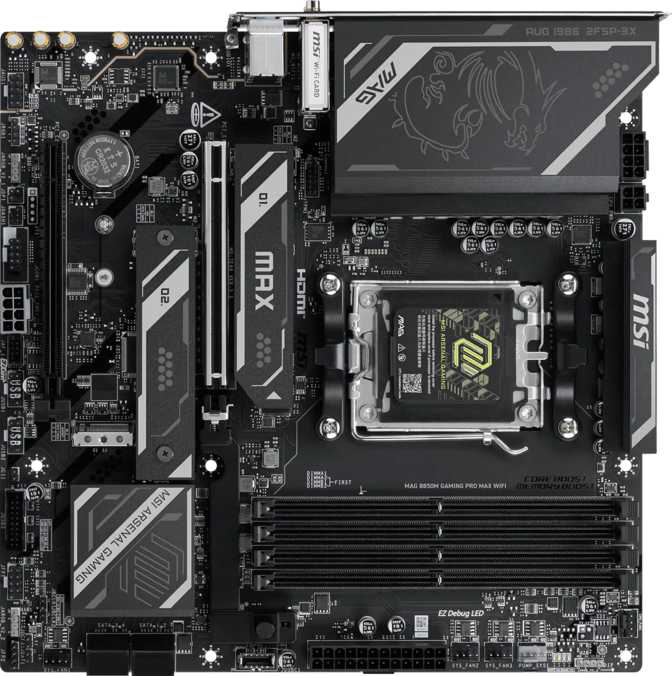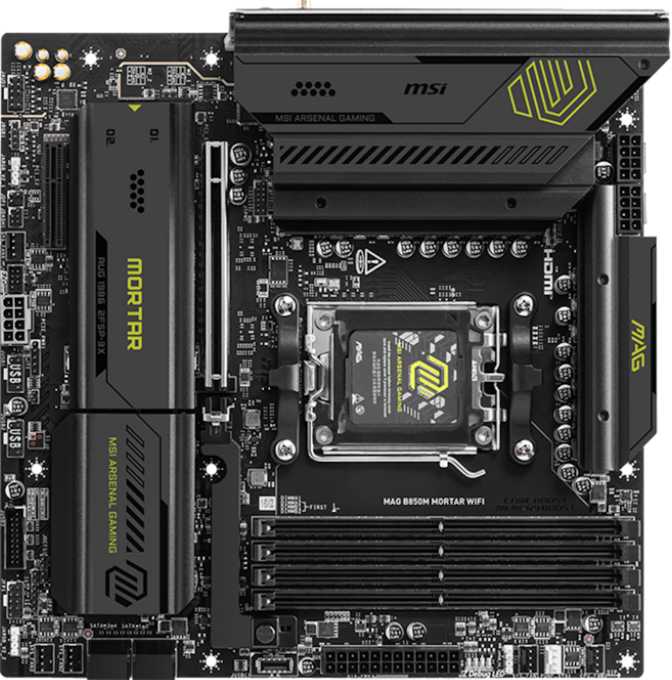
MSI MAG B850M Mortar WiFi Review: Compact AM5 Without Compromise
MotherboardsBuilding small used to mean giving something up — fewer ports, older wireless, a thinner storage lineup. The MSI MAG B850M Mortar WiFi challenges that assumption directly. At 244 × 244mm, it slots into any Micro-ATX or larger case without ceremony, but the connectivity it delivers reads more like a full-size enthusiast board than a space-saving one. Wi-Fi 7, PCIe 5.0, three M.2 slots, and nine rear USB ports of every modern variety: this board makes a credible argument that compact builds no longer require second-tier specs.
Whether you are assembling a gaming rig, a compact workstation, or a capable daily driver, the B850M Mortar WiFi positions itself as the answer. Here is what the specifications actually mean in practice.
Build and Physical Footprint
The Micro-ATX format — a perfect 244 × 244mm square — is the first thing to understand before purchasing. Micro-ATX cases are smaller, often quieter, and typically less expensive than full ATX enclosures. Crucially, Micro-ATX boards are also compatible with standard ATX cases, so you are not locked into compact enclosures if your preference changes later.
MSI's Mortar line sits within the MAG (MSI Arsenal Gaming) family as the brand's mid-range offering that prioritizes substance over cosmetic excess. The board includes RGB lighting — present for those who want a lit build, but not the theatrical kind that dominates at the expense of thermals. The emphasis is on functional engineering throughout.
Two reliability features stand out immediately. A dedicated hardware button resets the BIOS to factory defaults without needing to locate jumpers inside a dark case — essential when an overclock destabilizes a system. The dual BIOS design means two separate firmware chips are installed, with one serving as an automatic fallback if a firmware update fails or corrupts. On AM5, where BIOS revisions arrive regularly as AMD supports new CPU generations, this matters in practice rather than on paper.
Physical Specifications
-
Dimensions244 × 244 mm
-
StandardMicro-ATX (mATX)
-
RGB LightingYes — Addressable
-
BIOS ChipsDual BIOS — Backup Firmware
-
BIOS RecoveryDedicated Clear CMOS Button
The AM5 Platform and B850 Chipset: Why the Foundation Matters
The AM5 socket accepts AMD Ryzen 7000 and 9000 series processors, and AMD has publicly committed to this platform as its current consumer flagship. Buying into AM5 now means a credible CPU upgrade path exists without requiring a new motherboard down the road.
The B850 chipset positions itself in the middle of AMD's AM5 lineup — a meaningful step above the entry-level B650 and below the enthusiast-grade X870 and X870E. The practical outcome: the B850 delivers PCIe 5.0 bandwidth to the primary GPU slot, supports both CPU and memory overclocking, and carries more modern platform features than the base B650 tier allows. For gaming builds and content creation workloads that do not require extreme tuning, B850 is the sweet spot between feature access and cost efficiency.
B850 in AMD's AM5 Lineup
Mid-range — modern features without premium pricing
- PCIe 5.0 x16 GPU support
- CPU overclocking enabled
- DDR5 XMP / EXPO profiles
- Multi-generation AM5 upgrade path
Memory: Four DDR5 Slots with Serious Overclocking Headroom
Four DDR5 slots in a dual-channel configuration give flexibility that single-slot boards cannot match. Installing two matched sticks instead of one delivers measurably better memory bandwidth at no additional complexity — and all four slots can be filled as needs grow over time. The total capacity ceiling of 256 gigabytes is unusually high for a B850 board and will not constrain even intensive prosumer workloads like 3D rendering or multi-stream video editing.
The overclocked ceiling is the more compelling figure. Through AMD's EXPO profiles — the AMD-native equivalent of Intel's XMP tuning — supported kits can reach 8200 MHz. That is the current upper tier of consumer DDR5, and unlike boards that list OC support while practically capping it at modest gains, this specification is genuine. High-frequency memory kits will run as advertised rather than being bottlenecked by the board.
ECC (Error-Correcting Code) memory is not supported. This affects workstation builders requiring data-integrity guarantees — for gaming and everyday computing it is entirely irrelevant.
DDR5 Speed Tiers
For best results at high frequencies, use AMD EXPO-validated memory kits.
Storage: Three M.2 Slots and Room for Seven Drives Total
Three M.2 slots on a Micro-ATX board is a generous allocation. M.2 is the current standard for fast NVMe SSDs — cableless drives that seat directly on the motherboard for a clean build and high performance. One slot for the operating system, one for a games or application library, and a third for secondary fast storage or a scratch drive covers virtually every workflow without compromise.
Four SATA 3 connectors add support for traditional 2.5-inch SSDs and 3.5-inch hard drives for bulk storage — large media libraries, backup archives, or cost-effective high-capacity options where NVMe speeds are not required. Combined, the board accommodates up to seven simultaneous drives.
All major RAID configurations are supported, making the B850M Mortar WiFi a viable choice for small creative or business environments where data redundancy and protection are priorities.
RAID Configuration Support
Drive Slots at a Glance
Expansion Slots: PCIe 5.0 as the Long-Term Investment
The primary expansion slot delivers PCIe 5.0 at full x16 electrical bandwidth. PCIe 5.0 doubles the throughput of PCIe 4.0, and most current graphics cards do not saturate even PCIe 4.0 under game loads — meaning this slot provides forward compatibility headroom that grows more relevant as GPU generations advance. The board will not become a bandwidth bottleneck before the rest of the system is ready for replacement.
A secondary PCIe x4 slot provides space for capture cards, NVMe expansion adapters, or other PCIe accessories. On a Micro-ATX board where physical space is finite, two expansion slots is the appropriate allocation — with the GPU slot correctly prioritized at full bandwidth.
There are no PCIe x1 slots and no legacy PCI slots. Older accessories requiring those connections are not compatible. For any build using current hardware, this is the correct trade-off.
Expansion Slot Layout
Rear I/O: Nine Ports and a Standout 20 Gbps USB-C
The rear panel is where many mid-range boards quietly disappoint. The B850M Mortar WiFi does not follow that pattern. Nine USB ports cover a full desktop peripheral setup without needing a hub — and the top-tier USB-C runs at speeds that most competing boards in this size class skip entirely.
| Port Type | Count | Speed | Ideal Use |
|---|---|---|---|
| USB 3.2 Gen 1 Type-A | 4 ports | 5 Gbps | Keyboards, mice, headsets, hubs |
| USB 3.2 Gen 2 Type-A | 3 ports | 10 Gbps | Fast external SSDs, high-speed devices|
| USB 3.2 Gen 2 Type-C | 1 port | 10 Gbps | Modern peripherals, cable flexibility |
| USB 3.2 Gen 2×2 Type-C Standout | 1 port | 20 Gbps | Photo/video transfers, fast NVMe enclosures |
| Ethernet (RJ45) | 1 port | 1 Gbps | Wired network connection |
| HDMI 2.1 | 1 port | HDMI 2.1 | APU display output — G-series CPUs only |
Internal Headers (Case Expansion)
- 2 × USB 3.2 Gen 1 headers — front panel ports
- 1 × USB-C Gen 2 header — front panel USB-C
- 4 × USB 2.0 headers — legacy expansion
- 1 × TPM connector — Windows 11 ready
Notable Absences on Rear Panel
- No USB4 (40 Gbps) ports
- No Thunderbolt 3 or 4
- No DisplayPort output
Wi-Fi 7 and Bluetooth 5.4: Wireless That Actually Changes Daily Experience
Wi-Fi 7 (802.11be) is the current generation of the wireless standard. Its key advancement over Wi-Fi 6E is multi-link operation: the ability to transmit and receive across multiple frequency bands simultaneously rather than committing to one band per connection. The practical result is lower latency and more consistent throughput in environments crowded with wireless devices — apartments, busy home offices, shared buildings.
For online gaming, where milliseconds matter, and for wireless workstation workflows, where consistent speed matters more than peak speed, Wi-Fi 7 addresses the remaining weaknesses of its predecessors. If you currently have or plan to purchase a Wi-Fi 7 router, this board is fully equipped. If the router is older, the module falls back automatically to whatever standard the router supports — with no hardware changes needed when you eventually upgrade.
Bluetooth 5.4 handles all modern wireless peripherals — earbuds, controllers, keyboards, headsets — with reliable stability and low-latency pairing. One specific caveat: Qualcomm's aptX audio codec is not supported. Standard Bluetooth codecs including AAC and SBC work normally. Only users with aptX-dependent audio hardware will notice the absence.
Wi-Fi Backward Compatibility
Onboard Audio: 120 dB and a Genuine Surround Capability
Upper range of integrated audio — minimal background noise and interference, even at high volumes through quality headphones
Budget boards frequently treat onboard audio as an afterthought — functional, but prone to electrical interference at higher listening levels. The B850M Mortar WiFi's audio section is specified at 120 dB signal-to-noise ratio, sitting at the upper boundary of what integrated audio achieves. The background noise floor is low enough that quality headphones at high volumes do not reveal the interference that cheaper board implementations introduce.
The audio system supports 7.1 surround sound, with an optical digital output (S/PDIF) providing a clean path to external AV receivers, DACs, or audio processors that accept digital input. For anyone running a multichannel speaker setup, the optical output is the correct signal path — it hands the decoding off to dedicated hardware rather than relying on analog outputs alone.
For the vast majority of users — gaming with headphones, music listening, video calls, media playback — this onboard audio is good enough to skip a separate sound card entirely. The audience for which it falls short is narrow: audiophiles running reference-grade headphones through demanding amplifiers, or professionals doing critical audio monitoring work.
Reliability Features That Earn Trust
Dual BIOS
Two separate firmware chips installed — one acts as an automatic fallback if a BIOS update fails or corrupts. On AM5, where firmware updates are frequent, this moves from safety feature to practical necessity.
Easy CMOS Reset
A dedicated button restores BIOS defaults without locating jumpers inside a dark case. Essential when an overclock prevents the system from booting normally.
Easy Overclock
Profile-based EXPO and XMP tuning lets you boost memory speeds from a BIOS menu selection — no manual frequency entries or deep technical knowledge required.
6 Fan Headers
Every fan in a typical Micro-ATX build connects directly to the board for full software-based thermal control — no separate fan hub needed.
MSI backs this board with a three-year warranty — standard for the segment and worth confirming with your retailer before purchase.
Who Should Build With the B850M Mortar WiFi
Strong Fit
-
Compact Gaming PC BuildersNeed Micro-ATX without sacrificing PCIe 5.0, Wi-Fi 7, or fast USB-C connectivity. This board delivers all three.
-
Performance-Conscious Mid-Range BuildersWant DDR5 overclocking headroom and platform capability without paying X870E prices.
-
Work-From-Home Power UsersNeed reliable Wi-Fi 7 in a crowded wireless environment, nine USB ports for a full peripheral setup, and RAID for local backup storage.
-
AM4 Platform UpgradersMoving to AM5 and want a board that justifies the platform change without overpaying for features they will not use.
Look Elsewhere If...
-
You Need USB4 or ThunderboltNeither USB4 (40 Gbps) nor Thunderbolt 3 or 4 is available. Thunderbolt docks and eGPU enclosures will not function with this board.
-
You Require ECC MemoryWorkstation builders needing error-correcting memory for data-integrity workflows should look at different platforms entirely.
-
Extreme Overclocking Is the PriorityX870E boards offer more aggressive power delivery and deeper tuning headroom for those pushing the absolute limits of AM5.
-
You Need More Than Four SATA PortsNAS-adjacent builds requiring six or more spinning hard drives will hit the SATA connector ceiling on this board.
-
Form Factor Is Not a ConstraintIf ATX size makes no difference to your build, a full-size board in the same price range may offer an extra expansion slot or two.
How It Compares to the Competition
The B850M Mortar WiFi outspecifies typical B650M boards in ways that affect daily use — and closes the gap with X870 ATX boards in core performance infrastructure, without the size penalty or price premium of a full ATX option.
| Feature | MSI MAG B850M Mortar WiFi | Typical B650M | Typical X870 ATX |
|---|---|---|---|
| Form Factor | Micro-ATX | Micro-ATX | ATX |
| Wi-Fi Generation | Wi-Fi 7 | Wi-Fi 6E | Wi-Fi 7 |
| Primary PCIe Slot | PCIe 5.0 x16 | PCIe 5.0 x16 | PCIe 5.0 x16 |
| M.2 Slots | 3 Slots | 2 Slots | 4–5 Slots |
| Max DDR5 OC | 8200 MHz | ~6600 MHz | ~8200 MHz |
| Fastest USB Port | 20 Gbps Gen 2x2 | 10 Gbps | 20–40 Gbps |
| USB4 / Thunderbolt | None | None | Sometimes |
| Dual BIOS | Yes | Varies | Usually |
| Rear USB Ports | 9 Ports | 5–7 Ports | 8–10 Ports |
| Warranty | 3 Years | 3 Years | 3 Years |
Questions Real Buyers Ask Before Purchasing
Compact by Size — Not by Ambition
MSI MAG B850M Mortar WiFi
The MSI MAG B850M Mortar WiFi is one of the most completely specified compact motherboards available for AMD AM5 builds. It does not use the Micro-ATX form factor as an excuse to cut corners — and that distinction matters when you are building a machine expected to last several years.
Genuine Strengths
- Wi-Fi 7 in a B850 Micro-ATX board
- 20 Gbps USB-C on the rear panel
- DDR5 overclocking ceiling at 8200 MHz
- Three M.2 slots and nine rear USB ports
- Dual BIOS with dedicated CMOS reset
- 120 dB onboard audio
Known Limitations
- No USB4 or Thunderbolt ports
- No DisplayPort on rear I/O
- No ECC memory support
- SATA limited to four connectors
For anyone building a compact AMD system around a Ryzen 7000 or 9000 series processor — whether that is a gaming machine, a creator workstation, or a capable daily driver — the B850M Mortar WiFi earns a direct recommendation. It is not the cheapest B850 board, but it delivers genuine value at every point where it costs more than its competitors.
Buy it if you are building compact and want connectivity you will not outgrow. Consider alternatives if USB4, Thunderbolt, or an ATX board with more expansion room is specifically on your requirements list.