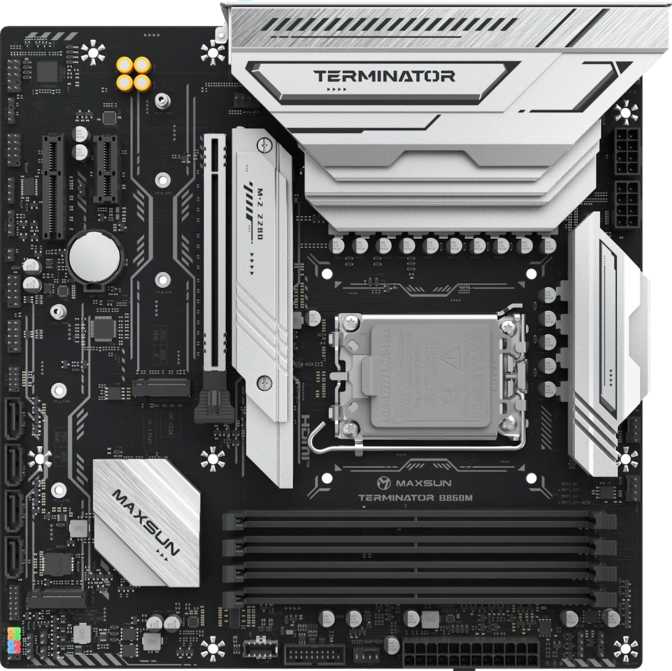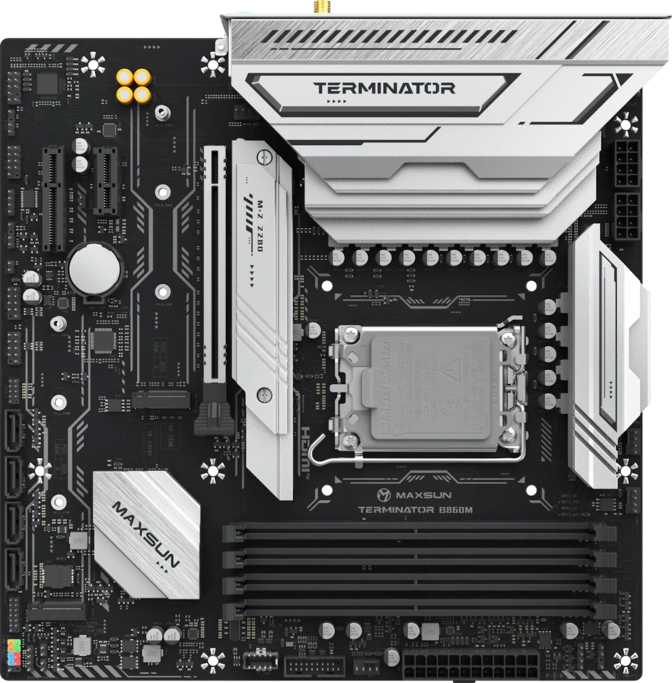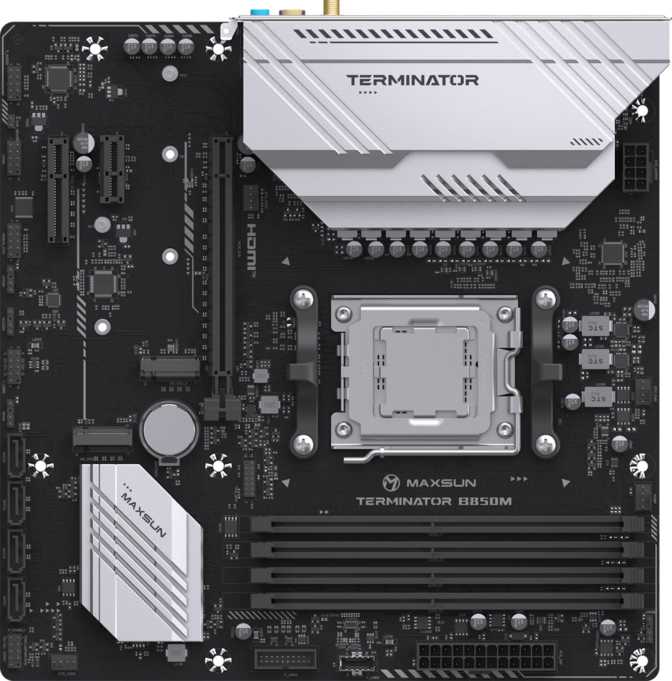
Maxsun Terminator B850M WiFi Full Review - Compact AM5 Done Right
MotherboardsThe AM5 motherboard market has had a persistent gap. B650 boards landed affordably but routed the primary GPU slot through older bandwidth infrastructure, while X870 boards delivered the full platform specification at a price that only made sense for flagship builds. The B850 chipset closes that gap — and the Maxsun Terminator B850M WiFi is one of the few Micro-ATX entries to occupy it without the brand-name premium that usually accompanies this feature set.
Overall Rating
Editors' RecommendationScore Breakdown
At a Glance
Platform
AM5 + B850
AMD chipset
GPU Slot
PCIe 5.0 x16
Primary lane
Wireless
WiFi 6 + BT 5.2
Built-in module
Memory
4× DDR5 Slots
Up to 192 GB
Reliability
Dual BIOS
3-year warranty
Form Factor
Micro-ATX
245 × 245 mm
Design and Build Quality
Compact Without Compromise
At 245mm on each side, the Terminator B850M WiFi follows the standard Micro-ATX footprint — fitting any mid-tower or purpose-built mATX case without modification. The form factor is a genuine advantage: compact enough for space-conscious builds while carrying four memory slots and a complete expansion layout without electrical compromise.
There is no RGB lighting on this board, and that is a considered design stance rather than a cost cut. The absence removes software dependencies, lighting control overhead, and any addressable hardware competing with the electrical budget. For workstations, under-desk rigs, or builders who prioritize function over aesthetics, this is exactly right. If lighting integration matters to your build, plan around this board contributing nothing to it.
No RGB — Deliberate, Not Forgotten
Maxsun made a clear product choice here. Without addressable lighting hardware on the BOM, more value stays on the electrical side. If you are building a dedicated streaming PC, a home office rig, or a system that lives inside a closed case, this is a feature — not a gap.
Reliability Engineering
Dual BIOS Protection
Two independent firmware chips mean a corrupted BIOS update cannot permanently disable the board. If the primary chip fails during a flash, the system automatically falls back to the secondary — no tools, no recovery USB, no dead board. For new builders, this eliminates the single most feared failure mode in PC assembly.
Accessible CMOS Reset
When an aggressive overclock setting prevents the system from booting, CMOS reset access on this board requires no tools and no case opening. Recovery takes seconds rather than minutes — a time-saver that any overclocker who has ever been locked out of their own system will immediately appreciate.
Performance Foundation: AM5 and PCIe 5.0
Why the Chipset Tier Matters
AMD's current platform organizes motherboard tiers by what they deliver to the primary expansion slot. The B850 chipset guarantees PCIe 5.0 bandwidth to the GPU — the precise dividing line between the B650 generation and the current tier. On B650 boards, the graphics card ran on PCIe 4.0 connectivity. On this board, the primary x16 slot operates at full PCIe 5.0, doubling the theoretical bandwidth ceiling compared to the previous generation.
That headroom is not fully consumed by today's graphics hardware. It becomes relevant when you factor in the next GPU generation and the one after that. Choosing the correct chipset tier at build time is the difference between a platform that lasts two GPU upgrade cycles and one that ages out in one.
AM5 Socket Compatibility
The single AM5 socket accommodates AMD's current Ryzen 7000, 8000, and 9000-series processors. One key point requires emphasis: the board carries no onboard graphics of any kind, and no integrated CPU. A discrete GPU or a Ryzen APU (G-series or GX-series with built-in Radeon graphics) is required for any display output. A standard Ryzen processor paired with this board and no GPU produces no signal.
Expansion Slot Layout
Memory: DDR5 With a High Ceiling
Four Slots — Unusual for Micro-ATX
Most Micro-ATX boards cut to two DIMM slots to simplify the layout. The Terminator B850M WiFi fits four, which changes the long-term economics of the build. Start with an affordable two-stick kit, leave the remaining slots empty, and add a second kit months or years later without replacing any existing hardware. The maximum installed capacity using the largest current DDR5 modules is high enough that it will not become a constraint before the rest of the platform is obsolete.
For content creation workstations or memory-intensive development environments, four slots also allow very high total capacities without reaching for premium high-density modules that carry significant price premiums.
Dual-Channel Setup — Install in Pairs
Install two or four DIMMs in the correct paired slots to activate dual-channel mode. Using a single stick or three sticks breaks the dual-channel configuration and cuts available memory bandwidth roughly in half. Your motherboard manual will show the correct pairing slots — typically slots 2 and 4 for a two-stick setup.
Speed: From JEDEC Base to Enthusiast Ceiling
The board operates DDR5 at standard JEDEC-defined speeds out of the box — no configuration required, fully stable from first boot. Enable an AMD EXPO or Intel XMP memory profile from a compatible kit and the platform unlocks overclocked frequencies that reach the upper tier of what DDR5 can currently achieve on any consumer desktop platform.
ECC memory is not supported — the expected standard for consumer desktop hardware. Workloads genuinely requiring hardware error correction belong on server-class platforms outside this category entirely.
Memory Specifications
- Memory Type DDR5 Only
- DIMM Slots 4 Slots
- Maximum Capacity 192 GB
- Memory Channels Dual Channel
- OC Profile Support EXPO / XMP
- ECC Support Not Supported
Storage: Practical and Sufficient
NVMe M.2 Storage
Two M.2 slots accommodate NVMe solid-state drives — one for the operating system and primary applications, one for secondary storage or a scratch volume. For gaming rigs, workstations, and most creative setups, two slots covers the native storage needs without expansion.
Workflows requiring three or more simultaneous high-speed NVMe drives — multicam video editing with high-bitrate streams, for example — can add an M.2 expansion card via the x4 secondary slot, though this occupies one of the two remaining expansion positions.
SATA Connectivity
Four SATA 3 connectors round out the storage picture for existing drive libraries — hard disks for bulk capacity, SATA SSDs bought before NVMe became the universal default, or optical drives via adapter. Combined with the two M.2 slots, up to six storage devices can be active simultaneously before any expansion card is needed.
No SATA 2 connectors are present. All four SATA ports operate at the full SATA 3 specification.
Connectivity: Where It Shines and Falls Short
WiFi 6 and Bluetooth 5.2
Wireless capability is built into the board — no optional card required, no expansion slot consumed. The implementation covers three WiFi generations, with WiFi 6 (802.11ax) at the top tier. WiFi 6 delivers meaningfully improved throughput and more efficient operation in network environments where many devices compete simultaneously. Connection to older WiFi 5 or WiFi 4 routers is automatic and requires no configuration.
Bluetooth 5.2 handles wireless peripherals — headsets, controllers, mice, and keyboards. Version 5.2 includes LE Audio improvements and better multi-device handling compared to earlier iterations, covering everything currently shipping in the consumer accessory market.
Wired Ethernet and Internal Headers
A single wired Ethernet port via RJ45 provides direct network connectivity for those who prefer a cable connection.
Internal expansion headers add front-panel USB through your case: USB 3.2 Gen 1 headers, a front-panel USB-C header running at 10 Gbps, and USB 2.0 headers for legacy front-panel connectors. Four fan headers accommodate CPU cooler, intake fans, exhaust fans, and auxiliary cooling. Builds with five or more fans will need a splitter or hub. A TPM connector is also present for hardware security modules, which is relevant for enterprise deployments or security-focused setups.
Rear USB Panel: Speed Present, USB-C Absent
Rear I/O USB Ports
Display Output and Audio
Display Output: Understand the Conditions
The rear I/O includes one HDMI output and one DisplayPort output. Both are only active when the installed processor includes integrated Radeon graphics — meaning a Ryzen APU (G-series or GX-series). A standard Ryzen processor without integrated graphics produces no signal through these ports regardless of driver or BIOS settings. All display output in that configuration must come from the discrete GPU.
HDMI 1.4 Ceiling for APU Builds
The HDMI port is version 1.4, which caps output at 4K resolution at 30 frames per second. Running a 4K display at 60Hz or above through HDMI is not possible here regardless of the APU's capability. For 4K at 60Hz or higher refresh rates driven by integrated graphics, use the DisplayPort output, which carries no such limitation.
For discrete GPU users, these ports are entirely irrelevant — the GPU provides its own video outputs at full current specification.
Audio: Analog Range and a Digital Bonus
Five analog audio jacks cover the full range of speaker and headphone configurations — front, rear, center/subwoofer, side surround, and microphone — from basic stereo through 7.1 surround setups. Standard headphone and microphone connections are fully accessible.
S/PDIF Optical Output Included
The board carries a digital optical (S/PDIF) output — a connection many boards at this price tier quietly drop. If you run an external DAC, a home theater receiver, or any digital audio processor that accepts an optical input, this port is present and ready. For the specific audience that needs it, its inclusion here is a meaningful differentiator.
For users running USB audio interfaces or discrete headphone amplifiers, the analog jacks provide a reliable secondary path, while the S/PDIF port handles digital routing without consuming an expansion slot.
Who Should Buy This Board
The Terminator B850M WiFi is a deliberate product aimed at a specific builder profile. Whether it matches yours depends on three or four key conditions — not general preferences.
Build This Board If You...
- Want PCIe 5.0 GPU bandwidth in a compact mATX build without paying X870 prices
- Need WiFi 6 and Bluetooth built in — no adapter card, no expansion slots consumed
- Value four DDR5 DIMM slots for long-term memory upgrade flexibility
- Want dual BIOS protection as a standard safety net against failed firmware updates
- Have a genuine use for optical (S/PDIF) audio output that most boards in this range drop
- Are building a functional, no-frills system with no need for RGB lighting integration
Look Elsewhere If You...
- Depend on a rear USB-C port daily — no rear USB-C exists on this board in any configuration
- Need three or more native M.2 slots — two is the hard limit without an expansion card
- Require hardware RAID for storage redundancy or striped performance
- Want RGB lighting integration across your build — this board contributes none
- Are building an APU system and need 4K at 60Hz via HDMI — HDMI 1.4 cannot support it
- Need an ITX form factor — Micro-ATX is as compact as this board gets
How It Compares to the Alternatives
The Terminator B850M WiFi sits between B650 boards that sacrifice GPU bandwidth and X870 boards that charge significantly more for features most builders will not use. Here is how the three tiers compare on the specifications that actually affect purchase decisions.
| Feature | B650 Micro-ATX | Terminator B850M WiFi | X870 Micro-ATX |
|---|---|---|---|
| Primary GPU PCIe Lane | PCIe 4.0 x16 | PCIe 5.0 x16 | PCIe 5.0 x16 |
| DDR5 DIMM Slots | 2 to 4 | 4 Slots | 4 Slots |
| WiFi 6 Onboard | Varies by SKU | Yes | Yes |
| Dual BIOS | Rarely included | Yes | Sometimes |
| M.2 Slots | 2 to 3 | 2 | 2 to 3 |
| Rear USB-C Port | Varies | No | Often Yes |
| Optical Audio Out | Rarely | Yes | Varies |
| Typical Price Position | Lower | Mid-Range | Higher |
Honest Assessment
No board in this price range is without trade-offs. What follows is a direct accounting of what this board genuinely gets right and where it falls short — so you can match those conditions to your actual build requirements.
Clear Strengths
-
PCIe 5.0 GPU in a compact footprint The defining advantage over B650 alternatives — full next-gen GPU bandwidth in a Micro-ATX chassis at a mid-range price.
-
Four DDR5 slots — unusual for this form factor Memory upgrade flexibility without a board replacement. Start small and add capacity when you need it.
-
Dual BIOS as a standard inclusion Recovery from a corrupted BIOS update is automatic, not a manual process involving a second PC and a recovery USB drive.
-
WiFi 6 and Bluetooth 5.2 standard Integrated and ready — not an optional upsell, not a slot-consuming adapter.
-
Optical audio output retained S/PDIF included where most boards at this price have quietly dropped it. Matters directly to the users who need it.
Areas to Consider
-
No rear USB-C port An increasingly conspicuous gap. Front-panel USB-C via a compatible case partially compensates, but only if your case supports it.
-
HDMI 1.4 limits APU display output Only relevant for integrated graphics users. Use DisplayPort instead if 4K at 60Hz or above is required.
-
Two native M.2 slots only Modest for the chipset tier. Multi-drive creative workflows may require an expansion card, consuming one secondary slot.
-
No hardware RAID support OS-level software RAID remains an option, but native hardware RAID is unavailable.
-
No RGB lighting integration Deliberate rather than an oversight, but builds with lighting ecosystems will need to plan around this board as the dark element.
Common Questions Before You Buy
These are the questions real buyers search for before committing to an AM5 motherboard at this tier.
Final Verdict
The Compact B850 Build, Done Honestly
8.2
/ 10
RecommendedThe Maxsun Terminator B850M WiFi earns a clear recommendation for a specific builder: someone targeting the AM5 platform in a compact case, pairing a current Ryzen processor with a mid-to-high-tier discrete GPU, and unwilling to pay the brand premium attached to equivalent hardware from larger names.
The PCIe 5.0 GPU slot is the defining advantage over B650 alternatives. Four DDR5 DIMM slots, dual BIOS, WiFi 6, optical audio, and a three-year warranty compose a feature set that competing boards rarely deliver without a tier upgrade. The trade-offs are specific and named — no rear USB-C, two M.2 slots, an HDMI 1.4 ceiling for APU output. These are defined conditions that either apply to your build or they don't. If they don't, the Terminator B850M WiFi is the most rational path through the Micro-ATX B850 segment.