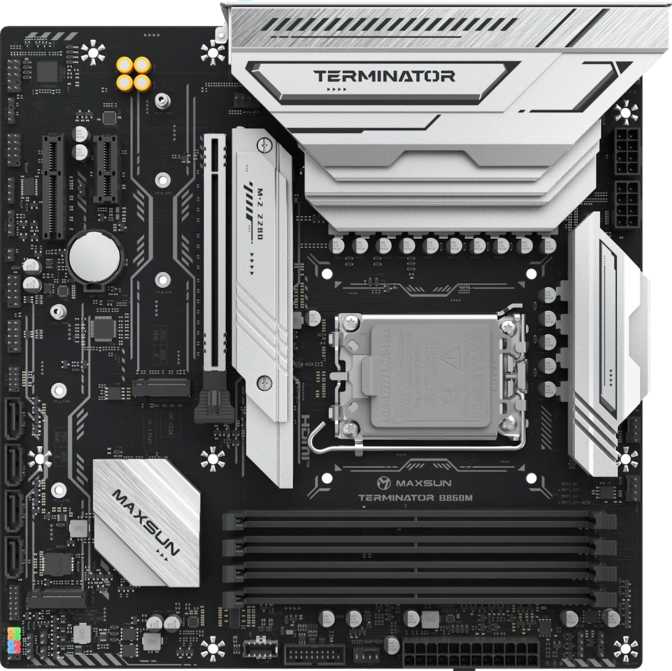
Maxsun Terminator B860M Review: More Than a Budget Board
MotherboardsIntel's mid-tier motherboard market is cluttered with choices that either underdeliver on features or overcharge for capabilities most builders will never use. The Maxsun Terminator B860M lands in that contested space with a proposition that's surprisingly difficult to dismiss: a Micro-ATX board on Intel's current-generation LGA 1851 socket that includes features typically reserved for premium builds — Thunderbolt 4 connectivity, PCIe 5.0 readiness, dual BIOS redundancy — without demanding a top-shelf price. This review breaks down what those features actually mean for your system, where the board pulls its punches, and whether the compromises are ones you can live with.
At a Glance: Key Specifications
Design and Physical Build
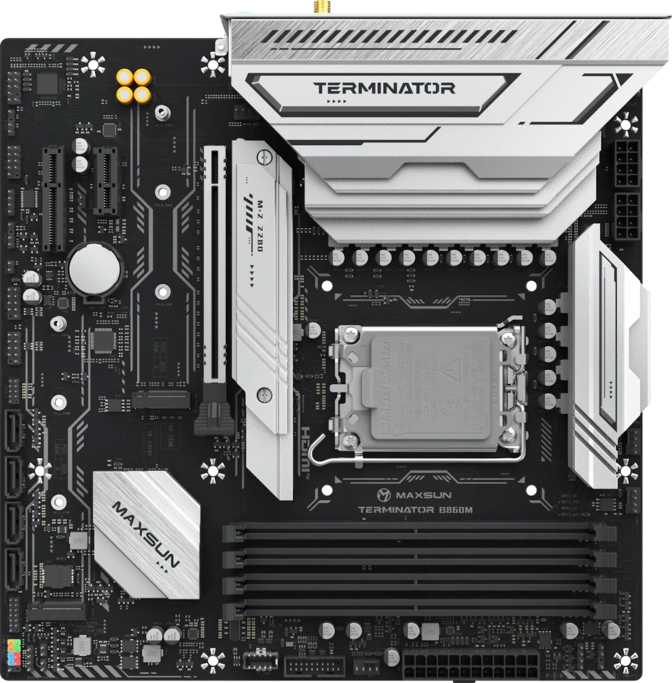
At exactly 245 mm square, the Terminator B860M conforms to the Micro-ATX standard, fitting comfortably into mid-tower and compact cases while staying clear of the tight space constraints of Mini-ITX. This size is a practical middle ground: you get more expansion options than a Mini-ITX board, while the system stays meaningfully smaller and more manageable than a full ATX build.
The board ships with RGB lighting — decorative illumination that adds visual character to windowed-case builds. Whether RGB matters to you is personal, but it's controllable through compatible software and suits any build prioritizing visual presentation.
Standout Physical Features
Instantly resets all firmware settings to factory defaults without opening the case or locating a jumper. Invaluable after a failed BIOS update or overly aggressive settings experiment — and easy to overlook until you actually need it.
Two separate firmware chips mean a power failure or corrupted update cannot brick the board. If the primary image fails, the backup takes over automatically — no user intervention required. For a board in this segment, that's a genuine reliability safeguard.
On-board RGB illumination suits windowed builds that prioritize visual presentation. Compatible software control allows customization to match system themes or peripheral lighting ecosystems.
The Platform Foundation: LGA 1851 and the B860 Chipset
The LGA 1851 socket positions this board squarely for Intel's current generation of desktop processors — the Core Ultra 200 series, also known as Arrow Lake-S. These are Intel's current flagship desktop chips, offering competitive multi-core performance, an efficient hybrid architecture, and access to the latest memory and storage standards.
What the B860 Chipset Means in Plain Terms
The B860 is Intel's mid-range chipset for this platform. It sits below the Z890 (the enthusiast-grade option) and above the H810 (the stripped-down entry tier). The practical difference between B860 and Z890 comes down to one primary capability: Z890 allows you to push the processor's core clock speeds beyond Intel's rated specifications; B860 does not.
B860 vs. Z890: The Core Decision
For most builders — including gamers, content creators, and everyday power users — manual CPU overclocking provides marginal real-world benefit that rarely justifies the Z890 price premium. If you're planning to run a Core Ultra 200-series processor at its standard operating speeds, the B860 chipset delivers an identical computing foundation at a meaningfully lower cost. The savings are better directed at the GPU, NVMe storage, or RAM.
Integrated Graphics and Display Output
The board does not have a dedicated graphics chip of its own. The HDMI 2.0 and DisplayPort outputs on the rear I/O panel are available for use with processors that include Intel's integrated graphics. Core Ultra 200-series processors without the "F" suffix can drive monitors directly through these ports. F-series processors — which carry no integrated graphics engine — leave those rear outputs inactive regardless of which monitor you connect. A discrete GPU is required in that scenario.
Memory: DDR5 Done Right
The Terminator B860M operates exclusively on DDR5 memory — the current-generation standard that delivers higher bandwidth and improved efficiency compared to the DDR4 platform. The board provides four memory slots in a dual-channel configuration, meaning pairing your RAM symmetrically (two matched sticks or a full set of four) unlocks the complete memory bandwidth the platform can deliver.
Capacity and Headroom
The ceiling on total installed memory is enormous by any consumer measure. Even at a fraction of the theoretical maximum — a single high-density stick per slot — you'd have enough RAM to support demanding multitasking, large video editing projects, or complex virtual machine environments without pressure. The board's capacity ceiling will not be a limiting factor in any consumer or prosumer use case. Upgrading later is simply a matter of adding sticks, not replacing the board.
ECC error-correcting memory is not supported. This rules out the board for scientific modeling, financial computing, or any workload where a silent memory error is unacceptable. For gaming, creative work, and productivity, this is irrelevant.
Speed and XMP Overclocking
DDR5 operates at higher base frequencies than DDR4, and the Terminator B860M supports speeds at the upper end of current-generation kit availability. For enthusiasts who want to push further, the board supports memory overclocking through XMP profiles — Intel's memory compatibility standard that applies tested, manufacturer-validated high-speed configurations with a single BIOS toggle. No manual timing adjustments required unless you want them.
The maximum supported overclocked speed sits at the outer edge of what current DDR5 kits can achieve. In practice, you'll reach the ceiling of available hardware before you reach the ceiling of this board.
Storage: Three Slots, Four Ports, Room to Grow
Storage flexibility is one of this board's genuine strengths, and the configuration on offer goes meaningfully beyond what most boards in this segment provide.
M.2 NVMe Fast Storage
Three M.2 sockets accommodate modern NVMe solid-state drives — the compact, high-speed format that has replaced traditional hard drives as primary storage in virtually all current builds. Three slots allow you to install a dedicated OS drive, a secondary working drive for large active files, and a third for overflow or backup — without using any of the SATA ports. That level of fast storage density is more typical of upper-mid-range boards than budget-oriented ones.
SATA, PCIe & Expansion
Four SATA 3 connectors cover standard hard drives or older SATA SSDs, making mixed configurations — fast NVMe for active workloads alongside high-capacity mechanical drives for archives — straightforward.
The primary PCIe 5.0 x16 slot handles the GPU with the fastest available interconnect, fully compatible with current PCIe 4.0 and 3.0 cards while providing headroom for future generations. A PCIe x1 slot covers compact add-in cards, and a PCIe x4 slot handles additional expansion needs.
RAID is not supported via the chipset. Redundant or striped configurations require a software RAID solution or dedicated controller card.
Rear I/O Connectivity: A Story in Two Halves
The rear I/O panel of the Terminator B860M has a clear split between its standout features and its budget-reflecting compromises. Understanding both before you commit is important.
What Stands Out
-
Thunderbolt 440 Gbps bandwidth for external 4K monitors, ultra-fast external drives, multi-device daisy-chaining, and Thunderbolt docks. Rare at this price point and a genuine long-term asset.
-
USB4 40 GbpsA second 40 Gbps connection for cutting-edge external storage or multi-function hubs — providing two premium high-bandwidth ports on the rear panel simultaneously.
-
2× USB 3.2 Gen 2 (Type-A)Two high-speed USB-A ports for fast external drives, USB 3 hubs, and bandwidth-demanding peripherals at current-generation transfer speeds.
-
Dedicated Ethernet (RJ45)Wired network connectivity — the most reliable and lowest-latency option for gaming, large file transfers, and bandwidth-intensive tasks.
-
HDMI 2.0 + DisplayPortDual display output options for processors with integrated graphics. Both current-generation display standards covered for monitor flexibility.
Where It Pulls Back
-
No Wi-Fi or BluetoothWireless connectivity is entirely absent — and this is the board's most critical specification to absorb before purchasing. A PCIe x1 Wi-Fi card with integrated Bluetooth resolves both absences but adds cost and consumes an expansion slot.
-
Six USB 2.0 Ports DominateSix of the rear panel's USB ports are the older 2.0 standard. Appropriate for keyboards, mice, and low-data-rate peripherals, but this reflects deliberate cost management — they carry a fraction of modern USB bandwidth.
-
No Digital Audio OutputNo optical or coaxial S/PDIF port. Three 3.5 mm analog jacks cover standard headphones and desktop speakers. For home theater receivers requiring a digital audio signal, this is a hard stop.
-
No Standard Rear USB-CThe Thunderbolt 4 and USB4 ports handle Type-C duty, but there are no standalone Gen 2 USB-C ports for standard modern devices connecting at full speed without using the premium ports.
Internal Headers: The Build's Backbone
The internal connectors determine what your complete system can become beyond the rear panel. Front-panel connectivity is well-covered — headers support USB 2.0 and USB 3 speeds routed through the case's front panel, plus a dedicated header for front-panel USB-C at the 20 Gbps tier. Modern cases with premium front I/O panels will find full support here.
Fan Headers: Plan Ahead
Only 3 Fan Headers Total
This is lean for a board targeting builders with discrete GPUs, active CPU coolers, and multi-fan case airflow setups. A typical mid-range build might run a CPU cooler fan, two or three intake fans, and one or two exhaust fans — easily exceeding three headers without planning.
A fan controller hub — an inexpensive add-on that plugs into a single header and distributes control to multiple fans — solves this cleanly. It's an additional component worth budgeting for if you're planning an airflow-focused build.
Additional Connectors
A TPM header supports trusted platform module hardware for users requiring a dedicated security chip — relevant for enterprise security configurations or users who prefer hardware-based TPM over the firmware-based implementation supported natively by most Core Ultra 200-series processors.
Four SATA 3 connectors, two internal USB 3.0 headers, and additional USB 2.0 internal headers round out the internal I/O, providing flexibility for case-mounted ports, card readers, and drives without competing for rear panel space.
Is the Maxsun Terminator B860M Right for You?
This Board Fits You If...
- You want Intel's LGA 1851 platform without paying Z890 pricing for overclocking capability you won't use.
- Your build location has Ethernet access, making built-in wireless an unnecessary cost.
- Storage density matters — you want multiple NVMe drives without running out of M.2 slots.
- Thunderbolt 4 is on your radar for docking stations, fast external storage, or high-bandwidth peripherals.
- Dual BIOS and a dedicated Clear CMOS button give you confidence for firmware updates and BIOS experimentation.
- You're building a compact system in an mATX case without sacrificing GPU slot quality or storage capacity.
- Memory speed and headroom are priorities — the XMP ceiling exceeds what current DDR5 kits can reach.
Consider Alternatives If...
- CPU overclocking is a firm requirement. The B860 chipset does not unlock multiplier-based frequency tuning — a Z890 board is required.
- Wireless is non-negotiable. No built-in Wi-Fi or Bluetooth means adding a card or adapter — extra cost and an occupied expansion slot.
- You need more than three fans with full BIOS-based individual control. Three fan headers create a practical ceiling without a hub.
- ECC memory is required for professional data integrity workloads. Error-correcting RAM is not supported on this platform.
- RAID configurations are needed. Chipset-managed RAID is absent — software solutions or add-in hardware are required.
- A dual-GPU setup is planned. Only one PCIe x16 slot is available on this board.
Competitive Context
The Terminator B860M competes primarily against other B860 Micro-ATX boards and, on the price-performance spectrum, against entry-level Z890 Micro-ATX options. Here is how it measures up across the features that most influence a buying decision.
| Feature | Maxsun Terminator B860M | Typical B860 mATX | Entry-Level Z890 mATX |
|---|---|---|---|
| CPU Overclocking | Not Supported | Not Supported | Supported |
| XMP Memory OC | Yes — High Ceiling | Yes | Yes |
| PCIe 5.0 x16 GPU Slot | Yes | Varies | Yes |
| M.2 Sockets | 3 | 2–3 | 3–4 |
| Thunderbolt 4 | Yes | Rarely Included | Occasionally |
| Dual BIOS | Yes | Uncommon | More Common |
| Built-in Wi-Fi | None | Often Included | Often Included |
| Fan Headers | 3 | 4–6 | 4–6 |
| Form Factor | Micro-ATX | Micro-ATX | Micro-ATX |
The Clearest Point of Differentiation
Thunderbolt 4 typically appears on considerably more expensive boards in the B-series segment and even among Z890 options. Against Z890 boards, the performance foundation is functionally identical for standard-speed operation — the premium buys overclocking headroom, typically more fan headers, and usually built-in wireless. If none of those apply to your build plan, the cost difference is money better directed at storage, RAM, or the GPU.
An Honest Assessment
Where It Earns Its Place
The Terminator B860M's strengths reflect real investment in specifications that extend a build's useful life. PCIe 5.0 readiness on the GPU slot keeps the board relevant as graphics hardware evolves. Three M.2 sockets provide storage density that more expensive boards used to reserve for themselves.
Thunderbolt 4 is a premium I/O capability that most competitors in this category simply don't include — and its long-term utility for docking, display, and external storage scenarios is meaningful regardless of how you use it at launch. Dual BIOS with a physical Clear CMOS button provides a reliability safety net that builders who update firmware regularly will genuinely appreciate.
A three-year warranty signals that Maxsun expects this hardware to perform reliably for years, not just long enough to clear the return window. That kind of commitment at this price tier is worth noting.
Where It Shows Budget Roots
The trade-offs reflect where the board was priced down. The absence of Wi-Fi and Bluetooth is the most consequential of these, affecting any builder whose location lacks a direct Ethernet cable run. This single omission can turn a straightforward purchase into one requiring an additional adapter and careful planning.
The heavy reliance on USB 2.0 for rear-panel port count is visible cost management. Six ports at outdated speeds is a lot of plastic for limited bandwidth. Three fan headers will require supplemental hardware for ambitious cooling configurations. The lack of S/PDIF output closes a door for home theater integrations.
None of these are fatal to a well-planned build, and several won't affect most buyers at all. But they require honest acknowledgment — a buyer who doesn't anticipate them may face friction that a moment's pre-purchase research would have prevented.
Common Buyer Questions
The Verdict
The Maxsun Terminator B860M is a well-targeted Micro-ATX board for builders who want Intel's current platform without paying the Z890 premium for overclocking headroom they don't need. The inclusion of Thunderbolt 4, PCIe 5.0 x16, three M.2 sockets, dual BIOS, a generous DDR5 memory subsystem, and a three-year warranty is a feature set that punches meaningfully above what most budget B860 boards offer.
The absences — Wi-Fi, Bluetooth, additional fan headers, S/PDIF audio output, RAID support — are real, and worth checking against your specific build requirements before committing. For a builder with Ethernet access, moderate cooling ambitions, and standard audio needs, none of these create problems.
Buy This Board If
You're building a mid-range Intel system on a disciplined budget, your location has wired internet, and you want Thunderbolt 4 or deep NVMe storage capacity that comparably priced competitors rarely offer.
Pass On It If
CPU overclocking, built-in wireless, comprehensive multi-fan BIOS management, or digital audio output are firm requirements for your specific build.