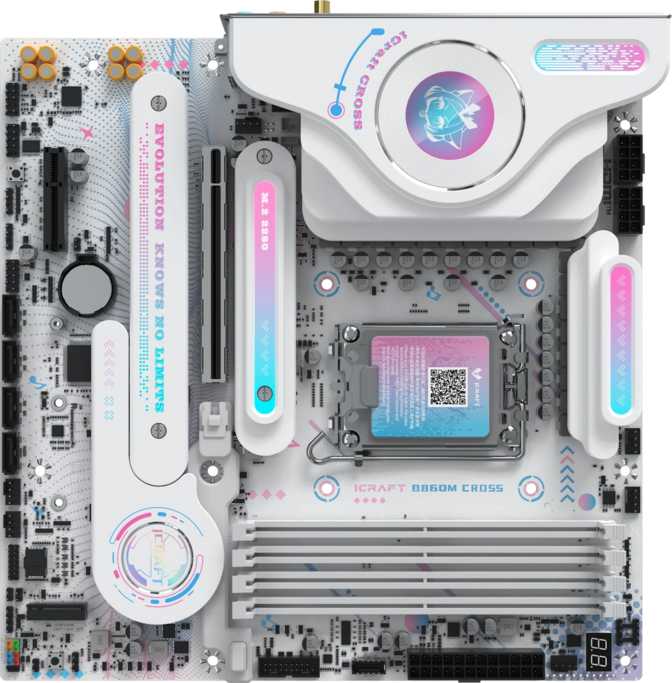
Maxsun iCraft B860M Cross Review: Thunderbolt 4 Meets Micro-ATX
MotherboardsThe Intel B860 chipset has quietly become the practical battleground for builders who want a current-generation platform without the premium that Z-series boards demand. Most B860M options from established names deliver exactly what you'd expect — competent, predictable, mid-range in a compact chassis. The Maxsun iCraft B860M Cross enters this category with different intentions.
Its rear connectivity panel carries specifications that would headline a flagship-tier board: eight full-speed USB-A ports, a Thunderbolt 4 connection, and USB4 40Gbps on a form factor that fits in nearly any case on the market. Add three M.2 storage slots, dual BIOS recovery, Wi-Fi 6E, and DDR5 memory support with a genuinely high overclocking ceiling, and you have a B860 M board that clearly wasn't designed to blend into the category average.
Whether that collection of features translates into the right board for your specific build is the central question — and the answer depends heavily on what you're actually plugging in.
This review is based entirely on the board's confirmed specifications. All performance inferences are clearly framed as such, and no benchmark numbers have been invented or extrapolated without basis.
Overall Score
Best for: Content Creators & High-Bandwidth Workstations
The iCraft B860M Cross delivers a rear connectivity profile that no other board in this chipset tier matches — eight 10Gbps USB-A ports and Thunderbolt 4 are the standout features. Dual BIOS protection and a 3-year warranty add long-term confidence. The single gigabit ethernet port is the clearest shortfall against competition.
Build Quality and Form Factor
Compact without feeling restricted
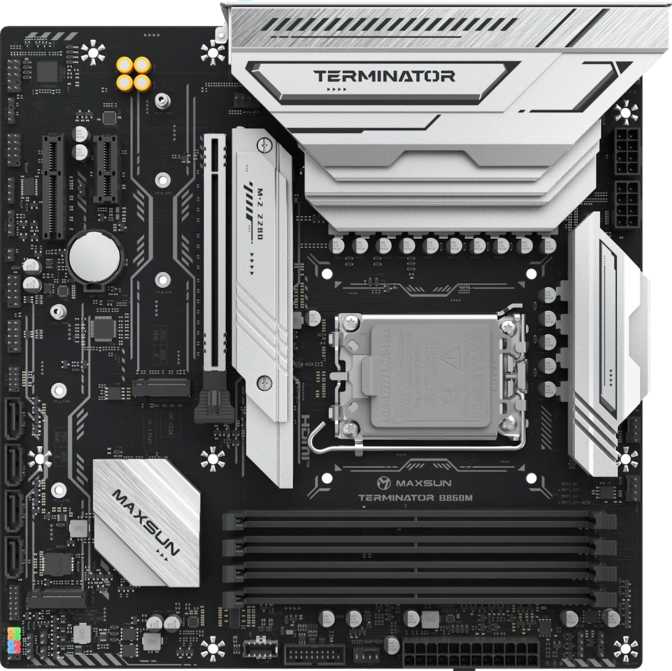
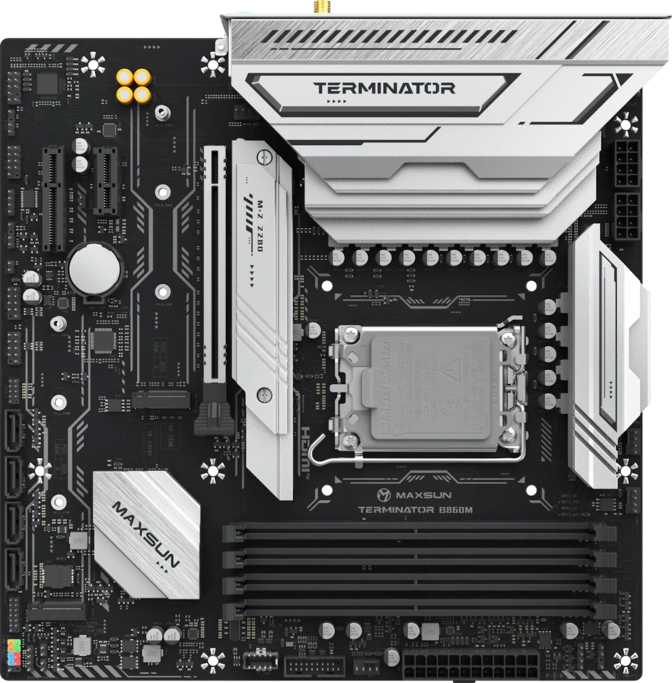
At 245mm × 245mm, the iCraft B860M Cross follows the standard Micro-ATX footprint. This is a meaningful size distinction for builders: Micro-ATX boards fit any case with mATX support, which includes most mid-tower ATX enclosures, purpose-built compact cases, and a wide range of home theater PC chassis. If you've outgrown a Mini-ITX build but don't want the full commitment of an ATX tower, Micro-ATX sits in a sweet spot.
The iCraft label is Maxsun's premium product tier, and the B860M Cross reflects that with integrated RGB lighting along the board surface. This is cosmetic rather than functional — it adds visual personality in a windowed case and can be tuned or disabled in the BIOS. The physical layout of headers and slots follows sensible conventions: power connectors at the perimeter, M.2 slots distributed across the board surface, front-panel audio in the lower-left corner where cases expect it.
Physical Specifications
- Dimensions245 × 245 mm
- Form FactorMicro-ATX
- RGB LightingYes
- Dual BIOSYes
- Warranty3 Years
Maxsun carries less Western market recognition than ASUS, MSI, or Gigabyte. The three-year warranty and hardware-level Dual BIOS partially compensate — but community troubleshooting resources and third-party BIOS documentation will be thinner than for major-brand equivalents.
The Intel B860 Platform
Understanding what you're working with before you buy
This board uses Intel's LGA 1851 socket and pairs it with the B860 chipset, placing it squarely in the mid-tier of the current Intel desktop platform. Think of B860 as the practical middle ground between budget H-series chipsets and the enthusiast-class Z890.
The most consequential difference from Z890 is overclocking. The B860 chipset does not allow manipulation of the processor's core frequency — that capability is explicitly reserved for Z890. What B860 does permit is memory profile optimization: the board fully supports DDR5 speed profiles above the processor's default specification, which is where its overclocking feature set lives.
For most gaming and productivity builds, this tradeoff is immaterial. Intel Core Ultra 200S processors extract the overwhelming majority of their performance at base settings; the incremental gains from CPU frequency tuning on Z890 are measurable but not transformative for mainstream workloads.
B860 vs Z890: Key Differences
| Feature | B860 | Z890 |
|---|---|---|
| CPU Overclocking | ||
| Memory OC (XMP) | ||
| PCIe 5.0 x16 GPU | ||
| DDR5 Support | ||
| Typical Cost | Lower | Higher |
Processor note: Not all Core Ultra 200S desktop chips include integrated graphics. "K" suffix variants include Intel Arc iGPU; "KF" variants do not. This directly affects whether the board's rear display outputs function without a discrete GPU.
DDR5 Memory
Four slots, serious headroom, and a high speed ceiling
DDR5 is the only memory standard this board supports, and it's equipped to push that standard meaningfully further than most boards in its segment. Four physical DIMM slots allow a maximum of 192GB of total system memory — a ceiling so far beyond any consumer application that it functions as a practical guarantee the board will never limit your memory configuration.
The native memory frequency support covers the fast end of what standard DDR5 kits ship at. For builders who want to go further, this board supports memory speed profiles that push into territory typically seen only on Z-series boards. Enabling these profiles is a single toggle in the BIOS rather than manual frequency and timing manipulation — this is what the board's "easy overclock" designation means in practice.
Dual-channel memory operation — using matching sticks in the correct paired slots — nearly doubles the bandwidth available to the processor compared to single-channel. Content creators processing video, engineers running simulations, and modern games all benefit from this bandwidth in ways single-channel configurations cannot match.
This board does not support error-correcting memory. ECC is absent from all consumer desktop chipsets at this tier — it is irrelevant for gaming, creative, and home office builds, but relevant to know if you're evaluating it for server or high-reliability compute purposes.
Memory Specifications
- TypeDDR5
- Slots4 DIMM
- ChannelsDual-Channel
- Maximum Capacity192 GB
- Base Speed6400 MHz
- Max OC Speed9066 MHz
Typical Build Configs
The Rear I/O Panel
Where this board genuinely separates itself from the competition
The rear connectivity panel is the iCraft B860M Cross's most distinctive characteristic. Most B860M boards ship with four to six USB-A ports, typically a mix of slower and faster generations. This board's rear panel tells a different story — and it's the primary reason to choose it over alternatives in this chipset tier.
USB-A Ports
All at 10 Gbps — no legacy-speed ports mixed in
Thunderbolt 4 / USB4
Full TB4 certification — rare on any B-series board
Ethernet
Single gigabit port — competitors often offer 2.5G
Audio Outputs
Five analog jacks plus optical S/PDIF digital out
Full Rear I/O Port Map
| Connection | Count | Speed / Standard |
|---|---|---|
| USB-A | 8 | 10 Gbps each |
| Thunderbolt 4 | 1 | 40 Gbps, USB-C |
| USB4 | 1 | 40 Gbps, USB-C |
| HDMI | 1 | 2.0 — 4K@60Hz |
| DisplayPort | 1 | 4K and above |
| Ethernet | 1 | 1 Gigabit |
| Analog Audio | 5 | Surround / Stereo |
| Optical S/PDIF | 1 | Digital audio out |
Thunderbolt 4: Why It Matters Here
On boards that target professional content creators and costing significantly more, Thunderbolt 4 is a premium headline feature. On a B860M board, it's unexpected and genuinely useful.
- 40 Gbps bandwidth — connects one cable to a Thunderbolt dock expanding your entire desk
- External GPU enclosure (eGPU) support for compatible docks
- DisplayPort Alt Mode for high-bandwidth monitor connections
- Daisy-chain compatible with the wider Thunderbolt accessory ecosystem
Ethernet caveat: The single gigabit ethernet port is the most tangible functional shortfall. Many B860M competitors have moved to 2.5 Gigabit as a baseline. If your NAS or router supports faster local speeds, this creates a real throughput ceiling.
Internal Connectors
Storage, headers, and expansion potential inside the chassis
Storage
- 3 M.2 slots — NVMe drives mount directly to the board, no trays or cables needed
- 4 SATA 3 ports — for traditional 2.5-inch SSDs or large-capacity hard drives
- No RAID support — drive striping and mirroring are unavailable on B860; a different platform is needed for redundant arrays
Front Panel USB Headers
- 1 USB 3.2 Gen 2×2 header — supports 20 Gbps front-panel USB-C on modern cases
- 2 USB 3.0 Gen 1 headers — standard front-panel USB 3.0 bay connections
- 3 USB 2.0 headers — older case connections and internal peripherals like RGB controllers
Fan & Thermal Headers
Five fan headers give this Micro-ATX layout enough coverage for practical cooling configurations:
- 1 CPU cooler header
- 1 AIO pump header
- 1–2 chassis intake headers
- 1 chassis exhaust header
Expansion Slots
One fast primary lane, one practical secondary
The primary PCIe slot runs at the current-generation PCIe 5.0 x16 specification — providing the maximum available bandwidth between the processor and a discrete graphics card. Any GPU on the market today installs and operates without any interface bottleneck, and future GPU generations will connect here without compromise.
A secondary PCIe x4 slot handles smaller add-in cards: 10 Gigabit ethernet controllers, capture cards, NVMe storage expanders, or dedicated audio hardware. There are no PCIe x1 slots, meaning very small riser-format expansion cards won't fit. Given that Wi-Fi is already integrated, this is unlikely to matter for most builds unless you're migrating specific legacy hardware.
Primary GPU Slot
Maximum bandwidth — no bottleneck for any current GPU
Secondary Expansion Slot
Capture cards, 10GbE adapters, storage controllers
No PCIe x1 slots are present. If you need multi-gigabit ethernet, a 2.5G or 10G NIC can be added to the PCIe x4 slot — but it will occupy that slot entirely.
Wireless and Audio
Current-generation, built in, with one gap worth noting
Wi-Fi 6E
The integrated wireless supports all four current mainstream standards — reaching up to Wi-Fi 6E and the 6 GHz band on routers that support it. In environments with many connected devices, 6 GHz access significantly reduces wireless congestion and delivers the theoretical maximum bandwidth ceiling for compatible hardware.
For users on older routers, the connection falls back gracefully to Wi-Fi 6, Wi-Fi 5, or Wi-Fi 4 — no adapter or configuration required.
Bluetooth 5.3 & Audio
Bluetooth 5.3 handles wireless peripherals, audio pairing, and device connectivity at current-generation stability and range.
One gap: no aptX codec support. Bluetooth audio connects at standard AAC or SBC quality rather than aptX's improved fidelity on compatible devices. For desk audio setups or wireless peripherals, this is imperceptible. For music production or competitive gaming where latency matters, wired or USB audio is the appropriate choice regardless.
Five-connector rear analog panel supports stereo and surround up to 7.1. The optical S/PDIF output provides an analog-free signal path to AV receivers or external DACs.
Display Outputs
A critical consideration before you buy
Integrated Graphics Required for Rear Display Outputs
The HDMI and DisplayPort outputs on this board only function when using a processor that includes Intel Arc integrated graphics. Installing a KF-suffix processor without a discrete GPU will result in no video signal from the rear panel. This is standard behavior across the LGA 1851 platform — but it is non-obvious and catches builders off guard.
Which Processors Have iGPU?
| Processor Suffix | Has iGPU | Rear Display Works |
|---|---|---|
| Core Ultra xxxK | ||
| Core Ultra xxxKF |
Display Output Specifications
- HDMI Version2.0
- HDMI Max Resolution4K @ 60 Hz
- DisplayPort Outputs1
- Use CaseSecondary / Backup
HDMI 2.0 handles 4K at 60Hz cleanly, covering all non-gaming monitor use without issue. High-refresh-rate gaming output belongs on the discrete GPU regardless.
BIOS, Dual BIOS, and Setup Safety
Protection features that matter more than you'd expect
Every motherboard carries firmware that controls its fundamental operation. If that firmware is corrupted during an update or a power failure at the wrong moment, the board can become unbootable. Dual BIOS addresses this by maintaining a second, independent copy on a separate chip. When the primary chip's data is corrupted, the board detects the failure and recovers automatically — no user intervention required.
For a first-time builder, a failed firmware update is not a catastrophe. For an experienced builder testing aggressive memory profiles, it means settings can be pushed without the risk of a one-way failure. Dual BIOS is uncommon on B-series boards from any manufacturer, making its presence here a meaningful differentiator.
A physical Clear CMOS button on the rear I/O panel provides a separate recovery layer: if BIOS settings prevent the system from booting, pressing this button resets all configuration to factory defaults instantly — no case disassembly, no jumper hunting with a screwdriver required.
Safety & Control Features
Dual BIOS Chip
Automatic recovery from firmware corruption — no RMA needed for failed updates
Rear-Panel Clear CMOS
One-button BIOS reset without opening the case — critical for troubleshooting memory OC settings
One-Click Memory Profiles
High-speed DDR5 XMP profiles activate with a single BIOS toggle — no manual timing tuning required
Who Should Build With This Board
And who should look elsewhere — honestly assessed
- A content creator or media professional who fills multiple USB ports simultaneously — editors connecting drives, cameras, audio interfaces, and card readers will find the eight Gen 2 rear ports genuinely functional, not just impressive on paper
- A compact workstation builder who needs Thunderbolt 4 for a dock, professional audio interface, or external GPU enclosure within a Micro-ATX chassis
- A home theater or living-room PC builder where the compact footprint keeps the case discreet and Wi-Fi 6E eliminates the need to run ethernet to the entertainment center
- An existing owner of Thunderbolt or USB4 accessories who would otherwise need a premium Z-series board to deploy them
- A builder who values firmware safety — dual BIOS and the clear CMOS button make this board forgiving to work with during setup and long-term maintenance
- A dedicated CPU overclocker aiming for maximum processor frequency — that requires a Z890 board. The B860 chipset does not provide that access regardless of board quality
- A multi-gigabit home network user — if your router and NAS support 2.5G or 10G speeds, the single gigabit ethernet port creates a real throughput ceiling without adding a PCIe network card
- Building with a KF processor but no immediate GPU — the board's rear display outputs will not function until a discrete GPU is installed
- Running ECC memory workloads — high-reliability compute and server use cases require a different platform architecture entirely
- Migrating legacy hardware — no PCIe x1 slots, no PS/2, and no rear USB 2.0 ports mean older peripherals require adapters or will not connect
How It Compares to Competing B860M Boards
The iCraft B860M Cross versus what you'd typically find at this chipset tier
| Feature | Maxsun iCraft B860M Cross | Typical Competing B860M |
|---|---|---|
| Rear USB-A Ports | 8 × 10 Gbps | 4–6, mixed 5/10 Gbps |
| Thunderbolt 4 | Included | Rare at this tier |
| USB4 40 Gbps | Included | Uncommon |
| Ethernet Speed | 1 Gigabit | 2.5 Gigabit |
| Wi-Fi Standard | Wi-Fi 6E | Wi-Fi 6E |
| Bluetooth | 5.3 | 5.2–5.3 |
| M.2 Slots | 3 | 2–3 |
| PCIe GPU Slot | 5.0 x16 | 5.0 x16 |
| Dual BIOS | Included | Uncommon on B-series |
| Rear CMOS Reset | Physical Button | Varies |
| DDR5 OC Ceiling | Very High | Varies by board |
| Warranty | 3 Years | 1–3 Years |
Comparison reflects typical segment characteristics and is not based on any single competing product's confirmed specifications.
Honest Assessment: Strengths and Limitations
What this board genuinely does well — and where it concedes ground
Where It Excels
The connectivity engineering on this board is the central reason to consider it, and it's a legitimate distinction rather than a marketing exaggeration. Eight 10Gbps USB-A ports and a Thunderbolt 4 connection on a B860M board is not an incremental improvement over the category norm — it is a fundamentally different connectivity profile that most competing boards at this chipset tier don't approach at any price.
The dual BIOS implementation adds protection that most builders only appreciate after recovering from a firmware failure. Combined with the rear-panel clear CMOS button, it speaks to a design philosophy that prioritizes long-term reliability alongside headline specifications.
The memory overclocking ceiling is legitimately high for a non-Z chipset product. Builders who want to push DDR5 performance without paying for a fully unlocked platform will find real headroom here, and activating it requires no manual expertise.
Where It Falls Short
The gigabit ethernet port is the most tangible functional shortfall. As home networking infrastructure continues moving toward multi-gigabit speeds, a single 1GbE port creates a real ceiling for local file transfer performance. This is likely a cost decision, but it creates a gap against competitors who have already standardized 2.5G.
The absence of aptX in the Bluetooth stack is a minor note for most users but a genuine limitation for audiophiles who rely on wireless audio. Bluetooth headphone quality on compatible devices will operate below its potential.
HDMI 2.0 rather than 2.1 limits the integrated graphics path to 60Hz at 4K — rarely a practical constraint for secondary monitors, but a generational step behind on a specification comparison.
Finally, Maxsun's smaller Western community presence means fewer third-party BIOS guides, compatibility reports, and troubleshooting threads compared to the major four brands. The hardware-level protections partially compensate — but they don't replicate a deep support ecosystem.
Questions Real Buyers Ask
Answers to the searches that bring people to this review
Final Verdict
Maxsun iCraft B860M Cross — Reviewed
Best for: Content Creators, Workstation Builders, and High-Bandwidth Peripheral Users
The Maxsun iCraft B860M Cross earns a clear recommendation for a specific type of builder: anyone who needs premium connectivity in a compact, mid-range platform. Content creators, desk-bound professionals with high-bandwidth peripheral ecosystems, and users who own Thunderbolt accessories will find this board delivers features that no other B860M option currently matches.
The rear I/O panel is the headline argument for choosing this board over competitors in the segment. Eight full-speed USB-A ports and a Thunderbolt 4 connection are not features that appear in this chipset tier with any regularity — their combination genuinely reshapes what a compact build can support from a connectivity standpoint.
The dual BIOS protection and three-year warranty address the most common hesitation about a less-established brand. Hardware-level recovery is built into the board itself, reducing dependence on after-purchase support infrastructure.
The gigabit ethernet limitation is real and worth weighing against your network setup. If your router or NAS supports multi-gigabit speeds, an add-in card fills the gap at modest cost — but it occupies the secondary PCIe slot. For CPU overclocking headroom or 2.5G networking without extra hardware, a Z890 board or a competing B860M makes more sense. Outside of those cases, the iCraft B860M Cross delivers a connectivity profile that no other board in this segment matches.
- Connectivity
-
9.5
- Value for Money
-
8.2
- Build Safety
-
9.0
- Networking
-
6.5