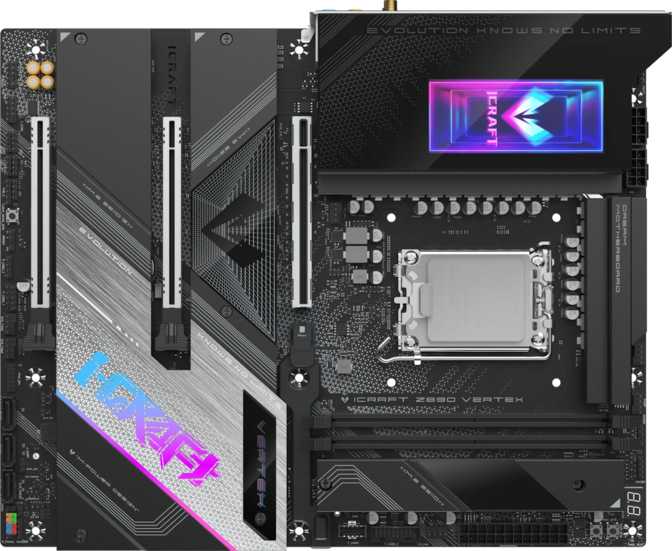
Maxsun iCraft Z890 Vertex Review: Outstanding I/O, One Real Trade-Off
MotherboardsThe Maxsun iCraft Z890 Vertex occupies an unusual position in the Z890 ecosystem. On one hand, it carries specifications that belong in unambiguously enthusiast territory: Wi-Fi 7, Thunderbolt 4, a PCIe 5.0 primary GPU slot, and rear USB connectivity that outpaces many flagship boards from far larger brands. On the other hand, it makes one deliberate departure from ATX convention that will require some builders to examine their assumptions before committing.
Built around Intel's Z890 chipset and LGA 1851 socket, this board is designed exclusively for Intel's Core Ultra 200 series processors. If you're planning a high-performance Arrow Lake build, the iCraft Z890 Vertex is actively competing for your money. Whether its specific design priorities align with yours is exactly what this review exists to answer.
Outstanding for connectivity-forward and enthusiast DDR5 builds on Intel's Z890 / LGA 1851 platform.
Key Specifications at a Glance
The standout numbers that define this board's character
Design, Build Quality, and Physical Experience
The ATX Layout
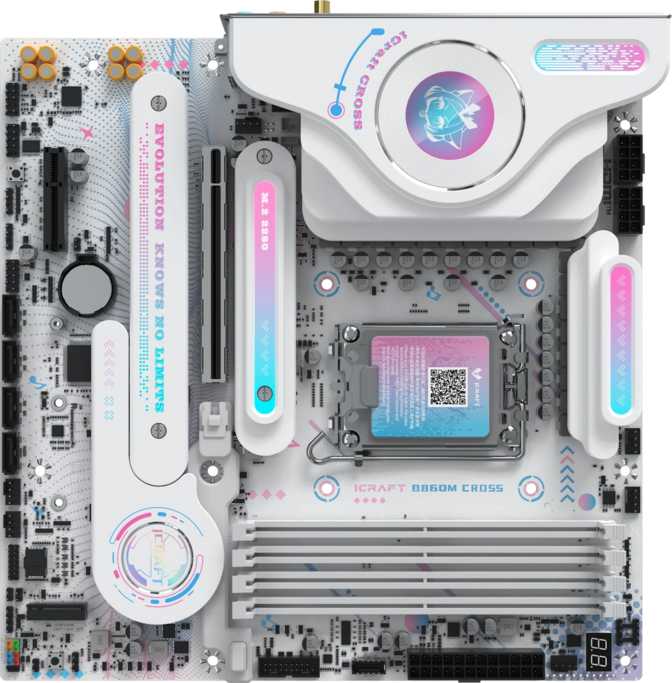
At 305mm × 245mm, the iCraft Z890 Vertex conforms to the standard ATX form factor — the most widely supported desktop motherboard size on the market. Case compatibility is a non-issue for any mid-tower or full-tower enclosure built to ATX specification. There is no need to verify unusual clearances or check for proprietary mounting schemes.
What you notice before examining any other specification is the DIMM configuration: two memory slots, where virtually every ATX board at this platform tier ships with four. This is a deliberate engineering choice, not a cost-cutting shortcut, and it has real performance implications explored fully in the next section.
The board includes integrated RGB lighting, consistent with the iCraft branding. Five fan and pump headers provide adequate thermal management connections for a high-performance air cooler or a moderate all-in-one liquid cooling setup without requiring a separate fan controller hub.
Built-In Reliability Features
Dual BIOS means two separate firmware chips on the same board. If one becomes corrupted from a failed BIOS update or an aggressive overclocking session, the board detects the failure and boots from the backup automatically. The physical CMOS reset button, mounted on the I/O panel, shortens recovery time from failed memory overclocks from a manual jumper search to a single button press.
- Dual BIOS with automatic failover on corruption
- Physical CMOS reset button on the rear I/O panel
- Three-year manufacturer warranty
- Integrated RGB lighting
- Five fan and pump headers for thermal management
Memory: Understanding the Two-Slot Configuration
The most discussed specification on this board — here is an honest breakdown of what it means in practice
Why Two Slots on an ATX Board?
Standard ATX Z890 motherboards ship with four DDR5 DIMM slots. The iCraft Z890 Vertex ships with two — a deliberate engineering decision with genuine performance rationale, not a cost-cutting shortcut in isolation.
What You Give Up
- No path to adding more sticks — ever
- Capacity expansion requires replacing the full kit
- Unusual for a board of this size and form factor
What You Gain
- Cleaner signal integrity for extreme DDR5 frequencies
- 9200 MHz OC ceiling becomes achievable
- Full dual-channel bandwidth is maintained with two sticks
- Preferred configuration for high-frequency DDR5 tuning
Speed and Capacity in Context
The board's native maximum speed of 6000 MHz aligns with the DDR5 sweet spot for Intel's current architecture — the frequency range where gains are most meaningful in real workloads. For enthusiasts who want to push further, the overclocked ceiling of 9200 MHz encompasses virtually every high-performance DDR5 kit currently sold at retail.
Maximum capacity reaches 128 gigabytes using two 64GB modules. For every realistic consumer workload — professional video editing, 3D rendering, software compilation, and heavy multitasking — 128GB of dual-channel DDR5 exceeds what any workload will saturate. ECC memory is not supported, consistent with all consumer-grade Z890 platform boards.
Memory Specifications
- DDR Standard
- DDR5
- DIMM Slots
- 2
- Memory Channels
- Dual Channel
- Maximum Capacity
- 128 GB
- Native Max Speed
- 6000 MHz
- OC Ceiling
- 9200 MHz
- ECC Support
- No
Connectivity: The Defining Characteristic
Where the iCraft Z890 Vertex separates itself from nearly every competitor at this platform tier
Rear Panel USB — At a Glance
Rear I/O That Changes the Conversation
Most Z890 boards structure their rear panel around two to four high-speed USB ports, with the remainder occupied by slower connections. The iCraft Z890 Vertex approaches this differently: nine USB Type-A ports, every one of them operating at 10 gigabits per second — fast enough to saturate the sequential read performance of most consumer external SSDs through a USB enclosure, and there are nine of them on a single board's rear panel.
Beyond those nine, two USB-C ports simultaneously support USB 4 at 40 gigabits per second and full Thunderbolt 4 capability — the complete Thunderbolt ecosystem at 40 Gbps, including daisy-chaining devices, connecting to Thunderbolt docks, and external storage arrays operating at full Thunderbolt bandwidth.
The rear panel carries no USB 2.0 ports. Legacy peripherals that require the older standard connect through the internal USB 2.0 headers, which accommodate front-panel connections. Three such headers are available on board.
Complete I/O Breakdown
| Connection Type | Count | Speed |
|---|---|---|
| USB Type-A (rear) | 9 | 10 Gbps each |
| USB4 / Thunderbolt 4 (rear) | 2 | 40 Gbps each |
| HDMI Output | 1HDMI 2.1 | |
| DisplayPort Output | 1 | — |
| RJ45 Ethernet | 1 | — |
| USB 3.2 Gen1 (internal header) | 2 | 5 Gbps |
| USB 3.2 Gen2x2 (internal header) | 1 | 20 Gbps Type-C |
| USB 2.0 (internal header) | 3 | — |
HDMI and DisplayPort outputs are active only when paired with a Core Ultra 200 processor that includes integrated graphics.
Storage and PCIe Expansion
4× M.2 NVMe Sockets
Four separate NVMe drives can run simultaneously — enough for a fast OS drive, an active-project drive, and additional bulk storage, all without adapter cards.
4× SATA 3 Ports
Extends storage to conventional 2.5" and 3.5" drives. Combined with M.2, the board supports up to eight storage devices before any expansion card is needed.
PCIe 5.0 x16 Primary
The latest expansion standard for the primary GPU slot. PCIe 4.0 and earlier cards remain fully backward compatible with no mismatches.
2 More PCIe Slots
One x8 and one x4 slot accommodate capture cards, audio controllers, 10GbE adapters, or professional I/O cards.
Audio: A Genuine Differentiator
What 120 dB SNR Actually Means
Signal-to-noise ratio in an onboard audio codec measures how cleanly sound is reproduced against the electrical noise a busy motherboard generates constantly. A higher number means less interference, less background hiss, and more accurate reproduction at high volume.
Budget and mid-range board audio typically measures between 90 and 108 dB SNR. Premium implementations with dedicated audio zones and shielded PCB sections typically land between 113 and 120 dB. The iCraft Z890 Vertex reaches 120 dB — matching the ceiling of what premium onboard audio achieves.
Through sensitive headphones or powered studio monitors, the noise floor noticeably drops compared to typical integrated audio. This implementation removes the need for a discrete sound card for all but the most demanding audiophile scenarios — freeing an expansion slot and simplifying the build.
Audio Output Summary
- SNR (DAC) 120 dB
- Channel Support 7.1 Surround
- Rear Audio Jacks 5 Connectors
- Digital Output S/PDIF Optical
Wireless: Wi-Fi 7 and Bluetooth 5.4
Wi-Fi 7: What Multi-Link Operation Changes
Wi-Fi 7 (the 802.11be specification) is the current leading edge of residential and commercial wireless technology. Its primary advancement over Wi-Fi 6E is multi-link operation — the ability to simultaneously transmit and receive across multiple frequency bands rather than selecting one. On a congested network with a compatible router, this reduces latency and improves effective throughput under load in ways previous Wi-Fi generations structurally cannot achieve.
The board also connects normally to Wi-Fi 6E, 6, 5, and 4 networks — full backward compatibility means no disruption to existing home networks. The Wi-Fi 7 hardware is ready to extract full performance once the network infrastructure catches up, representing forward planning for a platform expected to serve several years.
Bluetooth 5.4 — and the AptX Question
Bluetooth 5.4 is the current specification ceiling, compatible with every modern wireless peripheral without concern: headsets, keyboards, mice, game controllers, and audio devices all connect without compatibility issues.
Overclocking Capability and BIOS Configuration
Designed for Tuning From the Ground Up
The Z890 chipset is Intel's overclocking-capable consumer platform — multiplier control is available for compatible "K" and "KF" suffix Core Ultra 200 processors, and memory tuning operates in a dedicated BIOS environment designed for experimentation. The two-slot memory configuration is directly relevant here: fewer modules create a considerably cleaner electrical environment than four, which is part of why the board's 9200 MHz memory ceiling is positioned where it is. The design is internally consistent — fewer slots, better signal conditions, higher achievable frequencies.
Recovery Tools That Matter While Tuning
The dual BIOS protects against firmware corruption during aggressive update cycles. The physical CMOS reset button shortens the recovery loop when a memory profile doesn't hold stability — rather than opening the case and locating jumper pins, one button press returns the board to known-good defaults. For builders who iterate through memory timing adjustments or CPU voltage curves, these features meaningfully reduce the friction of the process.
Who This Board Is Designed For — and Who Should Look Elsewhere
Great Fit If You're...
- A heavy peripheral user wanting to eliminate hubs and docks — nine 10 Gbps USB-A ports plus Thunderbolt 4 connect everything directly
- Future-proofing wireless for a multi-year build with Wi-Fi 7
- Running an enthusiast two-stick DDR5 kit at extreme frequencies
- Wanting premium audio without a discrete sound card
- Working within a Thunderbolt 4 ecosystem of docks and high-bandwidth storage
Look Elsewhere If You're...
- Planning to start with 16GB or 32GB and add sticks incrementally over time — a four-slot board fits that strategy better
- Requiring hardware RAID for professional storage workflows
- Building a highly value-focused system that won't use the extra USB density or Wi-Fi 7
How the iCraft Z890 Vertex Compares
Positioned against typical mid-range and premium Z890 boards
| Feature | iCraft Z890 Vertex | Typical Mid-Range Z890 | Premium Z890 Tier |
|---|---|---|---|
| Memory Slots | 2 | Typically 4 | Typically 4 |
| DDR5 OC Ceiling | 9200 MHz | Lower, generally | Comparable |
| Rear USB Type-A | 9, all 10 Gbps | 4–6 ports | 6–8 ports |
| Thunderbolt 4 / USB4 40G | 2 ports | Uncommon to absent | Often present |
| Wi-Fi Standard | Wi-Fi 7 | Wi-Fi 6E or 7 | Wi-Fi 7 |
| Onboard Audio SNR | 120 dB | 108–113 dB | 113–120 dB |
| Primary PCIe Slot | 5.0 x16 | 5.0 x16 | 5.0 x16 |
| M.2 Sockets | 4 | 3–4 | 4–5 |
| Dual BIOS | Varies | Usually | |
| Hardware RAID | Varies | Often yes |
The comparison highlights a board that competes at premium-tier levels on connectivity and audio while positioning itself apart on memory slot count. The iCraft Z890 Vertex trades the memory slot count most buyers take for granted in exchange for I/O density that few boards at any level match.
Strengths and Honest Weaknesses
What Stands Out
The rear I/O is where the iCraft Z890 Vertex separates itself from the field. Nine 10 Gbps USB Type-A ports alongside Thunderbolt 4 on a single board's rear panel is not something most builders will find on competing Z890 products at this tier. For anyone who has run short of rear USB connections on a premium board, this addresses the problem at the source.
The 120 dB audio implementation deserves more consideration than onboard audio typically receives. It genuinely competes with entry and mid-range discrete sound cards — a freed expansion slot, a simpler cable layout, and no driver conflicts from a secondary controller.
Wi-Fi 7 and Bluetooth 5.4 form a wireless stack that will remain current for the realistic lifecycle of this platform. The dual BIOS and physical CMOS reset button are practical, real-world features rather than specification padding.
What Holds It Back
The two memory slot configuration is the honest limitation that requires acknowledgment regardless of how compelling the rest of the board is. For builders whose upgrade strategy involves adding sticks over time — starting at 32GB and expanding to 64GB by purchasing additional modules — this board ends that path permanently at two sticks. That's a structural constraint, not something resolved by a firmware update.
Hardware RAID is absent. For the majority of consumer builds, this is a footnote that never becomes relevant. For a minority of professional users with specific redundancy requirements, it's a dealbreaker — and they should know that before looking further.
Frequently Asked Questions
Answers to what buyers search for before purchasing the iCraft Z890 Vertex
Final Recommendation
The Maxsun iCraft Z890 Vertex is a board with a clear and deliberate identity: it allocates its engineering budget toward connectivity density, audio fidelity, and wireless readiness in ways that most Z890 competitors don't match — and accepts two memory slots in exchange.
If your DDR5 memory strategy is to buy the right kit once and run it at high frequency — the approach that actually benefits from this board's architecture — the two-slot limitation costs you nothing in practice. What remains is a board with nine high-speed USB Type-A ports, Thunderbolt 4, Wi-Fi 7, 120 dB audio, a PCIe 5.0 GPU slot, four M.2 sockets, and a dual BIOS safety net.
If your plan requires incremental memory expansion by adding sticks over time, or if hardware RAID is a non-negotiable workflow requirement, the iCraft Z890 Vertex is structurally the wrong board — and no amount of USB ports should override that.