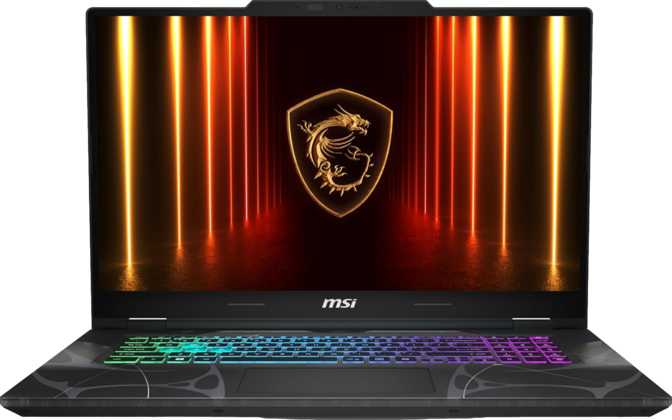
MSI Cyborg 17 B2RW (2025) Review: Big Screen, Next-Gen GPU, Real Trade-Offs
LaptopsThe MSI Cyborg 17 B2RW enters the mid-range gaming laptop market with a genuinely current-generation GPU, next-gen video memory, and a slim 17-inch chassis that punches above its weight class on paper. The real story, as always, lives in the details — and a few of those details will matter more to some buyers than the headline specs suggest.
Read through the full breakdown below to see whether this machine fits your specific needs, or whether a different configuration serves you better.
Quick Verdict
- Blackwell GPU with GDDR7 — genuine next-gen performance
- 144Hz IPS display well-matched to 1080p GPU capability
- Impressively slim chassis for a 17.3-inch gaming laptop
- No ethernet port — a real gap for competitive gamers
- Small 55Wh battery limits untethered use significantly
Key Specs at a Glance
The most decision-relevant specifications, translated into plain language.
Design and Build Quality
Physical experience, portability, and what daily life with this chassis feels like.
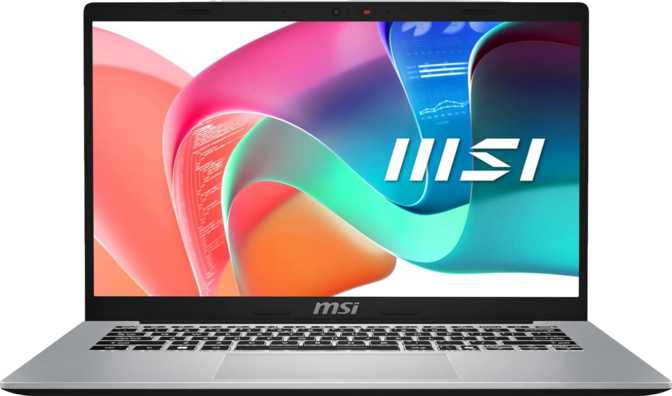
The Cyborg 17 cuts an unusual silhouette for a 17-inch gaming laptop. At just 21mm thick, it sits noticeably flatter on a desk than most machines in this size class, which tend to bulk up significantly to accommodate larger cooling systems and batteries. The trade-off, as discussed in the battery section below, shows up in thermal headroom and power capacity.
At 2.5 kilograms, it is not a light machine in absolute terms — carrying it in a backpack for a full day will remind you it is there. But relative to other 17-inch gaming laptops, this weight is on the lower side, and the slim profile helps it slip into a standard bag without the awkward bulk thicker chassis create.
The Cyborg aesthetic carries MSI's exposed structural styling language rather than the blacked-out minimalism of more business-adjacent gaming lines — it reads clearly as a gaming machine, which will suit some buyers and feel excessive for others.
Build Highlights
- Thickness
- 21mm — impressively slim
- Weight
- 2.5 kg
- Footprint
- 399 × 258 mm
- Keyboard
- Backlit
- Weather Sealed
- No
- Rugged Build
- No
- Fingerprint Reader
- No
- Facial Recognition
- No
There is no fingerprint reader or facial recognition on this laptop. Login security relies entirely on a PIN or password — worth noting if this machine travels with you regularly.
The Display: Fast, Large, and Honest About Its Limits
What the screen actually delivers for gaming and everyday use.
The 17.3-inch IPS LCD panel with 144Hz refresh is the sweet spot for gaming without overextending the GPU. A smooth, responsive image at this size creates genuine visual presence — whether in a fast-paced shooter or an expansive open-world title.
The 144Hz panel redraws 144 times per second, eliminating the stuttering and motion blur that plague 60Hz displays under gaming conditions. For new buyers, this difference is immediately visible and permanently appreciated once experienced.
The panel runs at 1920×1080 across a 17.3-inch diagonal, resulting in approximately 127 pixels per inch. Text will appear softer and slightly less defined compared to a 1440p or 4K panel at the same size.
For gaming, this is largely irrelevant and arguably advantageous: the GPU delivers frames to a lower-resolution target, which means higher and more consistent frame rates. For dense productivity work — writing, spreadsheets, reading — the display is functional rather than luxurious.
Display Specifications
The panel has no anti-reflection coating. In bright environments or near windows, glare will be a real issue. This machine is best used in controlled lighting conditions.
CPU Performance: Efficient Architecture, Strong Results
What the processor delivers for gaming, multitasking, and sustained workloads.
Core Configuration and Clock Speeds
The processor uses a hybrid core architecture — high-performance cores handle demanding workloads while smaller, more efficient cores manage background tasks and lighter loads. The result is a CPU that can reach peak single-core speeds exceeding 5.2GHz when needed, while managing heat and power draw intelligently when the full workload does not demand it.
With ten total cores spread across two tiers and sixteen processing threads, this CPU handles modern gaming titles without hesitation. Today's games rarely stress more than eight to twelve threads, while the full thread count holds its own in content creation, streaming, or compilation tasks running simultaneously.
The 24MB of L3 cache is a significant figure for gaming performance. Modern game engines frequently access large datasets rapidly, and a larger cache reduces the frequency of slower main memory accesses — one of the more quietly important contributors to consistent frame pacing.
The processor operates within a 45-watt thermal design envelope — standard for high-performance laptop CPUs. The thin chassis means the cooling system works harder than in thicker machines; expect audible fans under sustained load. The CPU sustains workloads up to its maximum thermal ceiling before throttling, which is standard for this class and not a concern under normal use.
CPU Specifications
- Core Count
- 10 (6P + 4E)
- Threads
- 16
- Base Clocks
- 2.5 / 1.8 GHz
- Turbo Boost
- 5.2 GHz
- L3 Cache
- 24 MB
- Process Node
- 5nm
- TDP
- 45W
- Architecture
- Hybrid big.LITTLE
Benchmark Context
Comfortably in the strong mid-range laptop tier — well ahead of entry-level machines. Handles all gaming workloads and most creative tasks without hesitation.
Single-core score is solid but not class-leading — most relevant for games that rely heavily on one or two cores. Translates to consistently high minimum frame rates.
GPU Performance: Blackwell Architecture with GDDR7 Memory
The GPU is the headline feature — here is what its specifications actually mean for gaming.
Blackwell Architecture — What It Means in Practice
The discrete GPU is built on NVIDIA's Blackwell architecture — the current leading generation of gaming GPU design. This is not a previous-generation chip with a new label. The underlying design includes architectural improvements in shader efficiency, AI acceleration, and rendering pipeline throughput compared to prior generations.
At approximately 9.7 trillion floating-point operations per second, this GPU delivers strong 1080p gaming performance across demanding titles. At the native 1080p resolution of this display, you can expect high frame rates in most modern games at high or ultra settings — and the headroom to push well beyond 60fps into territory where the 144Hz panel becomes genuinely relevant.
The GPU carries 8 gigabytes of GDDR7 video memory — the newest generation available. The effective memory speed translates to approximately 448 gigabytes per second of bandwidth, which is exceptional for an 8GB configuration. GDDR7's raw speed compensates for the 128-bit bus width relative to higher-end GPUs, and at 1080p the performance is well-matched to its target resolution.
Full GPU Specifications
- Architecture
- Blackwell
- VRAM
- 8GB GDDR7
- Memory Bus
- 128-bit
- Base Clock
- 952 MHz
- Boost Clock
- 1,455 MHz
- Shading Units
- 3,328
- TMUs / ROPs
- 104 / 32
- Transistors
- 21.9 billion
- DirectX
- DirectX 12 Ultimate
- Resizable BAR
- Intel Resizable BAR
Modern Rendering Features
AI-powered upscaling renders at a lower resolution internally and reconstructs a sharper image. In supported titles, this effectively increases frame rates with minimal visual cost — particularly valuable when ray tracing is enabled.
Hardware-accelerated ray tracing enables physically accurate lighting, reflections, and shadows in supported titles. Best paired with DLSS to maintain smooth frame rates in the most demanding scenes.
Full compliance with the current graphics API standard — including hardware ray tracing, variable rate shading, and mesh shaders. Ensures compatibility with all current and foreseeable gaming titles.
Memory and Storage: Good Foundations, Room to Grow
What ships in the box and how far you can take it.
The system ships with 16 gigabytes of DDR5 RAM across two memory channels. DDR5 is the current generation of system memory, offering faster transfer rates than DDR4. The dual-channel configuration means both modules work in parallel — meaningfully faster than a single-stick setup and important for both gaming performance and multitasking.
16GB is the functional minimum for serious gaming today. It handles most gaming sessions with a browser and Discord running alongside, but heavier multitasking — video editing, large virtual machines, or streaming while gaming — will push against this ceiling.
The 1TB NVMe SSD using PCIe 4.0 is a well-chosen configuration. PCIe 4.0 NVMe drives deliver loading times in modern games that are largely imperceptible, operating system boot under twenty seconds, and file operations that feel nearly instant.
The 1TB capacity accommodates a solid core games library — though a handful of large modern titles can consume over 100GB each, so library management becomes a reality over time.
- NVMe SSD — fast across all workloads
- PCIe Gen 4 — current-generation speed
- No optical disc drive (standard for this class)
Battery Life: The Clear Compromise
Honest expectations for real-world use away from an outlet.
The Cyborg 17 carries a 55.2 watt-hour battery. For a 17-inch gaming laptop, this is a notably modest capacity. The display, the CPU, and especially the GPU all draw significant power under load, and there is simply not enough stored energy for extended gaming sessions away from an outlet.
This machine is best understood as a desktop replacement that offers portability for transport — not a laptop designed for all-day unplugged use. If you travel frequently and need to game or work without access to power, this will frustrate you. If you move between rooms or locations while remaining mostly near outlets, the battery is a non-issue in practice.
USB sleep-and-charge is supported, so peripheral charging continues when the laptop is resting. There is no proprietary magnetic power connector — charging uses the standard port interface.
Expected Battery Life
Connectivity: Mostly Modern, With Notable Gaps
What ports you get, what is missing, and what it means for your setup.
| Port / Feature | Available | Notes |
|---|---|---|
| USB 3.2 Gen 2 Type-A | 2 ports | 10Gbps each |
| USB 3.2 Gen 2 Type-C | 1 port | 10Gbps |
| HDMI 2.1 | 1 port | 4K @ 144Hz capable |
| 3.5mm Audio Jack | Headset combo jack | |
| Ethernet (RJ45) | Absent — adapter needed | |
| SD Card Reader | Not included | |
| Thunderbolt 4 / USB4 | Not included | |
| DisplayPort | Not included |
Wireless Performance
Extends to the 6GHz frequency band, offering lower congestion and higher throughput than the crowded bands that older Wi-Fi devices compete over. In a household with many wireless devices, this provides measurably more consistent latency — partially compensating for the missing ethernet port, though not fully replacing it for competitive use.
Covers all modern wireless peripherals, headphones, and controllers without issue.
No Ethernet — Real Implication for Gamers
Wired network connections offer lower latency, more stable throughput, and immunity to wireless interference. Without an onboard ethernet port, a USB-to-ethernet adapter or USB-C hub with ethernet is required. This adds cost and an extra accessory to every setup.
Audio, Camera, and Supplementary Features
The peripheral features that round out the daily experience.
Audio
Stereo speakers with a 3.5mm headset jack are present. There is no Dolby Atmos certification — built-in audio will be functional, not impressive. No S/PDIF output for digital audio routing.
Gaming headset recommendedWebcam
The front camera captures 720p video at 30fps. Functional for occasional calls, but behind the times compared to the 1080p cameras many competing laptops now include as standard.
External webcam worth consideringMicrophone
A single built-in microphone provides adequate clarity for in-game communication and voice calls. It captures less directional audio than a dual-microphone array — voice quality is acceptable, not excellent.
Sufficient for casual useWho Should Buy the MSI Cyborg 17 B2RW
Matching the right buyer profile to this machine's actual strengths and limitations.
-
1080p gamers who want high frame rates
Display, GPU, and CPU are aligned for fast 1080p gaming with high settings. This is its primary competency and it executes it well.
-
First-time gaming laptop buyers
The 17-inch display provides an experience closer to a desktop monitor, and the specifications are future-capable enough to avoid buyer's remorse in the near term.
-
Desktop replacement users
If this will sit primarily on a desk near power outlets, its slim profile and capable internals make it a capable all-in-one setup that packs away when needed.
-
Buyers who want a next-gen GPU without flagship pricing
Blackwell architecture and GDDR7 memory represent genuine generational advancement at a tier well below the highest-end models.
-
Competitive gamers requiring wired network connections
The missing ethernet port is a genuine disadvantage that requires workarounds and extra accessories.
-
Users who need all-day battery life
The compact battery is insufficient for heavy portable use without frequent charging.
-
Content creators prioritizing display quality
The 1080p panel at 17.3 inches is a step below what professional creative work benefits from.
-
Daily commuters sensitive to laptop weight
At 2.5kg plus power adapter, carrying this machine across a full commute will be physically noticeable every day.
How It Compares to Logical Alternatives
Positioned against the two most common alternative purchase decisions at this tier.
| Feature | MSI Cyborg 17 B2RW | Typical 15" Same-Tier | Typical 17" Higher-Tier |
|---|---|---|---|
| Display Size | 17.3" — immersive | 15.6" — more portable | 17.3" — comparable |
| GPU Generation | Blackwell (current) | Often previous-gen | Blackwell (current) |
| VRAM | 8GB GDDR7 | 8GB GDDR6/6X | 12–16GB GDDR7 |
| Chassis Thickness | 21mm — slim | 19–22mm — similar | 23–28mm — thicker |
| Ethernet Port | Absent | Often present | Usually present |
| Battery Capacity | 55Wh — small | 60–90Wh — larger | 90–99Wh — much larger |
| Weight | 2.5kg | 2.0–2.3kg — lighter | 2.6–3.2kg — heavier |
The Cyborg 17's strongest differentiators are its slim chassis for the size category and its current-generation GPU. Buyers choosing a 15-inch alternative trade screen size for portability and typically better battery life. Higher-tier 17-inch machines offer improved VRAM, better display resolution options, and more complete port selections — at meaningfully higher prices.
Common Questions Before Buying
The questions real buyers search for — answered directly.
Final Verdict
The MSI Cyborg 17 B2RW earns a clear recommendation for buyers who want a current-generation 17-inch gaming laptop at a non-flagship price and understand the trade-offs they are accepting. Its combination of Blackwell GPU, GDDR7 memory, fast DDR5 RAM, and a 144Hz display at 1080p gives it a coherent, well-matched internal configuration that performs well at its target use case.
The battery limitation and absent ethernet port are not minor footnotes — they are genuine functional gaps that will affect real usage. Neither is insurmountable, but both require either behavioral adjustment or additional accessories. Buyers who will use this primarily at a desk, keep it near outlets, and are willing to add a USB hub or ethernet adapter will get a capable, slim, large-screen gaming machine with a genuinely current GPU at its core.
The RAM expandability ceiling of 96GB and the current-generation GPU architecture give this machine meaningful longevity — it is not built to be obsolete in two years.